Usage Examples
Below are common use cases and example outputs for portable-hexdump.
Read from a text file using the default 16-byte width.
portable-hexdump < LICENSEOutput:
00000000  4d 49 54 20 4c 69 63 65 6e 73 65 0a 0a 43 6f 70   |MIT License..Cop|
00000010  79 72 69 67 68 74 20 28 63 29 20 32 30 32 34 2d   |yright (c) 2024-|
...
Inspecting a binary file (e.g., the touch utility).
portable-hexdump -n 48 < /bin/touchOutput:
00000000  7f 45 4c 46 02 01 01 00 00 00 00 00 00 00 00 00   |.ELF............|
00000010  03 00 3e 00 01 00 00 00 d1 6e 00 00 00 00 00 00   |..>......n......|
00000020  40 00 00 00 00 00 00 00 08 41 0c 00 00 00 00 00   |@........A......|
Use -w to adjust the number of bytes displayed per line.
# 8-byte width
portable-hexdump -w 8 -n 16 < LICENSE
Output:
00000000  4d 49 54 20 4c 69 63 65   |MIT Lice|
00000008  6e 73 65 0a 0a 43 6f 70   |nse..Cop|
Use -s to skip an initial offset.
# Skip the first 12 bytes of the LICENSE
portable-hexdump -s 12 -n 16 < LICENSE
Output:
00000000 43 6f 70 79 72 69 67 68 74 20 28 63 | Copyright (|
portable-hexdump supports high-readability ANSI color themes for both dark and light terminal environments.
portable-hexdump --color < LICENSE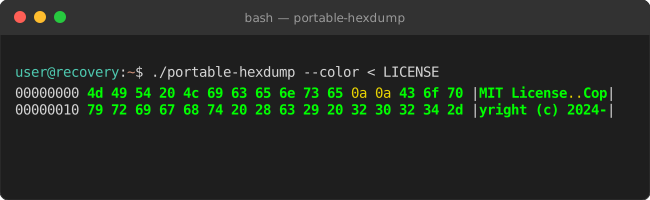
portable-hexdump --color=light < LICENSE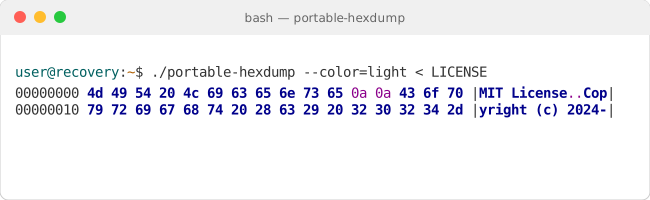
If the output is long, use your system's pager:
portable-hexdump < bigfile.bin | less -R(Note: Use -R with less to preserve ANSI color codes if using --color)