fluid_wave is a powerful Flutter package designed to create ultra-smooth "fluid reveal" transitions and radial warp distortions. By leveraging the power of Shaders, this package brings a premium, modern, and vivid UI experience to your applications.
Important Note: Since
fluid_wavetransitions work by capturing a snapshot of the target UI state, it is recommended to minimize or disable internal transition durations (e.g., in AnimatedContainer) for widgets inside FluidWaveView. The fluid reveal effect itself should be the primary animation to ensure perfect synchronization.
- Radial Warp Effect: Mimics the experience of looking through a liquid lens while transitioning between views.
- Smooth Transitions: Uses
CustomPaintandShaderto optimize rendering performance. - Flexible Customization:
- Change the wave origin point (
topLeft,center,bottomRight, etc.). - Adjust distortion strength (
warpStrength). - Customize animation
DurationandCurve.
- Change the wave origin point (
- Easy Integration: Simple wrapper with
FluidWaveViewand control viaFluidWaveController.
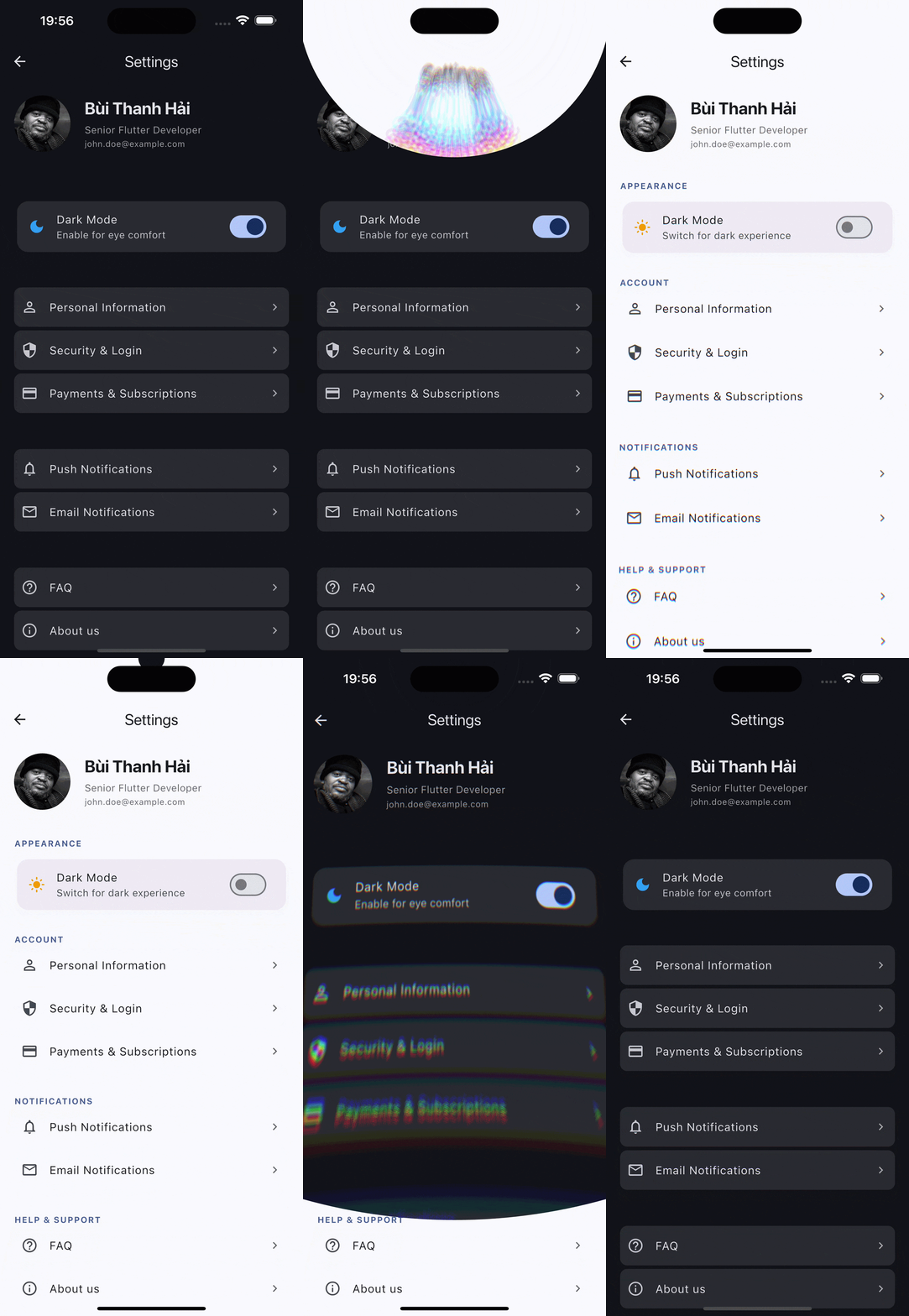
Auto-loop demo animation
Illustration of the fluid wave effect revealing a Settings interface.
Add this to your pubspec.yaml:
dependencies:
fluid_wave: ^1.0.1To ensure correct performance on Android devices, it is recommended to disable EnableImpeller in your AndroidManifest.xml:
<application
    android:label="untitled"
    android:name="${applicationName}"
    android:icon="@mipmap/ic_launcher">

    <meta-data
        android:name="io.flutter.embedding.android.EnableImpeller"
        android:value="false" /> // 👈 DisEnable Impeller
    ...
</application>final controller = FluidWaveController(
align: Alignment.center,
duration: const Duration(milliseconds: 1000),
curve: Curves.easeInOutQuart,
warpStrength: 0.6, // Supports negative values for inverted warp
);Wrap the widget you want to apply the effect to:
FluidWaveView(
  controller: controller,
  child: MyCurrentPage(),
)When you want to transition to a new view state:
controller.forward(() {
  setState(() {
    // Update your application state here
    // e.g., Change page, toggle Theme, etc.
    isFirstImage = !isFirstImage;
  });
});class Example extends StatefulWidget {
const Example({super.key});
@override
State<Example> createState() => _ExampleState();
}
class _ExampleState extends State<Example> {
bool isFirstImage = true;
late FluidWaveController controller;
@override
void initState() {
controller = FluidWaveController();
super.initState();
}
@override
Widget build(BuildContext context) {
return Scaffold(
body: FluidWaveView(
controller: controller,
child: isFirstImage
? Image.network("url1")
: Image.network("url2")
),
floatingActionButton: ElevatedButton(
onPressed: () {
controller.forward(() {
setState(() {
isFirstImage = !isFirstImage;
});
});
},
child: Icon(Icons.change_circle),
),
);
}
}Don't forget to dispose of the controller to prevent memory leaks:
@override
void dispose() {
  controller.dispose();
  super.dispose();
}This project is licensed under the MIT License.