Swift package · Metal-accelerated · GGUF & safetensors · drop-in for any sd.cpp-compatible model




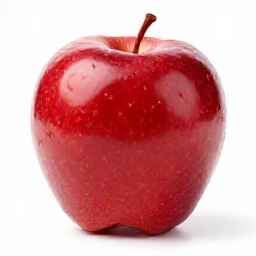 "a single red apple on a white background" 256² · 4 steps · 28s · M-series Mac · Z-Image-Turbo Q3_K_M |
 "a photorealistic golden retriever puppy in a sunlit field of wildflowers" 1024² · 9 steps · 7.5min · M-series Mac · Z-Image-Turbo Q3_K_M |
Apple's ml-stable-diffusion is great for the specific Stable Diffusion checkpoints Apple converted to Core ML — and stops there. Every new diffusion model (Flux, Z-Image, Qwen-Image, ERNIE-Image, Chroma, …) requires its own custom Core ML conversion that takes Apple weeks to publish, if it happens at all.
Mirage takes a different approach: embed stable-diffusion.cpp + ggml-metal into a clean Swift package. Anything sd.cpp can load, Mirage can run. No Core ML conversion required.
import Mirage

let engine = try Engine(models: ModelFiles(
    diffusionModel: zImageTurboGGUF,
    vae: fluxVAE,
    textEncoder: qwen3GGUF
))
let image = try await engine.generate(.init(prompt: "..."))
That's the whole public surface.
Every model below works through the same Engine — only the file inputs change.
| Family | Architecture | Example | Status |
|---|---|---|---|
| Stable Diffusion 1.x / 2.x | UNet (latent diffusion) | sd-v1-5.gguf |
✅ |
| SDXL / SDXL-Turbo | UNet (latent diffusion, 2-stage) | sd-xl-base-1.0.gguf |
✅ |
| SD3 / SD3.5 | MMDiT | sd3.5-medium.gguf |
✅ |
| FLUX.1 schnell / dev | DiT (rectified flow) | flux1-schnell-Q4_K.gguf |
✅ |
| Chroma1-HD | FLUX-derived (8B params) | chroma1-hd.gguf |
✅ |
| Qwen-Image | DiT (1.1B) | qwen-image-2512.gguf |
✅ |
| ERNIE-Image-Turbo | DiT (Turbo-distilled) | ernie-image-turbo.gguf |
✅ |
| Z-Image-Turbo | S3-DiT (6B, Turbo, 8 steps) | z-image-turbo-Q3_K_M.gguf |
✅ |
Mirrored, mobile-friendly bundles ship on Hugging Face — each repo includes the diffusion weights, the right text encoder, the right VAE, and a README.md with copy-pastable Engine(...) snippets:
- 🐶
jc-builds/Z-Image-Turbo-iOS— 6 B params, 9-step turbo, 6.5 GB - 📜
jc-builds/ERNIE-Image-Turbo-iOS— 8 B params, best-in-class text rendering, 5.9 GB - 🎨
jc-builds/Chroma1-HD-iOS— 8.9 B FLUX-derived, T5-XXL, 14.5 GB (iPhone 17 Pro / Mac only)
Add to your Package.swift:
dependencies: [
    .package(url: "https://github.com/haplollc/Mirage.git", from: "0.1.0"),
],
targets: [
    .target(name: "MyApp", dependencies: ["Mirage"]),
]
Or in Xcode: File ▸ Add Package Dependencies… → https://github.com/haplollc/Mirage
The package ships a prebuilt sdcpp.xcframework (Apple Silicon + iOS device + iOS simulator) as a SPM binary target — no cmake / ninja / clang++ wrangling required on consumer machines.
import SwiftUI
import Mirage

struct ImageGenScreen: View {
    @State private var prompt = "a cute corgi astronaut on Mars, photorealistic"
    @State private var output: CGImage?
    @State private var status = "Tap to generate."

    let engine: Engine

    init() throws {
        // 1. Download a model bundle from huggingface.co/HaploApps once
        //    (use Hugging Face's download helpers, or Haplo's model manager).
        let models = ModelFiles(
            diffusionModel: try modelURL("z-image-turbo-Q3_K_M.gguf"),
            vae: try modelURL("ae.safetensors"),
            textEncoder: try modelURL("Qwen3-4B-Instruct-2507-Q4_K_M.gguf")
        )
        // 2. Create the engine ONCE — loading weights is multi-GB I/O + GPU upload.
        self.engine = try Engine(models: models)
    }

    var body: some View {
        VStack {
            if let cg = output {
                Image(decorative: cg, scale: 1).resizable().scaledToFit()
            } else {
                Text(status).foregroundStyle(.secondary)
            }
            TextField("Prompt", text: $prompt).textFieldStyle(.roundedBorder)
            Button("Generate") {
                Task {
                    status = "Generating…"
                    do {
                        output = try await engine.generate(.init(
                            prompt: prompt,
                            width: 1024, height: 1024,
                            steps: 9, cfgScale: 1.0
                        ))
                    } catch {
                        status = "\(error)"
                    }
                }
            }
        }
        .padding()
    }
}
A complete reference app lives in Examples/MirageExampleApp.
Diffusion weights + text encoder + activations have to live in GPU memory at the same time. iPhone memory ceilings are real.
| Device | RAM | What fits? |
|---|---|---|
| iPhone 17 Pro / Air | 12 GB | Any model in this README, up to ~7 GB weights total (Z-Image-Turbo Q8, Flux Q5, SD3.5 Medium) |
| iPhone 16 Pro / iPad M-series | 8 GB | Z-Image-Turbo Q3_K (~6.5 GB total), SDXL-Turbo Q4 (~5 GB total) |
| iPhone 15 Pro | 8 GB | Same as 16 Pro, slightly tighter |
| iPhone 14 and older | 6 GB | SD1.5 / SDXL-Turbo at Q4 only. Larger models will OOM. |
Engine ships with keep_clip_on_cpu = true by default — keeps the text encoder off the GPU which saves ~2-3 GB on iPhone.
You should gate model availability by device:
let physicalRAM = ProcessInfo.processInfo.physicalMemory
guard physicalRAM >= 8 * 1024 * 1024 * 1024 else {
    // Show "Z-Image needs a newer iPhone" instead of trying to load.
    return
}Numbers from a 1024×1024 generation at the recommended step count for each family.
| Device | Z-Image-Turbo Q3 (9 steps) | SDXL-Turbo Q4 (4 steps) | SD3.5-Medium Q4 (28 steps) |
|---|---|---|---|
| iPhone 17 Pro | ~3 min | ~30 s | ~5 min |
| iPhone 16 Pro | ~5 min | ~45 s | ~8 min |
| M2 / M3 Mac | ~7 min | ~30 s | ~3 min |
These are engine-side wall-clock times, not including the first-time model load (multi-GB read + GPU upload, ~10-30 s once per app launch).
For "feels fast" generation on iPhone, ship the Turbo variants — they're distilled to 4-9 steps vs the 28-50 steps a non-turbo model needs.
                                        ┌─────────────────────┐
your prompt + model paths               │   Mirage (Swift) │
       │                                │  ┌───────────────┐  │
       ▼                                │  │ public  API   │  │
   ┌───────┐    actor isolation         │  └──────┬────────┘  │
   │Engine │  ◄──────────────────────────┼────────┘           │
   │ actor │                             │                    │
   └───┬───┘                             │   CMirage (C)   │
       │ mirage_generate(...)              │  ┌───────────────┐ │
       ▼                                 │  │ MirageC.cpp│ │
   ┌──────────────────────────────────┐  │  └──────┬────────┘ │
   │  stable-diffusion.cpp / ggml     │  │         │          │
   │  + Metal backend (compute kernels)│ │         ▼          │
   └──────────────────────────────────┘  │   sdcpp.xcframework│
       │                                 │   (prebuilt binary)│
       ▼                                 └─────────────────────┘
   CGImage (you decide what to do with it)
- Public Swift API is one
actor Engine+Engine.generate(_:)returningCGImage. Actor isolation serializes calls because the underlying C++ context isn't thread-safe against itself. - C bridge is a 12-symbol header (
MirageC.h) that's deliberately tiny so upstream sd.cpp churn doesn't reach Swift. - Native engine is
stable-diffusion.cpp(MIT) running onggml-metal. We compile it into an XCFramework so SPM consumers don't need cmake/ninja installed.
The XCFramework is reproducible. After cloning:
git submodule update --init --recursive
./Scripts/build-xcframework.sh        # all platforms (~5-10 min)
./Scripts/build-xcframework.sh macos  # macOS arm64 only (fastest, ~2 min)
./Scripts/build-xcframework.sh ios    # iOS device + simulator
Then swift build / swift test work normally.
# Fast smoke (always run, < 10s)
swift test --filter MirageSmokeTests

# Heavy integration (requires a folder with model files)
MIRAGE_TEST_MODELS_DIR=$HOME/Downloads/kiln-models \
    swift test --filter MirageHeavyIntegrationTests
The heavy tests load real multi-GB weights and generate small images. They're gated on MIRAGE_TEST_MODELS_DIR so CI doesn't try to ship 6+ GB through every PR.
- Generation is slow on iPhone. Even the Turbo variants take 3-10 minutes for a 1024² image. Show a clear progress UI. SDXL-Turbo at 512² is the closest thing to interactive (~30 s on iPhone 17 Pro).
- No upscaler integration yet. sd.cpp supports ESRGAN/4x; we haven't surfaced it in the Swift API. Drop a feature request if you need it.
- No LoRA / textual inversion API yet. sd.cpp supports them; we just haven't surfaced them. Easy to add when needed.
- ControlNet not exposed. Same story.
- iOS Simulator works for smoke tests, but the Simulator's Metal stack is much slower than a real device — don't benchmark there.
Haplo — on-device AI for iOS. The same engine powers Haplo's in-app image generation.
If Mirage shows up in your app, tell us about it.
stable-diffusion.cpp— the engine doing all the actual workggml— the tensor library underneath- Apple's Metal team — for
ggml-metalworking at all on a phone