
Terminal logging done right — structured, beautiful, and zero dependencies.




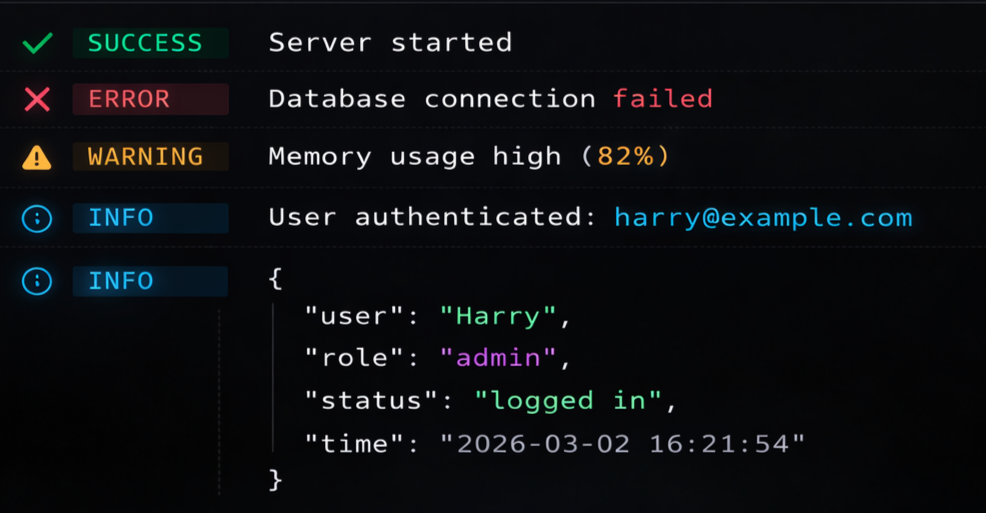
Most terminal libraries give you colors. devink gives you a complete logging system — child loggers, HTTP middleware, file rotation, field redaction, performance timers, and structured JSON output — all in a single package with zero dependencies.
Whether you are building a CLI tool, an Express API, or a production microservice, devink handles the entire logging pipeline so you don't have to glue five packages together.
- Expressive, developer-friendly API
- Zero dependencies — nothing extra in
node_modules - Child loggers with scoped namespaces
- HTTP middleware for Express, Fastify, Hono, and Koa
- File transport with automatic size-based rotation
- Structured JSON mode for Datadog, ELK, and log aggregators
- Performance timers built into the logger
- Log sampling and rate limiting for high-throughput apps
- Sensitive field redaction (passwords, tokens, secrets)
- Pretty error formatting with colored stack traces
- Boxed output for startup banners and critical alerts
- Log grouping for multi-step operations
- Full ANSI, 256-color, and Truecolor (16 million colors) support
- Auto-detects
TTY,FORCE_COLOR,NO_COLOR, andCIenvironments - Native TypeScript with full type definitions
npm install devinkyarn add devinkpnpm add devinkRequirements: Node.js 18 or later. Works with both ESM and CommonJS.
import { createLogger } from 'devink';

const logger = createLogger({ timestamps: true, level: 'info' });

logger.info('Server started on port 3000');
logger.success('Database connected');
logger.warn('Rate limit approaching');
logger.error(new Error('Connection timeout'));
Define your own scoped loggers:
const dbLogger = logger.child({ namespace: 'db' });
const authLogger = logger.child({ namespace: 'auth' });

dbLogger.info('Query executed in 12ms');
// [14:30:00] [db] ℹ info Query executed in 12ms

authLogger.warn('Token expires in 5 minutes');
// [14:30:00] [auth] ⚠ warn Token expires in 5 minutes
Switch to JSON for production:
const logger = createLogger({ mode: 'json', level: 'trace' });

logger.info('Processing payment', { userId: 123, amount: 49.99 });
// {"level":"info","time":"2026-03-03T00:00:00.000Z","message":["Processing payment",{"userId":123,"amount":49.99}]}Returns a new Logger instance. All options are optional.
| Option | Type | Default | Description |
|---|---|---|---|
level |
string |
'trace' |
Minimum log level: trace, debug, info, warn, error, fatal. |
mode |
'text' | 'json' |
'text' |
Text mode for the terminal, JSON mode for log aggregators. |
colors |
boolean |
true |
ANSI colors. Auto-disabled when the terminal doesn't support it. |
timestamps |
boolean |
false |
Prepend [HH:MM:SS] to text output. |
theme |
Partial<Theme> |
modernTheme |
Customize prefix icons and colors for each log level. |
transports |
Transport[] |
[ConsoleTransport] |
Output destinations — console, file, or custom. |
namespace |
string |
'' |
Prefix prepended to all log lines. |
redact |
string[] |
[] |
Field names to mask with [REDACTED]. |
sampling |
Record<string, number> |
{} |
Sampling rates (0–1) for rate-limiting high-frequency events. |
Every logger instance exposes these methods, ordered by severity:
logger.trace('...'); // fine-grained debugging
logger.debug('...'); // development diagnostics
logger.info('...'); // general information
logger.success('...'); // operation completed
logger.warn('...'); // something unexpected
logger.error('...'); // failure
logger.fatal('...'); // unrecoverableCreate a scoped child logger that inherits the parent configuration:
const requestLogger = logger.child({ namespace: 'api', requestId: 'abc-123' });
requestLogger.info('Request received');
// JSON: {"level":"info","namespace":"api","requestId":"abc-123","message":"Request received"}Visually group related log lines with indentation:
logger.group('Database Migration');
logger.info('Running migration 001_create_users...');
logger.info('Running migration 002_add_indexes...');
logger.success('All migrations complete');
logger.groupEnd();
[14:30:00] ▸ Database Migration
[14:30:00] ℹ info Running migration 001_create_users...
[14:30:01] ℹ info Running migration 002_add_indexes...
[14:30:01] ✔ success All migrations complete
Measure execution time for any operation:
logger.time('database-query');
await db.query('SELECT * FROM users');
logger.timeEnd('database-query');
// ℹ info database-query: 243msDraw a Unicode box around important messages:
logger.box(
  'System Ready',
  'All microservices have booted successfully.\nListening on http://localhost:8080',
);Drop-in request logging for any Node.js framework:
import { createLogger, httpMiddleware } from 'devink';
import express from 'express';

const logger = createLogger({ timestamps: true });
const app = express();

app.use(httpMiddleware(logger));

// [14:30:05] ℹ info GET /api/users 200 12ms
// [14:30:06] ⚠ warn POST /api/login 401 8ms
// [14:30:07] ✖ error GET /api/crash 500 3ms
Works with Express, Fastify, Hono, Koa, and any framework using the standard (req, res, next) pattern. Status codes above 400 automatically escalate to warn, and above 500 to error.
Write logs to files with automatic rotation and retention:
import { createLogger, FileTransport } from 'devink';

const logger = createLogger({
  transports: [
    new FileTransport({
      path: './logs/app.log',
      maxSize: '10mb',
      maxFiles: 5,
      rotate: true,
    }),
  ],
});

logger.info('This goes to a file with automatic rotation');
When app.log exceeds 10 MB, it rotates to app.log.1, app.log.2, and so on, keeping at most 5 rotated files. Writes are async and non-blocking.
Automatically mask sensitive data before it reaches any transport:
const logger = createLogger({
  redact: ['password', 'token', 'authorization', 'ssn'],
});

logger.info('User login', { user: 'harry', password: 's3cret!', token: 'eyJhbG...' });
// ℹ info User login { user: 'harry', password: '[REDACTED]', token: '[REDACTED]' }
Redaction works recursively on nested objects and in both text and JSON modes.
In high-throughput production environments, log only a fraction of repetitive events:
const logger = createLogger({
  sampling: {
    'db.query': 0.1, // log 10% of database queries
    'cache.hit': 0.01, // log 1% of cache hits
  },
});Pass an Error object and devink renders a readable, colored stack trace:
try {
  throw new Error('Database connection failed');
} catch (err) {
  logger.error('Fatal error during startup', err);
}- Error name and message in bold red
- Your source files highlighted with colored file paths and line numbers
node_modulesand Node.js internal frames dimmed so your code stands out
Route logs anywhere by implementing the Transport interface:
import { createLogger, Transport, TransportContext } from 'devink';

class WebhookTransport implements Transport {
  write(ctx: TransportContext) {
    fetch('https://hooks.example.com/logs', {
      method: 'POST',
      body: JSON.stringify({ level: ctx.level, message: ctx.raw }),
    });
  }
}

const logger = createLogger({
  transports: [new WebhookTransport()],
});
The TransportContext object provides level, levelValue, message, formatted, raw, timestamp, namespace, and optional meta.
devink ships with three built-in themes designed for accessibility and developer comfort:
| Theme | Style |
|---|---|
modernTheme (default) |
Soft hex colors (#10b981, #f43f5e, #38bdf8) with dimmed text to reduce eye strain. |
classicTheme |
Standard ANSI colors — Red, Green, Yellow, Cyan. |
minimalTheme |
Prefix icons only, no label text. |
import { createLogger, classicTheme } from 'devink';

const logger = createLogger({ theme: classicTheme });Build your own CLI tools with devink's built-in ANSI module — no extra package needed:
import { ansi } from 'devink';

console.log(ansi.rgb(255, 100, 50, 'True RGB text!'));
console.log(ansi.hex('#34d399', 'Hex coded text!'));
console.log(ansi.color256(128, '256 color support!'));
console.log(ansi.bold(ansi.cyan('Bold and cyan!')));Modifiers: bold, dim, italic, underline, inverse, reset
Colors: black, red, green, yellow, blue, magenta, cyan, white, gray
Background colors: bgBlack, bgRed, bgGreen, bgYellow, bgBlue, bgMagenta, bgCyan, bgWhite
Advanced: rgb(r, g, b, text), bgRgb(r, g, b, text), hex(color, text), bgHex(color, text), color256(code, text), bgColor256(code, text)
Utilities: stripAnsi(text), isColorSupported
Chalk is a string styling library — it colors text and that's it. devink is a complete terminal logging system. You get structured output, log levels, child loggers, HTTP middleware, file rotation, field redaction, performance timers, and JSON mode, all with zero dependencies. If you need more than colors, devink replaces an entire stack of packages with a single import.
Winston and Pino are excellent loggers with large ecosystems. devink is built for developers who want a fast, zero-dependency alternative that works out of the box without plugins or configuration files. If you need deep ecosystem integrations, those are great choices. If you want something that just works with beautiful defaults, pick devink.
Yes. devink uses direct ANSI escape codes, async file writes, and sampling support to minimize overhead. There are no runtime dependencies, no external I/O unless you configure a file or custom transport, and log sampling lets you throttle high-frequency events in hot paths.
Yes. devink auto-detects terminal capabilities. For the best experience on Windows, use Windows Terminal which supports Truecolor and Unicode out of the box.
Built with care by Harry Mate. If you find devink useful, a Star on GitHub goes a long way.
MIT © harrymate22