#621 Show caps lock on sign in#673
Conversation


| </div> | ||
| <div class="col-xs-12"> | ||
| <input class="clean" name="password" type="password" placeholder="Password" value="{{ old('password') }}"> | ||
| <div id="capsLock" class="capsLock" style="display:none;">CapsLock is on!! |

There was a problem hiding this comment.
- Add the icon you mentioned in the issue.
- Use italics to get more attention.
| @extends('layouts.default', ['body_class' => 'nav-profile']) | ||
| @section('content') | ||
|
|
||
| <link href="/css/jquery/jquery-ui.css" rel="stylesheet" type="text/css"> |
There was a problem hiding this comment.
If you just need to use $ for your password_caps.js, include <script src="/js/jquery-3.1.1.js"></script>
It looks like the jquery ui, extra css... aren't needed.
Including jquery-3.1.1.js is what various parts of the site do including home, rating, location search... The profile uses some jquery ui for the accordion plugin but you won't need something like that for the caps lock detection.
| </div> | ||
| <div class="col-xs-12"> | ||
| <input class="clean" name="password" type="password" placeholder="Password" value="{{ old('password') }}"> | ||
| <div id="capsLock" class="capsLock" style="display:none;">CapsLock is on!! |
There was a problem hiding this comment.
Try to make the caps lock message look more like this:
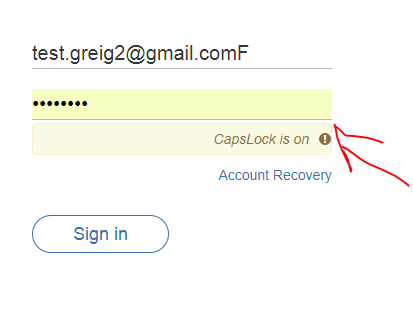
The exclamation mark that you posted in the issue looked good so that's what I was going for in that image.
Here is some inline styles I added for the above screenshot but please move them into the _sign_in.scss file.


|
updated the PR and now look just like you asked |


|
The updates to app/package-lock.json aren't clearly needed. They were commited with the commit that says "Looks better now and includes icon". If you remove those changes, this pull request should be ready for merge. Ideally, undo the changes and squash or fixup them into the "Looks better now and includes icon" commit to save a little space and help the 'git blame' feature point out more useful commits. If want an idea for how to undo the changes, I would:
|

2 participants


No description provided.