
TL;DR -- A "no-command-line-necessary" powershell menu to link multiple automation scripts together for blue-team investigators. When you run MACROSS for the first time, select the HIKARU demo to get a basic demonstration of making your scripts talk to each other. From the main menu, you can type "help" and any tool number to get that tool's help page, or type "debug" to get the usage and descriptions of MACROSS functions your scripts can make use of. Also, scan each script for the phrase "MOD SECTION" to find sections you can modify if needed.
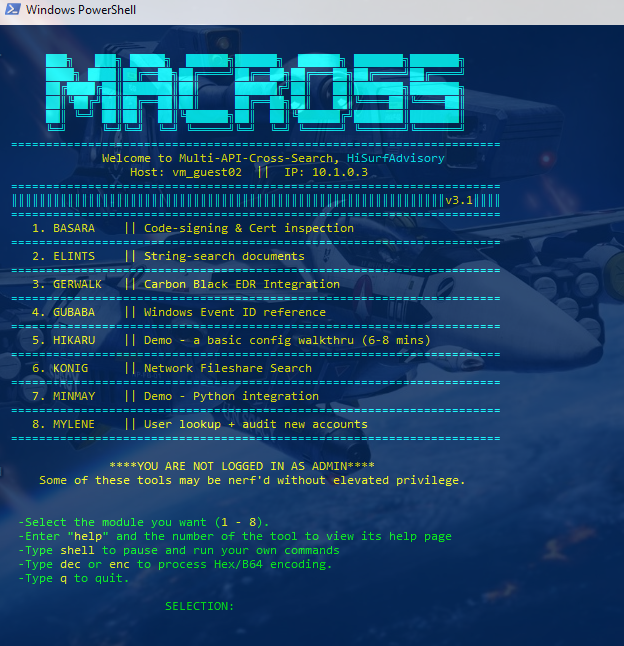
Powershell framework that links your Powershell and Python API automations for blueteam investigations. Developed on Powershell versions 5.1 and 7.5.
Multi-API-Cross-Search (MACROSS) console interface is a very simple powershell framework to connect multiple automation scripts together. I've included a few of my own scripts as examples, but the key to MACROSS is adding scripts specific to your environment, and letting the console seamlessly link them together.
The purpose of MACROSS is to make automation tasks available to everyone on your blue team regardless of their skill with command-line. This can make things alot quicker if you script out your most common Active-Directory and Windows Server queries, or you're able to use APIs instead of web-interfaces to query security tools.
MACROSS came about because I got tired of handjamming cmdlets and copying everything into notepad. I wanted a way to automatically send search results to other cmdlets or scripts while being able to come back to previous results, or pull information directly from APIs to avoid going to multiple web interfaces. Eventually I created a single front-end to handle doing all of these queries in whatever sequence I needed. It is written in powershell because all the initial automations were for active-directory and windows desktop tasks. It does include its own python library, macross, so that python scripts can also be used.
When you use MACROSS for the first time, a config wizard walks you through the process of generating a configuration file. To disable or ignore any of these configurations, simply enter 'None' in the appropriate field. It also asks you to create a password, which is used when you want to update the configuration file.
-Master Repository: if you want to distribute master copies to multiple users in your enterprise, enter its location here. MACROSS will check it at each startup. (NOTE: this version of MACROSS broke the previous version's checks for web & file server locations, so it's currently limited to loading files from network shares. I'll fix this in a later update.)
Once you've entered all the initial configurations and launched MACROSS, you can start testing and modifying:
-From the main MACROSS menu, enter "debug" to load a playground for testing scripts & functions, and viewing helpfiles.
-From the main MACROSS menu, enter "config" to change or add settings in your macross.conf file.
-There are two example scripts included -- BASARA (python) and HIKARU (powershell). Both of these demonstrate how to use MACROSS' built-in tools. They are located in the diamonds folder. Beyond that, everything you need is in the help comments in the MACROSS.ps1 file.