


Like letter_opener, but for iMessage and SMS, and in both directions.
pocket_phone is a fake Sendblue for development. Your
app sends to it instead of to api.sendblue.com; what it sent shows up in an
iMessage-style inbox in your browser, and what you type there reaches your app
as a signed Sendblue webhook. No real phone, no real texts, no tunnel.
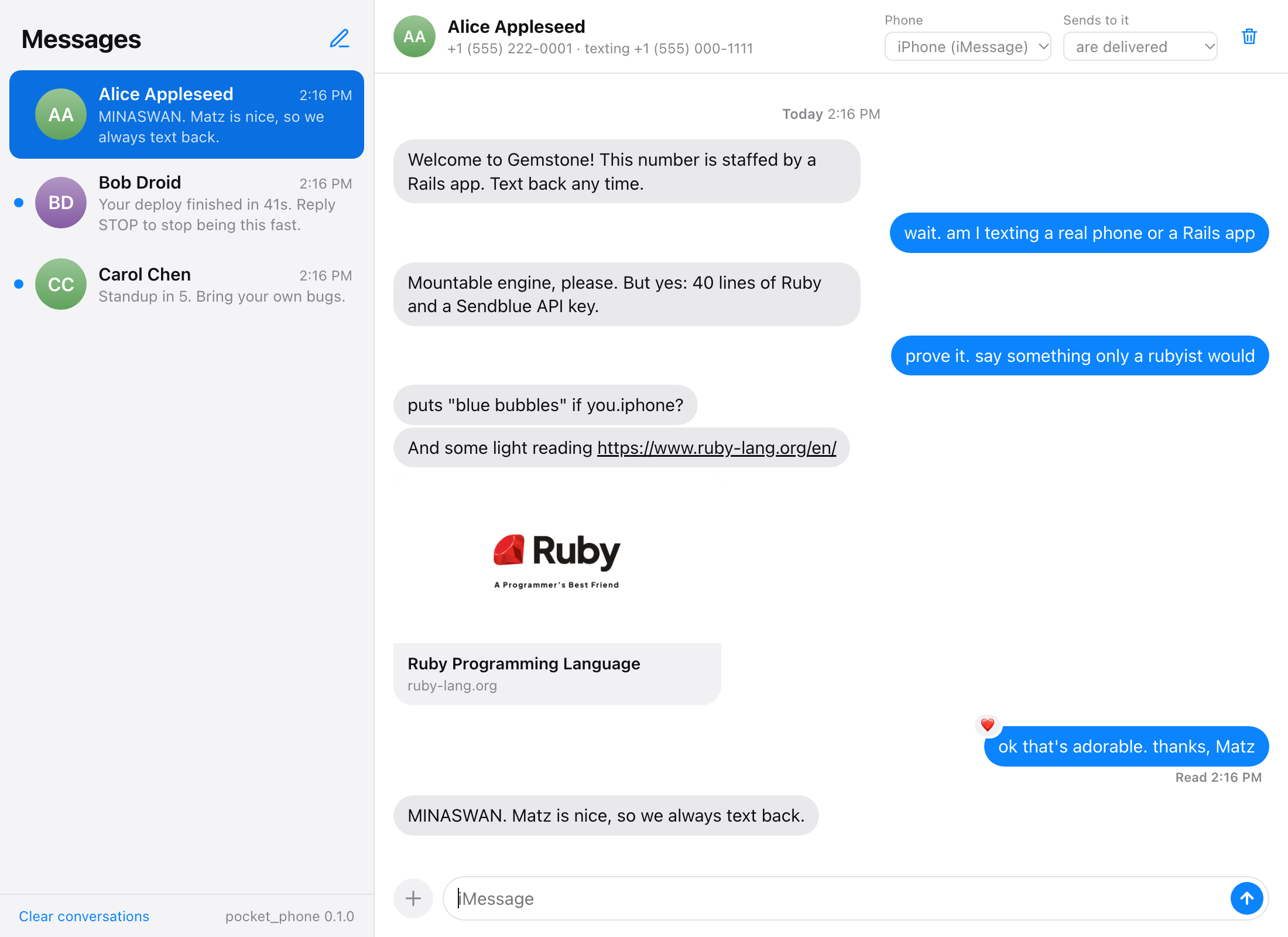
- Blue bubbles for iMessage, green for SMS and RCS
- Text back as any number of fake people, one-to-one or in a group
- Typing dots, tapbacks, read receipts, attachments
- Link previews drawn by iMessage's own rules, with a note when a link would not get one
- Make a person an Android phone, or make sends to them fail, with one click
- Every message shows the request your app made and the webhooks it got back
# Gemfile
group :development do
  gem "pocket_phone"
end
# config/routes.rb
mount PocketPhone::Engine, at: "/pocket_phone" if Rails.env.development?Then make two connections.
1. Point your Sendblue client at the engine. Wherever the base URL lives,
make it http://localhost:3000/pocket_phone in development in place of
https://api.sendblue.com. The paths after it stay the same
(/api/send-message, and so on), and so do the sb-api-key-id and
sb-api-secret-key headers, which must be present but can hold anything.
2. Tell pocket_phone where your webhook is.
# config/initializers/pocket_phone.rb
if defined?(PocketPhone::Engine)
  PocketPhone.configure do |config|
    config.webhook_url = "/webhooks/sendblue"        # where texts from the phone go
    config.signing_secret = ENV["SENDBLUE_WEBHOOK_SECRET"]
    config.from_number = ENV["SENDBLUE_FROM_NUMBER"] # your line, for phones that text first
  end
end
Open http://localhost:3000/pocket_phone.
bundle install
bundle exec rake demo
That runs pocket_phone on http://localhost:4567/pocket_phone with a small bot
behind it. Text it "link", "photo" or "thanks". The bot is 40 lines in
demo/config.ru and talks to Sendblue the ordinary way.
Any setting marked lazy also takes a lambda, read each time it is needed, for values that live in your database or are not loaded when the initializer runs.
| Setting | Default | |
|---|---|---|
webhook_url lazy |
none | Where receive webhooks go. A full URL, or a path on the server pocket_phone is mounted in. |
outbound_webhook_url lazy |
none | Where status updates for every message your app sends go. A status_callback on a send is always honoured as well. |
typing_webhook_url lazy |
none | Where typing_indicator webhooks go when you type on the phone. |
signing_secret lazy |
none | Signs webhooks, as described below. |
secret_header lazy |
sb-signing-secret |
The header the secret itself is sent in. |
from_number lazy |
first line seen | Your Sendblue line. |
api_key_id, api_secret lazy |
none | If set, API calls must carry exactly these. |
account_email lazy |
pocket_phone@example.com |
The accountEmail in payloads. |
storage_path lazy |
tmp/pocket_phone |
Where conversations and attachments are kept. |
people |
[] |
People to create on first use: [{ name: "Alice", number: "+15555550101", service: "iMessage" }] |
delivery_delay |
0.4 |
Seconds between QUEUED, SENT and DELIVERED. |
link_previews |
true |
Fetch pages to draw link cards. |
inbound_reactions |
:text |
How a tapback made on the phone reaches your app. See below. |
webhook_timeout |
45 |
Seconds to wait for your app to answer a webhook. |
async |
true |
Deliver on background threads. Set false in tests for inline delivery with no delays. |
| Endpoint | Notes |
|---|---|
POST /api/send-message |
content, media_url, send_style, status_callback, app_card |
POST /api/send-group-message |
By group_id, or numbers to create the group |
POST /api/send-carousel |
2 to 20 images, iMessage only |
POST /api/send-typing-indicator |
state and max_duration_ms are honoured |
POST /api/send-reaction |
Six tapbacks or one emoji; a leading - removes it |
POST /api/mark-read |
Shows "Read" under the phone's last message |
POST /api/modify-group |
add_recipient, remove_recipient |
GET /api/evaluate-service |
Answers with the person's phone type |
POST /api/upload-file, POST /api/upload-media-object |
Files are kept locally and served back |
POST /api/v2/contact-sharing/profile |
The line's shared name and photo |
GET /api/v2/messages, GET/DELETE /api/v2/messages/:handle |
Requests are checked the way Sendblue checks them: missing keys are a 401, a
number that is not E.164 is a 400, a tapback on an SMS is a 422. Anything else
under /api answers 404 with a message naming the endpoint, so a call that is
not faked is obvious rather than silently accepted.
App cards are drawn as the static card a recipient sees without the extension installed. The extension itself runs on an iPhone and cannot be faked.
When signing_secret is set, every webhook carries both things Sendblue sends:
x-sendblue-signature: t=<unix seconds>,v1=<hex>, an HMAC-SHA256 of"<t>.<raw body>"keyed by the secret- the secret itself in
sb-signing-secret(or the header you named)
Under a message the phone sent you will see Delivered when your app
answered 2xx, Not Delivered with the reason when it did not, and Read
once your app called mark-read. Open a message's details (the ⓘ) to see
every webhook and its response, and to send the receive webhook again, which
is how you check that a redelivery is not answered twice.
Each person has two settings in the thread's header:
- Phone: iPhone (iMessage), Android (SMS) or Android (RCS). Sends to an
Android phone come back with that
serviceandwas_downgraded: true, and iMessage-only calls are refused. - Sends to it: delivered; fail after sending (the send is accepted, then an
ERRORstatus arrives by callback); or refused (the send answers 200 with"status": "ERROR", which is how Sendblue reports a blocked number).
A group is blue only while everyone in it has an iPhone.
iMessage expands a link into a card only when the message contains exactly one
URL, at the very start or end, not touching punctuation. pocket_phone applies
the same rule and says so under a message whose link would stay plain text. The
page is fetched with the user agent Messages uses, so a site that serves og:
tags only to crawlers answers as it would for real.
A preview of a page on localhost (or any private address) is drawn with a
warning: a real phone could not have fetched it.
- Payload shapes follow Sendblue's documentation and the fields its webhooks are known to carry. Sendblue changes these without notice; if your app depends on a field, check it against a real payload.
- Sendblue documents no webhook for a tapback made by a recipient. With
inbound_reactions = :text, pocket_phone sends it as a received message with the text an iPhone falls back to (Loved “hello”). Set:noneto keep phone-side tapbacks in the UI only. - Webhooks are not retried automatically. Use "Send the webhook again".
- Rate limits, opt-outs, contacts, line provisioning and calls are not faked.
- Mount it in development only. It has no authentication of its own.
- State lives in
tmp/pocket_phone. "Clear conversations" keeps your people; delete the directory to start over completely. - A request in your app that sends a message is calling its own server. Run more than one thread or worker in development (Puma does by default).
bundle install
bundle exec rake test
BSD 3-Clause. See LICENSE.