
Replies: 1 comment

|
Warning Please ensure that you have read the safety warnings. No guarantee is provided that any information is correct or that people or appliances will not be harmed. You carry the full risk. There is no definitive answer to this question, as the layout can vary between different models and generations. However, there are some important rules to keep in mind to avoid misidentification:
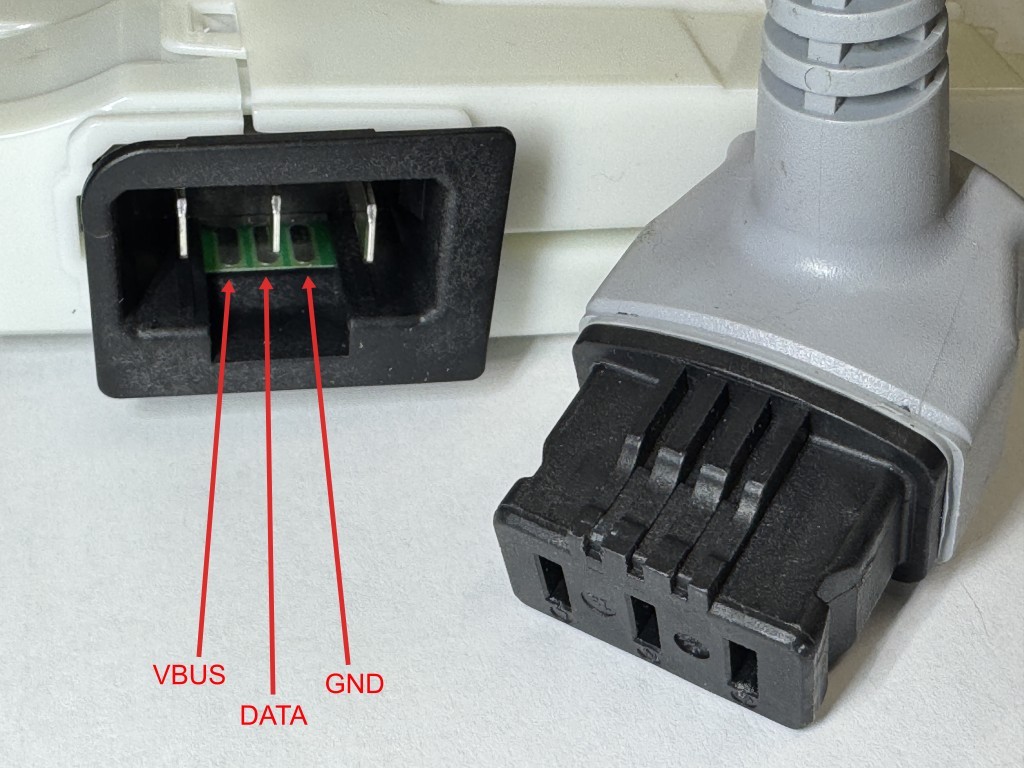
You must always double-check whether a connector is actually the D-Bus or something else entirely (like high-voltage components or different sensor interface) before connecting your hardware! The D-Bus consists of 3 wires: VBUS, DATA and GND. The details are described here. User interface panelThere usually is a 4-pin service connector (3 pins of it are D-Bus) somewhere behind the user interface panel at the front of the machine. @Bouni and @helloworldtest123 created some nice annotated pictures:
Power moduleLocate the Power Module. Once you have identified it, look for several slots positioned next to each other that share the exact same coding lugs. This is often a strong hint that these are D-Bus slots, because in a bus system, it doesn't matter which specific slot you plug the connector into. For illustration, please see these two images:
External accessAt least in dishwashers and some fridges, the D-Bus is accessible via PCB traces well hidden inside the power connector:
|



Uh oh!
There was an error while loading. Please reload this page.
I have opened my appliance and would like to connect to the D-Bus. However, I'm not sure which connector to use.
What are the typical characteristics of the D-Bus interface? Are there specific colors, pin counts, or markings on the PCB that I should look for to identify it correctly?
All reactions