Is your feature request related to a problem? Please describe.
I have been in documentations and issue for some time now and could not find how do I center align widgets.
My code
from dearpygui.core import *
from dearpygui.simple import *

# Global variables.
global mainWidth, mainHeight
mainWidth = 1200
mainHeigth = 800


def getPrevText(sender, data):
    print('Previous...')


def getNextText(sender, data):
    print('Next...')


def getDate():
    return 'Mar 26 2019 12:34PM'


# Window object settings.
set_main_window_title('App')
set_main_window_pos(100, 50)
set_theme("Gold")

with window('main'):

    with managed_columns("Columns", 2):

        with group("Left Group"):
            add_text(getDate())
            add_spacing(count=10)
            add_image_button('prev', 'arrowUp.png',
                             background_color=[0, 0, 0],
                             callback=getPrevText,
                             height=30,
                             width=30,
                             tip='Previous reading.'
                             )

        with group("Right Group"):
            add_text(getDate())
            add_spacing(count=10)
            add_image_button('prev', 'arrowUp.png',
                             background_color=[0, 0, 0],
                             callback=getPrevText,
                             height=30,
                             width=30,
                             tip='Previous reading.'
                             )

start_dearpygui(primary_window='main')
It produces window like that

however I want my output in this alignment
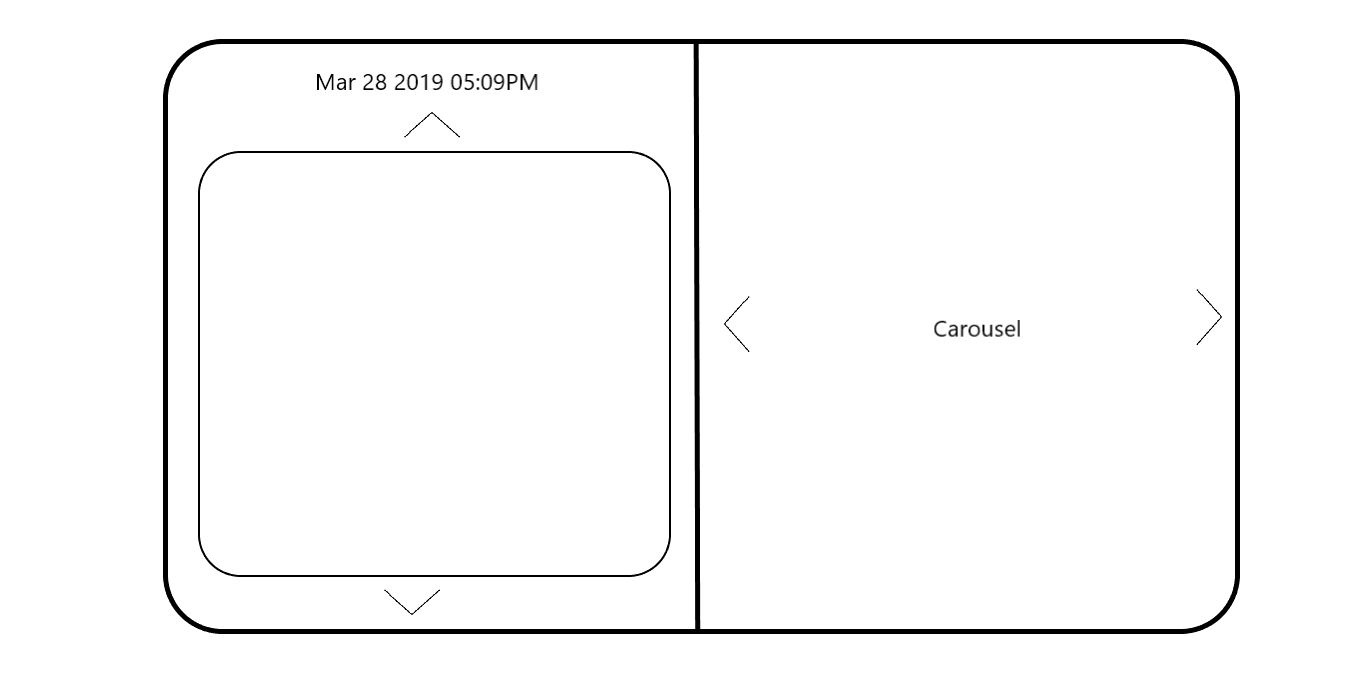
how do I center align texts and buttons in there? Also since we're discussing this design could you also help me with how can I make "text box" which is not the left of my design

Is your feature request related to a problem? Please describe.
I have been in documentations and issue for some time now and could not find how do I center align widgets.
My code
It produces window like that

however I want my output in this alignment
how do I center align texts and buttons in there? Also since we're discussing this design could you also help me with how can I make "text box" which is not the left of my design