The tutorial of Filter
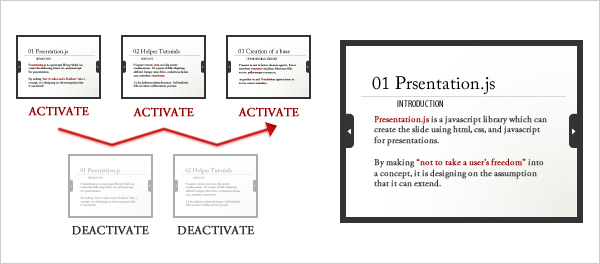
In this tutorial, the easy filter for understanding a contents filter is created.
The filter to create creates the filter which indicates the specific keyword in contents by highlight.
The data created by this tutorial is downloadable.
Favorite namespace is defined and the base of a filter is defined.
Since the keyword is indicated by highlight this time, a keyword is also described together.
(function(){

	var yournamespace = this.yournamespace = {};

	yournamespace.KeywordFilter = {

		keywords: ['ipsum', 'sapien', 'lobortis', 'leo'] //Keyword list

	}

}.call(this));
Next, the processing at the time is described that the page was displayed.
It is the processing which indicates the important keyword by highlight.
//The contents are indicated by highlight.
activate: function(content){
	var html = '',
		element = null,
		replaceKeywords = '',
		replaceContent = '',
		replaceTarget = null,
		replaceValue = '',
		isHighlight = false;

	//It changes into an element from a content object.
	element = $(content);

	//Status is acquired from data store, and already case highlighted, it skips.
	isHighlight = element.retrieve('content:highlight');

	if (isHighlight === true){
		return;
	}

	html = element.get('html');

	//The keyword in contents is emphasized with a strong element.
	replaceKeywords = this.keywords.join('|');

	replaceTarget = new RegExp('(' + replaceKeywords + ')', 'g');
	replaceValue = '<strong class="highlight">$1</strong>';

	replaceContent = html.replace(replaceTarget, replaceValue);

	element.set('html', replaceContent)
		.store('content:html', html)		//The contents before a highlight are backed up.
		.store('content:highlight', true);	//It uses ending with a highlight.
}
Next, processing when a page becomes undisplayed is described.
Although the keyword is indicated by the highlight, the processing returned to the original state here is put in.
Although I think that it is unnecessary, since it serves also as description of a filter, it incorporates and sees this time.
//It restores to a front state from the state where it has highlighted.
deactivate: function(content){

	var element = null,
		beforeContent = '',
		isHighlight = false;

	//It changes into an element from a content object.
	element = $(content);

	isHighlight = element.retrieve('content:highlight');
	if (isHighlight !== true){
		return;
	}

	beforeContent = element.retrieve('content:html');

	element.set('html', beforeContent)
		.store('content:highlight', false);	//It cancels ending with a highlight.

}
A filter is registered using an addFilter method.
The rest performs a start method and starts a slide.
(function(yournamespace){

this.addEvent('domready', function(){

	var p = new Presentation('presentation');

	p.addFilter(yournamespace.KeywordFilter);

	p.displayFullScreen().start();

});

}.call(this, yournamespace));
The code of a final filter turns into the following codes.
Download of yournamespace.keyword-filter.js
(function(yournamespace){

	var yournamespace = this.yournamespace= yournamespace;

	yournamespace.KeywordFilter = {

		keywords: ['ipsum', 'sapien', 'lobortis', 'leo'],

		//The contents are indicated by highlight.
		activate: function(content){
			var html = '',
				element = null,
				replaceKeywords = '',
				replaceContent = '',
				replaceTarget = null,
				replaceValue = '',
				isHighlight = false;

			//It changes into an element from a content object.
			element = $(content);

			//Status is acquired from data store, and already case highlighted, it skips.
			isHighlight = element.retrieve('content:highlight');

			if (isHighlight === true){
				return;
			}

			html = element.get('html');

			//The keyword in contents is emphasized with a strong element.
			replaceKeywords = this.keywords.join('|');

			replaceTarget = new RegExp('(' + replaceKeywords + ')', 'g');
			replaceValue = '<strong class="highlight">$1</strong>';

			replaceContent = html.replace(replaceTarget, replaceValue);

			element.set('html', replaceContent)
				.store('content:html', html)		//The contents before a highlight are backed up.
				.store('content:highlight', true);	//It uses ending with a highlight.
		},

		//It restores to a front state from the state where it has highlighted.
		deactivate: function(content){

			var element = null,
				beforeContent = '',
				isHighlight = false;

			//It changes into an element from a content object.
			element = $(content);

			isHighlight = element.retrieve('content:highlight');
			if (isHighlight !== true){
				return;
			}

			beforeContent = element.retrieve('content:html');

			element.set('html', beforeContent)
				.store('content:highlight', false);	//It cancels ending with a highlight.

		}

	}

}.call(this, this.yournamespace || {}));
An addFilter method is used using a filter and a filter is only used.
Now, when contents change, the specific keyword can be indicated by highlight.
(function(yournamespace){

this.addEvent('domready', function(){

	var p = new Presentation('presentation');

    p.addFilter(yournamespace.KeywordFilter);

	p.displayFullScreen()
		.start();

});

}.call(this, yournamespace));
The tutorial of a filter is an end now.
Thank you for everything.