
AI-powered Code Review Platform for GitHub and GitLab.
- AI Code Review: Automatically review code changes using OpenAI-compatible models
- Auto-Scoring: Automatically appends scoring instructions if custom prompts lack them
- Commit Comments: Post AI review results as comments on commits (GitLab/GitHub)
- Commit Status: Set commit status to block merges when score is below threshold (GitLab/GitHub)
- Sync Review API: Synchronous review endpoint for Git pre-receive hooks to block pushes
- Duplicate Prevention: Skip already reviewed commits to avoid redundant processing
- Multi-Platform Support: GitHub and GitLab webhook integration with multi-level project path support
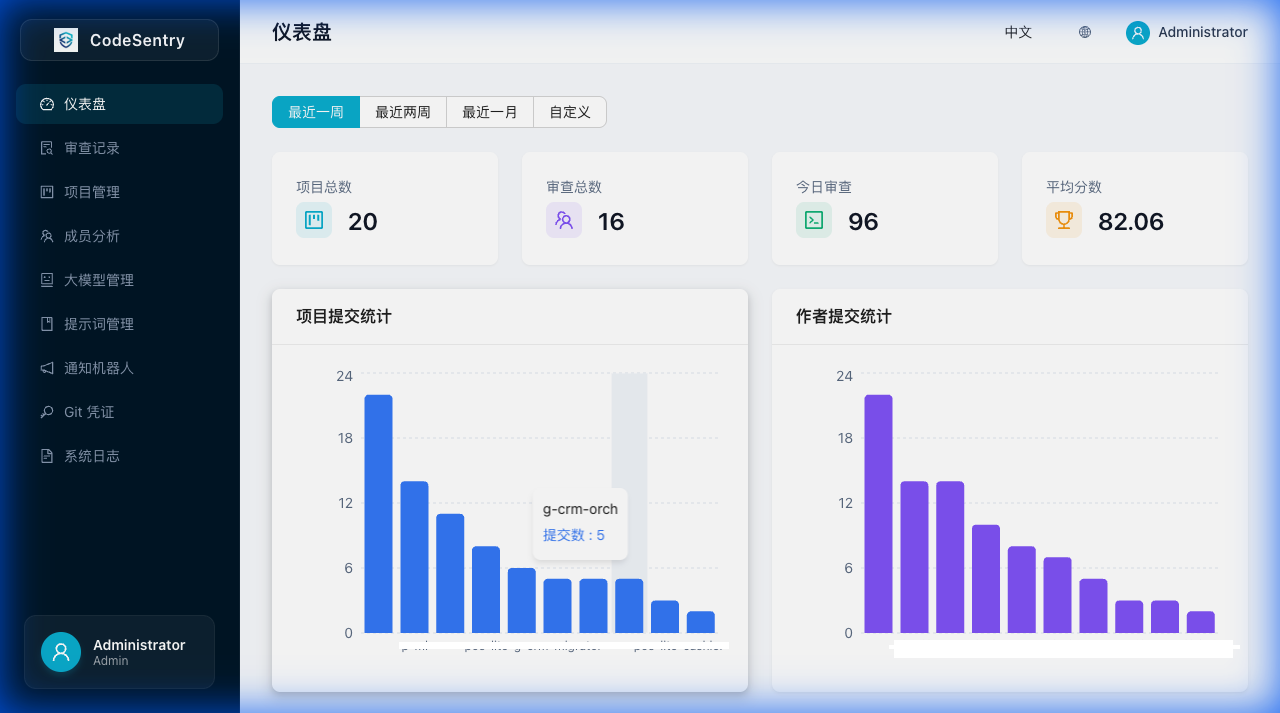
- Dashboard: Visual statistics and metrics for code review activities
- Review History: Track all code reviews with detailed logs and direct links to commits/MRs
- Project Management: Manage multiple repositories
- LLM Configuration: Configure multiple AI models with custom endpoints
- Prompt Templates: System and custom prompt templates with copy functionality
- IM Notifications: Send review results to DingTalk, Feishu, WeCom, Slack, Discord, Microsoft Teams, Telegram
- Daily Reports: Automated daily code review summary with AI analysis, sent via IM bots
- Error Notifications: Real-time error alerts via IM bots
- Git Credentials: Auto-create projects from webhooks with credential management
- System Logging: Comprehensive logging for webhook events, errors, and system operations
- Authentication: Local authentication and LDAP support (configurable via web UI)
- Role-based Access Control: Admin and User roles with different permission levels
- Multi-Database: SQLite for development, MySQL/PostgreSQL for production
- Internationalization: Support for English and Chinese (including DatePicker localization)
- Go 1.24+
- Node.js 20+
- Docker (optional)
cd backend

# Create config file
cp ../config.yaml.example config.yaml
# Edit config.yaml with your settings

# Run
go run ./cmd/servercd frontend
# Install dependencies
npm install
# Run development server
npm run devAccess the application at http://localhost:5173
Default credentials: admin / admin
# Pull from Docker Hub
docker pull huangangzhang/codesentry:latest

# Or pull from GitHub Container Registry
docker pull ghcr.io/huangang/codesentry:latest
Choose your database:
# MySQL (default, recommended for production)
docker-compose up -d

# SQLite (simple, single file)
docker-compose -f docker-compose.sqlite.yml up -d

# PostgreSQL
docker-compose -f docker-compose.postgres.yml up -d
Or run directly (SQLite):
docker run -d -p 8080:8080 -v codesentry-data:/app/data huangangzhang/codesentry:latestFor local development (build from source):
docker-compose -f docker-compose.dev.yml up --buildAccess the application at http://localhost:8080
# One-command build (frontend + backend combined)
./build.sh

# Run the binary
./codesentry
This builds frontend, embeds it into the Go binary, producing a single executable.
Copy config.yaml.example to config.yaml and update:
server:
  port: 8080
  mode: release  # debug, release, test

database:
  driver: sqlite   # sqlite, mysql, postgres
  dsn: data/codesentry.db
  # For MySQL: user:password@tcp(host:port)/dbname?charset=utf8mb4&parseTime=True&loc=Local
  # For PostgreSQL: host=localhost user=postgres password=xxx dbname=codesentry port=5432 sslmode=disable

jwt:
  secret: your-secret-key-change-in-production
expire_hours: 24Note: All business configurations (LLM models, LDAP, prompts, IM bots, Git credentials) are managed via the web UI and stored in the database.
Use a single webhook URL for both GitLab and GitHub:
https://your-domain/webhook
# or
https://your-domain/review/webhook
The system automatically detects the platform via request headers.
- Go to Repository Settings > Webhooks > Add webhook
- Payload URL:
https://your-domain/webhook - Content type:
application/json - Secret: Your configured webhook secret
- Events: Select "Pull requests" and "Pushes"
- Go to Project Settings > Webhooks
- URL:
https://your-domain/webhook - Secret Token: Your configured webhook secret
- Trigger: Push events, Merge request events
POST /api/auth/login- LoginGET /api/auth/config- Get auth configGET /api/auth/me- Get current userPOST /api/auth/logout- LogoutPOST /api/auth/change-password- Change password (local users only)
GET /api/projects- List projectsPOST /api/projects- Create projectGET /api/projects/:id- Get projectPUT /api/projects/:id- Update projectDELETE /api/projects/:id- Delete project
GET /api/review-logs- List review logsGET /api/review-logs/:id- Get review detailPOST /api/review-logs/:id/retry- Retry failed review (admin only)DELETE /api/review-logs/:id- Delete review log (admin only)
GET /api/users- List users (admin only)PUT /api/users/:id- Update user (admin only)DELETE /api/users/:id- Delete user (admin only)
GET /api/dashboard/stats- Get statistics
GET /api/llm-configs- List LLM configsGET /api/llm-configs/active- List active LLM configs (for project selection)POST /api/llm-configs- Create LLM configPUT /api/llm-configs/:id- Update LLM configDELETE /api/llm-configs/:id- Delete LLM config
GET /api/prompts- List prompt templatesGET /api/prompts/:id- Get prompt template detailGET /api/prompts/default- Get default prompt templateGET /api/prompts/active- List active prompt templatesPOST /api/prompts- Create prompt template (admin only)PUT /api/prompts/:id- Update prompt template (admin only)DELETE /api/prompts/:id- Delete prompt template (admin only)POST /api/prompts/:id/set-default- Set as default template (admin only)
GET /api/im-bots- List IM botsPOST /api/im-bots- Create IM botPUT /api/im-bots/:id- Update IM botDELETE /api/im-bots/:id- Delete IM bot
GET /api/daily-reports- List daily reportsGET /api/daily-reports/:id- Get daily report detailPOST /api/daily-reports/generate- Generate daily report (manual, no notification)POST /api/daily-reports/:id/resend- Send/resend notification
POST /webhook- Unified webhook (auto-detect GitLab/GitHub, recommended)POST /review/webhook- Alias for unified webhookPOST /api/webhook- Unified webhook under /api prefixPOST /api/review/webhook- Alias under /api prefixPOST /api/webhook/gitlab- GitLab webhook (auto-detect project by URL)POST /api/webhook/github- GitHub webhook (auto-detect project by URL)POST /api/webhook/gitlab/:project_id- GitLab webhook (with project ID)POST /api/webhook/github/:project_id- GitHub webhook (with project ID)
POST /review/sync- Synchronous code review for pre-receive hooksPOST /api/review/sync- Same endpoint under /api prefixGET /review/score?commit_sha=xxx- Query review status/score by commit SHAGET /api/review/score?commit_sha=xxx- Same endpoint under /api prefix
Request body:
{
  "project_url": "https://gitlab.example.com/group/project",
  "commit_sha": "abc123...",
  "ref": "refs/heads/main",
  "author": "John Doe",
  "message": "feat: add new feature",
  "diffs": "diff --git a/file.go..."
}
Response:
{
  "passed": true,
  "score": 85,
  "min_score": 60,
  "message": "Score: 85/100 (min: 60)",
  "review_id": 123
}
See scripts/pre-receive-hook.sh for GitLab pre-receive hook example.
GET /api/system-logs- List system logsGET /api/system-logs/modules- Get module listGET /api/system-logs/retention- Get log retention daysPUT /api/system-logs/retention- Set log retention daysPOST /api/system-logs/cleanup- Manually cleanup old logs
GET /health- Service health check
codesentry/
├── backend/
│   ├── cmd/server/          # Application entry point
│   ├── internal/
│   │   ├── config/          # Configuration
│   │   ├── handlers/        # HTTP handlers
│   │   ├── middleware/      # Auth, CORS middleware
│   │   ├── models/          # Database models
│   │   ├── services/        # Business logic
│   │   └── utils/           # Utilities
│   └── go.mod
├── frontend/
│   ├── src/
│   │   ├── i18n/            # Internationalization
│   │   ├── layouts/         # Layout components
│   │   ├── pages/           # Page components
│   │   ├── services/        # API services
│   │   ├── stores/          # State management
│   │   └── types/           # TypeScript types
│   └── package.json
├── Dockerfile
├── docker-compose.yml
├── config.yaml.example
├── README.md
└── README_zh.md
- Go 1.24
- Gin v1.11 (HTTP framework)
- GORM v1.31 (ORM)
- JWT authentication
- LDAP support
- React 19
- TypeScript 5.9
- Ant Design 5
- Recharts
- Zustand (state management)
- React Router 7
- react-i18next (internationalization)
- react-markdown (review result rendering)
MIT