


Watch the video demo here:
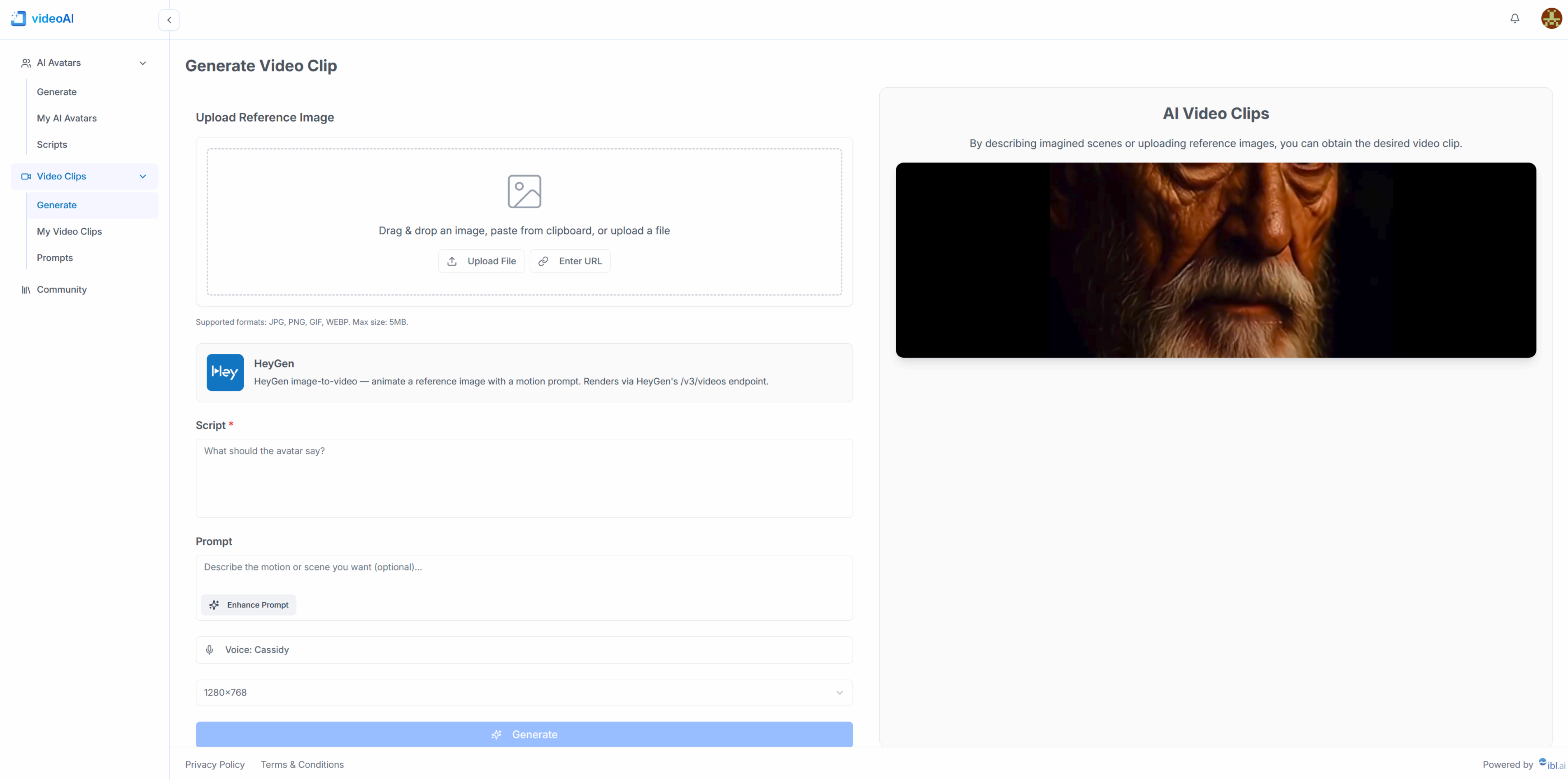
More screenshots:
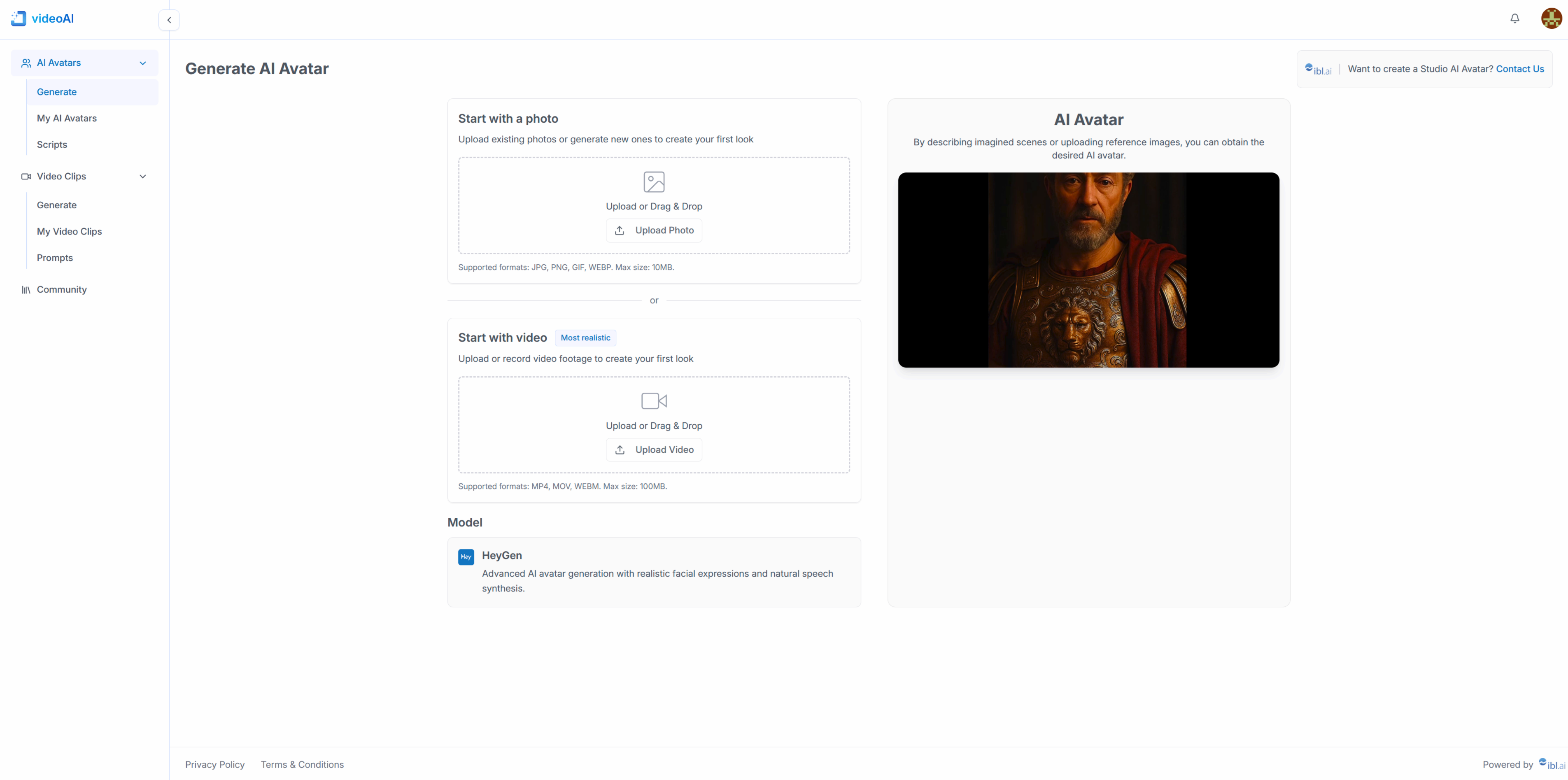
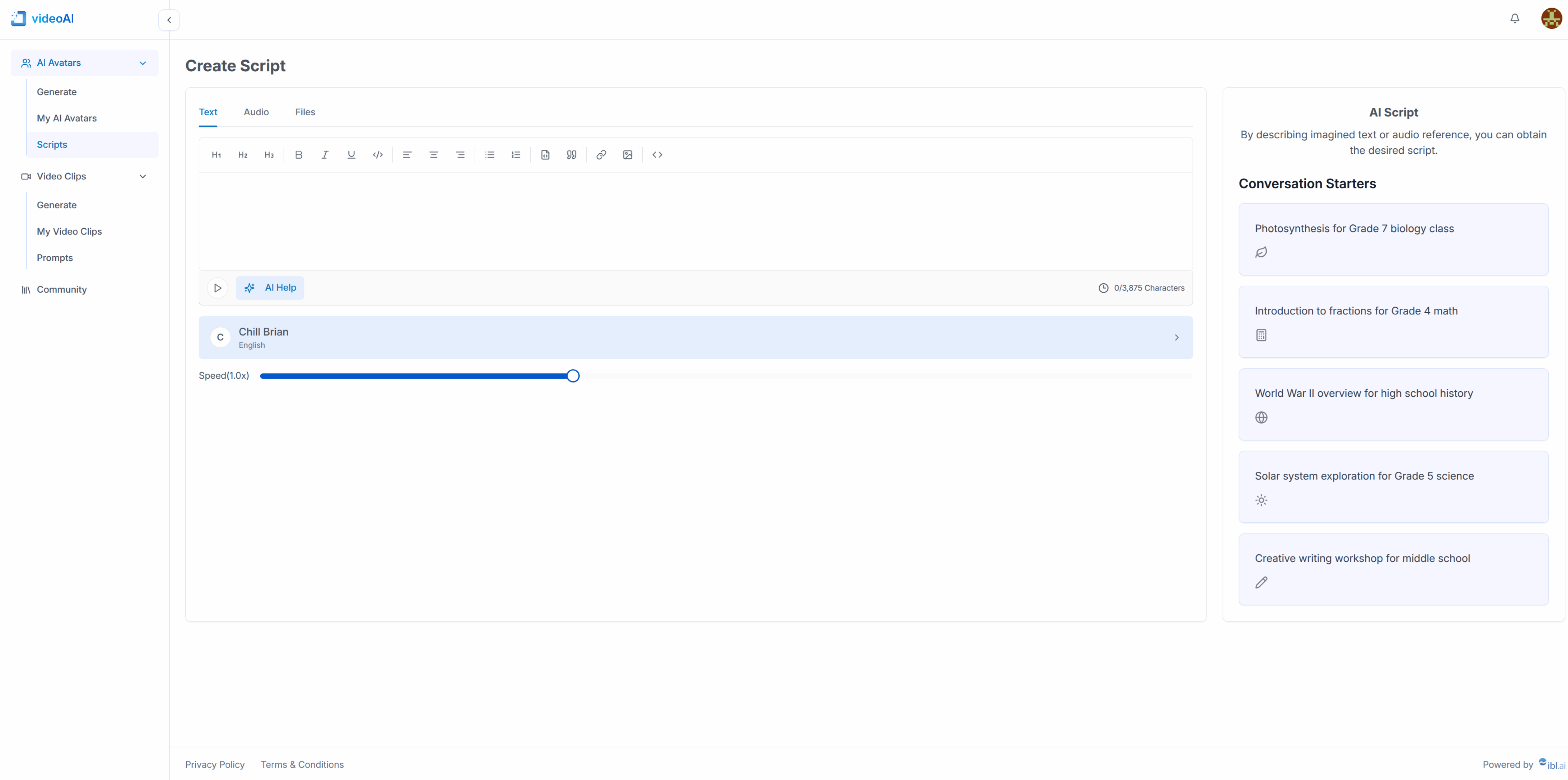
videoAI is an end-to-end video generation workspace. Pick or create an avatar, clone a voice, write or transcribe a script, and generate a finished video — all from one web app powered by the @iblai/iblai-js SDK and connected to iblai.app. The HeyGen and OpenAI API keys are never called directly from the browser: tenant-scoped server proxies resolve the integration credentials through ibl.ai API and forward each request upstream.
| Feature | Description |
|---|---|
| Video Clip Generation | Image-to-video via HeyGen /v3/videos — upload a reference image, pick a voice, write a script, and add an optional motion prompt |
| Avatar Videos | Generate full avatar videos from script + voice + avatar via HeyGen /v2/video/generate |
| Interactive Avatars | Real-time streaming avatars via HeyGen /v1/streaming.* + LiveKit — the browser joins LiveKit directly after the proxy creates the session |
| Voice Cloning | Clone any voice from an audio sample via HeyGen /v3/voices/clone; cloned voices are registered as heygen_private_voice catalog resources so every user on the tenant can find them |
| Voice Library | Paginated voice picker that merges tenant-curated private voices with HeyGen's public library, deduped by voice id |
| Create Script | Rich-text editor with three input modes: type, transcribe audio (OpenAI Whisper), or extract text from DOCX / PDF / PPTX / TXT — plus AI Help (OpenAI gpt-4o-mini) and TTS preview via HeyGen /v3/voices/speech |
| Prompt Gallery | Tenant-shared prompt library backed by catalog video_prompt resources — create, edit (delete + recreate), delete, and copy prompts |
| Community | Platform-wide video grid pulled from the main tenant's HeyGen library, with title search and cursor-based pagination |
| My Videos | Per-user gallery of generated videos with live status polling and player modal |
videoAI is for platform admins who've added a HeyGen API key to their ibl.ai settings. Non-admins land on a "Platform admin required" screen, and tenants without a heygen integration credential see a setup gate until one is registered.
- Node.js 18+
- pnpm (use
npmonly ifpnpmis unavailable) - An ibl.ai login
- A HeyGen integration credential registered on your tenant via the ibl.ai
ai-accountservice (the app gates itself with a "HeyGen integration required" screen when this is missing) - An OpenAI API key, exported as
OPENAI_API_KEYserver-side (used by the/api/openai/*proxy for Whisper, AI Help, and motion-prompt enhancement) - The
iblaiCLI — install from source (see below)
Create an integration credential object on one of ibl.ai's apps, name it "heygen" and add your HeyGen API key.
The CLI is installed from source via make. clone + make install is the supported install path.
macOS / Linux (Python 3.11+, pip, git, make):
git clone https://github.com/iblai/iblai-app-cli.git
cd iblai-app-cli
make -C .iblai install
cd -   # back to your project
If iblai isn't found afterwards, add ~/.local/bin to your PATH:
export PATH="$HOME/.local/bin:$PATH" # add to ~/.bashrc or ~/.zshrc to persistWindows (Python 3.11+, pip, git):
git clone https://github.com/iblai/iblai-app-cli.git
cd iblai-app-cli
pip install -e .iblai/
cd -
If iblai isn't found, ensure Python Scripts is on PATH (typically %APPDATA%\Python\Python311\Scripts\).
Verify the install:
iblai --versioncp .env.example .env.local
pnpm install
pnpm devOpen http://localhost:3000. You'll be redirected to https://login.iblai.app for SSO and you will return to the videoAI app after auth.
.env.local is populated with the iblai.app endpoints — no manual platform credentials are needed up front.
pnpm build
pnpm startVitest covers the libraries, hooks, providers, components, modals, and API route handlers:
pnpm test                # one-shot
pnpm test:watch          # rerun on file changes
pnpm test:coverage       # html + console v8 report under coverage/
Playwright covers user journeys via real SSO. Copy e2e/.env.development.example to e2e/.env.development (gitignored) and fill in your iblai login:
PLAYWRIGHT_USERNAME=you@example.com
PLAYWRIGHT_PASSWORD=…
Then:
pnpm test:e2e # spins up `next dev` on port 3100, runs auth.setup.ts once, then the journeys.env.local configures the ibl.ai endpoints and the OpenAI key. The HeyGen API key is never read by the browser — it's resolved server-side per request via the proxy.
# ibl.ai platform — defaults work out of the box
NEXT_PUBLIC_API_BASE_URL=https://api.iblai.app
NEXT_PUBLIC_AUTH_URL=https://login.iblai.app
NEXT_PUBLIC_PLATFORM_BASE_DOMAIN=iblai.app

# OpenAI — server-only. The `/api/openai/*` proxy reads this and adds
# `Authorization: Bearer` before forwarding. Do NOT use the
# `NEXT_PUBLIC_` prefix — that would inline the key into the browser bundle.
OPENAI_API_KEY=sk-...

# Optional: disable the SDK's cross-tab refresh in the dev server (also
# settable per-page via localStorage.__disable_storage_sync = "1")
NEXT_PUBLIC_DISABLE_STORAGE_SYNC=Setup: generate a Vercel token at https://vercel.com/account/tokens and add it to iblai.env:
echo 'VERCEL_TOKEN=<token>' >> iblai.envAnd then deploy:
iblai deploy vercelThe CLI auto-detects the deploy mode from next.config.mjs. videoAI is a server-rendered Next.js app (App Router with API routes for the HeyGen and OpenAI proxies), so the CLI will:
- deploy the repo root to Vercel for a remote build,
- disable Vercel authentication / password protection,
- upload env vars from
.env.localto production + preview (NEXT_PUBLIC_*asplain, the rest includingOPENAI_API_KEYasencrypted; reserved keys andyour-…placeholders are skipped), - rerun the deploy with
--force+VERCEL_FORCE_NO_BUILD_CACHE=1whenever env vars changed so the newNEXT_PUBLIC_*values are re-inlined into the client bundle.
Override detection with --mode static or --mode server when needed. Full guide: /iblai-ops-deploy.
Tip: You can change the vercel domain name by clicking on the three-dot button on your Vercel project on
vercel.comand select "Manage Domains".
Releases are automated via release-it
- GitHub Actions. Every push to
maintriggerspnpm release --civia GitHub Actions, and release-it bumps the version and cuts a GitHub Release.
To release locally:
pnpm release            # interactive prompts for version bump
pnpm release --ci # non-interactive (used by CI)app/
├── layout.tsx # Root layout — title "videoAI"
├── page.tsx # Home redirect (auth check → /ai-avatar/generate)
├── login/ # SSO entry
├── sso-login-complete/ # SSO callback (SDK <SsoLogin>)
├── ai-avatar/
│ ├── my/ # Tenant-shared private avatars
│ ├── generate/ # Photo / digital-twin avatar creation
│ ├── interactive/ # Interactive avatars list
│ └── interactive/[id]/ # Real-time streaming avatar session
├── voices/create/ # Clone a voice from an audio sample
├── scripts/add/ # Create Script (text, audio, files) + TTS preview
├── videos/
│ ├── generate/ # Image-to-video clip generator
│ ├── my/ # Per-user gallery with live status polling
│ ├── prompts/ # Prompt gallery (catalog-backed)
│ └── public-video-clips/ # Curated public clip browser
├── community/ # Platform-wide video grid (main tenant)
├── video/watch/[id]/ # Public/shareable watch page
├── session/[avatar]/[sessionId]/ # Interactive avatar session route
├── notifications/ # Notification center
├── account/ # Account settings (SDK <Account>)
└── api/
├── heygen/[...path]/route.ts # HeyGen REST proxy (resolves tenant credential server-side)
└── openai/[...path]/route.ts # OpenAI proxy (uses OPENAI_API_KEY, never the browser)
components/
├── admin-guard.tsx # Whole-app admin gate
├── heygen-guard.tsx # Probes /integration-credential?name=heygen — gates on missing key
├── conditional-layout.tsx # Auth shell vs. authed shell switch
├── app-sidebar.tsx # Left nav
├── app-header.tsx # Top bar — notifications + profile (shown on gate screens too)
├── video-generator.tsx # Clip generator UI (image + script + voice + motion prompt)
├── iblai/ # SDK wrappers (profile dropdown, notification bell)
└── modals/ # Player, share, voice picker, avatar picker, ...
lib/heygen/
└── rest.ts # Browser HeyGen client (every call goes via /api/heygen)
lib/iblai/
├── config.ts # NEXT_PUBLIC_* env reader
├── tenant.ts # Tenant resolution from localStorage `tenant`
├── catalog.ts # Catalog resources (private avatar / video / voice / video_prompt)
├── ai-proxy.ts # ibl.ai AI proxy helpers
├── auth-utils.ts # redirectToAuthSpa, logout, handleTenantSwitch
└── storage-service.ts # LocalStorageService for the SDK data layer
lib/openai/
└── proxy.ts # Browser helper for /api/openai/* (no key, just DM token + tenant)
lib/scripts/
└── extract-text.ts # Lazy DOCX / PDF / PPTX / TXT extractors
hooks/
├── use-heygen-voices.ts # Paginated voice loader (catalog + HeyGen, deduped)
├── use-heygen-avatars.ts # Private avatar loader (catalog + HeyGen)
├── use-heygen-streaming.ts # LiveKit + HeyGen streaming session hook
└── use-is-admin.ts # Reads tenants[].is_admin for the current tenant
providers/
└── iblai-providers.tsx # Redux + AuthProvider + TenantProvider
- Next.js — App Router
- @iblai/iblai-js — SDK for auth, UI components, and data
- HeyGen — avatars, voices, video generation, interactive streaming
- OpenAI — Whisper transcription,
gpt-4o-minifor prompt enhancement and AI Help - LiveKit — WebRTC transport for interactive avatar sessions
- Tailwind CSS — utility-first styling with the
videoai-*design tokens - shadcn/ui — accessible UI primitives
iblai.app— production backend for auth, integration credentials, AI agents, billing, and the resource catalog
- Fork the repo and clone it
- Install dependencies:
pnpm install - Start the dev server:
pnpm dev
- Create a branch from
main:git checkout -b feat/my-feature - Make your changes
- Run
pnpm buildandpnpm testto verify - Commit and push your branch
- Open a pull request against
main
- Never call HeyGen or OpenAI directly from the browser — every request must go through
/api/heygen/*or/api/openai/*so the API keys stay on the server - Use ibl.ai SDK components first — do not build custom components when an SDK equivalent exists
- Use shadcn/ui for custom UI — install via
npx shadcn@latest add <component>, not raw HTML or third-party libraries - Do not override SDK styles — SDK components ship with their own styling
- Use SDK design tokens — reference CSS variables like
var(--primary-color),var(--border-color),var(--text-secondary)instead of hardcoded colors - Register shared resources in the catalog — cloned voices, photo avatars, generated videos, and prompts are all platform-wide via
lib/iblai/catalog.ts. Always includeusernameon POSTs — the DM endpoint rejects requests without it - Use
pnpmas the package manager
Use the iblai CLI and/or Claude Code skills to add new features:
iblai add chat           # AI chat widget
iblai add invite         # Invite dialogs
...- ibl.ai Documentation
- HeyGen API Reference
- iblai-app-cli — CLI for scaffolding ibl.ai apps
- @iblai/mcp — MCP server for AI-assisted development
- Vibe — developer toolkit for building with ibl.ai
Built with ibl.ai Vibe