Home
Version 6.0.1 is based on GNU Midnight Commander 4.8.33.
The main change of the release is the new panel plugin framework. Panel contents can now be supplied by a dynamically loaded plugin, not only by the local filesystem or the built-in VFS modules.
Along with the new architecture, plugins for archives, Git, Docker, Kubernetes, MongoDB, S3, FTP, SFTP, Samba and others were added. The editor and the file viewer were extended considerably as well, and an embedded terminal appeared.
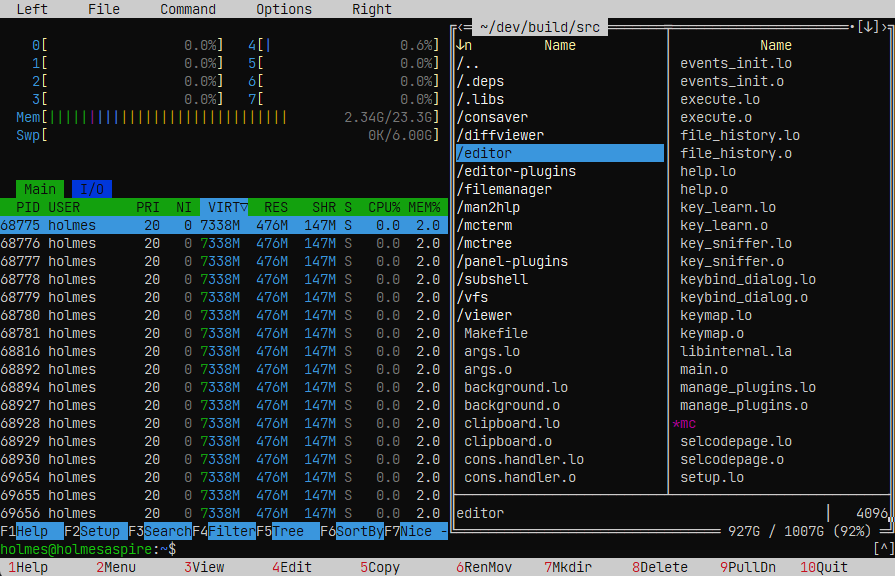
A plugin panel works like a regular file panel: it supports navigation, file viewing and the standard operations through F4, F5 and F6.
Plugins can add:
- their own data sources;
- entries in the panel menus and in the drive menu;
- settings and help;
- loading and saving of files;
- navigation history inside the plugin.
User plugins are loaded from ~/.local/lib/mc/panel-plugins.
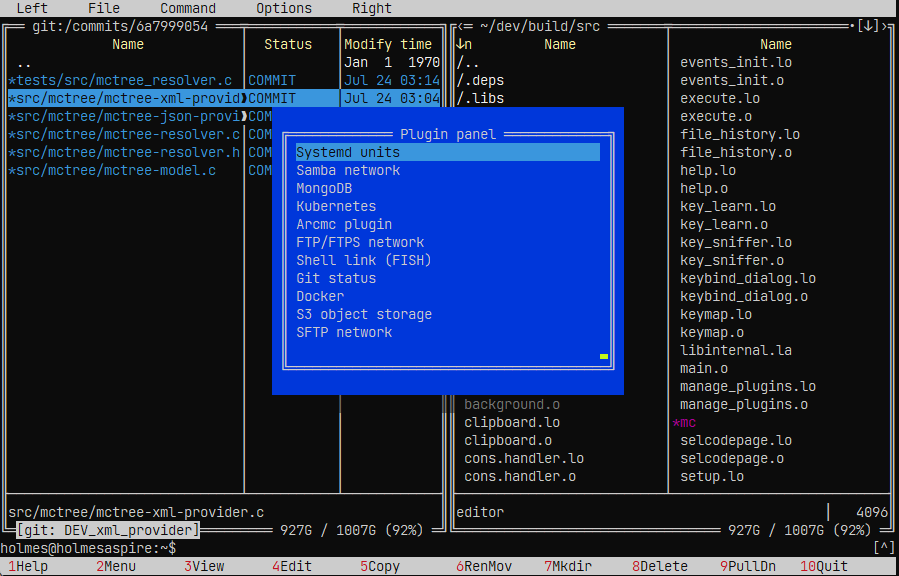
The arcmc plugin makes it possible to open archives directly in a panel.
Supported:
- browsing archives and nested archives;
- adding and deleting files;
- creating ZIP, 7z, TAR and CPIO;
- compression settings;
- passwords and encryption for the formats that support them;
- bulk extraction;
- display of progress, speed and remaining time;
- cancellation of long operations.
During extraction, absolute paths and .. components are checked, so the contents of an archive cannot escape the selected directory.
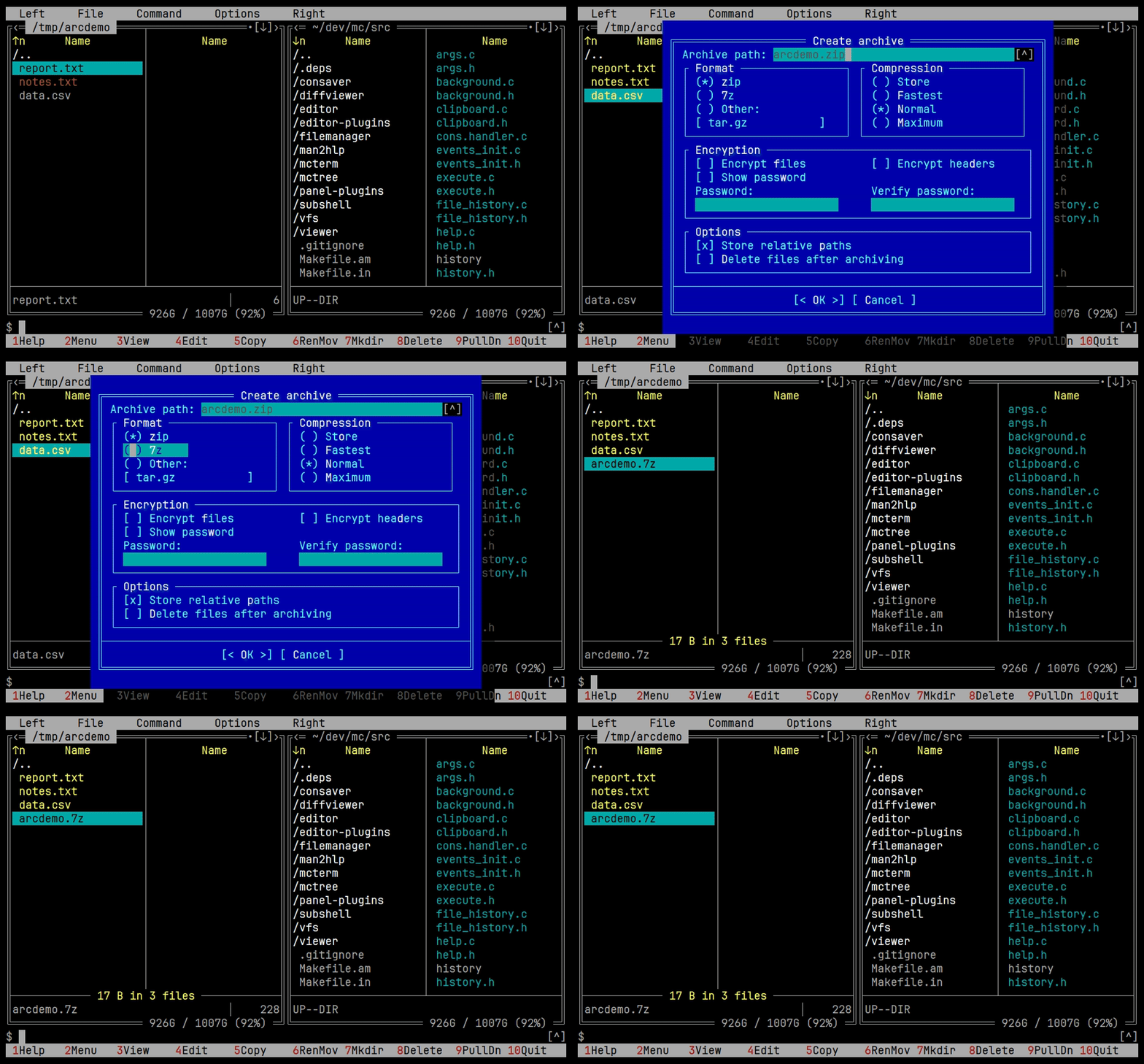
mcview gained a tree mode for:
- JSON;
- YAML;
- XML;
- HTML.
It is available both in the fullscreen viewer and in Quick View.
In tree mode you can expand and collapse nodes, set the expansion depth, search the whole structure and copy the path to the selected element in a format similar to jq.
The mcview_structured_auto option makes supported files open in structured mode automatically.
The viewer can now work with commands that never finish their output, for example:
docker logs -f
journalctl -f
Data is read without blocking the interface and is updated as it arrives.
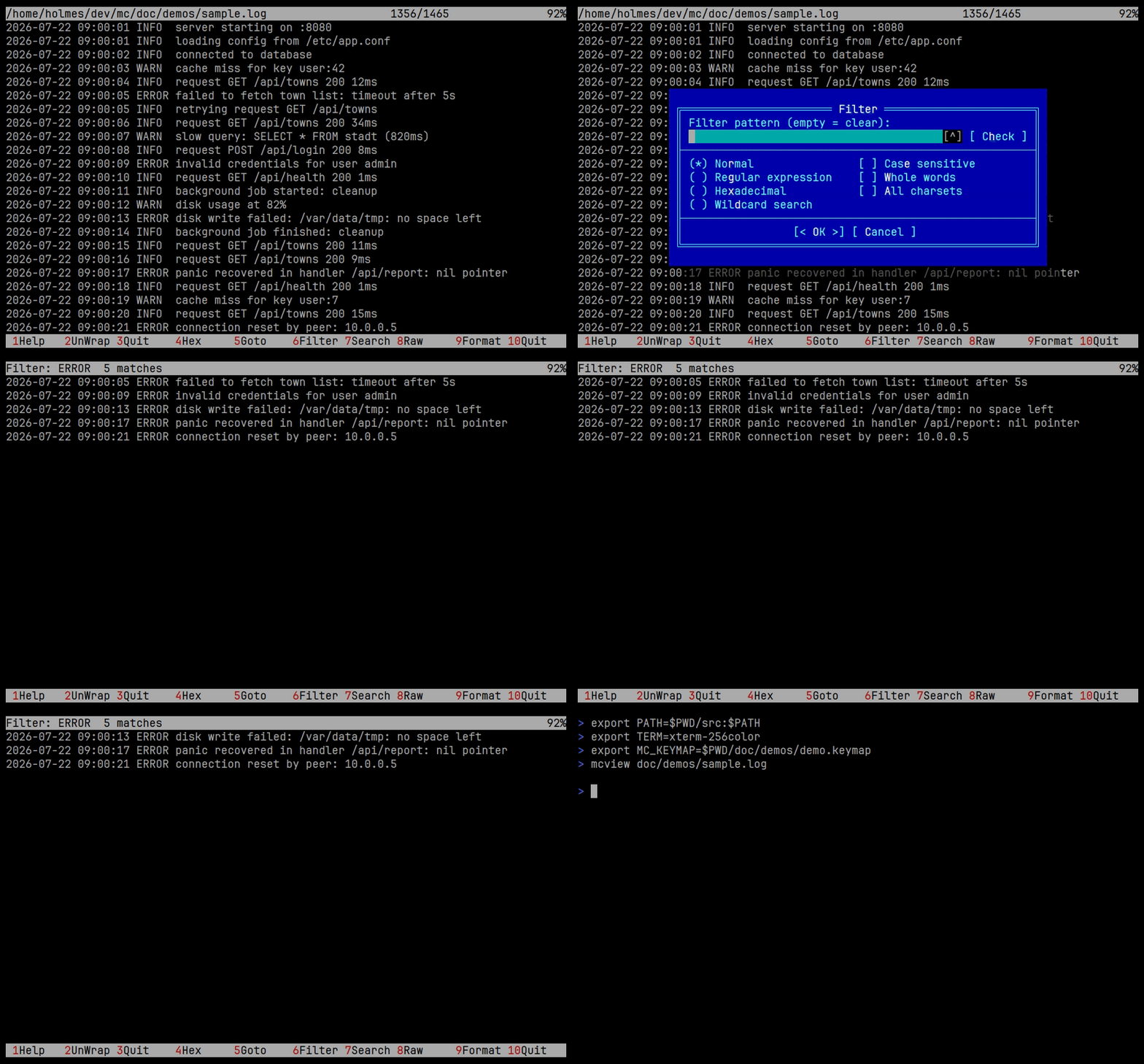
The filter offers:
- plain search;
- regular expressions;
- case sensitivity;
- whole word search;
- charset selection;
- checking the expression beforehand.
The filter applies to the current data source and shows only the matching lines, without creating a second file or a separate process.
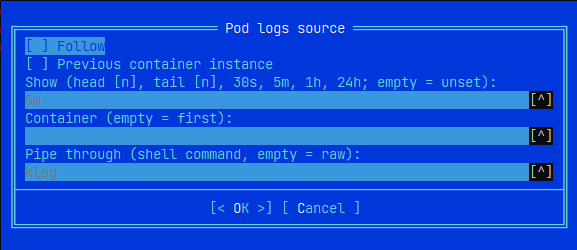
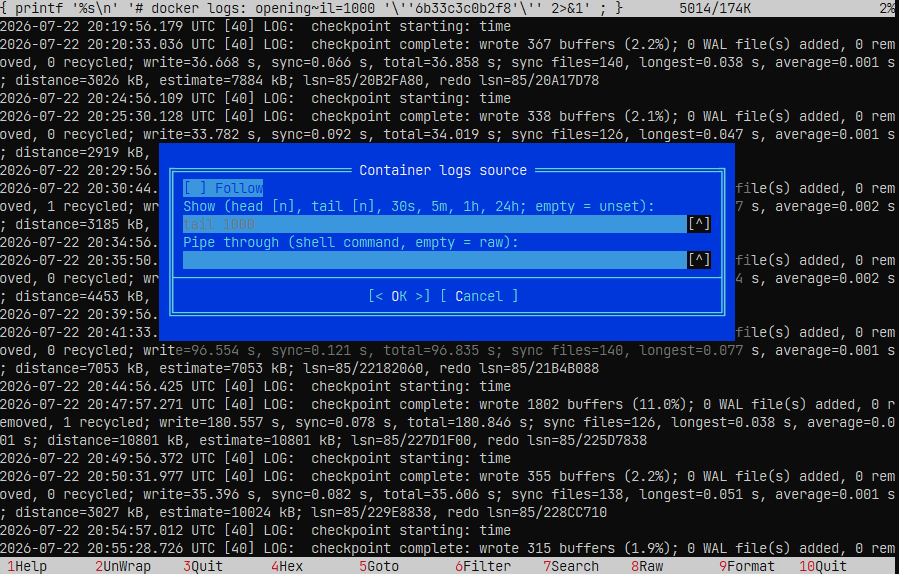
The log fetch parameters can be changed directly in the viewer, without closing it or returning to the panel. You can set the number of records loaded, the time interval, fetching the log of the previous container instance, and continuous refresh mode.
The fetched data can also be passed to an external command for transformation or formatting. This is available both for Docker logs, in the Container logs source dialog, and for Kubernetes logs, in the Pod logs source dialog.
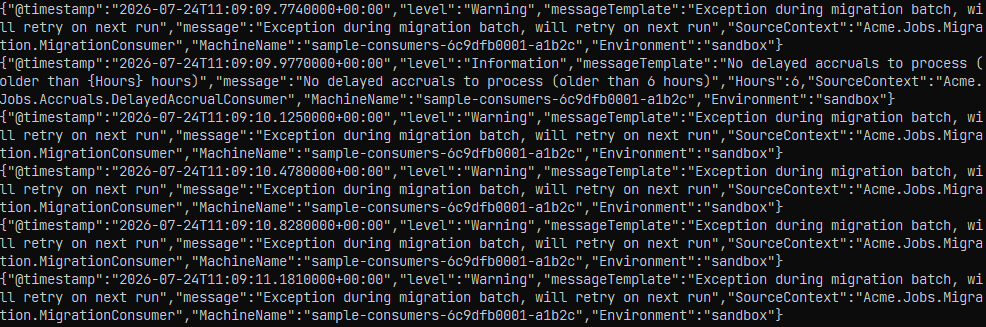
Without extra processing, structured logs, such as Serilog records in JSON, can be inconvenient to read:
In the source dialog you can set the log fetch parameters and specify the processing command in the Pipe through field:
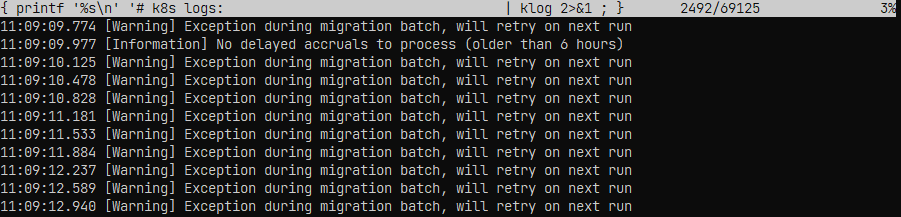
After processing, the data is shown in a more readable form:
mcview gained support for ANSI colours and a terminal replay mode.
Standard and bright colours, the 256-colour palette, True Color, bold and underlined text, italics and reverse video are supported.
Terminal mode handles the control sequences for positioning, screen erasing and scrolling regions. This makes it possible to view script(1) recordings and saved output of fullscreen terminal programs.
The None, SGR and Term modes are switched with F9. ANSI colour rendering can be turned on and off with Shift+F9.
The mcterm component adds an interactive command shell directly into the file manager.
The terminal is toggled with Ctrl+O, starts in the directory of the active panel and keeps the current path in sync with it through OSC 7.
Supported:
- interactive input;
- mouse;
- focus switching between the panels and the terminal;
- command line passthrough;
- shell prompt tracking.
Terminal emulation is done by the viewer's own engine, without an external library.
The editor has a plugin framework of its own. A plugin can register actions, add entries to the editor menus and handle keys.
Plugins are enabled and disabled per user in the Manage Plugins dialog, which also opens the settings of the selected plugin.
Three plugins ship with the editor:
- the spell checker;
- etags support;
- the ctags navigator.
The spell checker and etags support were moved out of the editor core into plugins. The ctags navigator is new: it jumps to definitions and declarations, searches symbols and files, finds references, browses members, completes symbols and keeps the history of jumps. Indexes are managed per repository and can be rebuilt from the plugin.
User plugins are loaded from ~/.local/lib/mc/editor-plugins.
mcedit can fold multi-line blocks by the {}, [] and () brackets.
Folding is available:
- through the indicator in the editor gutter;
- through the Command menu;
- through
Alt+Shift+F.
The command uses the selected area, or determines the nearest enclosing block relative to the cursor.

Alt+Shift+U opens the list of undo and redo operations.
For every group the line, the operation type, the number of characters and a fragment of the changed content are shown. From the list you can jump to any available point of the history.
Alt+Shift+M opens the list of recorded macros.
For the selected macro you can look at the sequence of actions, run it, delete it, or open the corresponding definition in mc.macros.
If a file cannot be saved because of insufficient permissions, the editor offers to repeat the operation through sudo -S tee.
A failed attempt does not close the editor and does not lose the current buffer.
Caching of character positions inside long lines was added. This reduces the delays during navigation, selection and redrawing of logs, CSV files and minified data.
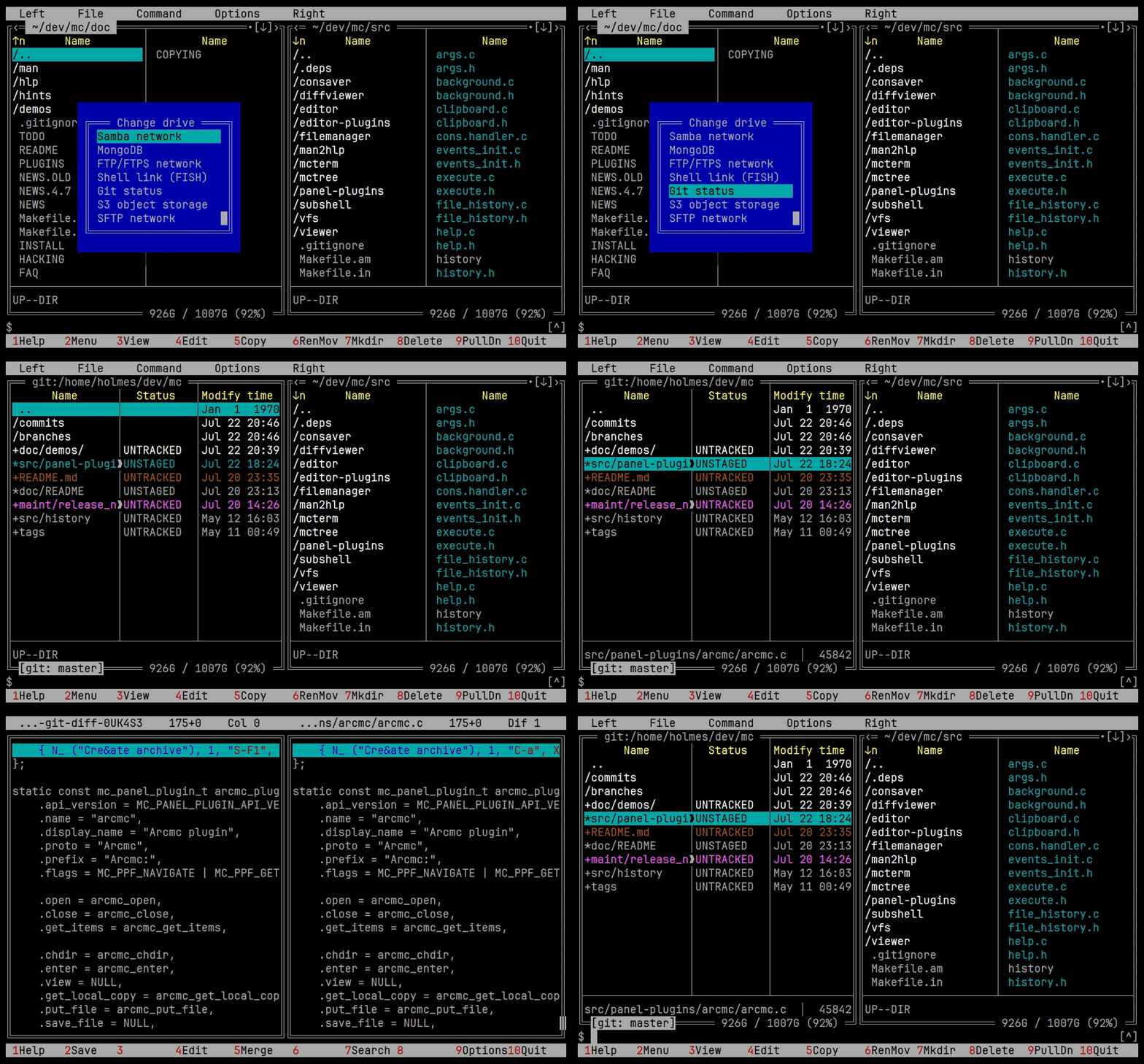
The Git plugin shows commits, branches and changed files. The built-in diff viewer is used for comparison.
Repositories can be saved as favorites. When a changed file is selected, the other panel moves to the corresponding file in the working directory.
The Docker plugin gives access to:
- containers;
- container files;
- images;
- volumes;
- networks;
- mounts;
- command execution;
- logs.
Local and SSH profiles are supported. For logs you can configure the number of lines, the time range, the previous run and the continuous reading mode.
A formatting script for .NET and Serilog logs is included.
The Kubernetes plugin works through kubectl and makes it possible to browse pods, nodes, services and workloads.
Contexts, namespaces, describe, YAML, exec, resource deletion and log viewing are also available.
The plugin makes it possible to browse connections, databases, collections and documents.
Filtering, projection, sorting, limiting the number of results, paged reading of large collections and document editing are supported.
The S3 plugin supports uploading, downloading and deleting objects, creating buckets, viewing metadata and streaming objects into the viewer.
Compatible storages can be used, including MinIO, Ceph and Cloudflare R2.
The FTP plugin supports FTP and FTPS, active and passive mode, proxies, keepalive and IP version settings.
The SFTP plugin supports password and key authentication, compression, progress display and streaming of files.
The Samba plugin gives access to SMB servers and shared resources.
Users can create their own panel display modes and choose the set and the width of the columns.
Three separate dialogs were added.
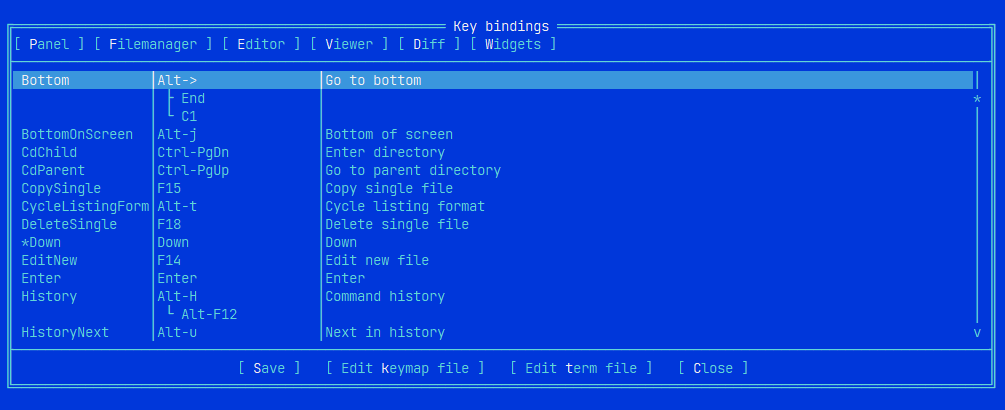
Key Bindings changes the key bindings and finds conflicts between them, with the bindings grouped by area into tabs.
Learn Keys recognises the modifiers, so Ctrl, Alt and Shift are captured together with the base key.
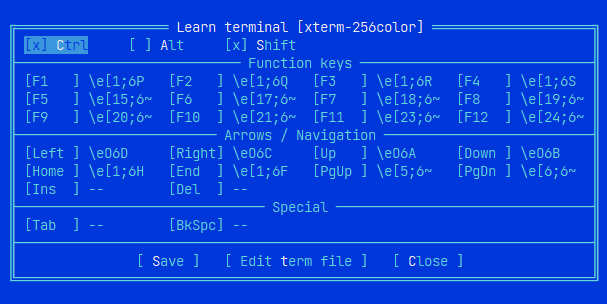
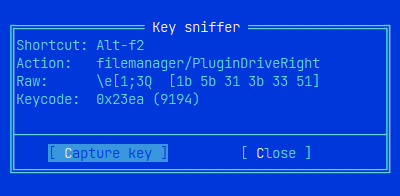
Key Sniffer shows the escape sequence the terminal sends for a key, along with the shortcut, the mapped action and the keycode.
Terminal settings are stored in:
~/.config/mc/term/<TERM>
The release also includes:
- Markdown rendering in the viewer;
- rectangular column selection in the editor;
- an internal implementation of the diff viewer instead of a separate
mcdiffprocess; - history filtering as you type;
- copying and pasting between input lines and the editor;
- the use of Procyon for decompiling Java classes;
- faster horizontal scrolling of very long lines;
- a fix for viewing DOCX, PPTX and XLSX;
- preserved extensions of the temporary files created by plugins;
- fixes for navigation and for restoring the panel format.
Version 6.0.1 is mostly devoted to four directions:
- The move to extensible panel plugins.
- The development of the viewer for structured data, logs and terminal recordings.
- Improvements to the editor.
- The addition of an embedded command shell.
Five screenshots are enough to illustrate the page:
- The general interface with the embedded terminal.
- The panel plugin menu.
- JSON or YAML in tree mode.
- Docker logs with a filter.
- Code folding in
mcedit.