Notebook(Alerts): AWS SES Alerts in Notebooks - could this be reimplimented #3936

Description

Thank you for suggesting an idea to improve InfluxData UI.
- Please ask usage questions on the Influx Community site.
- Please add a 👍 or comment on a similar existing feature request instead of opening a new one.
Proposal:
The controls for AWS SES notification integration could be simplified and streamlined, following for example, how to use the AWS SES API using Postman.
Current behavior:
The current controls are all stored as secrets. Most of them do not need to be. Additionally at least one is for a parameter which should be a constant value. See the notes section below.
Desired behavior:
I've managed to successfully send messages over the AWS SES API using postman. As shown here:
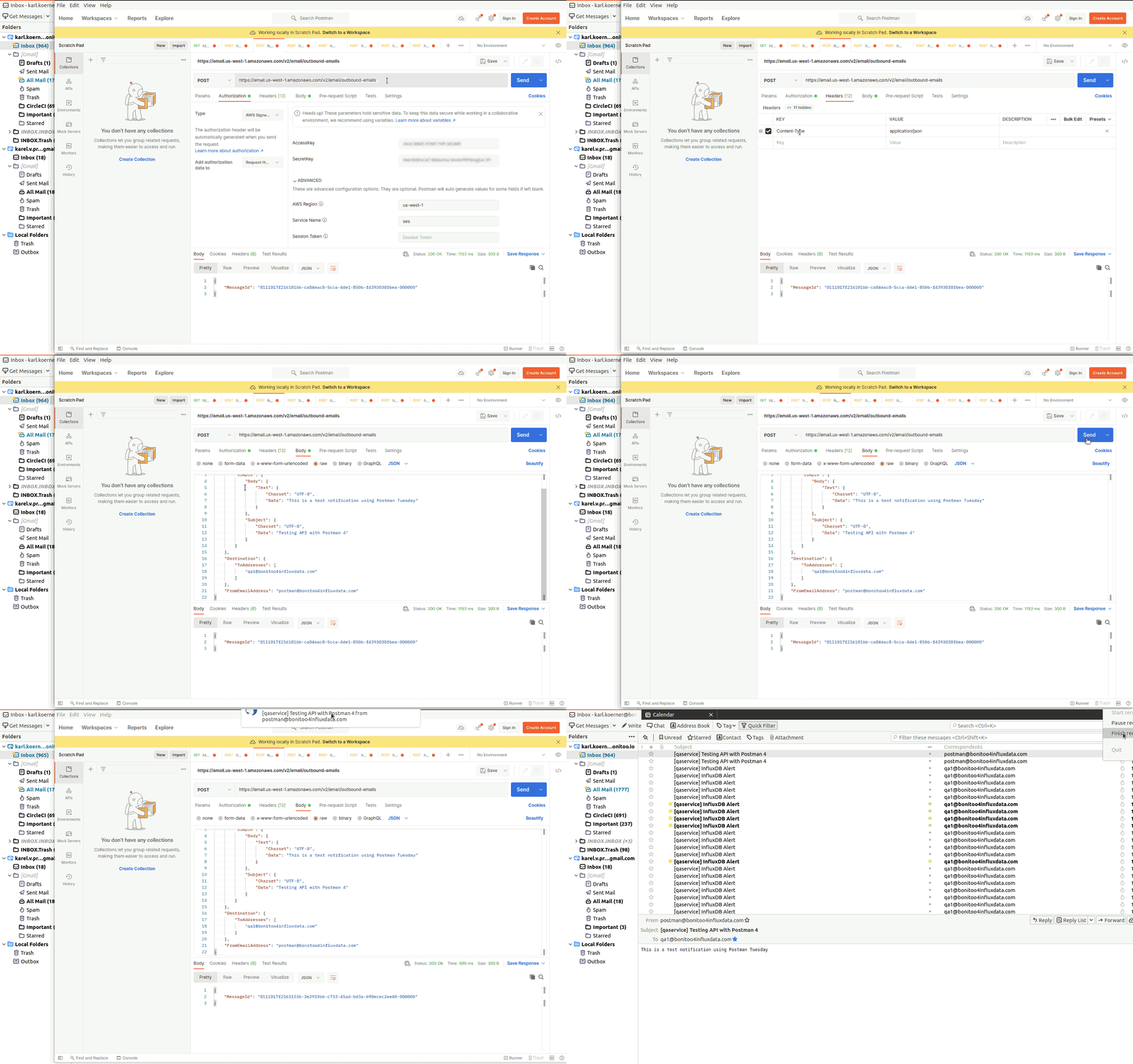
Inputs should be no more complicated than those used above.
Alternatives considered:
Started by trying to intuitively use the existing controls, but they soon did not make much sense. Studied the documentation at AWS SES and then managed to successfully send messages with Postman. See notes below.
Note that a successful implementation will require using a SHA256 hash in flux. This has been requested here:
Use case:
AWS SES is a widely used email service. Support was requested in an earlier enhancement request #2782, #2852.
Notes from investigating AWS SES integration
7.2.22
The UI
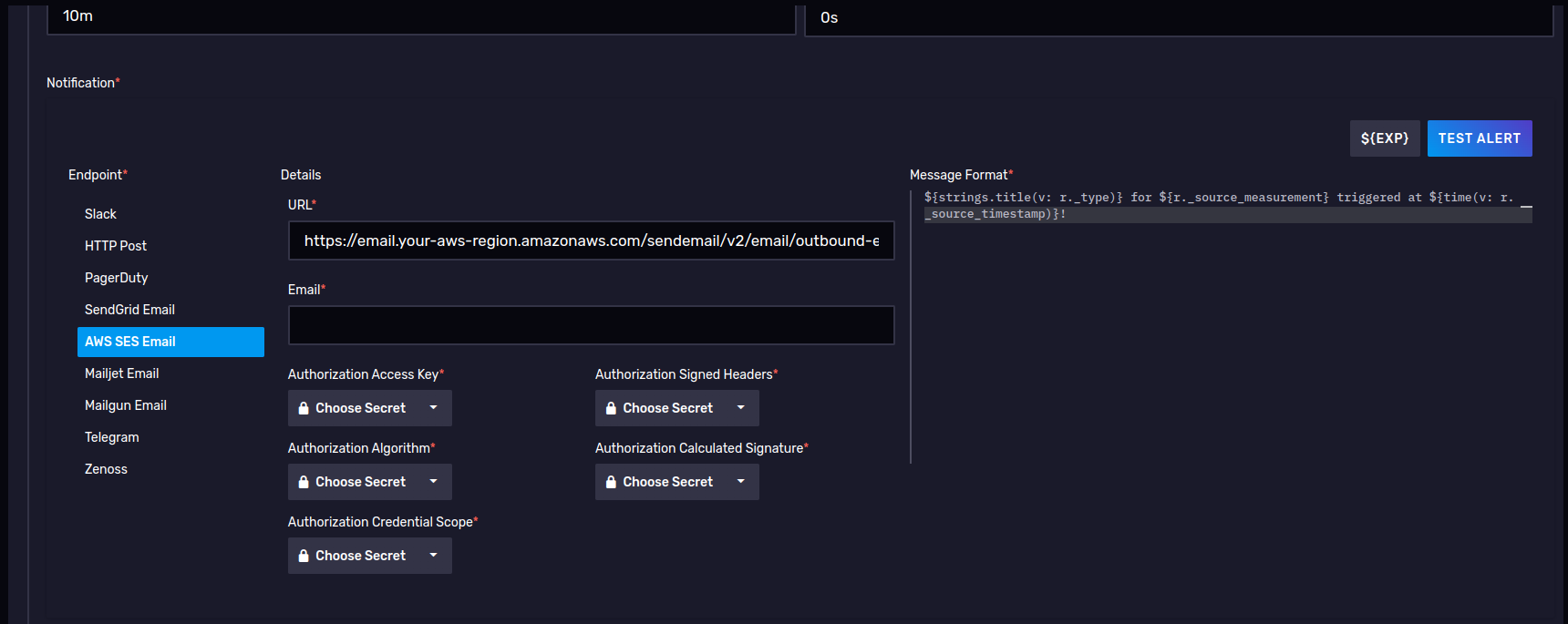
This configuration seems unnecessarily complicated and in some fields unclear.
- URL field is nearly constant, the only part of it which might vary is the aws-region. So why not just have an input for aws-region and then calculate the final URL parameter from it?
- Email - In what sense "Email"? An "Email" based on SMTP must contain at least a destination address, a from address, a subject and a body, however this simple text input does not provide space for these four parameters and it appears the body (message) is supplied by the Message Format text area to the right. I would expect to find the common SMTP parameters such as To, CC, BCC, etc.
- Authorization Access Key as a secret this makes sense.
- Authorization Algorithm. This makes little sense as a variable that needs to be input and even less sense as a secret. the algorithm according to the AWS documentation is at present constant (
AWS4-HMAC-SHA256). https://docs.aws.amazon.com/ses/latest/APIReference-V2/CommonParameters.html - Authorization Credential Scope. According to the AWS documentation https://docs.aws.amazon.com/ses/latest/APIReference-V2/CommonParameters.html this value can be calculated, so it makes little since to ask the user to supply it as a parameter, let alone as a secret. By the documentation it should appear as follows: access_key/YYYYMMDD/region/service/aws4_request.
- access_key - can be reused from the Authorization Access Key input.
- region - could be defined using an aws-region input (see point 1).
- service - would be a constant 'ses', since no other service would be used.
- date - can be retrieved from the system. This also raises the question: If this notebook is exported as a task, will the task fail to send notifications once the date value becomes stale, if it is defined by the user at the time of task creation?
- aws4_request - this is a constant value used to terminate the request string,
aws4_request. - When inspecting the flux generated by the TEST ALERT button (see below), it appears that the combined string appends the access_key value a second time. From the generated script
Credential=${accessKey}/${credScope}. By the AWS documentation access_key should already be part of the credScope value. - If the access_key and region are provided in other controls, then this value could be concatenated in javascript as follows:
${accessKey}/${(new Date()).toISOString().substring(0,10).replace(/-/g,"")}/${region}/ses/aws4_request. I would think that with a minimum amount of code this could be implemented in flux.
- Authorization Signed Headers - Again from the documentation (https://docs.aws.amazon.com/ses/latest/APIReference-V2/CommonParameters.html) this is better calculated at the time of sending. From testing the TEST ALERT button (see below) it appears that only one header in the generated flux script needed to be signed
"Content-type": "application/json". Firstly, how is the user supposed to know what headers the Influxdb task will use when making calls to SES, when the user is only defining the task? Shouldn't this be resolved on our side, programatically? Secondly, when successfully sending emails through SES using Postman, additional headers were needed:SignedHeaders=content-type;host;x-amz-content-sha256;x-amz-date. - Authorization Calculated Signature - Here again this value will be calculated from, for example the headers, and using a parameter not requested - the user's secret_key. So shouldn't secret_key be supplied as a secret, and then this value calculated using the SHA256 algorithm as part of the the generated flux code? The Mailjet configuration asks for just such a secret key. And if users are warry of supplying a secret key, they should be advised to create an influx_mail user in AWS IAM for handling their notifications, and limiting that user's permissions to programmatic access and only SES as required.
- Perhaps a hash library including SHA256 could be added to flux.
- From - It is suspiscious that there is no field for defining who the sender is. Firstly the
fromfield or sender identification is an essential part of the Internet Message Format standard (https://datatracker.ietf.org/doc/html/rfc5322#section-3.6.2). Secondly in order to send mail using AWS SES the sender's address or domain must be previously verified by Amazon.
Recommendation - limit parameters to the following: AWS_REGION, AUTH_KEY, SECRET_KEY, TO, FROM and calculate the rest. We also might give the users the chance to define the contents of SUBJECT
Generated Flux Script
The following is generated after clicking the TEST ALERT button and sent back to influxdb as a query. These attempts were done with dummy values in the parameters listed above. The intent was to simply investigate what is currently being generated.
import "strings"
import "regexp"
import "influxdata/influxdb/schema"
import "influxdata/influxdb/secrets"
import "experimental"
import "array"
import "http"
import "influxdata/influxdb/secrets"

authAlgo = secrets.get(key: "SHA256")
accessKey = secrets.get(key: "KK Auth Key")
credScope = secrets.get(key: "TestCredScope")
signedHeaders = secrets.get(key: "TestSignedHeaders")
calcSignature = secrets.get(key: "TestCalcSignature")

http.post(
    url: "https://email.us-west-1.amazonaws.com/sendemail/v2/email/outbound-emails",
    headers: {"Content-type": "application/json", "Authorization": "${authAlgo} Credential=${accessKey}/${credScope},SignedHeaders=${signedHeaders},Signature=${calcSignature}"},
    data: bytes(
    v: "{
        \"Content\": {
          \"Simple\": {
            \"Body\": {
              \"Text\": {
                \"Charset\": \"UTF-8\",
                \"Data\": \"This is a test notification\"
              }
            },
            \"Subject\": {
              \"Charset\": \"UTF-8\",
              \"Data\": \"InfluxDB Alert\"
            }
          }
        },
        \"Destination\": {
          \"ToAddresses\": [
            \"qa1@bonitoo4influxdata.com\"
          ]
        }
      }",
),
)

array.from(rows: [{value: 0}])
    |> yield(name: "ignore")
As mentioned in point 5.6 above the value for Credential in the Authorization header is suspicious, in that if the user followed the AWS documentation to create the credential value, the access_key would already be a part of it.
Who is it from? Where is the FromEmailAddress field? When investigating the AWS SES API with Postman (see below), I cleaned up the escapes in the data section of the http.post() call in the above generated script and with the results made an HTTP POST call in the Postman Scratch Pad. The request failed in the AWS SES API with the response header x-amzn-ErrorType: BadRequestException
Following AWS SES documentation (https://docs.aws.amazon.com/ses/latest/APIReference-V2/API_SendEmail.html) I added the property FromEmailAddress with a value based on our SES verified test identities, and the request in Postman succeeded.
Postman
Here's an example of setting up AWS Web API credentials in Postman.
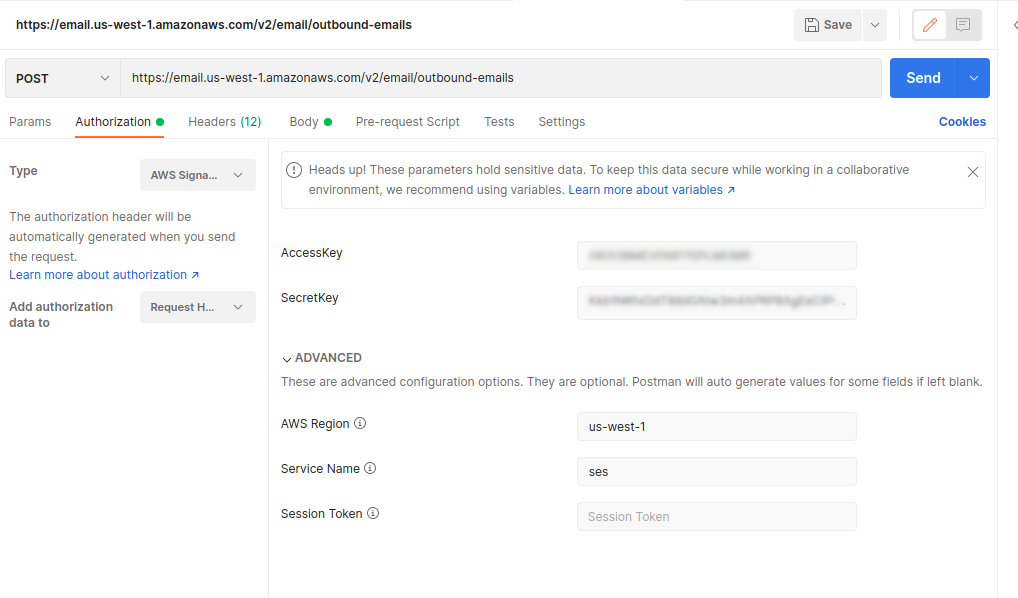
When implementing a client to AWS SES to only send emails to /v2/email/outbound-emailsonly the parameters AccessKey, SecretKey and AWSRegion would be required for successful authorization. All other values could either be calculated (url) or would be constant (ServiceName: 'ses').
Calls using this configuration and the following JSON as the request body, with the header content-type: application/json are being successfully sent.
{
    "Content": {
        "Simple": {
            "Body": {
                "Text": {
                    "Charset": "UTF-8",
                    "Data": "This is a test notification using Postman 3"
                }
            },
            "Subject": {
                "Charset": "UTF-8",
                "Data": "Testing API with Postman 3"
            }
        }
    },
    "Destination": {
        "ToAddresses": [
            "qa1@mydomainentity.com"
        ]
    },
    "FromEmailAddress": "postman@mydomainentity.com"
}
So in addition to the authorization parameters, the fields FromEmailAddress and Destination.ToAddresses would need to be added. Would probably also be nice to have Destination.CCAddresses and Destination.BCCAddresses. Perhaps even Content.Simple.Subject.Data.