JSMod further democratises the Minecraft modding world by bringing the superpowers of JavaScript to Minecraft. With JSMod lightweight mods can be written and created in modern ES6 JS and updated during play (hot reload).
The JS code is then executed using the state of the art JavaScript runtime V8. It's also worth noting that JSMod itself is a Forge mod, which means that it can be used alongside other mods.
JSMod only provides the link between Minecraft's Java codebase and your JavaScript code, but also includes optional JavaScript files which make coding modules and interacting with the Java side a lot easier.
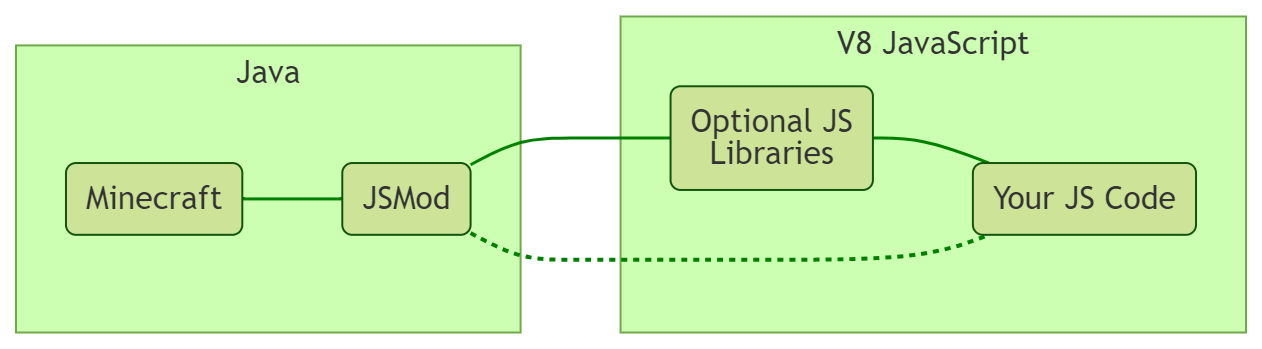
JSMod calls the event methods (such as onTick) and creates the basic namespaces required for communicating between Java and JS. The optional JS files aren't strictly necessary, but add more namespaces (e.g. Engine for modules) and constants (e.g. KEY_A for key codes, Chat.RED for chat colours and effects)
-
Make sure you have the correct Minecraft version and the corresponding forge version installed
-
Download the mod jar file (e.g
jsmod-1.11.2-0.0.1.jar) and the js files (e.g.js-0.0.1.zip) from the Releases page -
Install the mod by moving the downloaded jar file to the forge mods folder (On Windows
C:\Users\...\AppData\Roaming\.minecraft\mods) -
Set up your coding environment
-
Find (or create) a folder that you want to use to start coding your JS mods (e.g.
C:\Users\...\Documents\js) -
Unzip the JavaScript files zip and copy the contained files into the folder
-
Now you can start coding in the
srcsubdirectory
-
-
Launch Minecraft
-
In the main menu, click on
Mods, scroll down until you findJSMod, click on it and selectConfig. Change theRoot file pathfield to the file path of your coding environment for the JS mods (e.g.C:\Users...\Documents\js)
And you're ready to go!
Updating the code at runtime: JSMod supports a hot reload system which let's you make changes to your code and reload without having to restart Minecraft. This system even preserves the state of your modules between reloads.
To trigger a reload call the /hotreload command in Minecraft.