引入jwt,出处:
前后端分离微服务认证之JWT
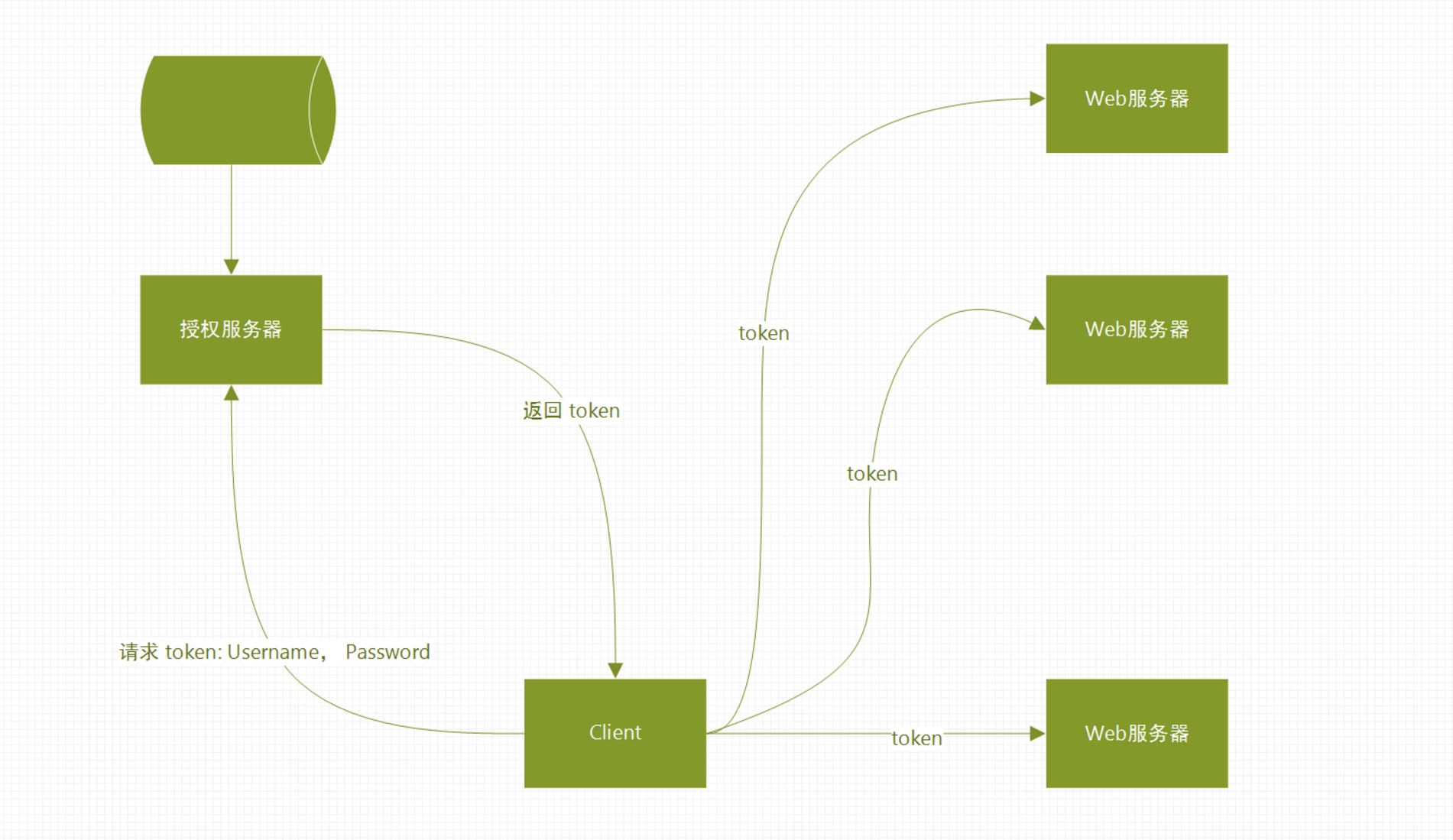
接口postman发布地址
https://documenteY.getpostman.com/view/7509577/S1LyTnJN
https://lively-satellite-1966.postman.co/collections/7509577-8b9f4444-9840-4381-828c-27bd9d21a0d8?workspace=d28b4872-7589-4b27-8a07-4c092352253c
reference link: http://www.ruanyifeng.com/blog/2018/07/json_web_token-tutorial.html
JWT 的几个特点
(1)JWT 默认是不加密,但也是可以加密的。生成原始 Token 以后,可以用密钥再加密一次。
(2)JWT 不加密的情况下,不能将秘密数据写入 JWT。
(3)JWT 不仅可以用于认证,也可以用于交换信息。有效使用 JWT,可以降低服务器查询数据库的次数。
(4)JWT 的最大缺点是,由于服务器不保存 session 状态,因此无法在使用过程中废止某个 token,或者更改 token 的权限。也就是说,一旦 JWT 签发了,在到期之前就会始终有效,除非服务器部署额外的逻辑。
(5)JWT 本身包含了认证信息,一旦泄露,任何人都可以获得该令牌的所有权限。为了减少盗用,JWT 的有效期应该设置得比较短。对于一些比较重要的权限,使用时应该再次对用户进行认证。
(6)为了减少盗用,JWT 不应该使用 HTTP 协议明码传输,要使用 HTTPS 协议传输。
other:
https://gitee.com/52itstyle/economic-daily-api
https://www.cnblogs.com/wangrudong003/p/10122706.html
https://www.jianshu.com/p/180a870a308a
https://blog.csdn.net/haoxin963/article/details/82860284
https://www.jianshu.com/p/24764aba1012?utm_source=oschina-app https://blog.csdn.net/carrie__yang/article/details/77836456 https://blog.csdn.net/chenjianandiyi/article/details/78604376
springboot https 后台配置与调用
https://blog.51cto.com/7308310/2333550
https://blog.csdn.net/shouldnotappearcalm/article/details/78047047
https://www.cnblogs.com/beibidewomen/p/9729686.html
https://blog.csdn.net/weixin_39568559/article/details/79609916
https://www.cnblogs.com/bodhitree/p/9469052.html
https://www.jianshu.com/p/2aa3d2dd83bd
https://segmentfault.com/a/1190000008632485
http://www.cnblogs.com/dreamroute/p/5173896.html
https://blog.csdn.net/qq_27474851/article/details/86660993
https://www.cnblogs.com/cl-rr/p/10397107.html
/generaCode
https://blog.csdn.net/forezp/article/details/70477821
https://segmentfault.com/a/1190000009732344
https://www.jianshu.com/p/3609c9a3f3be
https://www.cnblogs.com/java-zhao/p/5769018.html
https://blog.csdn.net/lucky373125/article/details/80471525
规范
https://github.com/OAI/OpenAPI-Specification/blob/master/versions/3.0.2.md
springboot 生成html接口文档
https://blog.csdn.net/qq_29534483/article/details/81227308
注解
https://blog.csdn.net/xxoo00xx00/article/details/77163399
https://www.jianshu.com/p/33c28a65deb8
http://editor.swagger.io/ https://inspector.swagger.io/builder
https://swagger.io/tools/open-source/
https://blog.51cto.com/wuxueqing/1972073
http://www.itdaan.com/blog/2018/04/10/ebb2ca2413729c655ab9c2959f4d2633.html
http://www.itdaan.com/blog/2018/04/03/954ba7e0f97a840ddd99efcc730b05c.html
swagger2markdown
https://github.com/Swagger2Markup/swagger2markup
https://blog.csdn.net/qq_34368762/article/details/79129303
http://os.opensns.cn/book/index/read/id/5.html
https://www.jianshu.com/p/fa3230ffb27c
https://blog.csdn.net/qq_33759042/article/details/80101941
https://www.jianshu.com/p/6e5ee9dd5a61
[swagger忽略某个header] https://www.oschina.net/question/262436_2301706
@ApiImplicitParam(name = "openid", value = "openid", required = true, dataType = "String",paramType="header")
https://www.wang1314.com/doc/topic-20733576-1.html
https://my.oschina.net/dlam/blog/808315
https://www.cnblogs.com/zhangdk/p/5907434.html
- monotoring: log, performance act on
https://www.licoy.cn/3238.html https://github.com/Licoy/encrypt-body-spring-boot-starter
https://github.com/zlt2000/microservices-platform https://gitee.com/owenwangwen/open-capacity-platform
待整合
-
@Valid 校验参数
http://www.cnblogs.com/winner-0715/p/10145594.html -
Springboot + AOP 实现参数统一非空校验 https://www.jianshu.com/p/c13a530d97f7
https://www.jianshu.com/p/583998f435d0 https://www.cnblogs.com/lr393993507/p/5234857.html github
MySql数据库开启binlog Mysql表 UPDATE_TIME字段 量级数据处理方案 https://blog.csdn.net/chivydrs/article/details/81670475 http://www.onexsoft.com/zh/oneproxy-mysql-parallel-query.html https://cloud.tencent.com/developer/article/1423703 https://cloud.tencent.com/developer/article/1060217 https://cloud.tencent.com/developer/information/mysql%20%E5%B9%B6%E8%A1%8C%E6%9F%A5%E8%AF%A2
https://github.com/zaiyunduan123/springboot-seckill https://github.com/search?q=springboot+redis https://blog.csdn.net/plei_yue/article/details/79362372 http://www.cnblogs.com/leeSmall/p/8728231.html
mysql >> ES https://elasticsearch.cn/article/756
https://segmentfault.com/q/1010000008179970?_ea=1578732
https://blog.csdn.net/u011163372/article/details/73995897
https://blog.csdn.net/AHAU10/article/details/52550430
java多线程压缩
https://blog.csdn.net/lyx2007825/article/details/7618151
https://blog.csdn.net/AHAU10/article/details/52550430
 ZipArchiveEntry archiveEntry = new ZipArchiveEntry(entryName);
archiveEntry.setMethod(ZipMethod.STORED.getCode());
注:开发环境,资源文件、压缩文件都在本机,性能得到很大提升。线上环境,资源文件是挂载网络位置,
接口还是很慢(考虑将merge文件生成到服务机器磁盘下,但资源文件数据庞大)。
之前接口代码如下:
@ApiOperation(value = "期刊原件下载")
@GetMapping(value = "/magazine/download/{magCode}/{pdDate}")
public ResponseObject downloadMagazines(@Valid MagazineParam param, HttpServletRequest request, HttpServletResponse response) throws Exception {
    long time_1 = System.currentTimeMillis();
    PageResult result = new PageResult();
    //String rootPath = "D:/z-files/magazine/imported/";
    String zipBasePath = this.extractPath(param.getMagCode(), param.getPdDate(), PlatformParamConfig.configsMap.get(PlatformParamConfig.MAGAZINE_ROOT),
            false);

    String path = zipBasePath;
    Map<String, List<String>> map = new HashMap<String, List<String>>();
    this.recursion(path, map);
    long time_2 = System.currentTimeMillis();
    logger.info("recursion take time: {}", time_2 - time_1);


    String fileName = "magazine-".concat(param.getMagCode().concat("-").concat(param.getPdDate()).concat(".zip"));
    response.setContentType("text/html; charset=UTF-8");
    response.setContentType("application/x-msdownload;");
    response.setHeader("Content-disposition", "attachment;filename=".concat(fileName));
    OutputStream out = response.getOutputStream();

    //String mergePath = zipBasePath += "merge/";
    try {
        String pdfZip = zipBasePath.concat("pdf.zip");
        this.queryFilesAndZip(map.get("pdfList"), pdfZip);
        String xmlZip = zipBasePath.concat("xmlZip.zip");
        this.queryFilesAndZip(map.get("xmlList"), xmlZip);
        String contentAttach = zipBasePath.concat("contentAttach.zip");
        this.queryFilesAndZip(map.get("contAttList"), contentAttach);
        long time_3 = System.currentTimeMillis();
        logger.info("queryFilesAndZip list take time: {}", time_3 - time_2);

        List<String> files = new ArrayList<String>();
        files.add(pdfZip);
        files.add(xmlZip);
        files.add(contentAttach);
        String compressFile = zipBasePath.concat("compress-files.zip");
        this.queryFilesAndZip(files, compressFile);
        long time_4 = System.currentTimeMillis();
        logger.info("queryFilesAndZip compress-files.zip take time: {}", time_4 - time_3);

        files = new ArrayList<String>();
        //files.add(mergePath);
        files.add(compressFile);
        this.writeOutputWithChannel(files, out, true);
        long time_5 = System.currentTimeMillis();
        logger.info("writeOutputWithChannel take time: {}", time_5 - time_4);
        logger.info("request total take time: {}", time_5 - time_1);
    } catch (IOException e) {
        e.printStackTrace();
    } finally {
        if (out != null) {
            try {
                out.close();
            } catch (IOException e) {
                e.printStackTrace();
            }
        }
    }
    return ResponseObject.newSuccessResponseObject(result, SystemConstant.REQ_SUCCESS);
}
https://www.cnblogs.com/sochishun/p/7000335.html
https + jwt (https可选)
https + auth2.0
@PathVariable (defaultValue)参数值被持久化了,地址变化了,参数值不变
@ApiOperation(value = "获取某一期报纸某一版面信息")
@GetMapping("/{paperCode}/{plDate}/{layout}")
public ResponseObject queryByCodeAndPlDateAndLayout(@PathVariable("paperCode") @RequestParam(name = "paperCode", required = true, defaultValue = "jjrb") String paperCode,
     @PathVariable("plDate") @RequestParam(name = "plDate", required = true, defaultValue = "2019-04-30") String plDate,
     @PathVariable("layout") @RequestParam(name = "layout", required = true, defaultValue = "10") Integer layout) throws Exception{


修改为
public ResponseObject queryByCodeAndPlDateAndLayout(@PathVariable("paperCode") String paperCode, @PathVariable("plDate") String plDate,
                                                    @PathVariable("layout") Integer layout) throws Exception{
refer:
@RequestParam @RequestBody @PathVariable的作用
show operator tracing
- 编码智能程度(符号匹配,修改报红线,修改未立即编译(全局编译 shift + alt + B 不凑效),重新启动服务后生效, 方法生成不够快捷且代码格式、方法名不优雅,以及文件创建、类名修改等),
- 控制台problems视窗,报出的错误、警告信息,与项目构建脱离,状态完全不一致。
- maven自动关联到M2_REPO(~/.m2/repository/)