A Flutter based native mobile application for the Google Solution Challenge.
| No. | Screen Name | Status |
|---|---|---|
| 1. | Register/Login | incomplete |
| 2. | Dashboard | incomplete |
| 3. | Profile | incomplete |
| 4. | Events | incomplete |
| 5. | Market Place | incomplete |
In this project, we will be building a Mobile Application using the flutter framework which uses the "Dart" programming language. Flutter is a framework developed by google in order to accomodate easy and quick mobile app front-end prototypes.
Front-end Development is the process of translating a user-interface design designed by UX/UI designers into a workable app. Not only that, front-end developers will also need to add the functionalities to the different components of mobile application, for example:
When you press the login button after entering your email and password, it should make an API call to the backendServer to verify if the information is valid and act accordingly
More information on API can be read on the following link: LINK
In fact, other than the design part of the front-end job, the other important job will be to interact with the backend server in terms of retrieving information, updating information and how to show those information into the design part of the layout.
A detailed documentation of the flutter framework can be found in the following link: LINK
To generalise how flutter works, flutter are made up of, Widgets , or in other words, you can imagine it is a super-human div from web development and followss the similar type of web development where you are just nesting each divs, however, the google framework itself have already provided a pre-made list of widgets built by them for quick-building and convenience.
In our file directory of the project,
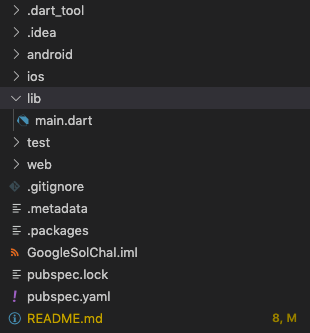
The lib folder is where all of our code will be stored for the app with main.dart being the default root of the app.
The root of a flutter project app looks something like this:
This is our main.dart file.
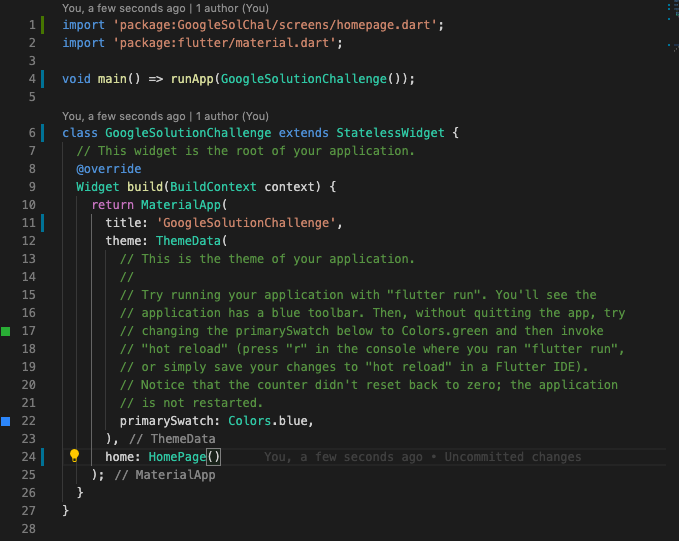
The Flutter framework follows very stricly a object-oriented programming style when writing code.
-
All of the text written in blue are pre-defined keywords that cannot be used for variable names or class names.
-
All of the text written in green are all starting with the first letter being capitalised which is used for definition of class name/type.
-
All of the text written in white are variables.
Follow the following link for short briefing of the link: LINK