The AI Agent Framework for Building, Deploying, and Orchestrating Intelligent Workflows
Create powerful AI agents • Design visual workflows • Extend with plugins • No code required










🌐 Website • ✨ Features • 📦 Installation • 🏃 Quick Start • 📚 API Docs • 🔌 Plugins • 💬 Discord
AGNT is local-first and designed for:
- ✅ Single users - Run on your personal computer
- ✅ Families - Share across household devices
- ✅ Small teams - 2-10 people in your organization
NOT designed for:
- ❌ Multi-tenant SaaS (isolating hundreds of unrelated users)
- ❌ Public hosting (each org should self-host their own instance)
- ❌ Large enterprises (50+ concurrent users)
AGNT uses SQLite and real-time sync that broadcasts to all connected clients. Perfect for trusted groups sharing a workspace, not for isolating thousands of separate organizations.
|
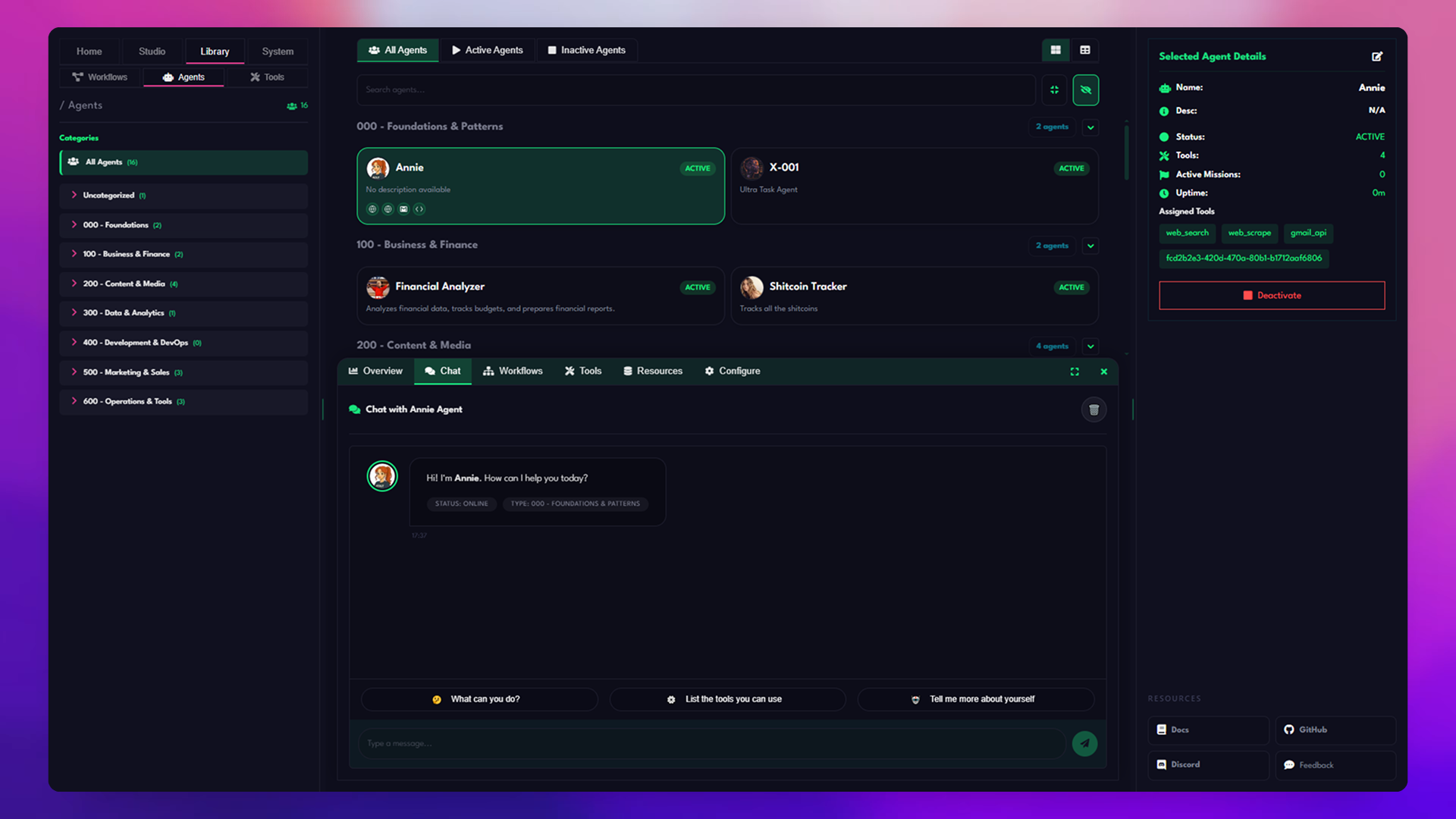
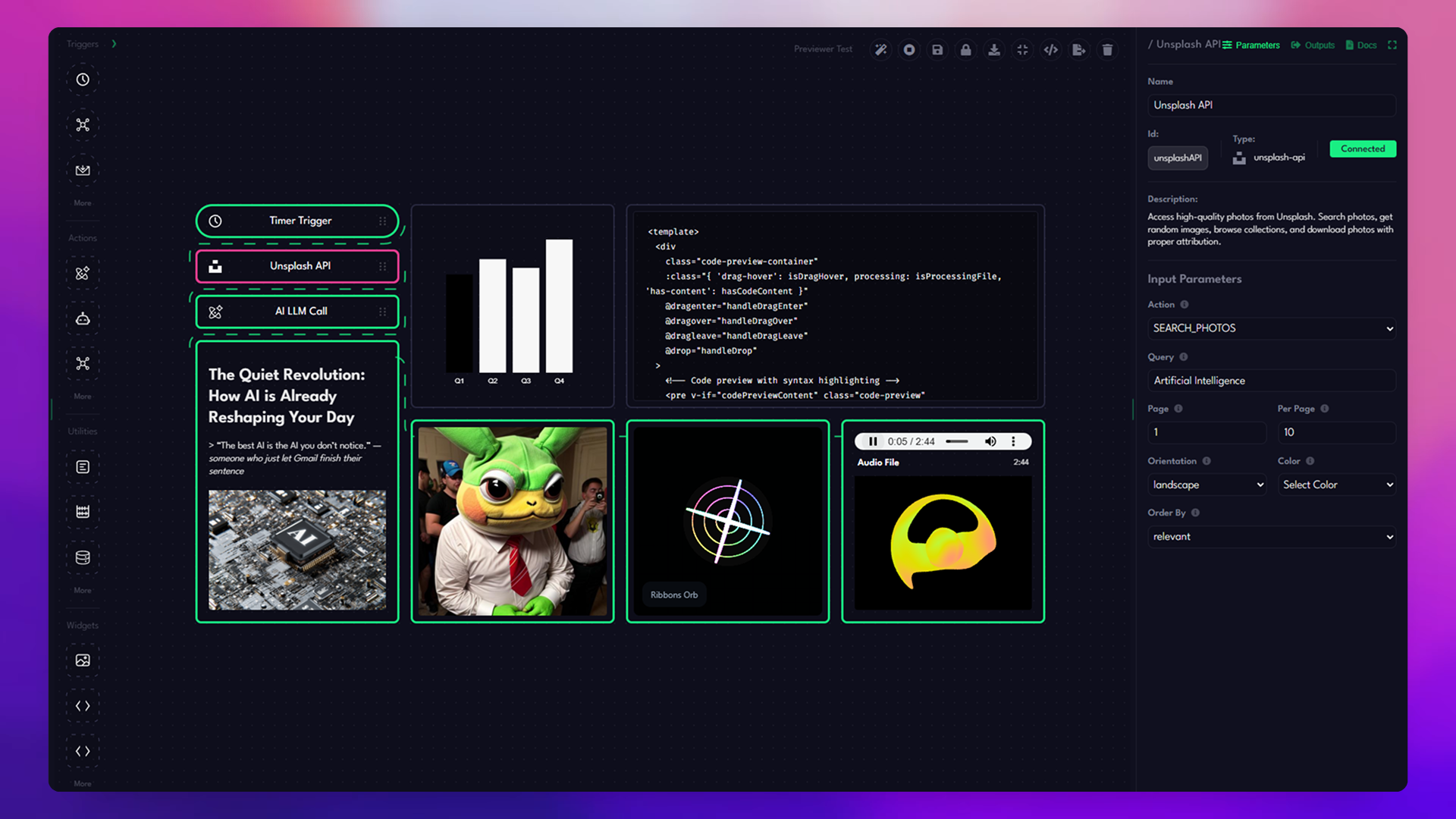
No complex setup. No coding required. Just install, connect your AI provider, and start building intelligent agents. 9+ AI providers, 50+ built-in tools, webhooks, and a plugin marketplace. If it has an API, AGNT can connect to it. Drag-and-drop workflow designer that makes complex automation accessible to everyone. |
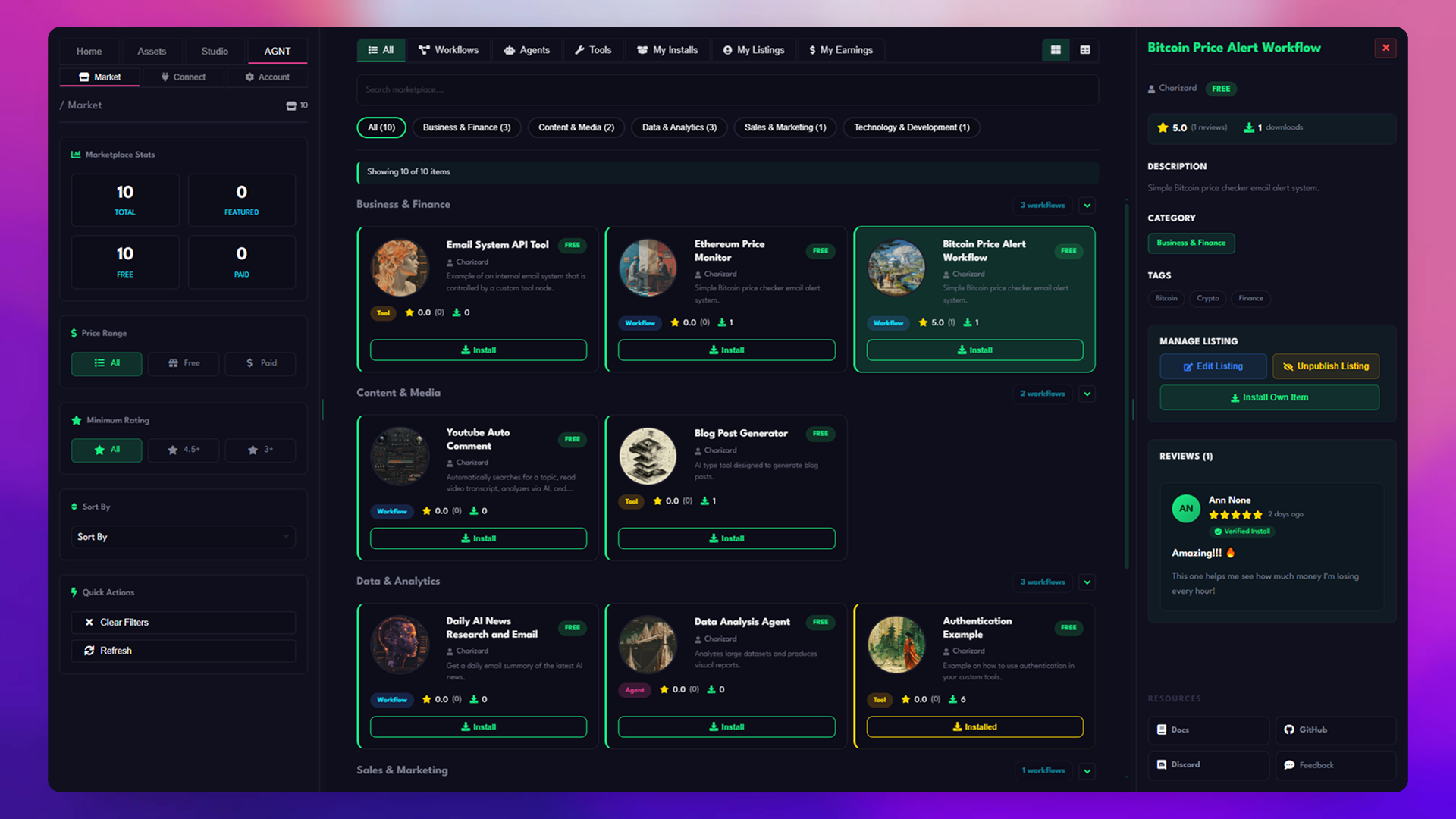
Build custom plugins with our VSCode-style distribution system. Share with the community or keep them private. Set objectives and let your agents work autonomously towards them with built-in progress tracking. Native desktop app with full system access. No browser limitations. Your data stays on your machine. |


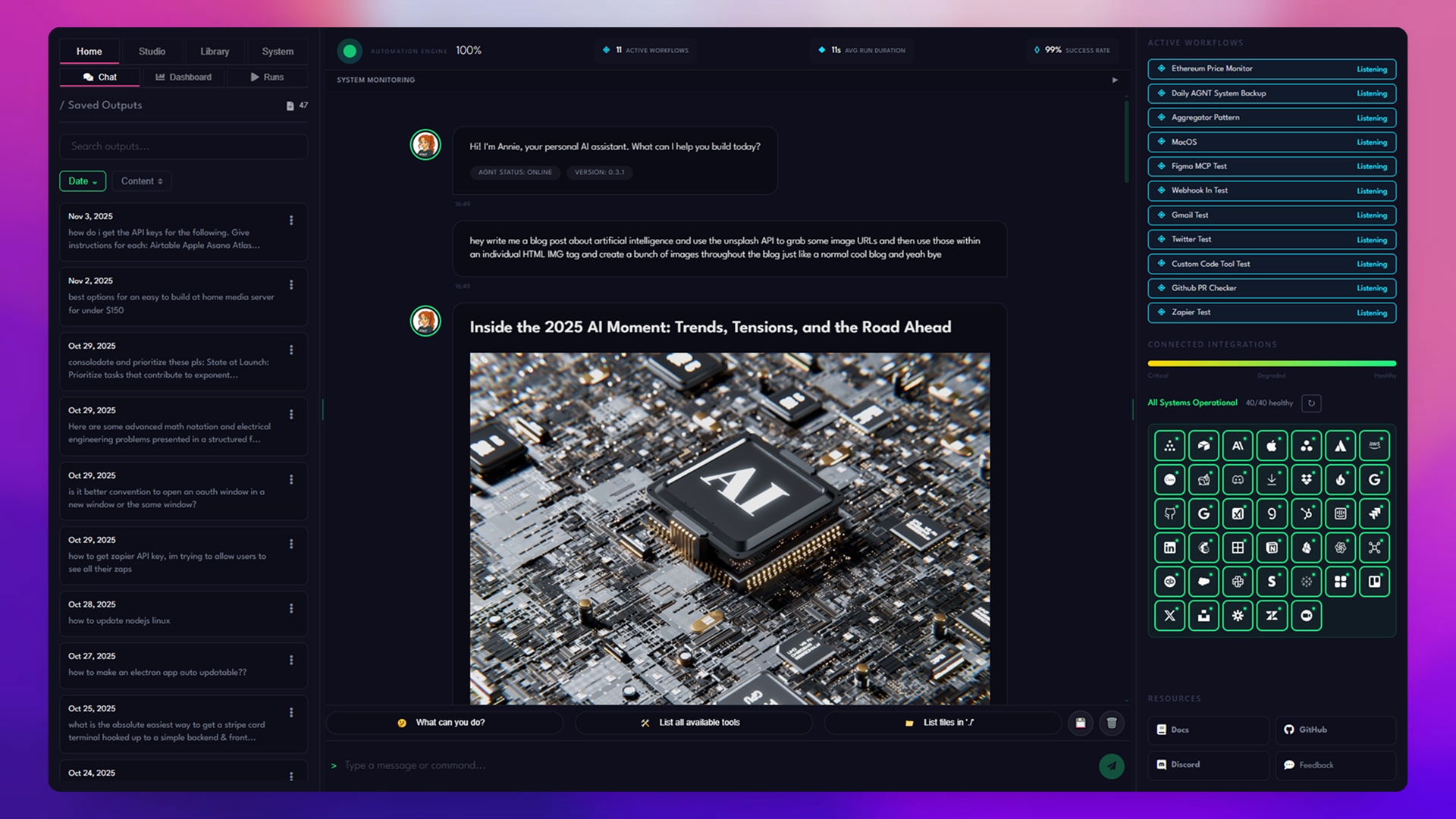
- Multi-Provider Support — Connect to OpenAI, Anthropic, Google Gemini, Groq, Cerebras, DeepSeek, and more
- Custom Agents — Create specialized agents with unique personalities, capabilities, and tool access
- Agent Forge — AI-powered agent generation from natural language descriptions
- Real-time Chat — Interactive conversations with streaming responses
- Memory & Context — Agents remember conversation history and learn from interactions
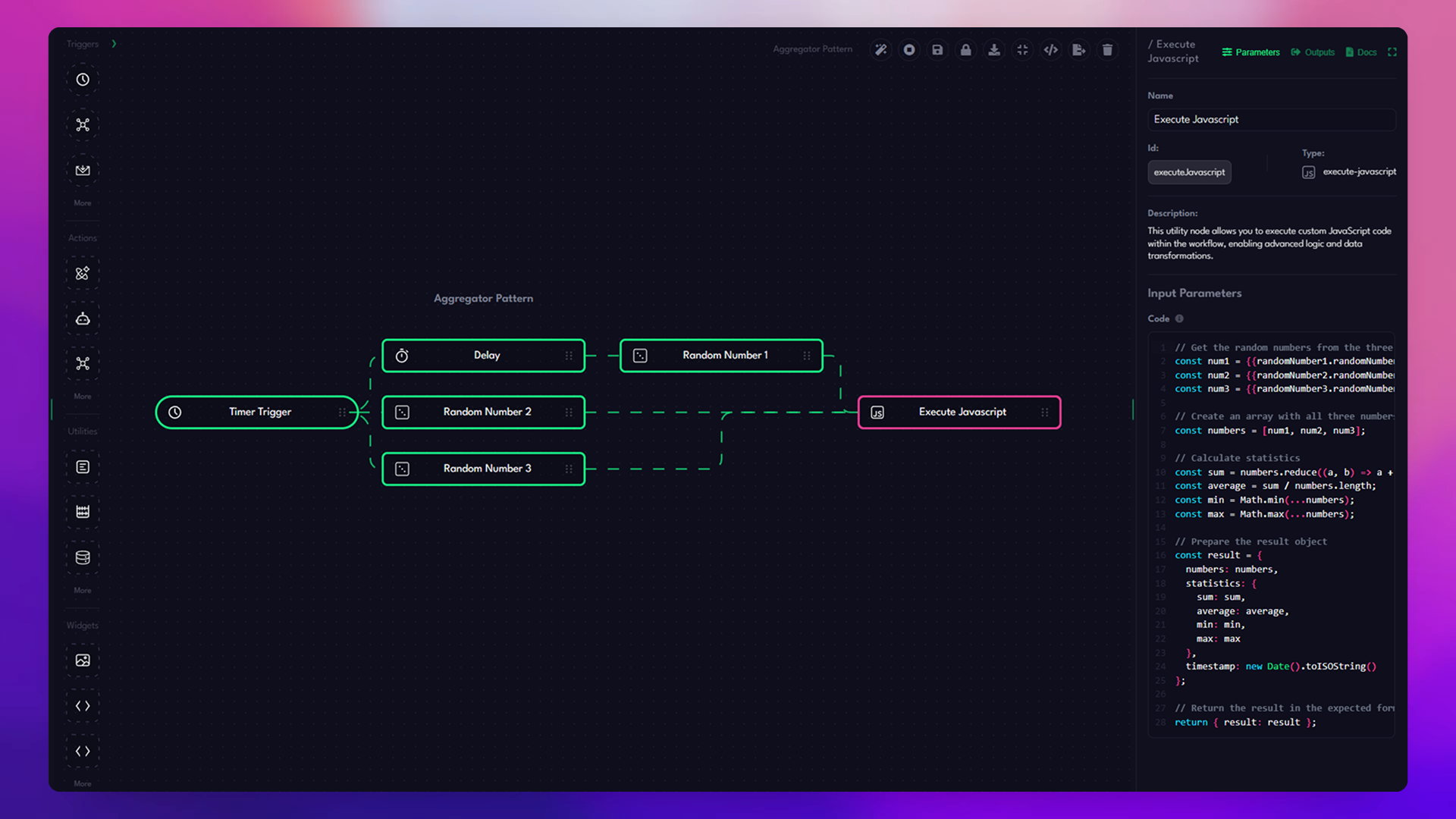
- Drag-and-Drop Interface — Build complex workflows visually without coding
- 50+ Built-in Tools — Triggers, actions, utilities, and widgets ready to use
- Conditional Logic — Branch workflows based on conditions and data
- Webhook Integration — Trigger workflows from external services
- Real-time Execution — Watch your workflows run with live status updates
┌─────────────────────────────────────────────────────────────┐
│  📦 Plugin Marketplace                                       │
├─────────────────────────────────────────────────────────────┤
│  🔷 Discord Bot        🔷 GitHub Actions    🔷 Slack         │
│  🔷 Gmail              🔷 Google Sheets     🔷 Notion        │
│  🔷 Twitter/X          🔷 Stripe            🔷 Zapier        │
│  🔷 YouTube            🔷 Dropbox           🔷 And more...   │
└─────────────────────────────────────────────────────────────┘
- VSCode/Figma-style Distribution — Install plugins as
.agntpackages - No Dependencies Required — Plugins come pre-bundled with all dependencies
- Hot Reload — Install and uninstall plugins without restarting
- Plugin Marketplace — Browse and install community plugins
- AI Plugin Generator — Describe what you need, AI builds the plugin
- Autonomous Goals — Set objectives and let agents work towards them
- Progress Tracking — Monitor goal completion and agent performance
- Golden Standards — Save successful executions as templates
- Evaluation Reports — AI-powered analysis of goal completion
- Tool Forge — Create custom tools with AI assistance
- MCP Server Support — Connect to Model Context Protocol servers
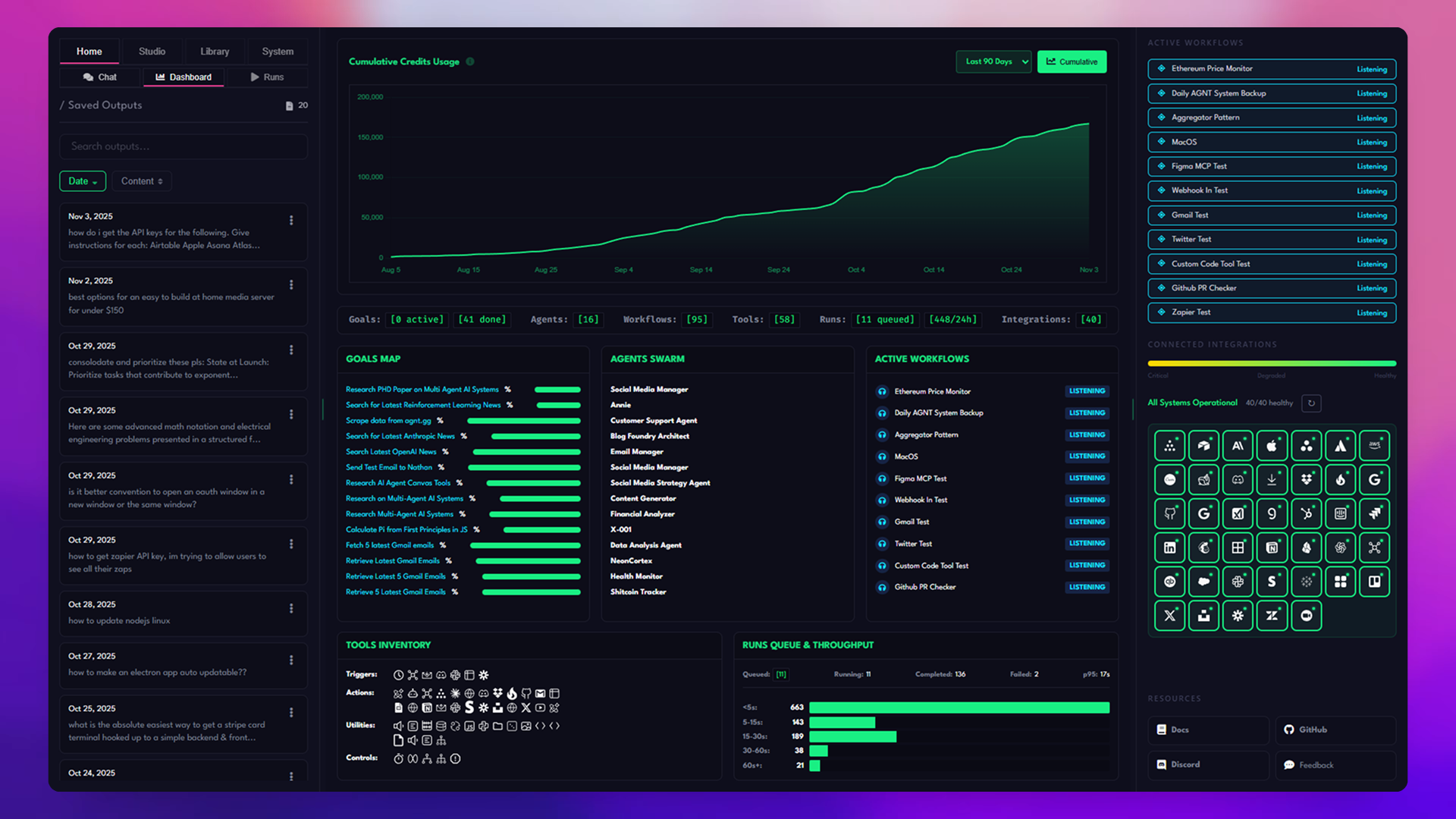
- Comprehensive API — Full REST API for programmatic control
- E2E Testing — Playwright-based test suite included
- WebSocket Streaming — Real-time updates and notifications



# Clone the repository
git clone https://github.com/agnt-gg/agnt.git
cd agnt/desktop

# Install dependencies
npm install

# Install frontend dependencies
cd frontend && npm install && cd ..

# Start the application
npm startUse Docker for an isolated, production-ready deployment.
# Full version with browser automation (~1.5GB) - Port 33333
docker run -d \
  --name agnt-full \
  -p 33333:33333 \
  -v agnt-data:/root/.agnt/data \
  ghcr.io/agnt-gg/agnt:latest

# Access at http://localhost:33333
# Lite version without browser automation (~715MB) - Port 3333
docker run -d \
--name agnt-lite \
-p 3333:3333 \
-v agnt-data:/root/.agnt/data \
ghcr.io/agnt-gg/agnt:lite
# Access at http://localhost:3333Available tags:
latest/full- Latest Full variant with browser automationlite- Latest Lite variant without browser automationv0.3.7/v0.3.7-full- Specific version (Full)v0.3.7-lite- Specific version (Lite)
# Clone the repository
git clone https://github.com/agnt-gg/agnt.git
cd agnt

# Option 1: Full version with browser automation (~1.5GB) - Port 33333
docker-compose up -d
# Access at http://localhost:33333

# Option 2: Lite version without browser automation (~715MB) - Port 3333
docker-compose -f docker-compose.lite.yml up -d
# Access at http://localhost:3333

# Option 3: Run both versions simultaneously
docker-compose -f docker-compose.both.yml up -d
# Full: http://localhost:33333
# Lite: http://localhost:3333

# Or use the Makefile
make run-bothBefore running Docker, set up your environment file:
# Copy the example environment file
cp .env.example .env
Optional variables for Docker:
# Docker data directory (where persistent data is stored)
# Usually not needed - defaults to $HOME/.agnt/ which works on most systems
# Only set this if using Docker snap on Linux or want a custom location
# AGNT_HOME=/home/youruser

# App path for plugins (required for Docker)
APP_PATH=/app
Data Directory Structure:
Your data is stored at ~/.agnt/:
- SQLite database:
~/.agnt/data/agnt.db - Plugins:
~/.agnt/data/plugins/ - Logs:
~/.agnt/logs/
Note for Docker snap users (Linux): If you installed Docker via snap, you must set
AGNT_HOMEwith an absolute path (e.g.,AGNT_HOME=/home/username docker-compose up -d) to avoid snap's home directory isolation issues.
Security secrets (change in production):
# Generate with: openssl rand -base64 32
JWT_SECRET=your-random-jwt-secret
SESSION_SECRET=your-random-session-secret
ENCRYPTION_KEY=your-random-encryption-key
See .env.example for all available configuration options including AI provider API keys, OAuth settings, and plugin configuration.
Docker variants available:
- 🔋 Full (~1.5GB): Includes Chromium for web scraping & browser automation (Port 33333)
- 🪶 Lite (~715MB): Smaller image without browser features, ~52% smaller (Port 3333)
- 🚀 Both: Run full and lite versions side-by-side for testing
Desktop installers available:
- 💻 Electron Full (~150-200MB): Portable desktop app with browser automation
- 📦 Electron Lite (~80-120MB): Lightweight desktop app, ~50% smaller
📖 See the Self-Hosting Guide for complete Docker setup, networking, and configuration.



🪟 Windows
Windows users may need to install build tools for native modules:
npm install --global windows-build-tools🍎 macOS
Ensure Xcode Command Line Tools are installed:
xcode-select --install🐧 GNU/Linux
Install required system dependencies:
# Ubuntu/Debian
sudo apt-get install build-essential libx11-dev libxkbfile-dev

# Fedora
sudo dnf install gcc-c++ make libX11-devel libxkbfile-devel
See GNU/Linux Build Instructions for detailed setup.
Run the frontend and backend separately for hot-reloading:
# Terminal 1: Start the frontend dev server
cd frontend
npm run dev

# Terminal 2: Start the Electron app
npm startBuild and run the production version:
# Build the frontend
cd frontend && npm run build && cd ..

# Start the app
npm startCreate distributable packages for your platform:
# Build for current platform
npm run build

# Build for specific platforms
npm run build:win      # Windows (NSIS installer)
npm run build:mac      # macOS (DMG + ZIP)
npm run build:linux    # GNU/Linux (AppImage, DEB, RPM)

# Build for all platforms
npm run build:allBuild AGNT Lite variants that exclude browser automation for ~50% smaller installers:
# Build Lite variant (~80-120MB vs ~150-200MB)
npm run build:lite
npm run build:lite:win      # Windows
npm run build:lite:mac      # macOS
npm run build:lite:linux    # GNU/Linux

# Build BOTH Full and Lite (recommended)
npm run build:both
npm run build:both:win
npm run build:both:mac
npm run build:both:linux
Lite Mode removes:
- ❌ Puppeteer/Playwright browser automation
- ❌ Web scraping tools
- ❌ Screenshot capture via browser
Everything else works:
- ✅ AI agents and workflows
- ✅ All API integrations
- ✅ Plugins, image processing, email automation
📖 See Electron Lite Mode Guide for details.
Build outputs are saved to the dist/ directory:
| Platform | Full | Lite | Size Reduction |
|---|---|---|---|
| Windows | AGNT-0.3.7-win-x64.exe (~150MB) | AGNT-Lite-0.3.7-win-x64.exe (~80MB) | ~47% |
| macOS | AGNT-0.3.7-mac-x64.dmg (~200MB) | AGNT-Lite-0.3.7-mac-x64.dmg (~120MB) | ~40% |
| GNU/Linux | AppImage (~180MB), DEB, RPM | AppImage (~100MB), DEB, RPM | ~44% |
AGNT features a powerful plugin system that allows you to extend functionality with custom tools.
# Navigate to the plugins development directory
cd backend/plugins/dev

# Create your plugin directory
mkdir my-awesome-plugin
cd my-awesome-plugin
Create a manifest.json:
{
  "name": "my-awesome-plugin",
  "version": "1.0.0",
  "description": "Does something awesome",
  "author": "Your Name",
  "tools": [
    {
      "type": "awesome-tool",
      "entryPoint": "./awesome-tool.js",
      "schema": {
        "title": "Awesome Tool",
        "category": "action",
        "description": "Performs awesome operations",
        "parameters": {
          "input": {
            "type": "string",
            "description": "Input value"
          }
        }
      }
    }
  ]
}
Create your tool implementation (awesome-tool.js):
class AwesomeTool {
  constructor() {
    this.name = 'awesome-tool';
  }

  async execute(params, inputData, workflowEngine) {
    // Your tool logic here
    return {
      success: true,
      result: `Processed: ${params.input}`,
      error: null,
    };
  }
}

export default new AwesomeTool();
Build and install:
cd backend/plugins
node build-plugin.js my-awesome-plugin
📚 See the full Plugin Development Guide for more details.
desktop/
├── 📄 main.js              # Electron main process
├── 📄 preload.js           # Preload scripts for IPC
├── 📄 package.json         # Project configuration
│
├── 📁 backend/             # Express.js backend server
│   ├── 📄 server.js        # Server entry point
│   ├── 📁 src/
│   │   ├── 📁 routes/      # API route handlers
│   │   ├── 📁 services/    # Business logic
│   │   ├── 📁 models/      # Data models
│   │   └── 📁 plugins/     # Plugin management
│   └── 📁 plugins/         # Plugin development & builds
│
├── 📁 frontend/            # Vue.js frontend application
│   ├── 📁 src/
│   │   ├── 📁 views/       # Page components
│   │   ├── 📁 components/  # Reusable components
│   │   ├── 📁 store/       # Vuex state management
│   │   └── 📁 services/    # API services
│   └── 📁 public/          # Static assets
│
├── 📁 build/               # Build resources & icons
├── 📁 docs/                # Documentation
└── 📁 tests/               # E2E test suites
Run the end-to-end test suite:
# Run all tests
npm run test:e2e

# Run specific test file
npx playwright test tests/e2e/agents.spec.js
See Testing Instructions for more details.
| Document | Description |
|---|---|
| 📚 API Documentation | Complete REST API reference |
| 🔨 Build Instructions | Detailed build guide |
| 🐧 GNU/Linux Build Guide | GNU/Linux-specific setup |
| 🐳 Self-Hosting Guide | Docker deployment & hosting |
| 🪶 Docker Lite Mode | Docker without browser automation |
| 🪶 Electron Lite Mode | Smaller desktop builds (~50% size) |
| 🔌 Plugin Development | Creating custom plugins |
| 🔧 Rebuild Guide | Native module rebuilding |
| 🚀 CI/CD Pipelines | GitHub Actions workflows |





| Provider | Models | Status |
|---|---|---|
| OpenAI | GPT-4, GPT-4 Turbo, GPT-3.5 | ✅ Supported |
| Anthropic | Claude 3.5, Claude 3 | ✅ Supported |
| Gemini Pro, Gemini Ultra | ✅ Supported | |
| Groq | Llama 3, Mixtral | ✅ Supported |
| Cerebras | Fast inference models | ✅ Supported |
| DeepSeek | DeepSeek Coder, Chat | ✅ Supported |
| OpenRouter | 100+ models | ✅ Supported |
| Together AI | Open source models | ✅ Supported |
| Custom | Any OpenAI-compatible API | ✅ Supported |


We welcome contributions! Here's how you can help:
- Fork the repository
- Create a feature branch (
git checkout -b feature/amazing-feature) - Commit your changes (
git commit -m 'Add amazing feature') - Push to the branch (
git push origin feature/amazing-feature) - Open a Pull Request
- Follow the existing code style
- Write tests for new features
- Update documentation as needed
- Keep commits atomic and well-described


This project is licensed under a Custom License. See LICENSE.md for details.




Built with ❤️ by Nathan Wilbanks



If you find AGNT useful, please consider giving it a ⭐ on GitHub!