- Creating github repo to push the markdown doc
- Amazon Web Services (AWS)
- Reduce toil(tedious or repetitive tasks) and ensuring that the underlying infrastucture is running smoothly. Maintaining systems and tools so that they are working as expected. On top of this they're responsible for monitoring critical applications and services to minimise downtime.
- Users are able to quickly and securely host their applications.
- You can use AWS Management Console or APIs to access AWS's application hosting platform.
- Able to select any of the different services you require.
- Receive a virtual environment used to load the software and services for your application.
- Easy to migrate
- If one region goes down the Auto Scaler can redirect to another Availability Zone (AZ)
- Can scale up and down on demand
- Pay for resources which are in use.
- Pay as you go format
- Amazon web services(AWS) is used for hosting cloud services. Big organisaitons and companies usch as Netflix and the Home office use aws to host their services. It provides servers,storage, networking, remote computign, emial , mobile development and security .
- The AWS Global Cloud is the most secure,extensive and reliable cloud platform that provides you the cloud infrastructure where and when you need it with a single-digit milisecond latency.
- Availability Zones are multiple, isolated locations within each Region.
- Each Amazon EC2 Region is designed to be isolated from the other Amazon EC2 Regions. This achieves the greatest possible fault tolerance and stability.
- Performance
- Security
- Reliability
- Functionality
- A content delivery network (CDN) refers to a geographically distributed group of servers which work together to provide fast delivery of Internet content. A CDN allows for the quick transfer of assets needed for loading Internet content including HTML pages, javascript files, stylesheets, images, and videos
- Hybrid cloud refers to a mix of on-prem storage, private cloud services and public cloud services such as AWS.
On-prem is more secure and reliable but reliant on physical maintenance Public cloud removes responsibility and pressure of maintenance, it is also easily scalable.
Requires permissions through roles, ports and keys
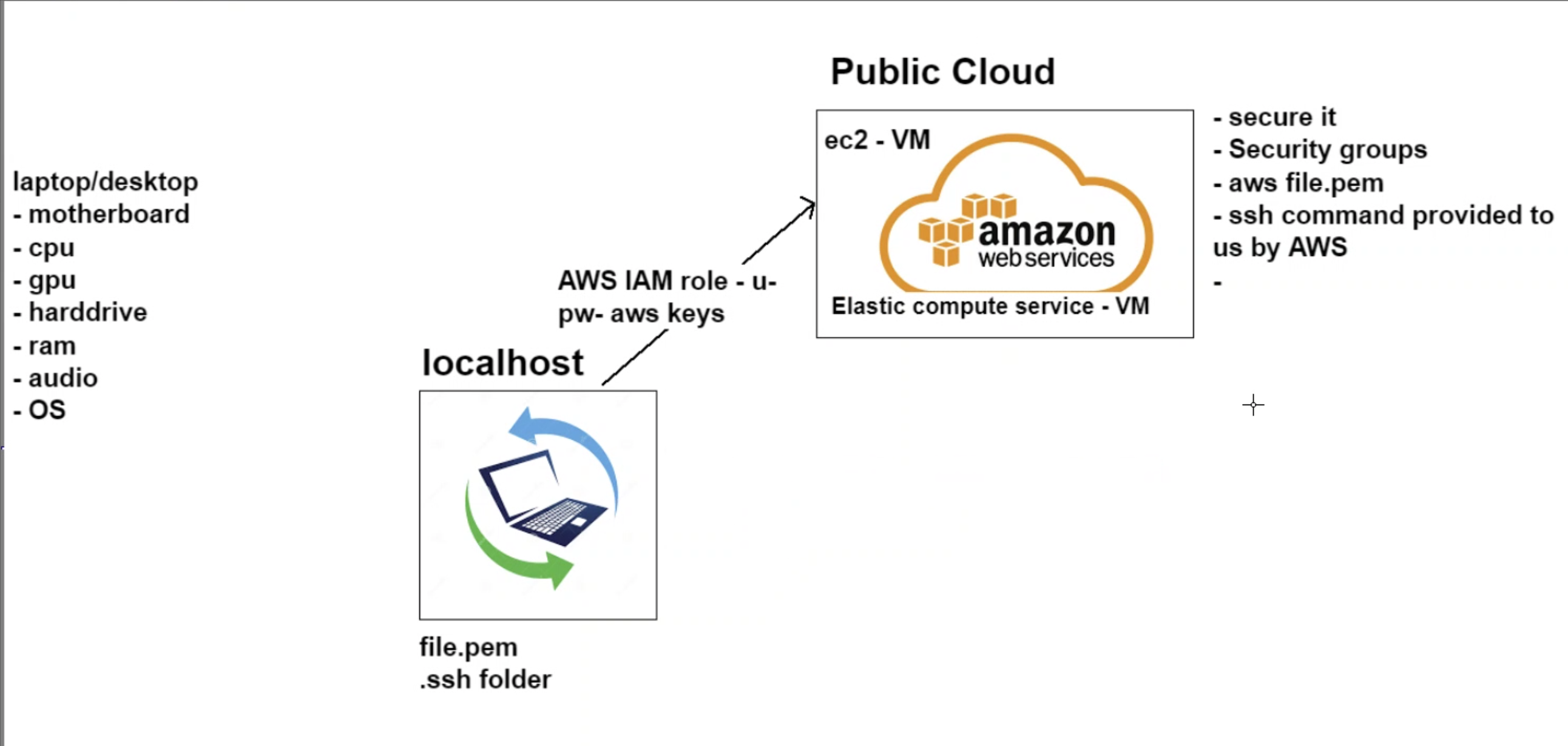
local machine, desktop pc, laptop Stores file.pem (in .ssh folder) to access public cloud
- AWS
- Needs to be secure -- Creates aws file.pem as SSH key -- Important, key is not shared with non-authorised parties
- We need to create a virtual machine on the cloud - ec2 (elastic compute service) -- Virtual machine similar to hardware - requires specific components! AWS Diagram image
- Creating of an EC2 Instance
- Login and access to AWS services
- Choose AMI (ubuntu 18.0.4)
- Choose EC2 Instance Types (default bc cheap lol)
- Configure Instance Details
- Subnet choose "default a"
- Add storage
- Tag instance (for me it's 105_sre_jack_{purpose})
- Configure security groups
- SSH on My Ip (port 22)
- HTTP on anywhere (port 80)
- HTTPS ONLY if you have ssl certificate -Review instances
- Select key name Launch :D
-
The link should look like this:
-
ssh -i /path/my-key-pair.pem my-instance-user-name@my-instance-public-dns-name
-
Once connected update all the required services via
sudo apt-get update -yandsudo apt-get upgrade -ycommands. Then install viasudo apt-get install {name} -y -
Example: after installing nginx with a sudo apt-get install nginx -y command your output from the website should look like this: picture
select ami image select launch instance
enable the subnet and the ip
slect the instance
If you have a dynamic ip address you cannot use ROOT instead use Ubuntu ssh -i "105.pem" ubuntu@ec2-34-247-195-55.eu-west-1.compute.amazonaws.com
###Linux commands
-
check the status of a service
systemctl status nginx -
How to start a service
sudo systemctl start nginx -
How to stop a service
sudo systemctl stop nginx -
How to enable a service
sudo systemctl stop name_service -
How to install a package
sudo apt install package_name -y -
How to remove a package
sudo apt remove package_name -y -
how to check all processes
top -
who am i
uname -a -
where am i
pwd -
create a dir
mkdir_name -
How to check
lsorls -a -
How to create a file
touch name_fileornano file_name -
How to check content of the file without going inside the file
cat file_name -
how to move a file mv /home/jack/testfile /home/jack/testfile2
or, if you’re already within /home/jack:
mv testfile testfile2
- how to delete folder sudo
rm -rf folder_name
- How to check a file permission
ll - Change file permission
chmod required_permission file_name
using sudo su is the root user
it is not best practice
- code block
## Provision.sh script:
#!/bin/bash

# run update
sudo apt-get update -y

# run upgrades
sudo apt-get upgrade -y

# install nginx
sudo apt-get install nginx -y

# ensure it's running - start nginx
sudo systemctl start nginx

# enable nginx
sudo systemctl enable nginx- change the file to exe
chmod +x provision.sh - How to tun an exe file
./provision.sh
Apache Tomcat (called "Tomcat" for short) is a free and open-source implementation of the Jakarta Servlet, Jakarta Expression Language, and WebSocket technologies. Tomcat provides a "pure Java" HTTP web server environment in which Java code can run.
- Tomcat runs on port 8080 so enable inbound for this port
- Tomcat may interfere with other web container services so be wary which services you want to run on which ports
#get updates sudo apt-get update -y #get upgrades sudo apt-get upgrade -y #install tomcat9 sudo apt-get install tomcat9 -y #start tomcat9 sudo systemctl start tomcat9 #enable tomcat9 sudo systemctl enable tomcat9 #check if running - optional, remember to ctrl+c to exit sudo systemctl status tomcat9
- Virtual Private Coud Simplified Definition: -A private sub-section of AWS that you control, in which you can place AWS resources (such as EC2 instances and databases). You have FULL control over who has access to the AWS resources that you place inside your VPC.
- A virtual network dedicated to your account on the Service
- Private instance that is Secure and Isolated within a Public cloud
- Store Data
- Run Code -Host Websites
- A Horizontally scaled, redundant and highly available VPC component -Allows Communicatins between your VPC and the Internet
- Enables the resources like EC2 Instances to connect to the internet if they have a public IPV4 or 6 Address
- Provide a target in your VPC Route tables for traffic routing -Perform Network Address Trans lation for instances with Public IPV4 Addresses
- A set of rules cal led rooutes that determine where network traffic from your subnet or Gateway is directed
- local route for communication within the VPC
- A range of IP Addresses in your VPC
- Dividing the Network into two or more networks
- Public and Private Subnets exist
- Network Access Control List
- Optional Security Layer
- Acts as Firewall for controlling traffic in and out of one more subnets
- A Virtual Firewall that controls Traffic
- Decides what traffic leaves and reaches the resources it is associated with
- Such as Our EC2 Instance where our security group we needed to add 8080 to the Ports in order to access TomCar
- By using Security Groups and allowing only ports we know that are Safen and Frequently Used Such as acessing TomCat a safe port we allow only 8080 to leave and reach the instance
- Doing this, we restrict whether traffic can enter or leave the instace thereby securing
- Default is Al inbound traffic from resources that are assigned to the same security Group
- Allows all outbound IpV4 Traffic
- Allows all Outbound IPV6 Traffic if VPC has an associated IPv6 Block
kill
kill -9 <processID>
used to manage micro services A monolithic architecture is the traditional unified model for the design of a software program. Monolithic, in this context, means composed all in one piece. According to the Cambridge dictionary, the adjective monolithic also means both too large and unable to be changed.
- self contained
- It’s the process of end to end product development.
- Products need to follow a certain life cycle. The Stages are:
- Planning Just an idea, only in someone’s head
- Designing Writing out how the product will look and what it needs.
- Development Develop an environment that works for all of us. i.e the linux instance we created Implementing the design. • Testing Nothing goes to production without testing. The test must pass in order to go to the next stage. Beta versions can happen after testing to get feedback from the user. • Staging It’s the holding area before the code gets deployed. The program is packaged and ready, just on hold till the release date. After staging the code is deployed.
Github
- One person reviewing is always the best.
- Someone who is more knowledgeable should merge.
- Git enter will tell you all the commands that can be performed on git
- If you delete the .git file you need to reconnect to the github remote before pushing the code back to github.
update sudo apt install python3 sudo apt install python3-pip
check version python --version
it should show 2.7.17
set python alias
alias python=python3
run the cammand aggain python --version
the output should be 3.6.9
update sudo apt updateand upgrade sudo apt update again
install awscli python3 -m pip install awscli
run the command aws configure
run sudo apt install awscli
run the command aws configure again
input the keys:
- Access key
- Secret key
set default region
eu-west-1and the output:json
to check everything is working run aws s3 ls
aws s3 mb s3://105-sre-name (how to make a bucket)
make a txt file
touch test.txt
run the command to copy the file to the s3 bucket
aws s3 cp test.txt s3://105-sre-jack
remove the file from te ec2 rm test.txt
download the file from the s3 bucket aws s3 cp s3://105-sre-jack/test.txt test.txt
remove the file from the bucket aws s3 rm s3://105-sre-jack/test.txt
delete the s3 bucket aws s3 rb s3://105-sre-jack/