Conversation


Create a new class to gather the widgets of the progress bar meter (two progress
bars: the same old one, and one more for the clipping indication).

The fancy skin LED display could also be grouped in a similar class.
CMultiColorLEDBar would then just become an interface to either that class or
the one created in this commit.

src/multicolorledbar.cpp
Outdated
| } | ||
| else | ||
| { | ||
| vecpLEDs[iLEDIdx]->setColor ( cLED::RL_DISABLED ); |
There was a problem hiding this comment.
Is this case used for anything?

There was a problem hiding this comment.
This is not used by the Jamulus software. When I wrote that class, I wanted to have something more general. But these things could be removed/cleaned up.
There was a problem hiding this comment.
I'll take the opportunity of further development to clean it out then. If I remember.

|
Thank you for your code. I will checkout your repo this weekend and try it out. Without having it compiled and tested, I have a comment regarding your specification. You write:
My preference would be somewhat different. To avoid having the need of user interaction, I would prefer that the clipping indicator would vanish itself controlled by some timer. So if a signal is overloaded, the clipping LED stays on for, e.g., 10 or 20 seconds and clears automatically. |

|
Personally I like both approaches. I suggest making the clipping LED disappear automatically after some time and also give the possibility to click to reset the cLED. In the middle of a jam it's good to have it disappear automatically, but while making adjustments, it's good for the other person to be able to reset the cLED instead of having to wait for it to reset automatically. |

|
I'll have a go at a time-out, I've heard they're not hard to do in Qt. That will also solve the audio mixer clip indications, most of which I suppose would stay on for most of a session. "user resets clip on input -> reset on all clients' mixer" becomes less critical. |
This makes it easier to call functions to the right widget from the public
interface's member functions, depending on skin.
Different time-out times for input level and for mixer levels.
|
PR updated. I had to rework (and rename) the structure of the meter classes, since there was more to be implemented there, and and a bunch in common. I hope it makes sense, the bar and LED versions are now more on par, instead of LED "owning" Bar. Two time-out values: 60 seconds for the input (since it requires action), 10 seconds in audio mixer. Still clickable. |
I find that way too long. Why should the local LED have a different time out. I would like to have the same time-outs for all clip LEDs. Maybe use 20 seconds for both? An issue I observed: If the dialog is pretty high, it looks like this: I actually do not like that we have a larger distance between the clip LED and the normal LED: |


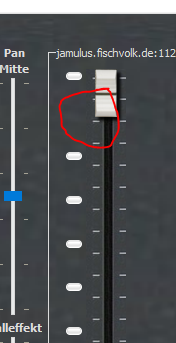
|
Thanks for the feedback! Time-outThe 60 seconds delay on Input is to make sure the musician doesn't miss it. It's only disturbing this musician, but it's kind of the point. Either it's on for very long and they don't notice it (no harm done), or it makes them notice and they can fix it right away and click it off directly. I don't look at the interface while playing, for example while reading sheet music. In these cases it's valuable to have a longer time-out so I have a chance to notice it between tunes. On the other hand, other players in the jam don't want to have all mix input red, which I suppose could tend to happen. They don't have the possibility to take measure either (other than telling about it later), so there's no point in disturbing them more than necessary. Odds are they're not all playing at the same time as the clipping musician, so they'll probably notice first. Therefore the shorter time-out. So in short: the clipping musician can and should react to the clip as soon as they see it. The other musicians can't. Does this explanation make sense? Do you still want same time-out for both? LED disappears in shortest window heightGood spotting, will fix! Distance between meter LED and clip LEDThis was inspired by Audacity (where it's click to reset): Logic shows peak value in red a good bit above the level meter, Premiere keeps them visually separated, so does Pro Tools. I guess I didn't want them to get mixed with the rest of the LED, so that it wouldn't look like it just got stuck somehow. Do you know of an alternative to reduce the gap, while indicating that it's not just part of the regular level meter? I'm not sure I would have clicked on it if it didn't look somewhat different. |

Well, it's Jamulus and not Audacity. If you use Audacity you usually want to record something and clipping is a pretty bad thing. Jamulus is a real-time jamming tool. This is somewhat different. A slight overload usually does not hurt the session.
I actually don't see an issue with getting mixed. If the upper most LED stays on with red color, I think 95 % of the Jamulus users will know what it means. BTW: If you are in "fancy skin" and make the main window as small as possible, you will not have a larger distance to the other LEDs even with your current implementation. |
|
You have a point about not being Audacity, and the clipping detection level. And about my opinion of this not being a gimmick :D In hindsight, I really should have discussed this here before implementing it. Would that be the preferred way? Next time, I promise! And I should have mentioned the use case. I think it can be phrased as a scrum user story: "As a musician, I want to be made aware of my input clipping, so that I can reduce my gain accordingly." I was in that big band rehearsal that was mentioned in an issue by @enorson. People were busy sight-reading, and could not watch their input levels while playing. Some were clipping, but didn't notice, not visually (because they couldn't watch), and hardly hearing it either (up to 20 musicians in the mix). To be honest: I was clipping (or close to according to the mixer's VU), but had to be told by other musicians. I saw a comment by @gilgongo in another issue here, where he mentioned it would be nice to have a "clipping" alert, so I decided to give it a go. |
Yes definitely. First discuss the specification and then start coding. This saves us all some time.
Ok, agreed. Using instruments like a trumped it will not be possible to hear just the signal which comes back from the server but you will hear mostly the direct signal from your instrument. In that case a clipping LED is useful. But again, let's do it in a way that solves the purpose but still looks nice. If the LED stays on for 60 seconds, it does not look good. Let's come back to the usecase: You play your song and after the song you look at the Jamulus dialog to find out if you have clipped. This will not take longer than some seconds. Of course you could argument that you play your trumpet only in the middle of the song but there are certainly songs where you play it until the end of the song. And if your level is set correctly, usually you do not have to modify it all the time. So I really would like to have the time out as short as possible. Let's do it this way: Use 20 seconds for the input meter and 10 seconds for the mixer panel. I'll then integrate it and make a new Jamulus version and we wait for the user feedback. Adjusting the time-out values is trivial and can be done at any later time easily if you or other users are really unhappy with it. Can you agree on that?
Maybe use a different type of LED. Maybe this one (of course, a rotated version must be created): |
|
For your info: I have just created a feature branch containing code for a pan feature for each mixer control. I will work in this the next few days and will then merge it to master. So I guess it then will be necessary to rebase your code. Just to let you know. |
|
Ok, let's do it that way. But again, on the input it will not look bad until the user looks at it. The tree in the forest, does it make a sound, and all that. I'll try to come up with ideas / mocks. The png you showed could work, either rotated, or as is on the side of the higher level LED. Another possibility would be to keep the same shape as in my branch, but a version that bleeds more when on. It would keep some kind of consistency when off. |
This was just my first impression when I tried out your code. Please keep in mind that with the way you detect clipping you will show the LED maybe too early. So as a result some people who had perfectly set they level will tend to lower the volume now. Example: I use a TD-20 drum set with SP-DIV input. The level will never overload but the TD-20 will use the full dynamic. Therefore I expect the clipping LED go on with my setup quite often.
The width of the faders is critical and should be kept as small as possible. So I would not put it on the side actually. |
|
What is the status of this pull request? Are you still working on it? |
|
I plan to, but I've had a bit much on my plate lately. I should have some progress by next week. |
|
No hurry, I was just asking. Take your time :-). |
|
Just for your info: I do not have access to my laptop the next four days. So if you update the pull request, I will only be able to test/merge it at the upcoming weekend. |
|
Any updates? |


|
The pull request is very old, it did not make sense to spend time on fixing the merge conflicts. I have now implemented the clip LED feature on the Git master based on the changes in your pull request: https://github.com/corrados/jamulus/blob/master/ChangeLog#L14 Thanks again for your code. I'll close this pull request now. |
|
@corrados Thanks for doing this. I understand that not all the functionality made it through, which is understandable. I'll create new issues to discuss these. |
3 participants


This PR adds a clipping signal indication above the level meters, in form of a LED or a red rectangle depending on skin.
The user may reset the indication by clicking anywhere on the meter/clipping LED.
Stereo meters reset both indications on clicking on any of the two meters.
Not implemented, would be nice to have: