Buffer Delay WhatisThis text update #2232
Conversation


src/clientsettingsdlg.cpp
Outdated
| @@ -186,7 +186,7 @@ CClientSettingsDlg::CClientSettingsDlg ( CClient* pNCliP, CClientSettings* pNSet | |||
| "<br>" + tr ( "Three buffer sizes are supported" ) + | |||

There was a problem hiding this comment.
... the change itself here is okay -- but the whole strSndCrdBufDelay text could probably do with rewriting...
There was a problem hiding this comment.
Apart from the 128 Samples text, it is now in-line with the web-site. The 128 Samples on the web-site includes the preferred text (which is matching with the text shown in the GUI).
There was a problem hiding this comment.
First up, the extra use of QString() could be done away with in several places as I think tr() will happily take .arg() directly.
Then there's the fact checks...
Three buffer sizes are supported
Hm. If the sound card doesn't allow the app to set the buffer size, the app happily copes with the sound card buffer size. So this isn't entirely true. One could go as far as saying "Wrong!". Indeed, it finishes by saying "(Jamulus) will still work with this setting". (Arguable it's explained that "supported" means "one of these three" and "unsupported" means "not one of these three".)
256 samples: Should only be used on very slow computers or with a slow internet connection.
Not really sure the sound card buffer size is going to help with a slow network connection, I'm afraid... It'll still either be fast enough or not fast enough. There are other settings that do affect network bandwidth but this doesn't... so scores another "Wrong!".
There was a problem hiding this comment.
Lines 214 to 218 also look spurious...
There was a problem hiding this comment.
My approximate understanding of the processing is...
If Jamulus is using 64 sample network buffers, it can read a 64 samples from the audio buffer each time they're ready, i.e. once per audio buffer input - reads once and sends a 64 sample audio buffer, reads twice for a 128 sample buffer, four times for a 256 sample buffer, and so on - and then sends them after each read.
If Jamulus is using 128 sample network buffers, it can read 128 samples from the audio buffer each time they're ready, i.e. once per audio buffer input - it needs to read two 64 audio sample buffers before sending, or reads once for a 128 sample buffer, or can read and send twice for 256 sample buffer, and so on.
Input and Output buffer sizes have to match for Audio and Network. Audio and Network buffers do not have to match. Network buffer size has to be 64 ("small") or 128 (not "small"). Audio buffer size isn't constrained.
Latency in this sytem comes from a combination of factors:
- The size of the Audio buffer: this should be as low as possible, obviously, but having a value lower than the size of the network buffer introduces negligible improvement and introduces CPU overhead and I/O.
- The size of the Network buffer: this is more significant as it affects the delay introduced by jitter buffering
- Jitter buffering: this is even more significant as it magnifies the network buffer delay
- Ping: this adds to the other factors but is outside Jamulus's control
The unit of "delay" here is the time span represented by a sample at 48KHz (or, rather 64 or 128 samples, or whatever).
Note that actual jitter is also outside Jamulus's control - the jitter buffers are there to alleviate the effect of jitter to a more acceptable level.
Network bandwidth is unlikely to be a problem for most Client systems - the highest data rate is well under 1Mbps (around 900Kbps at 64 samples, high quality stereo). Increasing the audio buffer size does drop the data rate - with 256 samples, low quality mono audio, it can go under 200Kbps. The largest impact on bandwidth comes from turning on small network buffers when using 64 sample audio buffers.
The bandwidth usage, however, does not directly affect the latency. (The network buffer size, of course, does.)
There was a problem hiding this comment.
No - it shouldn't be in the "What's This?" (and scare people ;) ). What's there now is "good enough" - if still too long.
It should be something short and relevant, really... Hm... Maybe something like:
"When enabled, this control allows selecting the size of the buffer Jamulus uses for handling sound. For details on how the buffers affect latency (delay in when you hear sound), see the [wiki](link...). The values here are:
- 2.67ms (64): this gives lower latency when 'small network buffer' is selected
- 5.33ms (128): this gives lower CPU and network usage, suggested when 'small network buffer' is not selected
- 10.67ms (256): this gives still lower CPU and network usage at the expense of a small increase in latency, suggested when for low bandwidth connections or slow computers.
When not enabled, Jamulus does not have control of the buffer size but similar considerations apply to those mentioned above. Set up your sound device appropriately."
which still feels too long...
There was a problem hiding this comment.
And another thing - separate improvement...
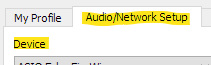
"Device" on the "Audio/Network Setup" tab really, really needs to say "Sound Device" (or Audio Device). Yes, "everybody knows" it's not the network device...
There was a problem hiding this comment.
@pljones, I did not notice this until now (when I was fixing a conflict which I merged incorrect yesterday). All should now be back in sync with master and this change has been applied as well. I used Audio Device, because of the TAB name referring to Audio as well.

There was a problem hiding this comment.
10.67ms (256) […] slow computers
I don’t think it’s mainly about "Slow computers" from my experience it’s mainly about cheap audio devices…
There was a problem hiding this comment.
I don’t think it’s mainly about "Slow computers"
Hence why I removed both text "Slow computers" and "Slow internet" and now just mention that 256 should only be used when 64 or 128 is causing issues :).


3 participants


Short description of changes
Remove preferred text from "What Is This?" for Buffer Delay.
Context: Fixes an issue?
Fixes: #2222
Does this change need documentation? What needs to be documented and how?
Yes, minor text update in the Software Manual would be advised to keep the "64, 128 and 256" samples options in-line with the details in the GUI.
Status of this Pull Request
Complete.
The next round of translation should apply this change to the local languages as well.
What is missing until this pull request can be merged?
Nothing
Checklist