Registries
Registries are the primary way that the editor saves configurations.
There are two primary registries in the editor :
- User specific editor configuration
(
./HTMLDesignerCfg.registry) - Project specific configuration
(
myProject/ProjectPrefs.registry)
They hold entirely different settings, and do not influence each other.
In the future, a more user friendly approach to a settings menu will me implemented atop of the registry.
For now, the registries can still be edited directly using the Registry Editor accessible via the menu bar.
For editor configurations :
Menu > HTML Designer > Registry...
For project configuration :
Menu > Project > Registry...
The registry editor looks like this :
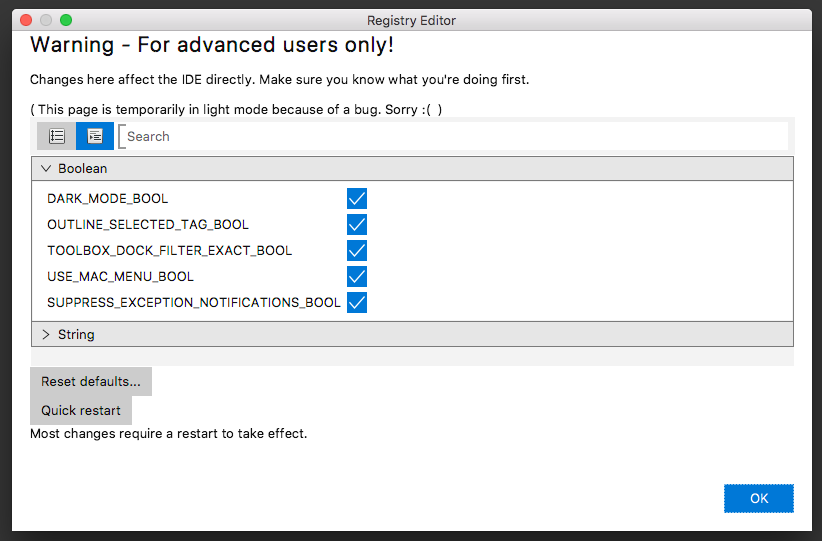
The warning is intended to deter unassuming users, but to those who advanced enough to be reading this, it can be known that there are no > entries in the registry that can break the functionality of the editor if altered.
The values were made to be changed - we just recommend you check what the value effects first.
Changes made in the registry editor are automatically applied and saved to disk immediately after being changed.
Some changes, mainly those that are read upon boot (like DARK_MODE_BOOL), require a restart to take effect.
The quick restart button is for this purpose.
Tabled below are the keys for the IDE Configuration and Project preferences, alongside their function.
| Key | Purpose |
|---|---|
| LAST_PROJECT_PATH_STRING | Location of the last loaded project. Used to auto-load project on boot. |
| DARK_MODE_BOOL | When set, IDE uses JMetro dark instead of light. |
| SUPPRESS_EXCEPTION_NOTIFICATIONS_BOOL | When set, the user is not shown notifications raised by the ExceptionListener. |
| TOOLBOX_DOCK_FILTER_EXACT_BOOL | When set, the toolbox dock will use String.startsWith, rather than String.contains when the user filters. |
| USE_MAC_MENU | When high and ran on mac, the menu is off-loaded to the system menu bar. |
| OUTLINE_SELECTED_TAG_BOOL | Determines if the selected tag is outlined in reg within the renderer. |
| AUTO_LOAD_PROJECT_BOOL | When high, the LAST_PROJECT_PATH_STRING is loaded at boot. |
| Key | Purpose |
|---|---|
| BACKUP_DEPTH_INT | Unused. Will configure the quantity of backups to keep. |
| BACKUP_ENABLE_BOOL | Unused. Will enable automated backups. |
| ZOOM_STEP_SIZE_DOUBLE | Controls how far the + and - buttons zoom open documents |