
In this lab, you will be using the Sakila database of movie rentals. You have been using this database for a couple labs already, but if you need to get the data again, refer to the official installation link.
Go to:
The database is structured as follows:

Drop column picture from staff.
ALTER TABLE
    staff DROP COLUMN picture;
A new person is hired to help Jon. Her name is TAMMY SANDERS, and she is a customer. Update the database accordingly.
INSERT INTO
    staff
VALUES
    (
        DEFAULT,
        'Tammy',
        'Sanders',
        79,
        'Tammy.Sanders@sakilastaff.com',
        2,
        1,
        'Tammy',
        'P@ssw0rd',
        NOW()
    );
Add rental for movie "Academy Dinosaur" by Charlotte Hunter from Mike Hillyer at Store 1. You can use current date for the rental_date column in the rental table.
Hint: Check the columns in the table rental and see what information you would need to add there. You can query those pieces of information. For eg., you would notice that you need customer_id information as well. To get that you can use the following query:
   select customer_id from sakila.customer
   where first_name = 'CHARLOTTE' and last_name = 'HUNTER';
Use similar method to get `inventory_id`, `film_id`, and `staff_id`.
INSERT INTO
    rental
VALUES
    (DEFAULT, NOW(), 1, 130, NULL, 1, NOW());
Delete non-active users, but first, create a backup table deleted_users to store customer_id, email, and the date for the users that would be deleted. Follow these steps:
- Check if there are any non-active users
SELECT
    count(*) AS non_active_users
FROM
    customer
WHERE
    `active` = (0);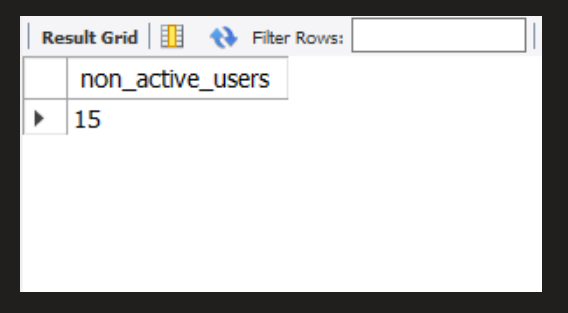
or with a bit more visivility
and to store the query
on a view for later use:
CREATE VIEW users_status AS
SELECT
    (
        SELECT
            count(*)
        FROM
            customer
        WHERE
            `active` = 1
    ) AS active_users,
    (
        SELECT
            count(*)
        FROM
            customer
        WHERE
            `active` = 0
    ) AS non_active_users
FROM
    customer
GROUP BY
    1,
    2;
- Create a table backup table as suggested
CREATE TABLE deleted_users
SELECT
    customer_id,
    email,
    last_update
FROM
    customer
LIMIT
    0;
I've limited the number of rows to 0 in the create table statement. In this way, I'm only copying the structure of the columns I picked rather than the structure and data from the original columns. Yes, I could have filtered with a WHERE clause to get the non-active user's data. However, doing so would have also copied the last_update data, the timestamp of the last update on the original table.
When the data from the customer_id and email columns are copied over to the new table, only then does the last_update column get updated with a more precise timestamp, indicating that those users were deleted on that very day when the data is copied to the new table.
- Insert the non active users in the table backup table
INSERT INTO
    deleted_users (customer_id, email)
SELECT
    customer_id,
    email
FROM
    customer
WHERE
    `active` = (0);
I verify that the data was actually copied to the new table:
SELECT
   count(*) AS deleted_users_backup
FROM
   deleted_users
WHERE
   date(last_update) = '2021-12-26';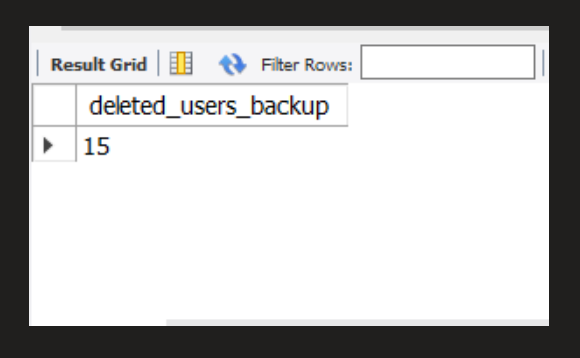
- Delete the non active users from the table customer
DELETE FROM
    customer
WHERE
    `active` = 0;
I am unable to delete the non-active users from the custome table.
Error messages:
⚠️ Error Code: 1451. Cannot delete or update a parent row: a foreign key constraint fails (sakila.payment, CONSTRAINTfk_payment_customerFOREIGN KEY (customer_id) REFERENCEScustomer(customer_id) ON DELETE RESTRICT ON UPDATE CASCADE)
also
⚠️ Error Code: 1451. Cannot delete or update a parent row: a foreign key constraint fails (sakila.rental, CONSTRAINTfk_rental_customerFOREIGN KEY (customer_id) REFERENCEScustomer(customer_id) ON DELETE RESTRICT ON UPDATE CASCADE)
The "customer" table is connected to two other tables as foreign keys at "payment" and "rental," with the default restrict constraint of ON DELETE RESTRICT.
In my opinion, an alternative would be to change the constraint from "ON DELETE RESTRICT ON UPDATE CASCADE" to "ON DELETE CASCADE ON UPDATE CASCADE." This way, as well as any non-active users, the user's payment and rental history, would be removed.
The name constraint name has to be passed as an argument on the ALTER TABLE statement to change the table and remove the previous constrain. For example, the constraint name can be found with the SHOW CREATE TABLE:
SHOW CREATE TABLE payment;
SHOW CREATE TABLE rental;
Now having the constraint name (fk_payment_customer) and (fk_rental_customer) I can proceed to drop the old constraint, and add the new constraint ON DELETE CASCADE ON UPDATE CASCADE.
ALTER TABLE
    payment DROP FOREIGN KEY fk_payment_customer,
ADD
    FOREIGN KEY(customer_id) REFERENCES customer(customer_id) ON DELETE CASCADE ON UPDATE CASCADE;
ALTER TABLE
    rental DROP FOREIGN KEY fk_rental_customer,
ADD
    FOREIGN KEY(customer_id) REFERENCES customer(customer_id) ON DELETE CASCADE ON UPDATE CASCADE;
Now I can delete all non-active users:
DELETE FROM
    customer
WHERE
    `active` = 0;
I can use one column from each table to ensure that the non-user data deletion went according to plan: "customer," "payment," and "rental" tables, which contain data for inactive users:
SELECT
    customer.customer_id,
    amount,
    return_date
FROM
    customer
    INNER JOIN payment ON customer.customer_id = payment.payment_id
    INNER JOIN rental ON customer.customer_id = rental.rental_id
WHERE
    `active` = 0
LIMIT
    20;
So to view the users_status with the view I saved previously:
SELECT
    *
FROM
    users_status;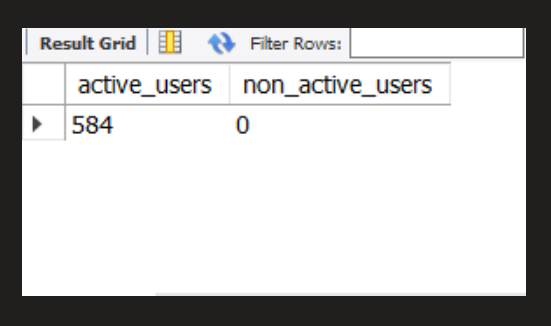
Non-active users have been successfully removed.