
Give your AI agents access to 10,000+ APIs — without leaking a single credential. Building agents that call real APIs is painful. You end up hardcoding auth, juggling secrets in prompts, writing bespoke glue code for every service, and praying nothing leaks. Jentic Mini fixes this. It's a self-hosted API execution layer that sits between your agent and the outside world. Your agent says what it wants to do. Jentic Mini handles the how — finding the right API, injecting credentials at runtime, and brokering the request. Secrets never touch the agent. Ever.
⚠️ Early Access — Jentic Mini is new and under active development. It may contain bugs, rough edges, and security gaps we haven't found yet. It is not recommended for production use at this stage. We're sharing it early so the community can explore it, test it, and help shape it. Use it in personal or development environments, and please report issues as you find them.
Using OpenClaw? The fastest way to get started is via the Jentic skill on ClawHub — it will guide you through your installation options and connect your agent automatically. Just tell your OpenClaw agent:
"install and set up the jentic skill from ClawHub"
Want the full stack on a fresh VPS? jentic-quick-claw installs OpenClaw, Jentic Mini, Mattermost, and a file browser in one command — everything pre-wired and secured via Tailscale.
Just want Jentic Mini standalone? See Getting Started below.
Jentic Mini is the open-source, self-hosted implementation of the Jentic API — fully API-compatible with the Jentic hosted and VPC editions.
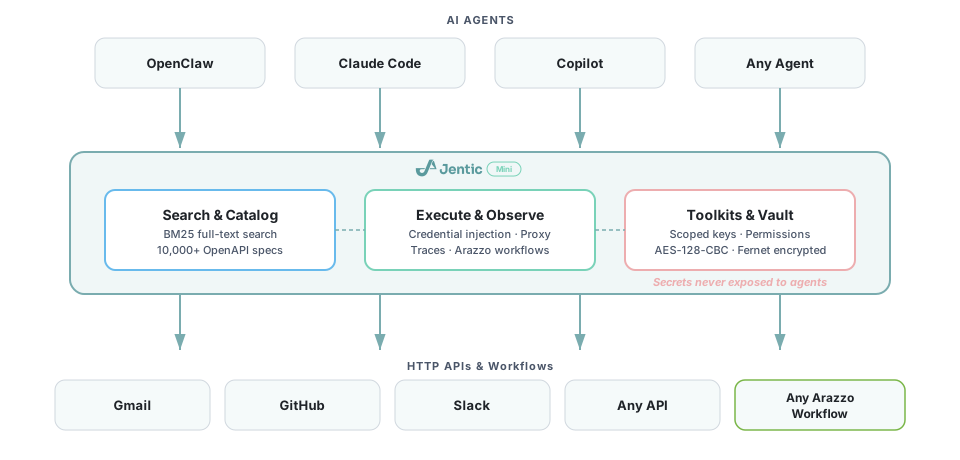
Jentic Mini gives any AI agent a local execution layer:
- Search — find the right API operation or workflow from a registered catalog using full-text BM25 search
- Execute — broker authenticated requests through any registered API without ever exposing credentials to the agent
- Observe — inspect execution traces, async job handles, and audit logs
- Toolkits — define scoped access policies and credential bundles for agents (one toolkit key per agent, individually revocable)
- Credentials vault — store API keys, OAuth tokens, and secrets in an encrypted local vault; they're injected at execution time and never returned via the API
- Public catalog — browse and import from 10,000+ OpenAPI specs and 380 Arazzo workflow sources in the Jentic public catalog; specs and workflows are imported automatically when you add credentials
The Jentic hosted and VPC editions offer deeper implementations across four areas:
| Capability | Jentic Mini (this) | Jentic hosted / VPC |
|---|---|---|
| Search | BM25 full-text search | Advanced semantic search (~64% accuracy improvement over BM25) |
| Request brokering | In-process credential injection | Scalable AWS Lambda-based broker with encryption at rest and in-transit, SOC 2-grade security, and 3rd-party credential vault integrations (HashiCorp Vault, AWS Secrets Manager, etc.) |
| Simulation | Basic simulate mode | Full sandbox for simulating API calls and toolkit behaviour (enterprise-only) |
| Catalog | ~10,000+ APIs + ~380 workflow sources from jentic-public-apis; auto-imported on credential add | Central catalog — aggregates the collective know-how of agents across API definitions and Arazzo workflows |
Jentic Mini is a self-hosted deployment option for individuals and small teams who want full control over their data and credentials. For teams that need managed scaling, SLAs, or enterprise features, Jentic offers hosted and on-premises editions — get in touch to find out more.
- Docker and Docker Compose
From DockerHub:
docker run -d --name jentic-mini -p 8900:8900 -v jentic-mini-data:/app/data jentic/jentic-miniFrom GitHub Container Registry:
docker run -d --name jentic-mini -p 8900:8900 -v jentic-mini-data:/app/data ghcr.io/jentic/jentic-miniOpen http://localhost:8900 to complete setup.
git clone https://github.com/jentic/jentic-mini.git
cd jentic-mini
docker compose up -d
Open http://localhost:8900 to complete setup.
Optional environment variables (set in .env or pass to docker compose):
| Variable | Default | Description |
|---|---|---|
JENTIC_VAULT_KEY |
auto-generated | Fernet key for the credentials vault |
JENTIC_PUBLIC_HOSTNAME |
none | Public hostname for self-links and workflow IDs, e.g. jentic.example.com |
LOG_LEVEL |
info |
debug, info, warning, error |
- Toolkit key (
tk_xxx): scoped to a toolkit's credentials and policy — give this to agents - Human session: username/password login for admin operations (credential management, toolkit setup)
First-time setup is guided through the UI at http://localhost:8900. Alternatively, via the API:
POST /default-api-key/generatefrom a trusted subnet to get your agent keyPOST /user/createwith{"username": "...", "password": "..."}to create an admin account- Add credentials for your APIs — specs are auto-imported from the public catalog
- Agents authenticate with the
tk_xxxkey viaX-Jentic-API-Keyheader
| Tag | Who uses it | Purpose |
|---|---|---|
| search | Agents | Full-text search — the main entrypoint |
| discover | Agents | Inspect capabilities, list APIs and operations |
| execute | Agents | Transparent request broker — runs API operations and Arazzo workflows |
| toolkits | Agents/Humans | Toolkits, access keys, policies, permission requests |
| observe | Agents | Read execution traces |
| catalog | Humans/admin | Register APIs, browse public catalog, upload specs, overlays, notes |
| credentials | Humans only | Manage the credentials vault; adding credentials auto-imports catalog specs and workflows |
Jentic Mini is connected to the Jentic public API catalog — ~10,000+ API specs and ~380 Arazzo workflow sources.
The catalog manifest is fetched lazily at startup (two GitHub API calls) and cached locally for 24 hours. Specs and workflows are imported automatically the first time you add credentials for a catalog API.
# Just add credentials — Jentic Mini handles the rest
POST /credentials
{ "api_id": "slack.com", "scheme_name": "BearerAuth", "values": { "token": "xoxb-..." } }

# Slack's 17 workflows and its full API spec are now in your local registry
GET /workflows?source=local&q=slack
See docs/CATALOG.md for full details.
Prerequisites for local development without Docker:
Python source (src/) is volume-mounted into the container — edit any .py file and the server hot-reloads automatically.
For UI development, use the dev compose override which runs Vite in a container with full HMR:
docker compose -f compose.yml -f compose.dev.yml upThis starts a Vite dev server on http://localhost:5173 with hot module replacement, proxying API calls to the backend on port 8900. Edit files in ui/ and changes appear instantly.
Alternatively, run Vite directly on the host (requires Node.js 20+):
cd ui && npm install && npm run devTo rebuild the production UI bundle: cd ui && npm run build, then docker compose up -d --build.
Note: The container runs as a non-root user.
compose.ymldefaults to uid/gid 1000 for bind mount compatibility. If your host user has a different uid, setJENTIC_UIDandJENTIC_GIDbefore starting:JENTIC_UID=$(id -u) JENTIC_GID=$(id -g) docker compose up -d
Swagger UI is available at http://localhost:8900/docs for interactive API exploration.
- FastAPI + uvicorn — async HTTP server with hot reload in dev
- SQLite — local registry, toolkit/key store, execution log
- BM25 — in-memory full-text search index over operation descriptions
- Fernet — symmetric encryption for the credentials vault
- arazzo-runner — Arazzo workflow execution engine
On first startup, Jentic Mini generates a random UUID and registers it with Jentic (https://api.jentic.com/api/v1/register-install). This ID is fully anonymous — only the UUID is included in the registration payload, and no hostname or other machine identifiers are sent. As with any HTTPS request, the client IP address may still appear in standard server or network logs, but it is not included in the application payload.
This install ID is the foundation for community contribution features: when your instance discovers a working workflow or an API improvement, it can share that back under your anonymous install ID, benefiting everyone running Jentic. Disabling telemetry also disables the ability to contribute workflows and API fixes back to the community.
The install ID is stored locally at /app/data/install-id.txt. A second marker file (/app/data/install-registered.txt) is written after successful registration so that subsequent startups skip the network call.
To opt out, set JENTIC_TELEMETRY=off:
docker run -d --name jentic-mini -p 8900:8900 \
  -v jentic-mini-data:/app/data \
  -e JENTIC_TELEMETRY=off \
jentic/jentic-miniPlease read our Contributing Guide and Code of Conduct before submitting a pull request.
This project is licensed under the Apache 2.0 License.