Import HP aruba networking stencil from VisioCafe not working as expected #3076

Description

Preflight Checklist
- [x ] I agree to follow the Code of Conduct that this project adheres to.
- [x ] I have searched the issue tracker for a feature request that matches the one I want to file, without success.
Describe the bug
A clear and concise description of what the bug is.
When importing stencil from VisioCafe http://www.visiocafe.com/downloads/hp/HPE-Aruba-Networking.zip, broken image are display. Stencils were converted to vssx from visio.
To Reproduce
Steps to reproduce the behavior:
- Drag and drop vssx to draw.io (web or client)
Expected behavior
A clear and concise description of what you expected to happen.
Stencils correctly display.
Screenshots
If applicable, add screenshots to help explain your problem.
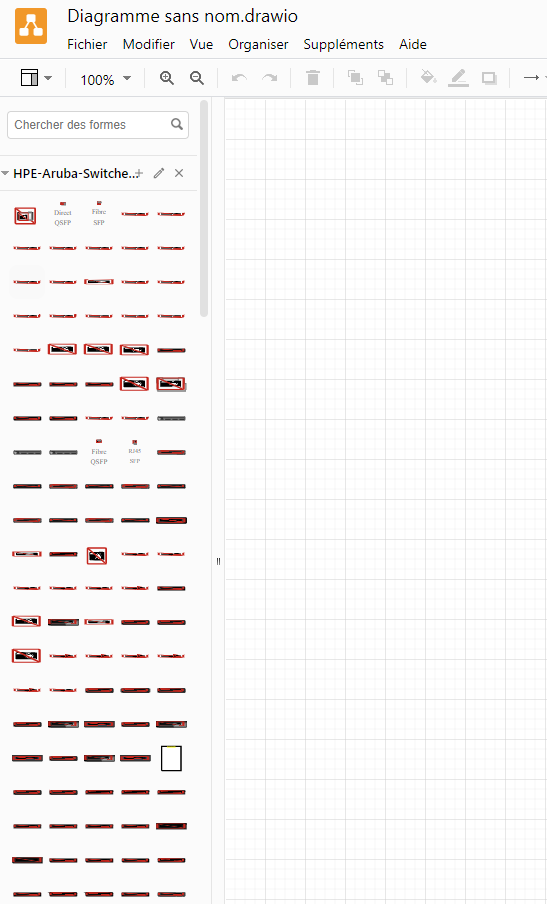
draw.io version (In the Help->About menu of the draw.io editor):
- draw.io version 20.3.0 (client) and draw.io version 20.3.6 (web)
Desktop (please complete the following information):
- OS: Windows 11
- Browser: Firefox and Chrome
- Version: latest