OOK example #402


-
|
Is there a working SX1278 OOK to OOK example? Been playing with a pair of Heltec WiFi LoRa 32 (V2) modules. LoRa works. FSK works. Added calls needed to set OOK, no packets received. |
Beta Was this translation helpful? Give feedback.
Replies: 5 comments 4 replies

-
|
You should be able to just set OOK to true, it works nearly the same way as FSK (so I didn't feel it was necessary to have a separate example). Can you post your code? |
Beta Was this translation helpful? Give feedback.
-
|
Yeah, that's what I thought since the examples work fine out of the box for LoRa and FSK... SX1278_transmit_ook.cpp /*
RadioLib SX127x Transmit Example
This example transmits packets using SX1278 LoRa radio module.
Each packet contains up to 256 bytes of data, in the form of:
- Arduino String
- null-terminated char array (C-string)
- arbitrary binary data (byte array)
Other modules from SX127x/RFM9x family can also be used.
For default module settings, see the wiki page
https://github.com/jgromes/RadioLib/wiki/Default-configuration#sx127xrfm9x---lora-modem
For full API reference, see the GitHub Pages
https://jgromes.github.io/RadioLib/
*/
// include the library
#include <RadioLib.h>
// SX1278 has the following connections:
// NSS pin: 10
// DIO0 pin: 2
// RESET pin: 9
// DIO1 pin: 3
//SX1278 radio = new Module(10, 2, 9, 3);
// Heltec WiFi LoRa has the following connections:
// NSS pin: 18 (CS) GPIO18
// DIO0 pin: 26 (irq) GPIO26
// RESET pin: 14 (RST 1278) GPIO14
// DIO1 pin: 35 (clk) GPIO35
// DIO2 pin: 34 (data) GPIO34
SX1278 radio = new Module(18, 26, 14, 35);
// or using RadioShield
// https://github.com/jgromes/RadioShield
//SX1278 radio = RadioShield.ModuleA;
void setup()
{
Serial.begin(9600);
// initialize SX1278 with default settings
Serial.print(F("[SX1278] Initializing FSK ... "));
//int state = radio.begin();
int state = radio.beginFSK();
if ( state == ERR_NONE )
{
Serial.println(F("FSK success!"));
}
else
{
Serial.print(F("FSK failed, code "));
Serial.println(state);
while (true);
}
// some modules have an external RF switch
// controlled via two pins (RX enable, TX enable)
// to enable automatic control of the switch,
// call the following method
// RX enable: 4
// TX enable: 5
/*
radio.setRfSwitchPins(4, 5);
*/
Serial.print(F("[SX1278] Setting OOK ... "));
state = radio.setOOK(true);
state = radio.setDataShapingOOK(1);
if ( state == ERR_NONE )
{
Serial.println(F("OOK success!"));
}
else
{
Serial.print(F("OOK failed, code "));
Serial.println(state);
while (true);
}
// transmit power
state = radio.setOutputPower(2, true);
if ( state == ERR_NONE )
{
Serial.println(F("setOutputPower success!"));
}
else
{
Serial.print(F("setOutputPower failed, code "));
Serial.println(state);
while (true);
}
} // end setup
void loop()
{
Serial.print(F("[SX1278] Transmitting OOK packet ... "));
// you can transmit C-string or Arduino string up to
// 256 characters long
// NOTE: transmit() is a blocking method!
// See example SX127x_Transmit_Interrupt for details
// on non-blocking transmission method.
//int state = radio.transmit("Hello World!");
// you can also transmit byte array up to 256 bytes long
//byte byteArr[] = {0x01, 0x23, 0x45, 0x67, 0x89, 0xAB, 0xCD, 0xEF};
byte byteArr[] = {0xDE, 0xAD, 0xBE, 0xEF};
int state = radio.transmit(byteArr, 4);
if ( state == ERR_NONE )
{
// the packet was successfully transmitted
Serial.println(F(" success!"));
// print measured data rate
Serial.print(F("[SX1278] Datarate:\t"));
Serial.print(radio.getDataRate());
Serial.println(F(" bps"));
}
else if ( state == ERR_PACKET_TOO_LONG )
{
// the supplied packet was longer than 256 bytes
Serial.println(F("too long!"));
}
else if ( state == ERR_TX_TIMEOUT )
{
// timeout occurred while transmitting packet
Serial.println(F("timeout!"));
}
else
{
// some other error occurred
Serial.print(F("failed, code "));
Serial.println(state);
}
// wait for a second before transmitting again
delay(1000);
} // end loopSX1278_receive_ook.cpp /*
RadioLib SX127x Receive Example
This example listens for LoRa transmissions using SX127x Lora modules.
To successfully receive data, the following settings have to be the same
on both transmitter and receiver:
- carrier frequency
- bandwidth
- spreading factor
- coding rate
- sync word
- preamble length
Other modules from SX127x/RFM9x family can also be used.
For default module settings, see the wiki page
https://github.com/jgromes/RadioLib/wiki/Default-configuration#sx127xrfm9x---lora-modem
For full API reference, see the GitHub Pages
https://jgromes.github.io/RadioLib/
*/
// include the library
#include <RadioLib.h>
// SX1278 has the following connections:
// NSS pin: 10
// DIO0 pin: 2
// RESET pin: 9
// DIO1 pin: 3
//SX1278 radio = new Module(10, 2, 9, 3);
// Heltec WiFi LoRa has the following connections:
// NSS pin: 18 (CS) GPIO18
// DIO0 pin: 26 (irq) GPIO26
// RESET pin: 14 (RST 1278) GPIO14
// DIO1 pin: 35 (clk) GPIO35
// DIO2 pin: 34 (data) GPIO34
SX1278 radio = new Module(18, 26, 14, 35);
// or using RadioShield
// https://github.com/jgromes/RadioShield
//SX1278 radio = RadioShield.ModuleA;
void setup()
{
Serial.begin(9600);
// initialize SX1278 with default settings
Serial.print(F("[SX1278] Initializing ... "));
//int state = radio.begin();
int state = radio.beginFSK();
if ( state == ERR_NONE )
{
Serial.println(F("FSK success!"));
}
else
{
Serial.print(F("FSK failed, code "));
Serial.println(state);
while (true);
}
// turn on OOK
state = radio.setOOK(true);
state = radio.setDataShapingOOK(1);
if ( state == ERR_NONE )
{
Serial.println(F("OOK success!"));
}
else
{
Serial.print(F("OOK failed, code "));
Serial.println(state);
while (true);
}
} // end setup
void loop()
{
Serial.print(F("[SX1278] Waiting for incoming OOK transmission ... "));
// you can receive data as an Arduino String
// NOTE: receive() is a blocking method!
// See example ReceiveInterrupt for details
// on non-blocking reception method.
String str;
//int state = radio.receive(str);
// you can also receive data as byte array
byte byteArr[4];
int state = radio.receive(byteArr, 4);
if ( state == ERR_NONE )
{
// packet was successfully received
Serial.println(F("success!"));
// print the data of the packet
Serial.print(F("[SX1278] Data:\t\t\t"));
Serial.println(str);
// print the RSSI (Received Signal Strength Indicator)
// of the last received packet
Serial.print(F("[SX1278] RSSI:\t\t\t"));
Serial.print(radio.getRSSI());
Serial.println(F(" dBm"));
// print the SNR (Signal-to-Noise Ratio)
// of the last received packet
Serial.print(F("[SX1278] SNR:\t\t\t"));
Serial.print(radio.getSNR());
Serial.println(F(" dB"));
// print frequency error
// of the last received packet
Serial.print(F("[SX1278] Frequency error:\t"));
Serial.print(radio.getFrequencyError());
Serial.println(F(" Hz"));
}
else if ( state == ERR_RX_TIMEOUT )
{
// timeout occurred while waiting for a packet
Serial.println(F("timeout!"));
}
else if ( state == ERR_CRC_MISMATCH )
{
// packet was received, but is malformed
Serial.println(F("CRC error!"));
}
else
{
// some other error occurred
Serial.print(F("failed, code "));
Serial.println(state);
}
} // end loopterminal: |
Beta Was this translation helpful? Give feedback.

-
|
You're not actually checking the result of Also, are you sure your module is using RFO pin as the RF output? Could you check with a lower bit rate like 4.8 or 9.6 kbps? |
Beta Was this translation helpful? Give feedback.
-
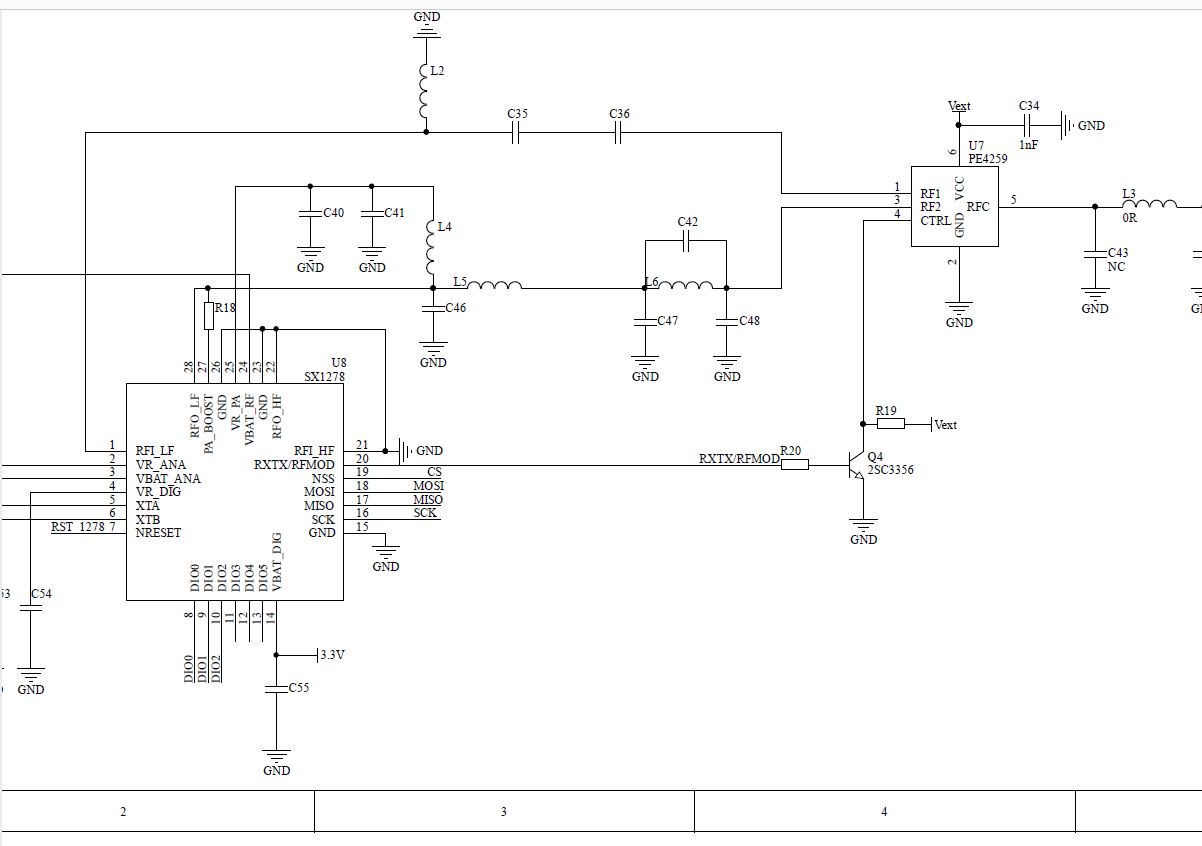
Did you mean to set bitrate default to 48K since SX1278 has a default of 4.8k? Now looking through SEMTECH datasheet for clues and possible default problems with OOK... |
Beta Was this translation helpful? Give feedback.
-
The default bit rate comes from the FSK default, which is 48 kbps, same as for all the FSK modules. However, I think I'm going to reduce that to somethink like 9k6, since it lower data rate makes the link a lot more reliable, and therefore simplifies debugging.
I wasn't able to find any info in the datasheet on OOK bit rate range, so I assumed it was the same as FSK. |
Beta Was this translation helpful? Give feedback.
-
|
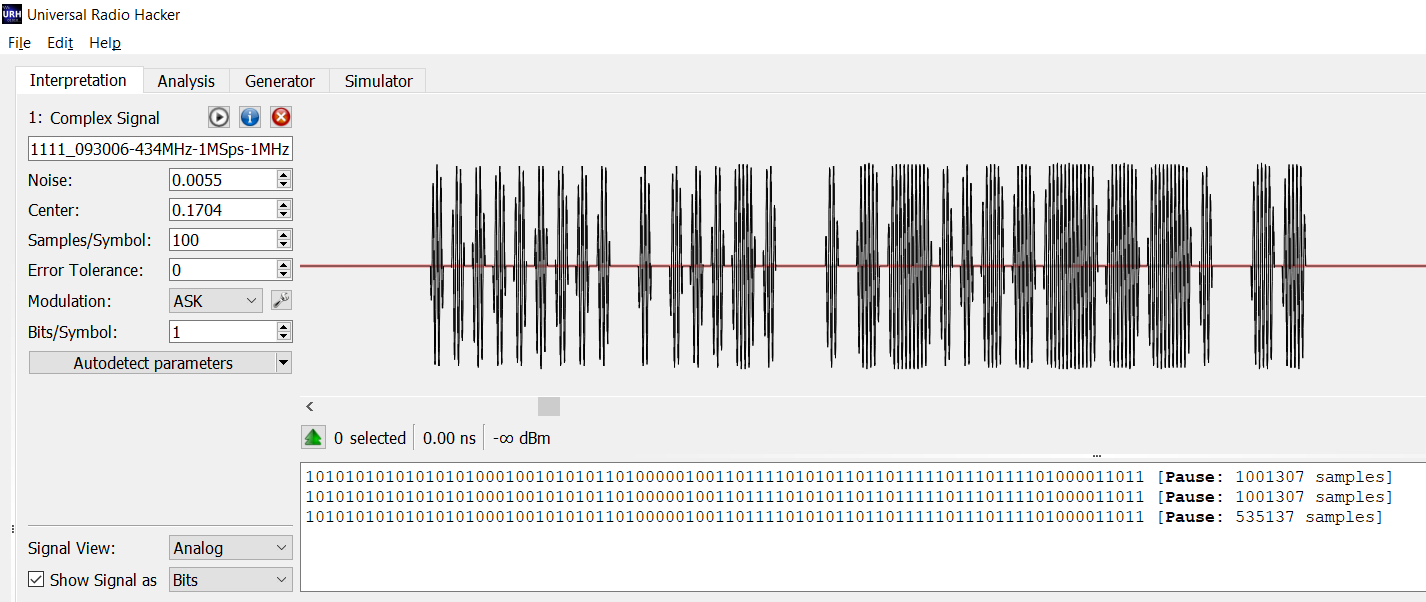
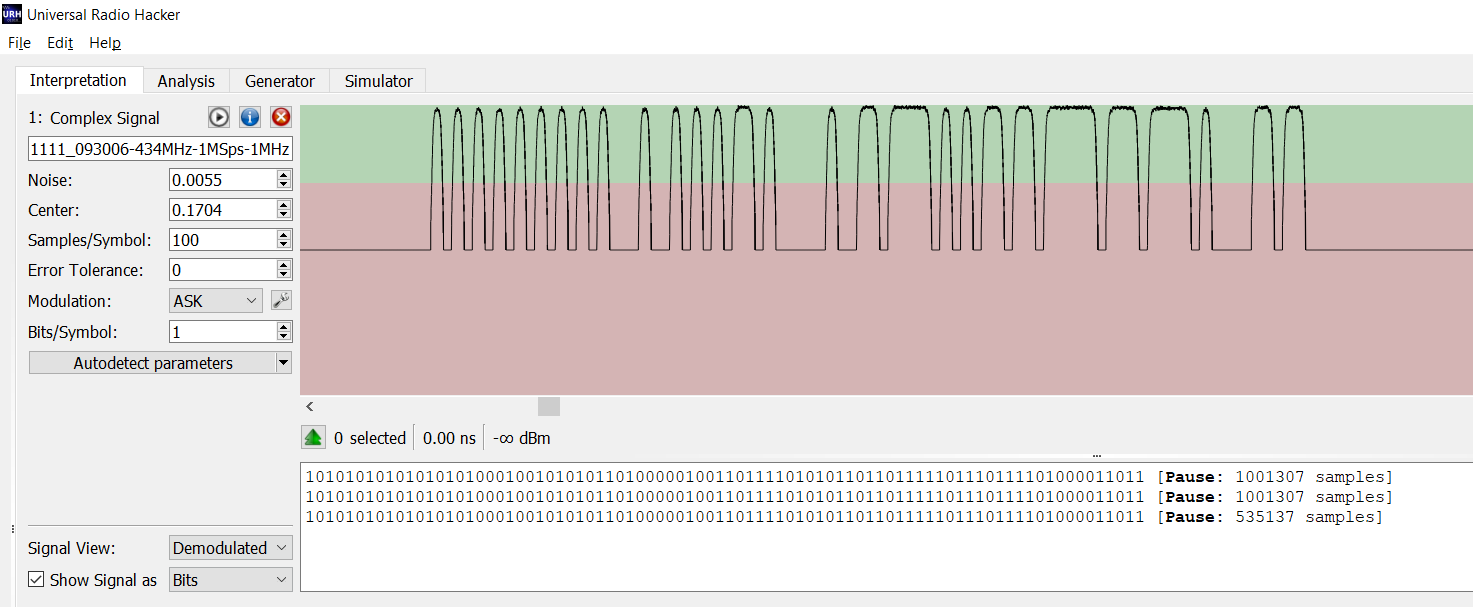
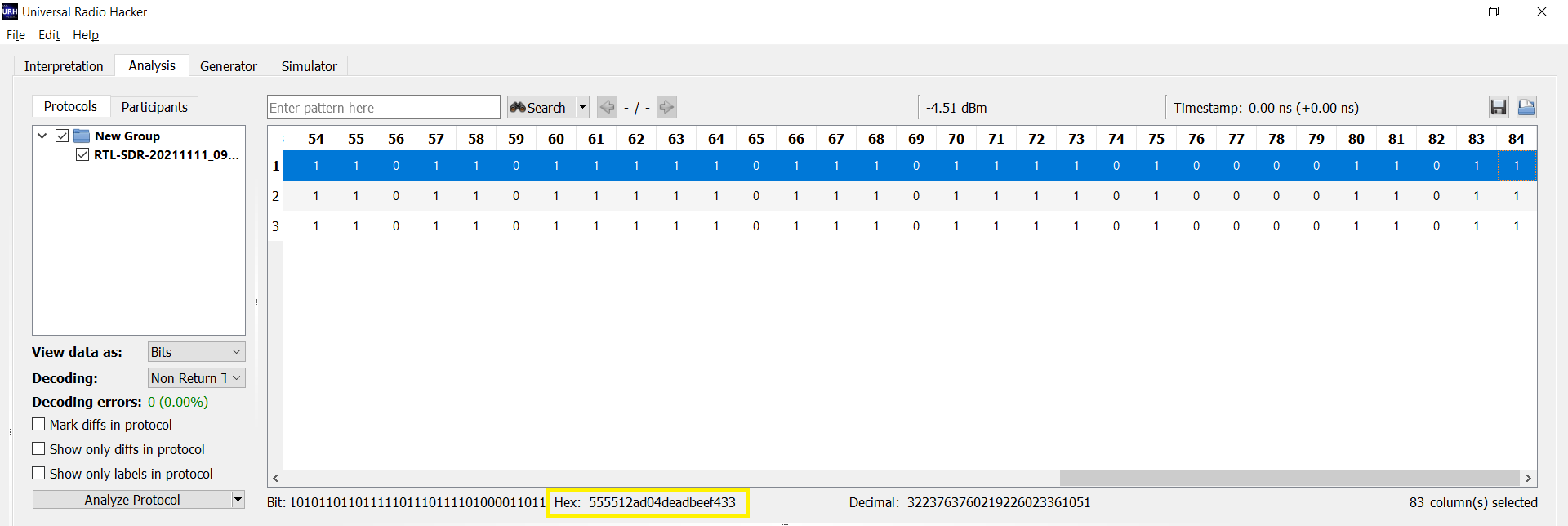
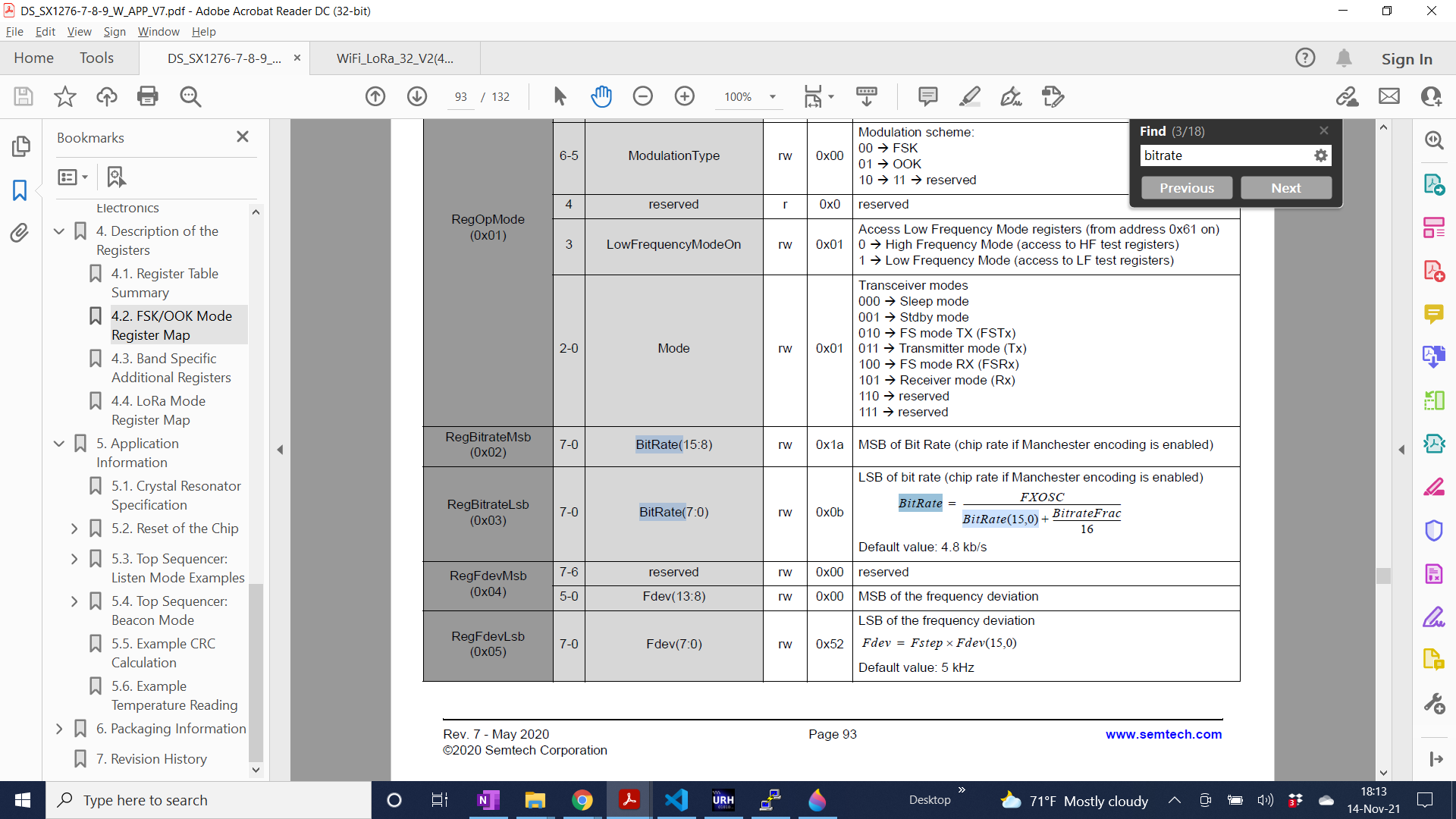
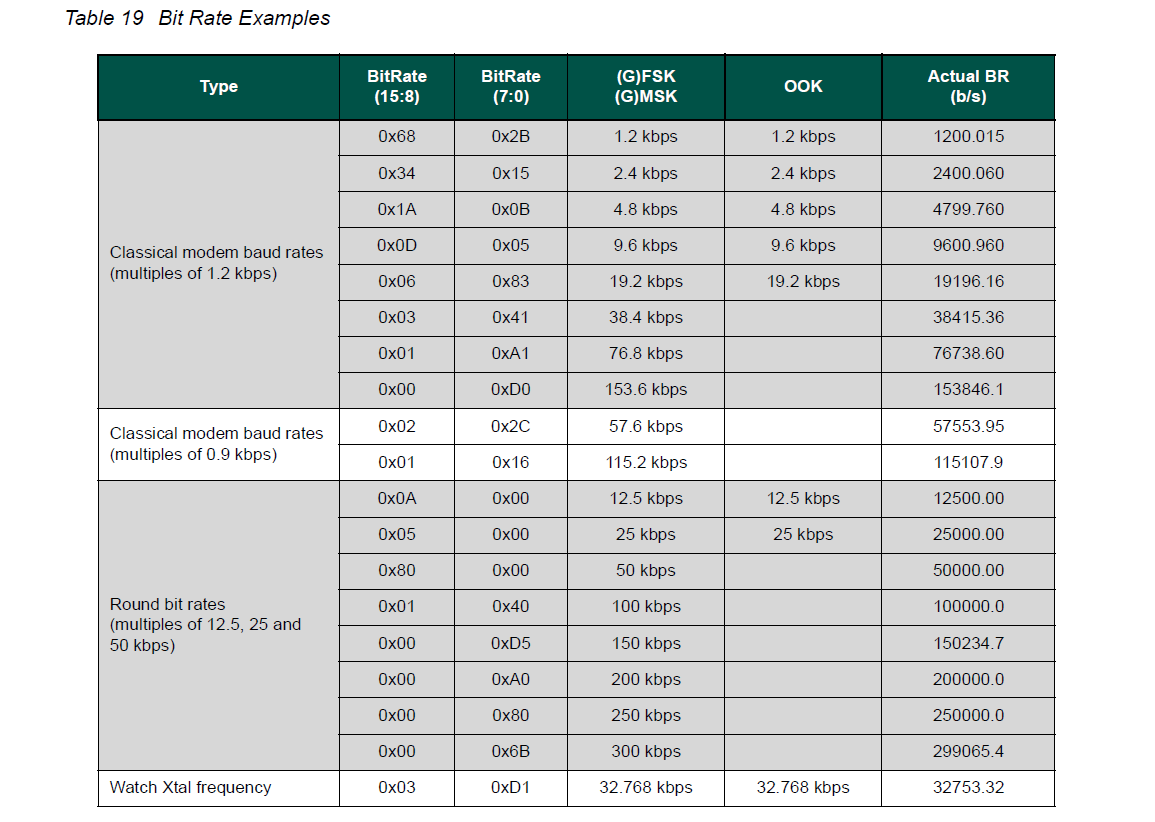
Semtech 127x datasheet shows RegBitrate default of 0x1A0B (4.8K), but yes 9k6 should be easier to start with. Table 19 shows examples with gaps for OOK: Been playing with bandwidth and RSSI thresholds. Turned on getRSSI during receive and consistently get ~ -84dBm and no received packets. SDR shows -7dBm, although with obviously different antenna and receiver, but still way off. Maybe I should try direct mode to get the packet handler out of the way for testing. |
Beta Was this translation helpful? Give feedback.

-
|
Finally got it to work with radio.setAFCAGCTrigger(SX127X_RX_TRIGGER_RSSI_INTERRUPT); _NONE also works. _BOTH & _PREAMBLE_DETECT do not work. |
Beta Was this translation helpful? Give feedback.
-
|
|
Beta Was this translation helpful? Give feedback.
-
|
Ok, well OOK does seem to work SX1278 to SX1278 with the above fix. Moving on to receiving OOK from other sources and not having much luck. I realize OOK is a tertiary priority for SX127x, but the Heltec module gives you so much bang for your buck. ESP32 + SX127x + WiFi + BLE + LiPo management + on board display. |
Beta Was this translation helpful? Give feedback.


Semtech 127x datasheet shows RegBitrate default of 0x1A0B (4.8K), but yes 9k6 should be easier to start with.
Table 19 shows examples with gaps for OOK:
Been playing with bandwidth and RSSI thresholds. Turned on getRSSI during receive and consistently get ~ -84dBm and no received packets. SDR shows -7dBm, although with obviously different antenna and receiver, but still way off. Maybe I should try direct mode to get the packet handler out of the way for testing.