Individual MVP project. This web app allows speech-language pathologists to keep track of their caseload, including student data and due dates for paperwork. It also allows SLPs to take and record data and session notes.
The app has two pages. On the Caseload page:
- There is a form where the speech therapist can add new students to their student list.
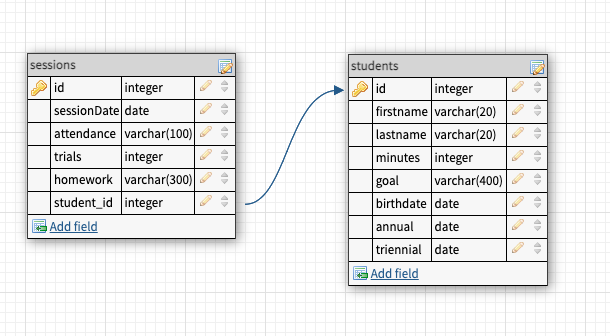
- The speech therapist can see a table listing all of the students on their caseload and their data, including their first and last names, date of birth, the number of minutes of speech therapy they receive per month, and the dates that their annual review and triennial reevaluations are due.
- Each column of the table is sortable in ascending and descending order. The clinician can easily locate students and see which paperwork is due soon by clicking on the column header.
On the Progress page, the speech pathologist can take and record session data:
- There is a list of students in the sidebar listed in alphabetical order by last name.
- Upon clicking on a student's name in the sidebar, a component appears which shows:
- the selected student's name, speech goal, a form for adding new sessions
- the student's speech goal
- a calculator that the clinician can use in real time to track student trials
- a form for taking and recording session data
- a list of summaries of previous sessions, where the most recent session is at the top and the oldest at the bottom
- Open a new terminal window
- Run
npm installin the project's root folder to install Node/Express dependencies - Open a new terminal window
- Enter
cd clientto navigate to the client folder - Run
npm installto install React dependencies
- Open a new terminal window
- Run
mysql -u root -pto access MySQL - Create a .env file in the project's root folder and enter the following:
DB_USERDB_HOST=localhost
DB_USER=root
DB_NAME=speech
DB_PASS=your_password
DB_TIMEZONE="+00:00"
- In a new terminal, in the project directory, run
npm run migrateto create tables
- Run
npm startin the root folder to start the Express server on port 5001. - Run
npm startin the client folder to start the server on port 3000.


This is a student project that was created at CodeOp, a full stack development bootcamp in Barcelona.