


Lightweight, cross-platform process sandboxing powered by OpenAI Codex's sandbox runtime.
- Deny by default: Writes, network, and environment variables are blocked unless you allow them
- Credential injection: Pass API keys that the process never sees. Zerobox injects real values only for approved hosts
- File access control: Allow or deny reads and writes to specific paths
- Network filtering: Allow or deny outbound traffic by domain
- Clean environment: Only essential env vars (PATH, HOME, etc.) are inherited by default
- TypeScript SDK:
import { Sandbox } from "zerobox"with a Deno-style API - Cross-platform: macOS and Linux. Windows support planned
- Single binary: No Docker, no VMs, ~10ms overhead

curl -fsSL https://raw.githubusercontent.com/afshinm/zerobox/main/install.sh | shnpm install -g zeroboxgit clone https://github.com/afshinm/zerobox && cd zerobox
./scripts/sync.sh && cargo build --release -p zeroboxRun a command with no writes and no network access:
zerobox -- node -e "console.log('hello')"Allow writes to a specific directory:
zerobox --allow-write=. -- node script.jsAllow network to a specific domain:
zerobox --allow-net=api.openai.com -- node agent.jsPass a secret to a specific host and the inner process never sees the real value:
zerobox --secret OPENAI_API_KEY=sk-proj-123 --secret-host OPENAI_API_KEY=api.openai.com -- node agent.jsSame thing with the TypeScript SDK:
import { Sandbox } from "zerobox";

const sandbox = Sandbox.create({
  secrets: {
    OPENAI_API_KEY: {
      value: process.env.OPENAI_API_KEY,
      hosts: ["api.openai.com"],
    },
  },
});

const output = await sandbox.sh`node agent.js`.text();
Record filesystem changes and undo them after execution:
zerobox --restore --allow-write=. -- npm installOr record without restoring, then inspect and undo later:
zerobox --snapshot --allow-write=. -- npm install
zerobox snapshot list
zerobox snapshot diff <session-id>
zerobox snapshot restore <session-id>
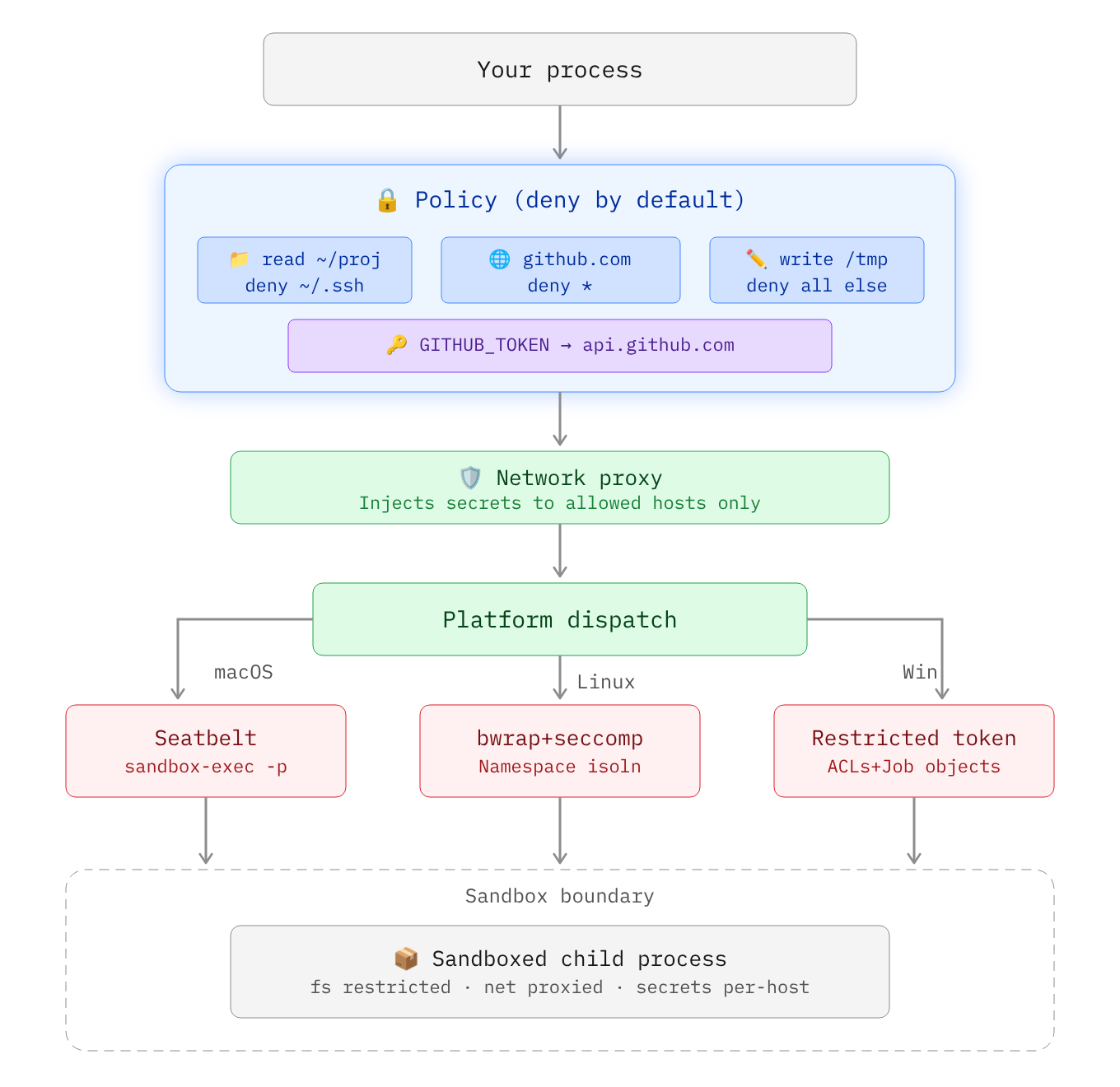
Secrets are API keys, tokens, or credentials that should never be visible inside the sandbox. The sandboxed process sees a placeholder in the environment variable and the real value is substituted at the network proxy level only for requested hosts:
sandbox process: echo $OPENAI_API_KEY
  -> ZEROBOX_SECRET_a1b2c3d4e5...  (placeholder)

sandbox process: curl -H "Authorization: Bearer $OPENAI_API_KEY" https://api.openai.com/...
  -> proxy intercepts, replaces placeholder with real key
  -> server receives: Authorization: Bearer sk-proj-123
Pass a secret with --secret and restrict it to a specific domain with --secret-host:
zerobox --secret OPENAI_API_KEY=sk-proj-123 --secret-host OPENAI_API_KEY=api.openai.com -- node app.jsWithout --secret-host, the secret is pass to all domains:
zerobox --secret TOKEN=abc123 -- node app.jsYou can also pass multiple secrets with different domains:
zerobox \
  --secret OPENAI_API_KEY=sk-proj-123 --secret-host OPENAI_API_KEY=api.openai.com \
  --secret GITHUB_TOKEN=ghp-456 --secret-host GITHUB_TOKEN=api.github.com \
  -- node app.js
Node.js
fetchdoes not respectHTTPS_PROXYby default. When running Node.js inside a sandbox with secrets, make sure to pass the--use-env-proxyargument.
import { Sandbox } from "zerobox";

const sandbox = Sandbox.create({
  secrets: {
    OPENAI_API_KEY: {
      value: process.env.OPENAI_API_KEY,
      hosts: ["api.openai.com"],
    },
    GITHUB_TOKEN: {
      value: process.env.GITHUB_TOKEN,
      hosts: ["api.github.com"],
    },
  },
});

await sandbox.sh`node agent.js`.text();By default, only essential variables are passed to the sandbox e.g. PATH, HOME, USER, SHELL, TERM, LANG.
The --allow-env flag allows all parent environment variables to be inherited by the sandboxed process:
zerobox --allow-env -- node app.jszerobox --allow-env=PATH,HOME,DATABASE_URL -- node app.jszerobox --allow-env --deny-env=AWS_SECRET_ACCESS_KEY -- node app.jsor set a specific variable:
zerobox --env NODE_ENV=production --env DEBUG=false -- node app.jsconst sandbox = Sandbox.create({
env: { NODE_ENV: "production" },
allowEnv: ["PATH", "HOME"],
denyEnv: ["AWS_SECRET_ACCESS_KEY"],
});Run AI generated code without risking file corruption or data leaks:
zerobox -- python3 /tmp/task.pyOr allow writes only to an output directory:
zerobox --allow-write=/tmp/output -- python3 /tmp/task.pyOr via the TypeScript SDK:
import { Sandbox } from "zerobox";

const sandbox = Sandbox.create({
  allowWrite: ["/tmp/output"],
  allowNet: ["api.openai.com"],
});

const result = await sandbox.sh`python3 /tmp/task.py`.output();
console.log(result.code, result.stdout);Each AI tool call can also be sandboxed individually. The parent agent process runs normally and only some operations are sandboxed:
import { Sandbox } from "zerobox";

const reader = Sandbox.create();
const writer = Sandbox.create({ allowWrite: ["/tmp"] });
const fetcher = Sandbox.create({ allowNet: ["example.com"] });

const data = await reader.js`
  const content = require("fs").readFileSync("/tmp/input.txt", "utf8");
  console.log(JSON.stringify({ content }));
`.json();

await writer.js`
  require("fs").writeFileSync("/tmp/output.txt", "result");
  console.log("ok");
`.text();

const result = await fetcher.js`
  const res = await fetch("https://example.com");
  console.log(JSON.stringify({ status: res.status }));
`.json();
Full working examples:
examples/ai-agent-sandboxed- Entire agent process sandboxed with secrets (API key never visible)examples/ai-agent- Vercel AI SDK with per-tool sandboxing and secretsexamples/workflow- Vercel Workflow with sandboxed durable steps
Run a build script with network access:
zerobox --allow-write=./dist --allow-net -- npm run buildRun tests with no network and catch accidental external calls:
zerobox --allow-write=/tmp -- npm testnpm install zeroboximport { Sandbox } from "zerobox";
const sandbox = Sandbox.create({ allowWrite: ["/tmp"] });
const output = await sandbox.sh`echo hello`.text();const data = await sandbox.sh`cat data.json`.json();const result = await sandbox.sh`exit 42`.output();
// { code: 42, stdout: "", stderr: "" }await sandbox.exec("node", ["-e", "console.log('hi')"]).text();const data = await sandbox.js`
console.log(JSON.stringify({ sum: 1 + 2 }));
`.json();Non-zero exit codes throw SandboxCommandError:
import { Sandbox, SandboxCommandError } from "zerobox";

const sandbox = Sandbox.create();
try {
  await sandbox.sh`exit 1`.text();
} catch (e) {
  if (e instanceof SandboxCommandError) {
    console.log(e.code);   // 1
    console.log(e.stderr);
  }
}const sandbox = Sandbox.create({
allowWrite: ["."],
restore: true,
});
// Changes are automatically undone after execution.
await sandbox.sh`npm install`.text();Record without restoring:
const sandbox = Sandbox.create({
  allowWrite: ["."],
  snapshot: true,
  snapshotExclude: ["node_modules"],
});

await sandbox.sh`npm install`.text();const controller = new AbortController();
await sandbox.sh`sleep 60`.text({ signal: controller.signal });Sandbox overhead is minimal, typically ~10ms and ~7MB:
| Command | Bare | Sandboxed | Overhead | Bare Mem | Sandbox Mem |
|---|---|---|---|---|---|
echo hello |
<1ms | 10ms | +10ms | 1.2 MB | 8.4 MB |
node -e '...' |
10ms | 20ms | +10ms | 39.3 MB | 39.1 MB |
python3 -c '...' |
10ms | 20ms | +10ms | 12.9 MB | 13.0 MB |
cat 10MB file |
<1ms | 10ms | +10ms | 1.9 MB | 8.4 MB |
curl https://... |
50ms | 60ms | +10ms | 7.2 MB | 8.4 MB |
Best of 10 runs with warmup on Apple M5 Pro. Run ./bench/run.sh to reproduce.
| Platform | Backend | Status |
|---|---|---|
| macOS | Seatbelt (sandbox-exec) |
Fully supported |
| Linux | Bubblewrap + Seccomp + Namespaces | Fully supported |
| Windows | Restricted Tokens + ACLs + Firewall | Planned |
| Flag | Example | Description |
|---|---|---|
--allow-read <paths> |
--allow-read=/tmp,/data |
Restrict readable user data to listed paths. System libraries remain accessible. Default: all reads allowed. |
--deny-read <paths> |
--deny-read=/secret |
Block reading from these paths. Takes precedence over --allow-read. |
--allow-write [paths] |
--allow-write=. |
Allow writing to these paths. Without a value, allows writing everywhere. Default: no writes. |
--deny-write <paths> |
--deny-write=./.git |
Block writing to these paths. Takes precedence over --allow-write. |
--allow-net [domains] |
--allow-net=example.com |
Allow outbound network. Without a value, allows all domains. Default: no network. |
--deny-net <domains> |
--deny-net=evil.com |
Block network to these domains. Takes precedence over --allow-net. |
--env <KEY=VALUE> |
--env NODE_ENV=prod |
Set env var in the sandbox. Can be repeated. |
--allow-env [keys] |
--allow-env=PATH,HOME |
Inherit parent env vars. Without a value, inherits all. Default: only PATH, HOME, USER, SHELL, TERM, LANG. |
--deny-env <keys> |
--deny-env=SECRET |
Drop these parent env vars. Takes precedence over --allow-env. |
--secret <KEY=VALUE> |
--secret API_KEY=sk-123 |
Pass a secret. The process sees a placeholder; the real value is injected at the proxy for approved hosts. |
--secret-host <KEY=HOSTS> |
--secret-host API_KEY=api.openai.com |
Restrict a secret to specific hosts. Without this, the secret is substituted for all hosts. |
-A, --allow-all |
-A |
Grant all filesystem and network permissions. Env and secrets still apply. |
--no-sandbox |
--no-sandbox |
Disable the sandbox entirely. |
--strict-sandbox |
--strict-sandbox |
Require full sandbox (bubblewrap). Fail instead of falling back to weaker isolation. |
--debug |
--debug |
Print sandbox config and proxy decisions to stderr. |
--snapshot |
--snapshot |
Record filesystem changes during execution. |
--restore |
--restore |
Record and restore tracked files to pre-execution state after exit. Implies --snapshot. |
--snapshot-path <paths> |
--snapshot-path=./src |
Paths to track for snapshots (default: cwd). |
--snapshot-exclude <patterns> |
--snapshot-exclude=build |
Exclude patterns from snapshots. |
-C <dir> |
-C /workspace |
Set working directory for the sandboxed command. |
-V, --version |
--version |
Print version. |
-h, --help |
--help |
Print help. |
| Command | Description |
|---|---|
zerobox snapshot list |
List recorded sessions. |
zerobox snapshot diff <id> |
Show changes from a session. |
zerobox snapshot restore <id> |
Restore filesystem to a session's baseline. |
zerobox snapshot clean --older-than=<days> |
Remove old snapshot sessions. |
Apache-2.0