Chrome App
##Introduction
The best introduction to Chrome Apps is provided by Google. Google also provides a developer guide.
Chrome apps forbid eval and new Function unless they run in a sandbox. So Kendo UI controls which rely heavily on templates and eval can only run in a sandboxed iFrame. This is further explained by Telerik.
Sandboxed iFrames have other limitations: they have no access to Chrome apps APIs (including storage) and cannot run external web pages, which we need for authenticating with identity providers like Facebook, Google, Twitter and Windows Live.
##Building the Chrome App
Building the Chrome app with sandboxing requires the addition of 4 files:
- manifest.json, the manifest with name, description, icons and permissions;
- chrome_launcher.js, the application launcher;
- chrome_wrapper.html, the container for the sandboxed iFrame and the webview;
- chrome_pkg.js, the communication API based on window.sendMessage and window.onMessage,
- chrome_wrapper.js, the script that .
##Loading and testing the Chrome App
In Chrome, call menu tools -> extensions or type chrome://extensions in the address bar and click the Developer mode checkbox.
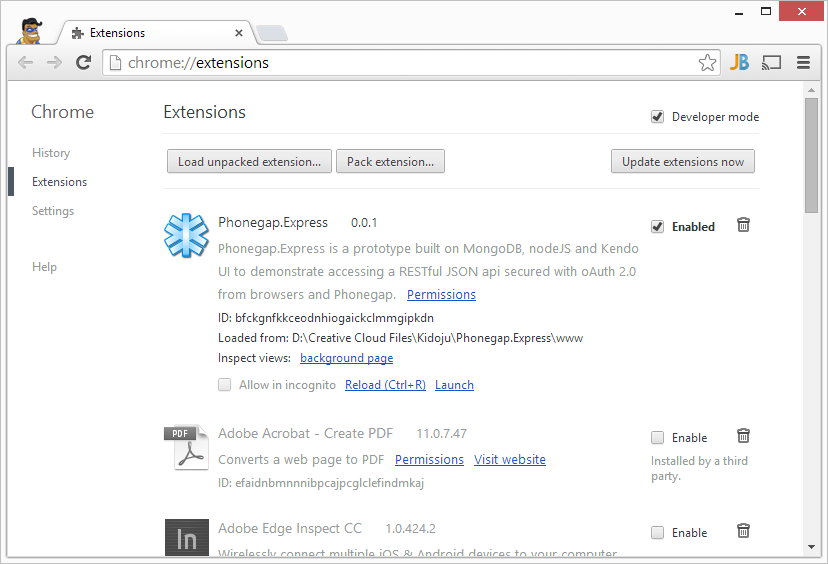
This displays a button to Load unpacked extension from a directory. Click the button and select the www directory on your computer, which should contain manifest.json.
Then the chrome app is displayed in the list of extensions with a Launch link that you can click to run it.
##Limitations
In the current state of the chrome app some features do not work. Some Javascript functions have been disabled in Chrome apps. The ones which affect Phonegap.Express are:
- localStorage is easily taken care of in api.js (DONE);
- window.alert can easily be circumvented (TODO);
- window.location is more difficult to work around although we should be able to assign the src attribute of the containing iFrame of chrome.html (TODO).
The solution is complex:
there is a top window which is the chrome packed application (chrome_wrapper) and which has access to the chrome API, especially storage; there is a sandboxed iFrame to be able to run Kendo UI client templates which use eval (index.html). Unfortunately the sandboxed iFrame has many limitations : load only local pages, cannot run chrome APIs, ... there is a webview which can load web pages from Facebook, Google, Twitter and Windows Live. The webview notifies the top window (chrome wrapper) via event handlers for loadredirect events and teh top window and iframe communicate through messages (window.sendMessage and window.onMessage). This is further explained here.