Chrome App
##Introduction
The best introduction to Chrome Apps is provided by Google.
Most Kendo UI controls rely on templates which use the eval function which chrome apps forbid unless sandboxing. This is further explained by Telerik.
##Building the Chrome App
Building the Chrome app with sandboxing requires the addition of 3 files:
- manifest.json, the manifest with name, description, icons and permissions;
- background.js, the laucher;
- chrome.html, the container for the sandboxed application.
##Loading and testing the Chrome App
In Chrome, call menu tools -> extensions or type chrome://extensions in the address bar and click the Developer mode checkbox.
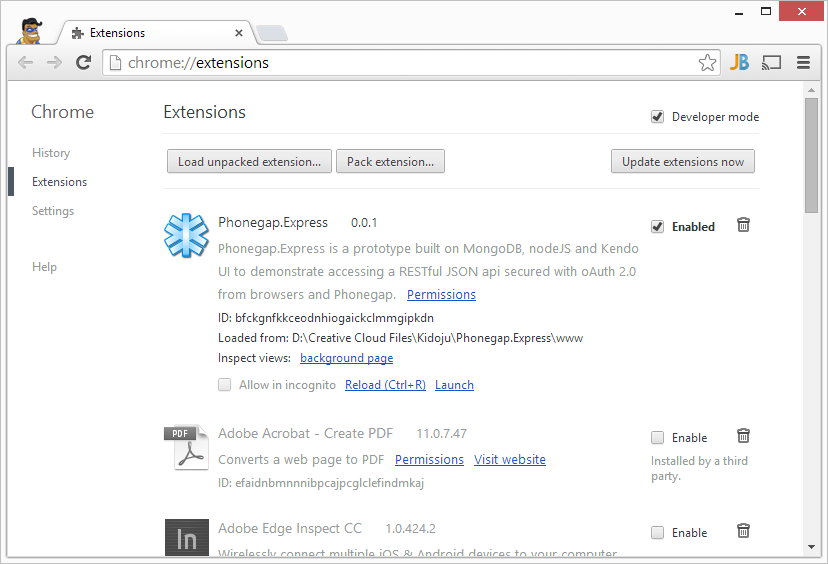
This displays a button to Load unpacked extension from a directory. Click the button and select the www directory on your computer, which should contain manifest.json.
Then the chrome app is displayed in the list of extensions with a Launch link that you can click to run it.
##Limitations
In the current state of the chrome app some features do not work. Some Javascript functions have been disabled in Chrome apps. The ones which affect Phonegap.Express are:
- localStorage is easily taken care of in api.js (DONE);
- window.alert can easily be circumvented (TODO);
- window.location is more difficult to work around although we should be able to assign the src attribute of the containing iFrame of chrome.html (TODO).