Phonegap
Apart from the Phonegap documentation, Christophe Coenraets has a great Phonegap tutorial.
http://www.tricedesigns.com/2013/01/18/my-workflow-for-developing-phonegap-applications/
Phonegap requires the use of the InAppBrowser plugin to read the auth_token.
http://coenraets.org/blog/2014/04/facebook-phonegap-cordova-without-plugin/ http://phonegap-tips.com/articles/google-api-oauth-with-phonegaps-inappbrowser.html https://software.intel.com/en-us/html5/articles/oauth2-with-intelxdk-cordova-html5 https://github.com/krisrak/jquery-cordova-oauth2 https://github.com/andreassolberg/jso/tree/version2 https://github.com/andreassolberg/jso/blob/version2/README-Phonegap.md
##Development Environment
Cordova archives can be downloaded from http://archive.apache.org/dist/cordova/.
cordova-3.4.0-src.zip contains a second zip file for windows phone 8 \cordova-3.4.0\cordova-wp8.zip. Unzip it and execute \cordova-wp8\createTemplates.bat. This creates CordovaWP7_3_4_0.zip and CordovaWP8_3_4_0.zip in the same directory.
Copy CordovaWP8_3_4_0.zip to \My Documents\Visual Studio 2013\Templates\ProjectTemplates\Visual C# (Yep, Visual C#).
Launch Visual Studio 2013 and create a new project.
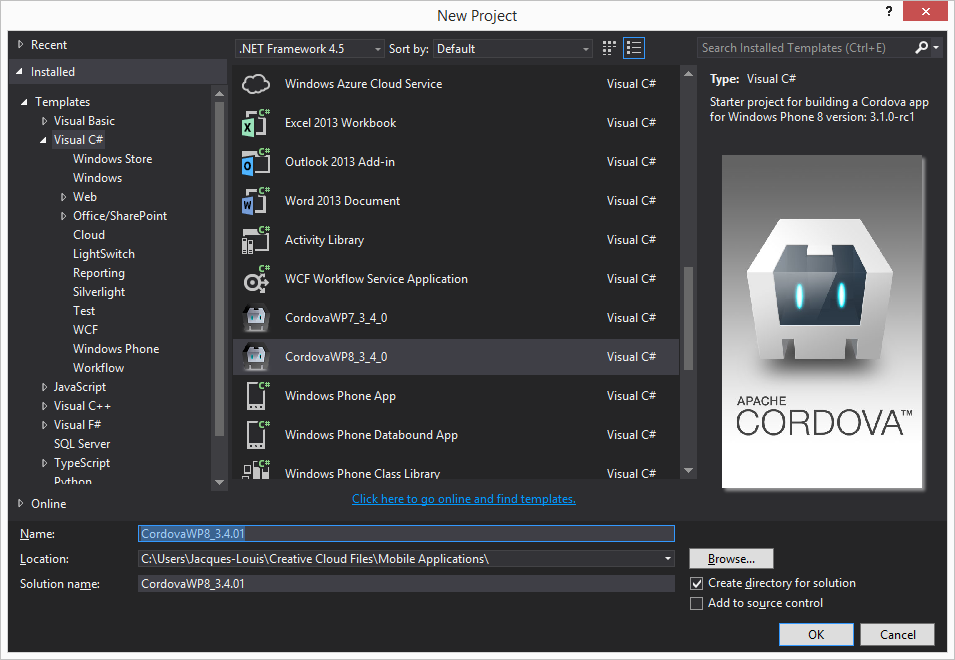
Open a command prompt and navigate to the project directory inside the solution directory. The project directory contains config.xml and the www directory. Launch teh following command to install plugins.
>plugman install --plugin org.apache.cordova.inappbrowser --platform wp8 --project .
Fetching plugin "org.apache.cordova.inappbrowser" via plugin registry
Installing "org.apache.cordova.inappbrowser" for wp8
Copy your html, js and css files in the www directory and you are good to go.
http://msopentech.com/blog/2014/05/12/apache-cordova-integrated-visual-studio/