A note-taking app for your phone and your computer — no cloud, no subscription, no account.
You jot on your phone. You work and store in your Bunker.
Website · Docs
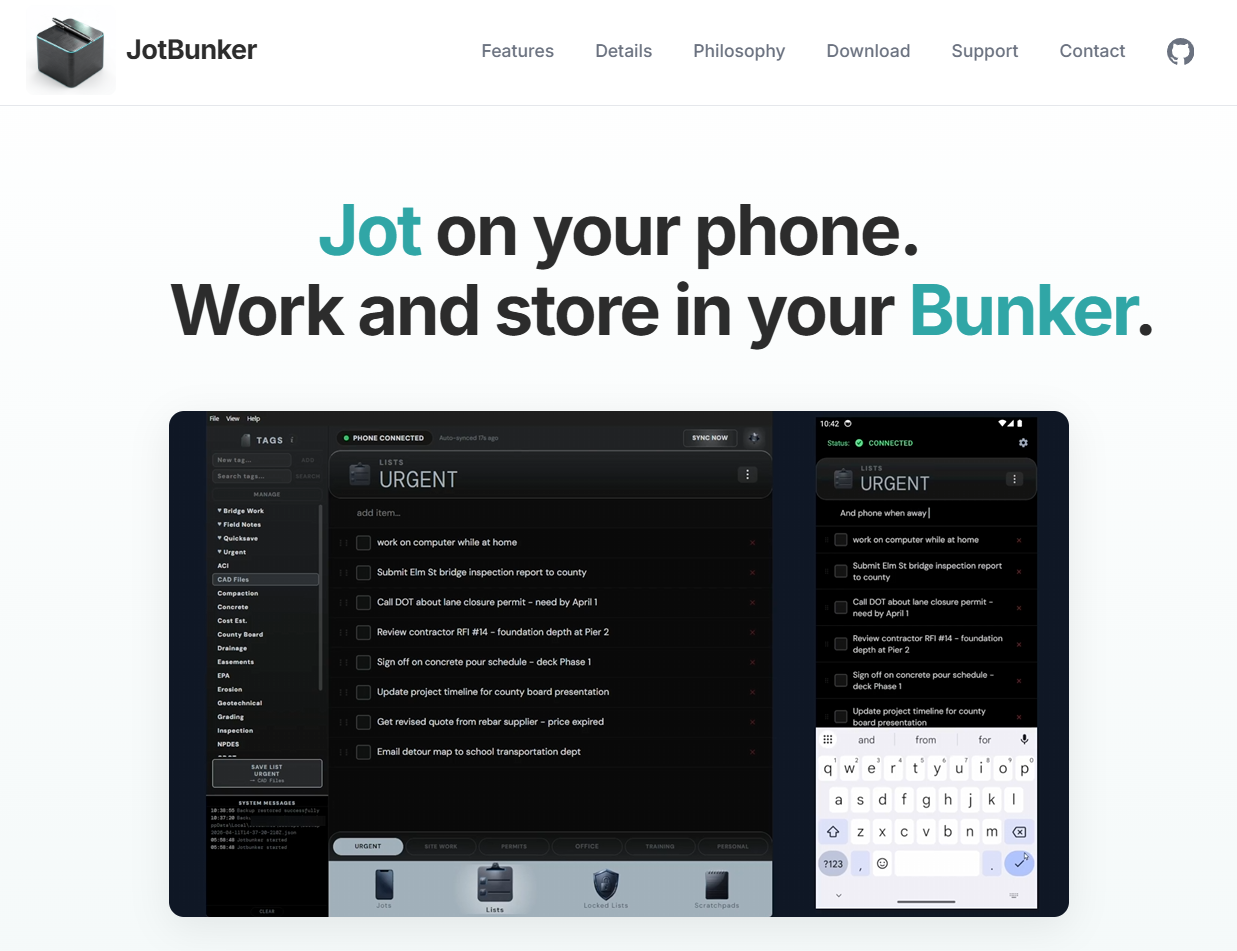
JotBunker connects two devices you already own over your own Wi-Fi. Your data stays exactly where it belongs: on your devices. Everything on the phone works offline. No spinners, no connectivity required.
See it in action — jotbunker.com has screenshot videos, feature details, and full documentation.
Your phone is always with you, which makes it the right tool for capture. JotBunker gives you four workspaces:
Jots — Six numbered slots for quick capture. Each slot holds text, a finger drawing, camera photos, voice recordings, and file attachments, all independently. When the slots fill up, bring your phone back to the Bunker, download them, and clear the slots for the next round. The constraint is the point: you're capturing what matters today, not building a digital hoard.
Lists — Todos and checklists. Rename the default categories to whatever fits your life, reorder items with a drag, and check things off on either device — changes merge automatically when you reconnect.
Locked Lists — For the stuff you always need but can never remember: gate codes, lock combos, membership numbers, safe combinations. Protected behind biometrics (Face ID or passcode) and auto-locked the moment you navigate away.
Scratchpads — Six freeform text areas with no formatting and no structure. Start a thought on your computer, pick it up on your phone. Or the other way around.
Your home network and computer are the Bunker. This is where things live permanently.
Pair your phone once by scanning a QR code. After that, tap Sync whenever you're back on your home network and your phone connects automatically over local Wi-Fi. No internet required. No cloud relay in the middle.
Once connected, everything syncs: lists, scratchpads, jots. From the computer app you can download jots to your filesystem as plain files — .txt, .jpg, .m4a, .pdf — into folders you choose and control. Use them with anything: search tools, scripts, a PKM system, a RAG pipeline, or just File Explorer.
A tag-and-file system lets you build your own organizational structure by mapping tags to folders on your hard drive.
Because you don't need it for this.
Your phone and your computer are on the same network every time you come home. That's enough. All sync traffic is encrypted end-to-end with NaCl (X25519 + secretbox). Nothing leaves your network. There's no account to create, no server that holds your data, no terms of service covering your own notes, and no monthly fee.
Your Bunker is already a locked-down home base — a secure computer on a private network. JotBunker just connects your phone to it.
| Layer | Technology |
|---|---|
| Phone | Expo SDK 54 (iOS / Android) |
| Computer | Electron 35 (Windows) |
| UI | React 19, TypeScript |
| State | Zustand 5 |
| Encryption | TweetNaCl |
Monorepo with npm workspaces: packages/shared, packages/mobile, packages/desktop.
- Node.js 20+
- npm 10+
npm install
This installs all workspaces (shared, mobile, desktop).
cd packages/desktop
npm run dev          # dev mode with hot-reload
npm run dist         # build distributable installer
Requires a development build on your device. See Expo development builds.
cd packages/mobile
npx expo start       # start dev server
npm test             # run all tests
npm run test:shared  # shared package only
npm run test:mobile  # mobile package only
npm run test:desktop # desktop package only
GPL-3.0 — see LICENSE.
Not accepting contributions at this time.