[Paper] [Project Page] [Datasets] [Checkpoints]
Youngjoon Jeong*, Junha Chun*, Taesup Kim†
Seoul National University
*Equal contribution, †Corresponding author
Accepted to CVPR 2026 (Poster)
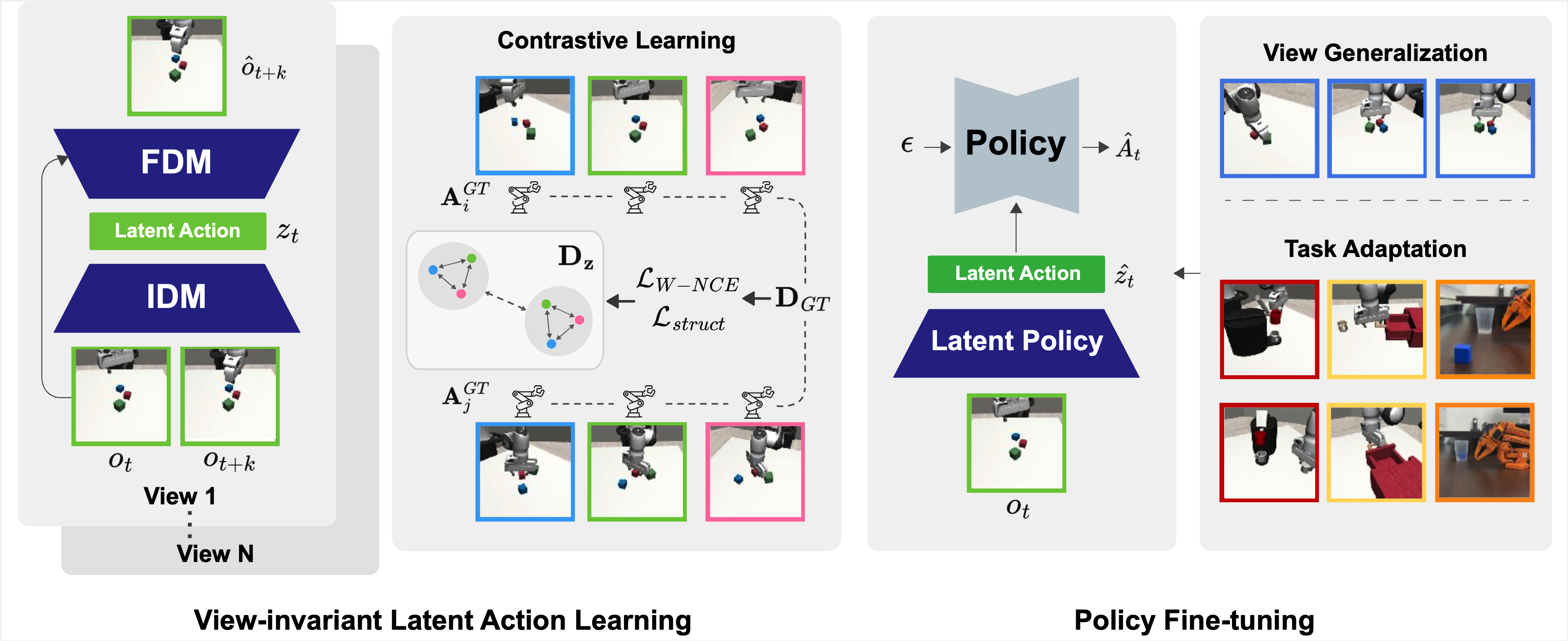
This repository contains the official simulation code release for VILA.
Clone the code repository and create a Python 3.10 environment:
git clone https://github.com/joon-stack/vila-code.git
cd vila-code
conda env create -f environment.single.yml -p /path/to/envs/vila
conda activate /path/to/envs/vila
pip install -r requirements.txt
This repository is intended to run directly from the checkout. Do not install an external editable robomimic into this environment. The local robomimic package in this repository must be the one that gets imported.
Canonical multiview evaluation also requires the VILA robosuite arena camera patch so that the environment exposes the fixed camera names view_00..view_24. Apply it once after installation:
python scripts/apply_robosuite_patch.pyThe patcher updates the active environment's installed robosuite package in place and creates .pre_vila_patch.bak backups the first time it touches each XML asset.
Export the environment variables used by the canonical training and evaluation paths:
export ROBOTICS_DATA_ROOT=/path/to/VILA-data
export VILA_ENCODER_CHECKPOINT=/path/to/lift/bc.pt
export MUJOCO_GL=egl
export WANDB_MODE=disabled
VILA_ENCODER_CHECKPOINT should point to a stage-1 BC checkpoint such as lift/bc.pt.
Run the environment sanity check after installation:
python scripts/check_env.pyIf you are without CUDA:
python scripts/check_env.py --allow-no-cudaThe current public dataset release contains:
lift/lift_25v.hdf5
Download from Hugging Face: https://huggingface.co/datasets/joon-stack/VILA-data
Public path: lift/lift_25v.hdf5
Expected dataset layout:
VILA-data/
└── lift/lift_25v.hdf5
The code expects the following HDF5 contract:
data/demo_x/obs/view_00..view_24/agentview_image
data/demo_x/actions
If you want to use your own custom dataset, organize it to follow the same multiview HDF5 structure. The simplest option is to mirror the public release layout and place your file under a task directory such as my_task/my_task_25v.hdf5. If you prefer a different file name or directory layout, keep the same internal HDF5 contract and update the dataset path in the corresponding stage-1 or stage-2 config.
For our SO101-style stage-1 runs, the action target is defined as end-effector delta commands (delta_ee) instead of the default actions key. If your custom dataset uses a different action convention, update action_key in the stage-1 config accordingly.
Set ROBOTICS_DATA_ROOT to the root of the downloaded dataset tree so that the config paths resolve without modification.
The initial checkpoint release contains:
lift/idm.pt,so101_drawer/4v/idm.ptStage-1 VILA pretraining checkpoints.lift/bc.pt,so101_drawer/4v/bc.ptStage-1 latent behavioral cloning checkpoints. These are the encoder checkpoints used to initialize stage 2.lift/finetune_10v/last.pthStage-2 policy checkpoint.
Download from Hugging Face: https://huggingface.co/joon-stack/VILA-checkpoints
Representative paths: lift/idm.pt, lift/bc.pt, lift/finetune_10v/last.pth
Stage 1 corresponds to the VILA pretraining and latent behavioral cloning pipeline in the paper. The model first learns a view-invariant latent action representation from multiview trajectories, and then trains a latent behavioral cloning policy that is later used to initialize stage 2.
For a completed run, the main artifacts are:
idm.pt: the latent action model checkpointbc.pt: the stage-1 encoder / BC checkpoint used to initialize stage 2config.yaml: the resolved training configuration
Example:
python scripts/train_stage1.py \
  --config configs/stage1/lift.yaml \
--output-root outputs/stage1Stage 2 corresponds to policy learning in the paper. A diffusion policy is trained on top of the stage-1 representation, using the exported bc.pt checkpoint from stage 1 as the visual encoder initialization.
Example:
python scripts/train_stage2.py \
  --config configs/stage2/lift/finetune_10v.json \
--encoder-checkpoint "$VILA_ENCODER_CHECKPOINT"Example:
python scripts/eval_stage2.py \
  --checkpoint /path/to/policy_checkpoint.pth \
  --camera-names view_00
For canonical multiview evaluation, pass any camera in view_00..view_24. The camera registry lives under configs/views/, and the corresponding fixed cameras are installed into robosuite by scripts/apply_robosuite_patch.py.
To switch among the released canonical cameras, simply change the argument:
python scripts/eval_stage2.py \
  --checkpoint /path/to/policy_checkpoint.pth \
  --camera-names view_24
To add your own custom evaluation view:
- Add a new entry to the appropriate camera registry under
configs/views/with a uniquenameand the desiredpos/quat. - Add a fixed camera with the same name to the arena XML assets under
assets/robosuite_patch/arenas/. - Re-apply the patch with
python scripts/apply_robosuite_patch.py. - Evaluate with
--camera-names <your_view_name>.
If you update only the registry JSON or only the robosuite XML, the policy and environment will be out of sync and evaluation will not reproduce the intended view.
This release builds on top of the public codebases for LAOM and robomimic. We thank the original authors and maintainers of these projects for making their work publicly available.
@misc{jeong2026learningactrobustlyviewinvariant,
      title={Learning to Act Robustly with View-Invariant Latent Actions},
      author={Youngjoon Jeong and Junha Chun and Taesup Kim},
      year={2026},
      eprint={2601.02994},
      archivePrefix={arXiv},
      primaryClass={cs.RO},
      url={https://arxiv.org/abs/2601.02994},
}Upstream license texts are copied into:
LICENSES/LAOM_LICENSELICENSES/ROBOMIMIC_LICENSE