
This program uses OpenAI's API to generate responses to user prompts and questions in an interactive chatbot format. The responses generated are based on OpenAI's text-davinci-003 language model. To end the chat the user can enter the keyword end.
Below is an screenshot containing a brief conversation with the chatbot:

- Users must have the OpenAI API library for Python installed in order for this program to work. The library can be installed using the following pip command:
pip install openai - The program has the API key set as an environment variable by default, the code can however be modified in the following ways so that the user can set up their API key differently:
- Use a configuration file to store the API key
- Pass the API key through a command-line argument
- Use a keyring library
- Hardcode the API key (not recommended)
- The
openai.Completion.create()function call includes several parameters that can be adjusted to change the behavior of the chatbot. More information regarding the parameters can be found on OpenAI's API documentation.
This program uses OpenAI's API to generate images based on user prompts using OpenAI's DALL-E model. For best results, user prompts should be clear and concise. For example cat vs orange cat sitting on a windowsill overlooking a city skyline at sunset, photorealistic:


- Users must have the OpenAI API library for Python installed in order for this program to work. The library can be installed using the following pip command:
pip install openai - The program has the API key set as an environment variable by default, the code can however be modified in the following ways so that the user can set up their API key differently:
- Use a configuration file to store the API key
- Pass the API key through a command-line argument
- Use a keyring library
- Hardcode the API key (not recommended)
- By default the program is set to generate a single image with a resolution of
256x256. This was done for prompt testing purposes due to the greater charges OpenAI places on higher resolution images. This however can easily be changed by modifying thesizeparameter in theopenai.Image.create()function call to a greater resolution such as1024x1024and by modifying thenparameter to a set number of how many images you want such as3.
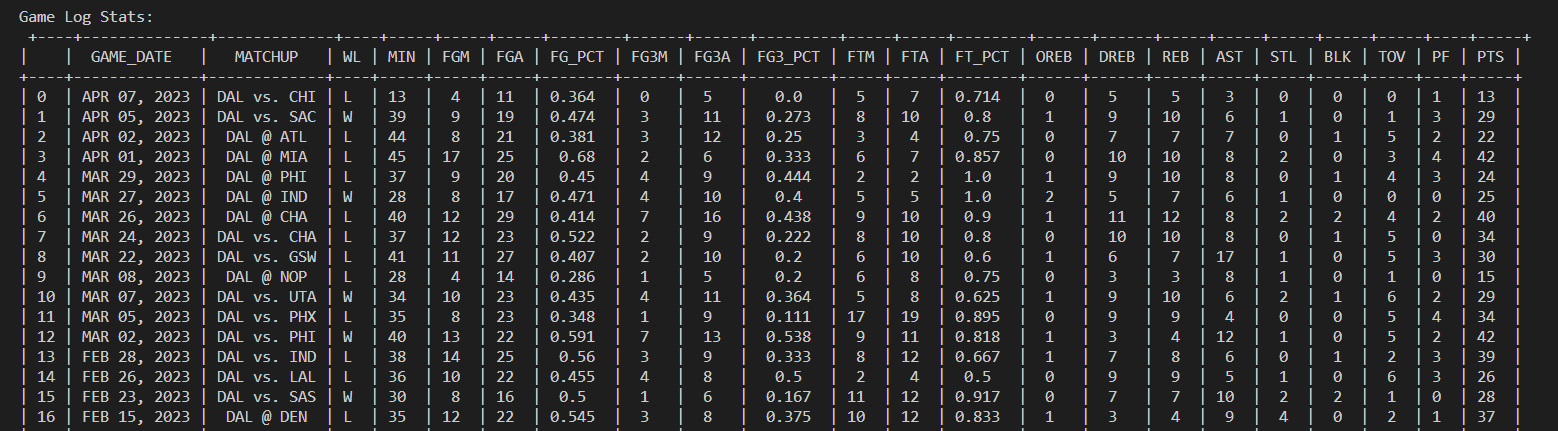
This program uses swar's NBA API to fetch career, season and game log stats for a given NBA player that the program prompts the user to enter. Here is an example of the program running using the NBA Player Luka Doncic:


- Users must have the
nba_apiandtabulatelibraries for Python installed in order for this program to work. The libraries can be installed using the following pip command:pip install nba_api tabulate
This project is based on the following GitHub Repo:
https://github.com/dbisu/pico-ducky
The payload was created by SurfKahuna (RJC)
The payload targets Windows computers. First it opens up Notepad using Run and draws Bart Simpson in ASCII characters then writes the message: "I will learn to lock my computer." several times before locking the computer.
- Download the latest CircuitPython firmware and the Adafruit HID library, you should have a
.UF2file and a.ZIPfile. - Connect the Raspberry Pi Pico (RP2040) to computer using USB-A to Micro-USB cable.
- Put the Pico into bootloader mode by holding down the BOOTSEL button when plugging in the USB.
- The Pico should appear as a mass storage device.
- Move the
.UF2firmware file that was downloaded from Circuit Python's website on to the Pico. - The Pico should now appear as
CIRCUITPY - Extract the contents of the
.ZIPfile that was downloaded from Adafruit HID library and search for the following folder:/adafruit_hid
- Select
adafruit_hidand copy it into thelibfolder inCIRCUITPY - To make a copy of this project you can overwritte the contents of the
payload.ddandcode.pyfile with the code from this repo. Just be forewarned as the code will automatically run upon plugging in the Pico.code.pyis a Python script that converts DuckyScript into MicroPython code for Pico. Thepayload.ddfile is a binary file that contains the keystrokes and other actions that will be executed by the Pico when it is plugged in.
This program uses the BeautifulSoup and requests Python libraries to parse through a given URL from a web forum and extract and download media that is in the form of (.JPG, .PNG, .GIF, .WEBM and .MP4). Here is an example of the program running and downloading media from AVForums, an audiovisual and home entertainment forum:
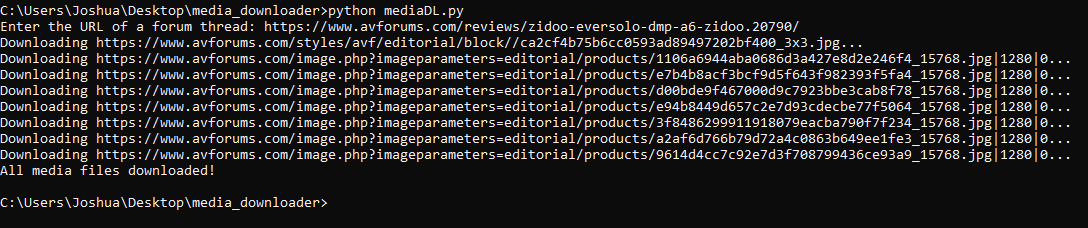
The media that is downloaded will be saved within a folder entitled media within the directory the program is in.
- Users must have the
BeautifulSoupandrequestslibraries for Python installed in order for this program to work. The libraries can be installed using the following pip command:pip install beautifulsoup4 requests