Skip to content

feat: view build info#363

Merged
Insprill merged 8 commits intojpochyla:masterfrom
oleggtro:feat-view-build-info
May 8, 2023
Merged

feat: view build info#363
Insprill merged 8 commits intojpochyla:masterfrom
oleggtro:feat-view-build-info

Conversation

@oleggtro
Copy link
Copy Markdown
Contributor

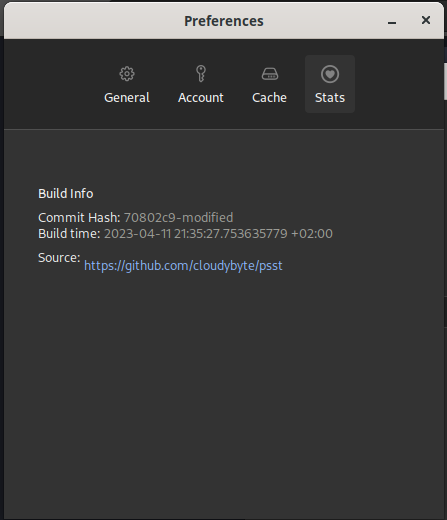
Adding a way to check build info in the preferences

image

Copy link
Copy Markdown
Collaborator

@Insprill Insprill left a comment

Choose a reason for hiding this comment

The reason will be displayed to describe this comment to others. Learn more.

Thank's for the PR! I think it'd be more fitting to add a new 'About' tab that could contain this, along with some other information like a short description of the project, a link to the repo, and the project's license.

Updating all the dependencies should also be done in its own PR.

@oleggtro
Copy link
Copy Markdown
Contributor Author

I like the idea, but need an icon to go with it...
Are they an original creation for the project, or did you download them somewhere?

@jacksongoode
Copy link
Copy Markdown
Collaborator

I agree, if this info could be moved into an info page, along with a link to the source page, that would be nice 🤔

@oleggtro
Copy link
Copy Markdown
Contributor Author

Give me an icon and I should be able to finish this up in the next few days :)

@Insprill
Copy link
Copy Markdown
Collaborator

I'm not sure where @jpochyla got the icons from, so I'd say just use a placeholder for now and we'll figure out the icon before merging.

@arch-btw
Copy link
Copy Markdown
Contributor

Hey guys, I'm new to this project. Let me start off by saying thank you so much! I use psst every day :-)

In regards to the icons used, it appears that it's SF Symbols by Apple.

You can download them here: https://developer.apple.com/sf-symbols/

The symbols used in the Psst menu are called gearshape, key and internaldrive

They are commented here as "SF Pro Regular", but I think that's supposed to be "SF Symbols" because the Pro Regular package doesn't have these symbols.

See here: https://github.com/jpochyla/psst/blob/master/psst-gui/src/widget/icons.rs

@jacksongoode
Copy link
Copy Markdown
Collaborator

Hey guys, I'm new to this project. Let me start off by saying thank you so much! I use psst every day :-)

In regards to the icons used, it appears that it's SF Symbols by Apple.

You can download them here: https://developer.apple.com/sf-symbols/

The symbols used in the Psst menu are called gearshape, key and internaldrive

They are commented here as "SF Pro Regular", but I think that's supposed to be "SF Symbols" because the Pro Regular package doesn't have these symbols.

See here: https://github.com/jpochyla/psst/blob/master/psst-gui/src/widget/icons.rs

Good detective work!

@jpochyla
Copy link
Copy Markdown
Owner

Oops, thanks a lot, yup the icons are indeed from SF Symbols!

@oleggtro
Copy link
Copy Markdown
Contributor Author

Sorry for the long delay, I've had some private stuff going on.
It seems that using Apples SF Symbols is against their license agreement, and thus not legal/at least against their ToS.

This StackOverflow post states that:

Your use of Symbols obtained from Apple’s SF Font is limited to creating mock-ups of user interfaces for software products running on Apple’s iOS, iPadOS, macOS and tvOS operating systems.

Although I wasn't able to verify/locate that sentence on an official Apple website.
I don't know whether they'll pursue us for packaging them, but personally tend to not risk it.

Apart from that, I don't have any way to access them anyways. I don't own a Mac, and they're only distributed as .dmg.

Any thoughts on how to move forward with this? @jpochyla @Insprill

This is looks really bad and there's probably a better way to do this, but idc right now
@oleggtro oleggtro force-pushed the feat-view-build-info branch from b3aad0d to 31cc8bc Compare April 11, 2023 21:31
@oleggtro
Copy link
Copy Markdown
Contributor Author

This is what it looks like rn:
image

The repo url is dynamically generated at compile time with the repos origin url.
We obviously need another icon and probably change the tab's title.
As you can see the URL gets moved(/linewrapped?), but I can't figure out how to keep its position fixed.

Another idea I've had is copying the other two labels into the system's clipboard on click. Maybe a nice QoL feature for troubleshooting?

@oleggtro oleggtro requested a review from Insprill April 13, 2023 07:18
Copy link
Copy Markdown
Collaborator

@Insprill Insprill left a comment

Choose a reason for hiding this comment

The reason will be displayed to describe this comment to others. Learn more.

We'll have to wait on @jpochyla for the icon issue.

Comment thread psst-core/build.rs
Copy link
Copy Markdown
Collaborator

@Insprill Insprill left a comment

Choose a reason for hiding this comment

The reason will be displayed to describe this comment to others. Learn more.

Apologies for how long this took. LGTM. Thank you!

@Insprill Insprill merged commit 801097e into jpochyla:master May 8, 2023
Sign up for free to join this conversation on GitHub. Already have an account? Sign in to comment

Labels

None yet

Projects

None yet

Development

Successfully merging this pull request may close these issues.

5 participants