Generate a pull request title and description from git diff and commit history.
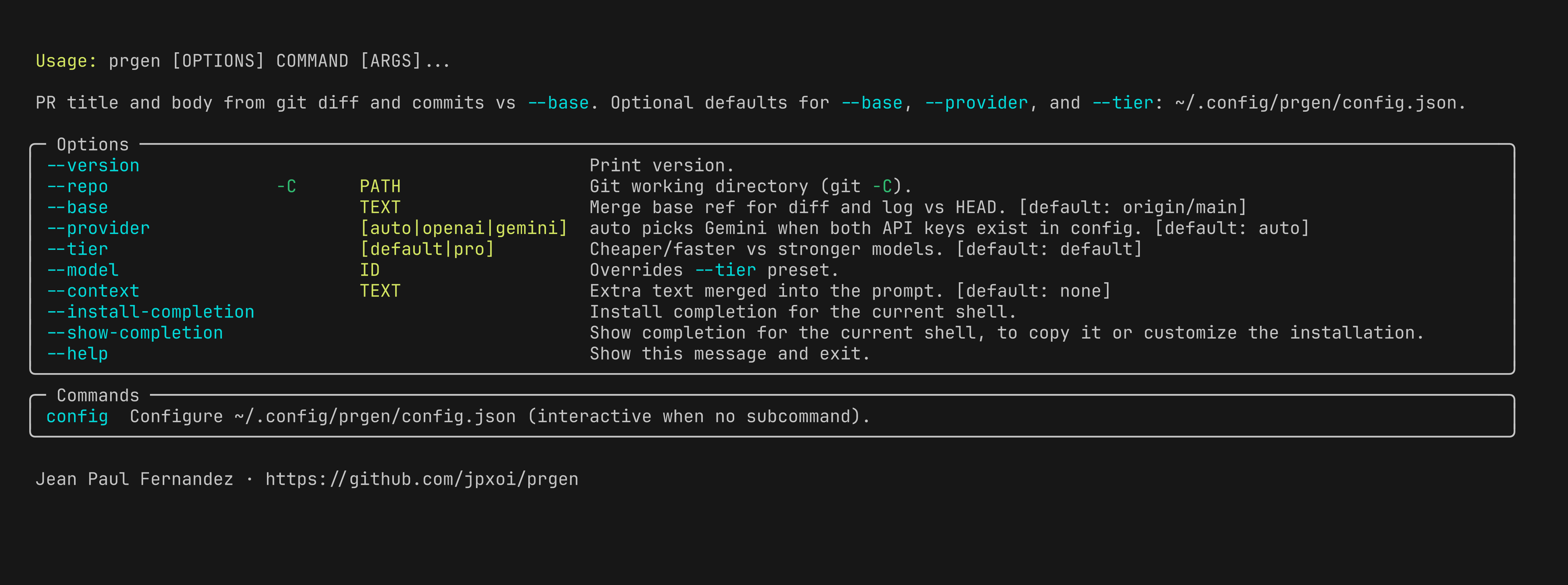
Author: Jean Paul Fernandez · github.com/jpxoi/prgen
Licensed under the GNU General Public License v3.0 (GPL-3.0-only).
- Python 3.10+
giton yourPATH- One of:
- OpenAI API access
- Google Gemini API access
- A local or remote Ollama server
From PyPI:
pip install prgen-cli
# or
uv tool install prgen-cli
From a clone:
uv syncRun the CLI with:
prgen --helpprgen compares HEAD against a base ref, collects:
git diff <base>...HEADgit log <base>..HEAD
It sends that context to an LLM and prints:
- a PR title from
<summary>...</summary> - a PR description from
<body>...</body>
If the model does not return those tags, prgen prints the raw model output instead.
prgen supports three backends:
openaigeminiollama
--provider auto is the default.
In auto mode:
- Gemini is chosen when
GOOGLE_API_KEYis available - otherwise OpenAI is chosen when
OPENAI_API_KEYis available - if neither key is configured, prgen exits with an error
Ollama is always explicit:
- use
--provider ollama - also pass
--model <name> --tierpresets do not apply to Ollama
OpenAI:
prgen config set OPENAI_API_KEY sk-...
prgen
Gemini:
prgen config set GOOGLE_API_KEY your-key
prgen --provider gemini
Ollama:
prgen --provider ollama --model llama3.1:8bIf the Ollama model is missing locally, let prgen pull it:
prgen --provider ollama --model llama3.1:8b --pullConfiguration lives in ~/.config/prgen/config.json.
If XDG_CONFIG_HOME is set, prgen uses:
$XDG_CONFIG_HOME/prgen/config.jsonYou can manage the file with:
prgen config
prgen config show
prgen config path
Supported persisted keys:
OPENAI_API_KEYGOOGLE_API_KEYOLLAMA_HOSTbaseprovidertier
Notes:
OPENAI_API_KEYandGOOGLE_API_KEYare treated as secretsOLLAMA_HOSTis not secret and is merged into the environment if setbase,provider, andtierare optional CLI defaultsmodelandcontextare not persisted in config
Examples:
prgen config
prgen config set OPENAI_API_KEY sk-...
prgen config set GOOGLE_API_KEY your-key
prgen config set OLLAMA_HOST http://127.0.0.1:11434
prgen config set base origin/main
prgen config set provider ollama
prgen config set tier pro
prgen config unset OLLAMA_HOST
prgen config show
To read a secret value from stdin:
prgen config set OPENAI_API_KEY - < key.txtBuilt-in defaults:
| Option | Default | Notes |
|---|---|---|
--repo, -C |
current directory | Uses the current git repo unless you point elsewhere |
--base |
origin/main |
The ref must resolve locally |
--provider |
auto |
Prefers Gemini over OpenAI when both keys exist |
--tier |
default |
Used only for OpenAI and Gemini |
--model |
unset | Overrides tier selection; required for Ollama |
--context |
none |
Extra text merged into the prompt |
--pull |
false |
Only relevant for Ollama |
Config-file defaults apply only when you omit the matching flag:
baseprovidertier
Explicit flags always win over the config file.
Current model presets:
- OpenAI
default:gpt-5-mini - OpenAI
pro:gpt-5.4 - Gemini
default:gemini-3-flash-preview - Gemini
pro:gemini-3.1-pro-preview
Basic usage:
prgenPick a different base:
prgen --base mainRun against another repository:
prgen -C ~/src/my-projectOverride the model directly:
prgen --provider openai --model gpt-5.4
prgen --provider gemini --model gemini-3.1-pro-preview
prgen --provider ollama --model mistral-small3.1
Add extra context:
prgen --context "Focus on customer-facing impact and rollout notes."- prgen validates that
--baseresolves before generating anything - if there are no commits and no file changes vs the base ref, prgen exits with an error
- when
--provider ollama --pullis used, prgen can download the model automatically - when stderr is a TTY, loading states and Ollama downloads use Rich UI output
Install local dependencies:
uv syncFormat and lint:
uv run ruff format .
uv run ruff check .
Run from the repo without installing globally:
uv run prgen --helpInstall the local checkout as a global tool:
uv tool install .
# or
pipx install .