A full-featured configurable Twitch bot to connect with your MIDI equipment while streaming. Allow your viewers to be part of your musical creations!
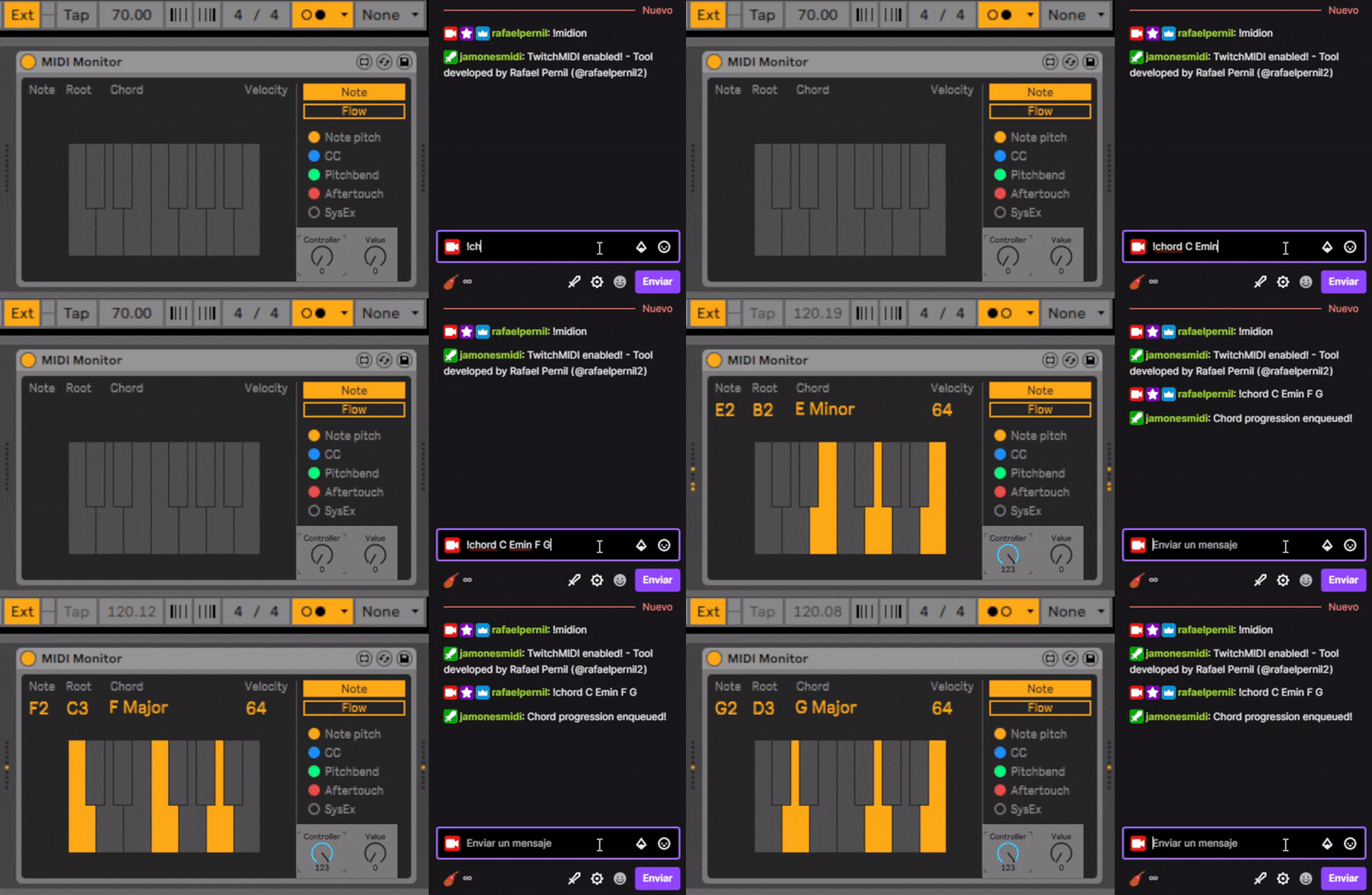
- TwitchMIDI
Latest release - TwitchMIDI for Windows, Linux & MacOS (x86-64)
- Extract the zip
- Run TwitchMIDI-yourplatform (e.g TwitchMIDI-win.exe)
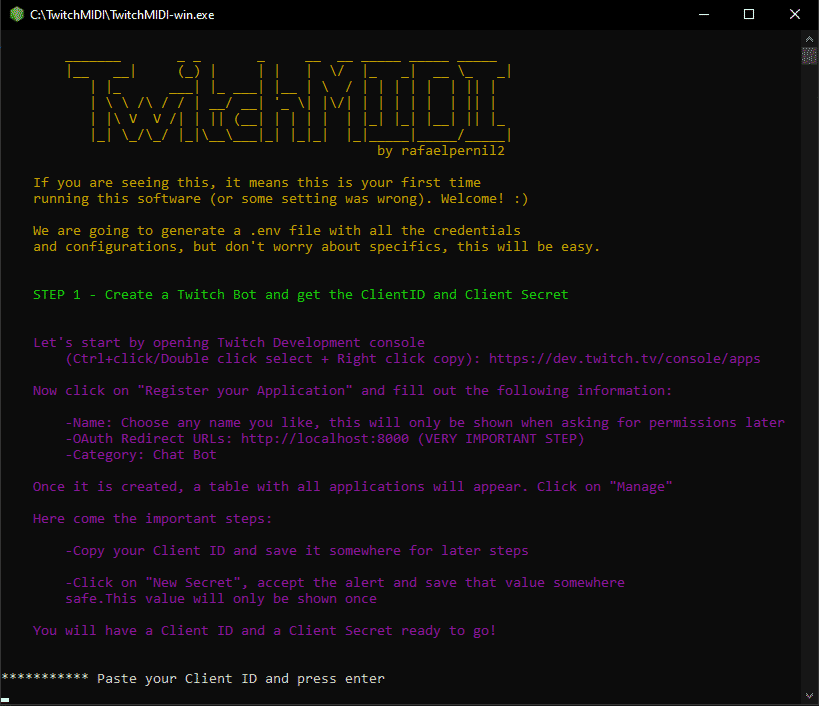
- Follow the configuration steps to link this bot to your account. You will see something like this:
- Done. Have fun!
Note: For MacOS, open a terminal, "cd" into the extracted folder and then execute it from there with "./TwitchMIDI-macos". Otherwise you will get an error like: "no such file or directory, open './config/aliases.json'"
This project was born out of an idea for my music streams (twitch.tv/rafaelpernil) where I play piano and improvise with my synth and drum machine. It is really fun, but I wanted to apply my software engineering skills to make something special for my streams, to provide my viewers a new fun way of interacting with my gear.
I had this idea for months but it was not up until recently that I started to define tangible goals and implement them. My previous project, PolyVolcaWeb using the Web MIDI API gave me the confidence and clarity to start :)
My goals were:
- Create a Twitch bot and process commands
- Create a set of MIDI functionalities such as MIDI clock with tempo adjustments, synced chord progressions, notes, loops, cc messages, macros...
- Unite commands and MIDI functionalities
- Make it fast, suitable for streamers, stable and easy to use
So far, this first version does all that, keep reading the features for more details!
- Wide set of MIDI functionalities:
- High precision MIDI Clock using "nanotimer" with adjustable tempo via !settempo
- Sequencer on 4/4 time signature with infinite subdivisions (1 = Quarter note, 0.5 = 8th note, 0.25 = 16th note...)
- Trigger individual notes or build a chord via !sendnote
- Trigger chord progressions with specific length per chord via !sendchord
- Loop chord progressions via !sendloop
- See the current chord progression via !midicurrentrequest
- Check the chord progression request queue via !midirequestqueue
- Change MIDI velocity via !midivolume
- Send CC (Control Change) messages and sweeps between values via !sendcc
- Clock-Loop synchronizer to correct sync issues via !syncmidi
- Automatic synchronization that forces loops to wait until the start of the beat
- On/Off bot toggle
- Configurable aliases on config/aliases.json
- Commands - Add as many command aliases as you want
- Chord progressions/loops - Add an alias for a chord progresion to play or loop using "name/chords" syntax
- Add chord progressions via !addchord
- Remove chord progression via !removechord
- List all added chord progressions with their name with !chordlist
- Control Change controller names - Put a name to your Control Change controllers (e.g sustain: 64)
- Control Change commands - Assign a set of cc commands
- Sweep functionality, specify two values and the time in milliseconds to get from one value to other (e.g "cutoff 20(5000),cutoff 120(10000)")
- List all added chord progressions with their name with !cclist
- Reload config/aliases.json, config/permissions.json and config/rewards.json file while using the bot with !fetchdb
- Commands explaination with examples via !midihelp commandname
- Fine-grained command access control with role check, whitelist and blackist on config/permissions.json
- Channel Points reward mode enabled via REWARDS_MODE flag and configurable on config/rewards.json
- Set the name of your channel points reward, the command to launch and the price (e.g. "Twitch Midi - Loop": ["!sendloop",100] )
- Automatic enable/disable rewards on !midion/!midioff
- Automatic points refund on bad requests / any kind of error
- Commands only work for the streamer and mods
- Allow VIPs to bypass rewards via VIP_REWARDS_MODE
- Bundle optimized for different operating systems and no extra software required for execution
Shows all commands available and info about each command.
Syntax:
command // (e.g "sendloop")
Turns on the MIDI functionality of the bot
Turns off the MIDI functionality of the bot
Adds a chord progression or loop with an alias to config/aliases.json.
Syntax:
name/chords(chord length in quarter notes) // (e.g. "pop/C G(2) Amin(2) F")
Removes a chord progression or loop with an alias from config/aliases.json.
Syntax:
alias // (e.g. "pop")
Shows all saved chord progressions or loops from config/aliases.json that can be used
Sends a note or a set of notes.
Syntax:
note1 note2 ... // (e.g. "C4 E4 G4")
Sends a chord progression with an alias or with chords.
Syntax:
chord1 chord2(chord length in quarter notes)... // (e.g. "C(4) G Amin(2) F","pop")
Sends a loop with an alias or with chords.
Syntax:
chord1 chord2(chord length in quarter notes)... // (e.g. "C G Amin F","pop")
Sends a MIDI CC message with an alias, code or value sweeps.
Syntax:
controller value,controller2 value2(delay_in_ms) // (e.g. "43 100,43 60", "cutoff sweep", "cutoff 100,cutoff 10(10000)")
Shows the current request being played.
Shows the request queue for chord progressions and loops.
Shows a list of available CC command macros from config/aliases.json
Sets the velocity for the chords/notes/loops.
Syntax:
value between 0 and 100 // (e.g. "50","100")
Stops the loop once it ends
Stops all MIDI messages and sound
Starts the MIDI clock and sets a tempo.
Syntax:
tempo // (e.g. "120", "200")
Restarts the MIDI clock and syncs loop and clock on the next repetition
Refreshes aliases, rewards and permissions configurations from the respective files.
There is no plan regarding contributions in this project.
This software is developed by:
Rafael Pernil Bronchalo - Software Engineer
The format is based on Keep a Changelog, and this project adheres to Semantic Versioning - see the CHANGELOG.md file for details.
All rights reserved