




All-in-one Active Directory management tool built as a WPF GUI in PowerShell.
Manage users, computers, groups, GPOs, shares, DNS, DHCP, network status, and more — from a single polished interface. No ADUC, no MMC snap-ins, no separate consoles.
| System | Domain | Users |
 |
 |
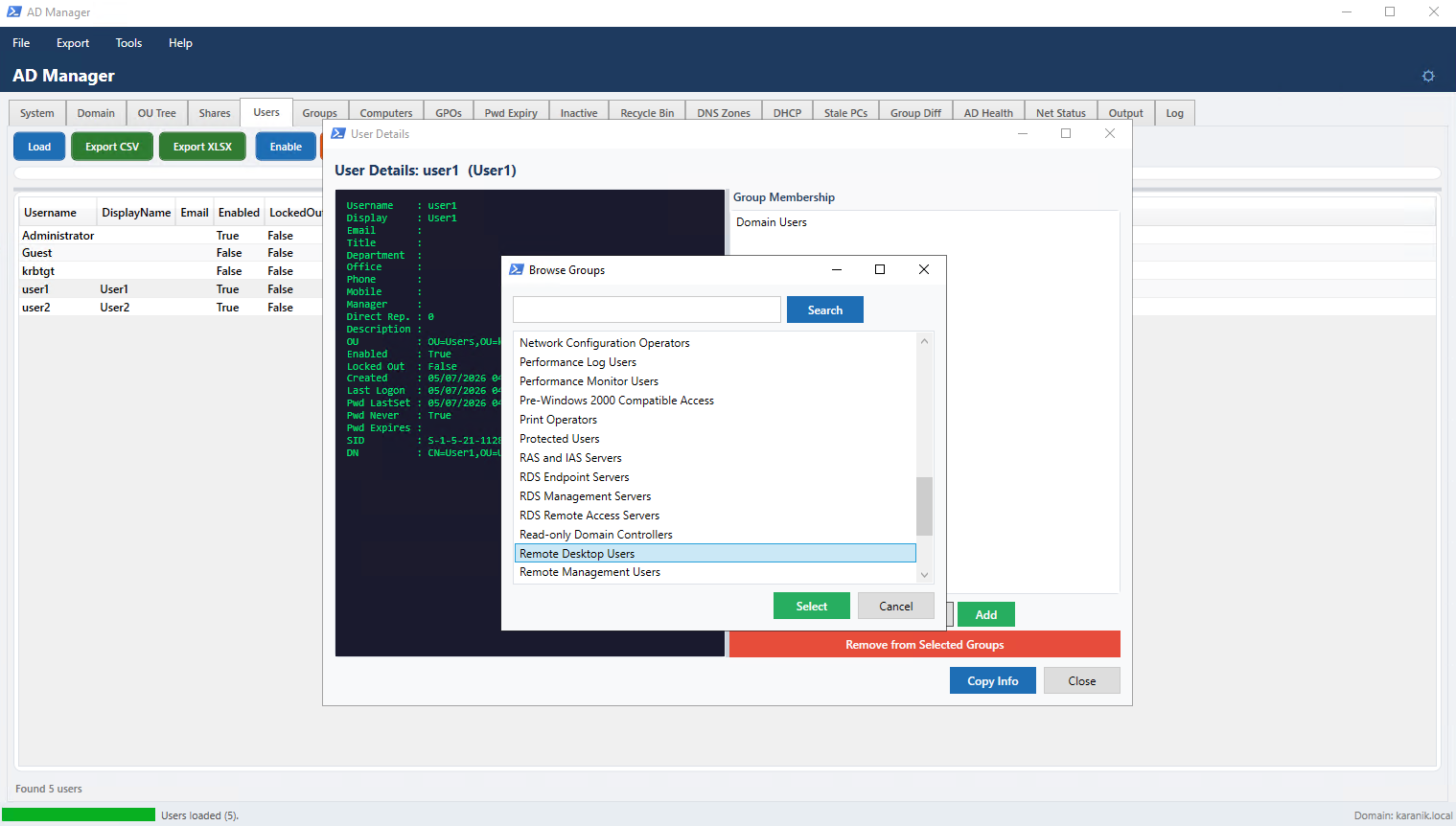 |
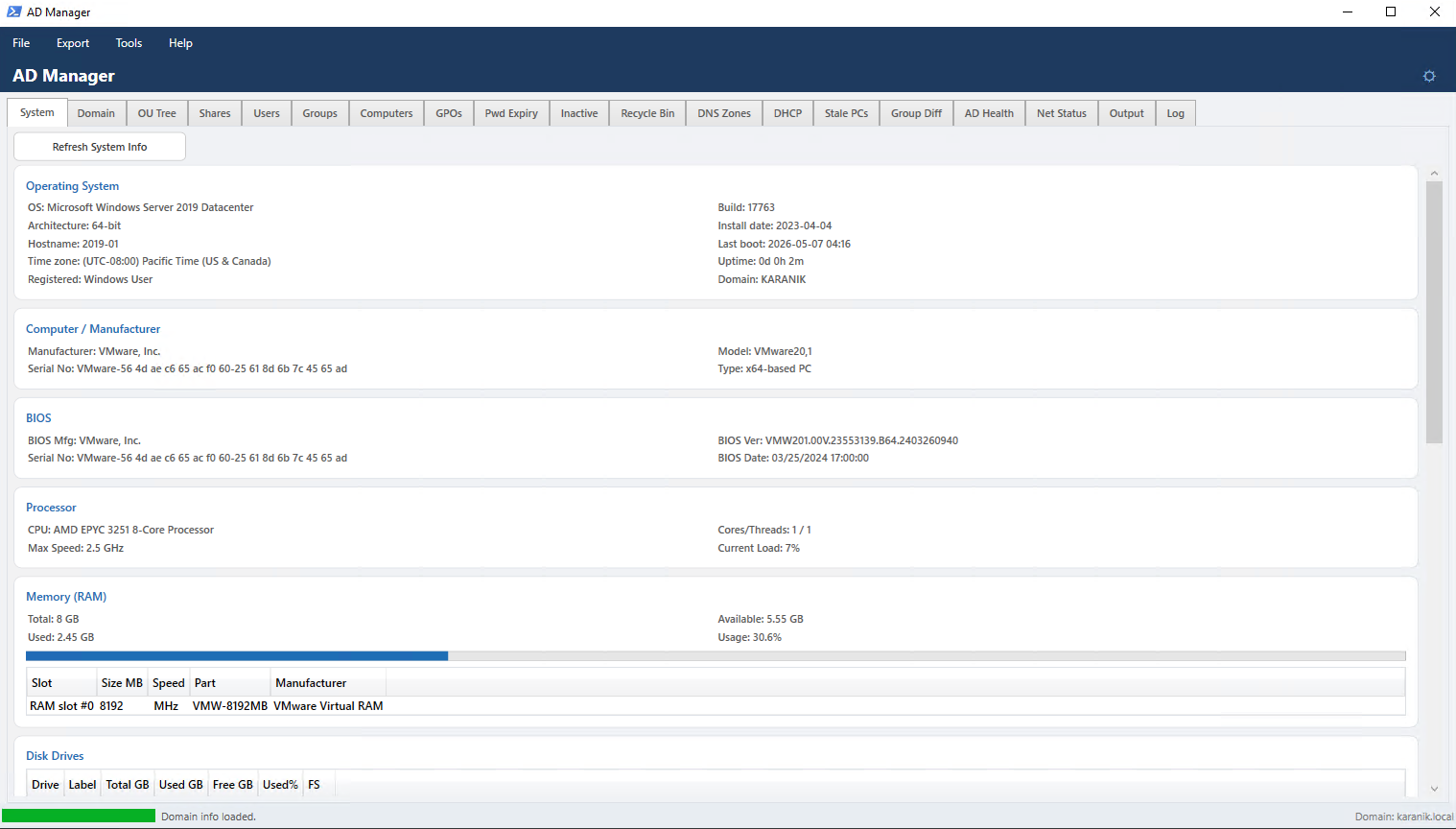
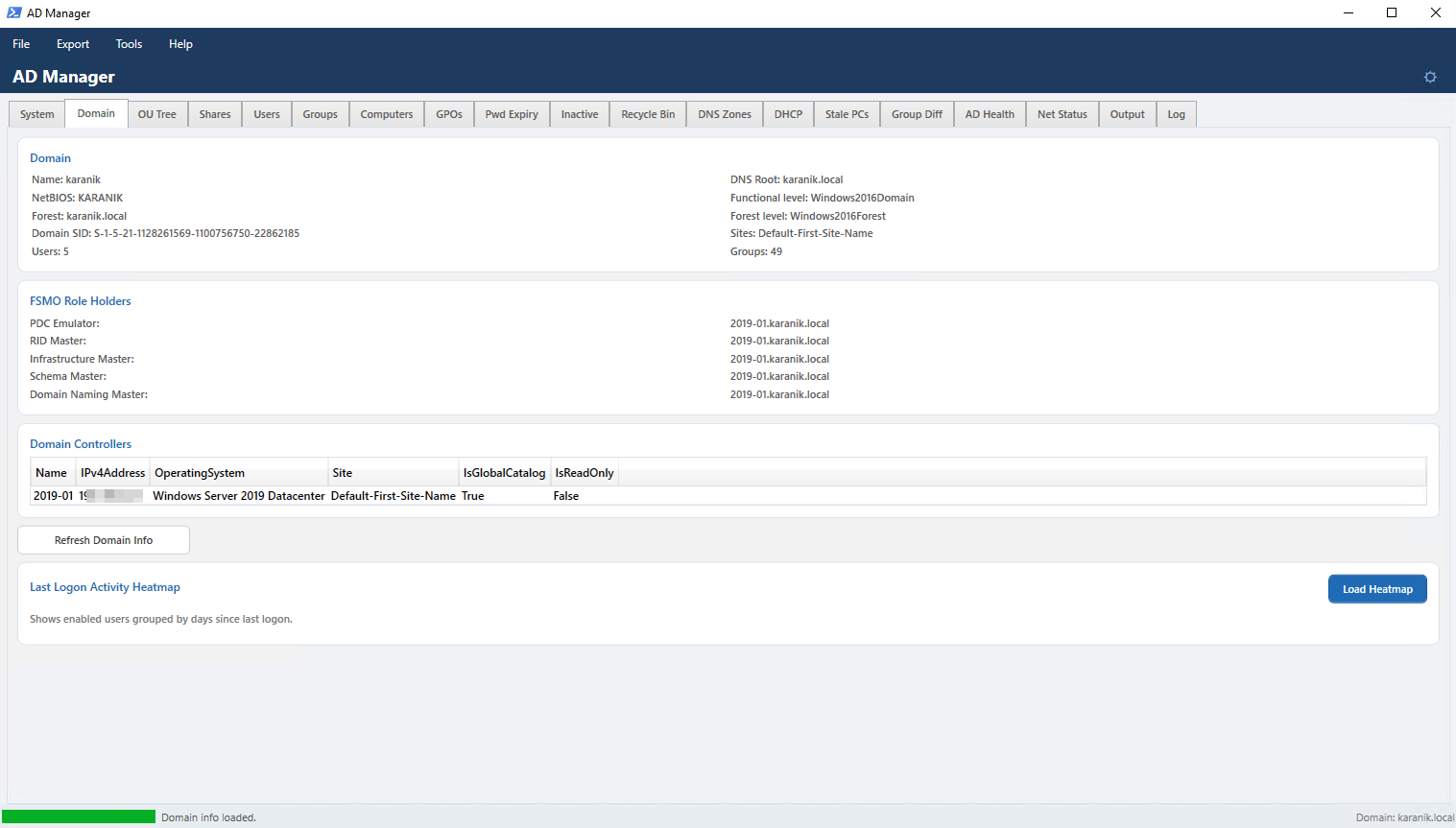
| Local machine info — OS, CPU, RAM, disks, network, services, processes | Domain overview — forest info, FSMO roles, DCs, Last Logon Heatmap | User management — live filter, enable/disable, reset, export |
| Auth Audit | Heatmap | Groups |
 |
 |
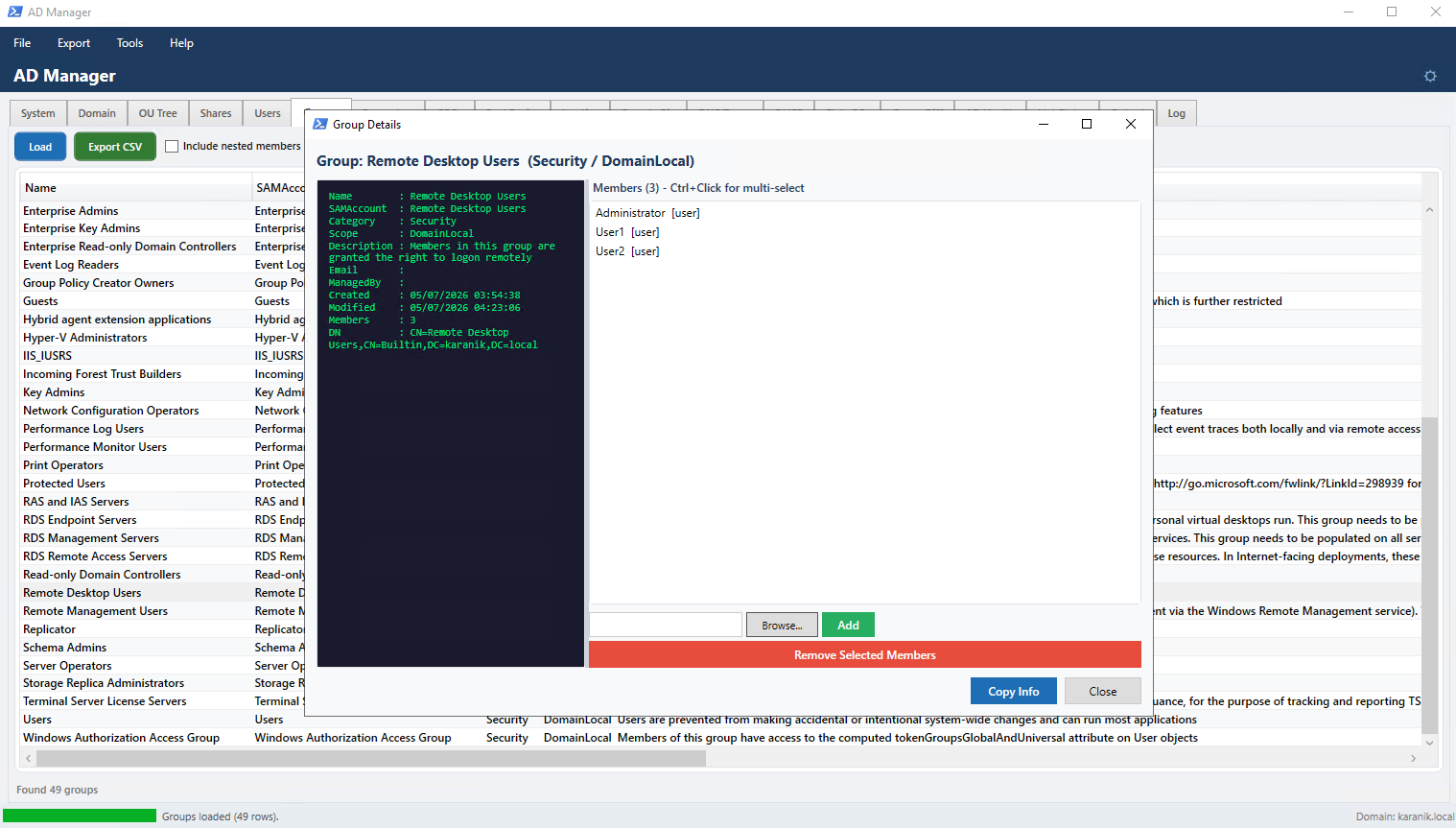 |
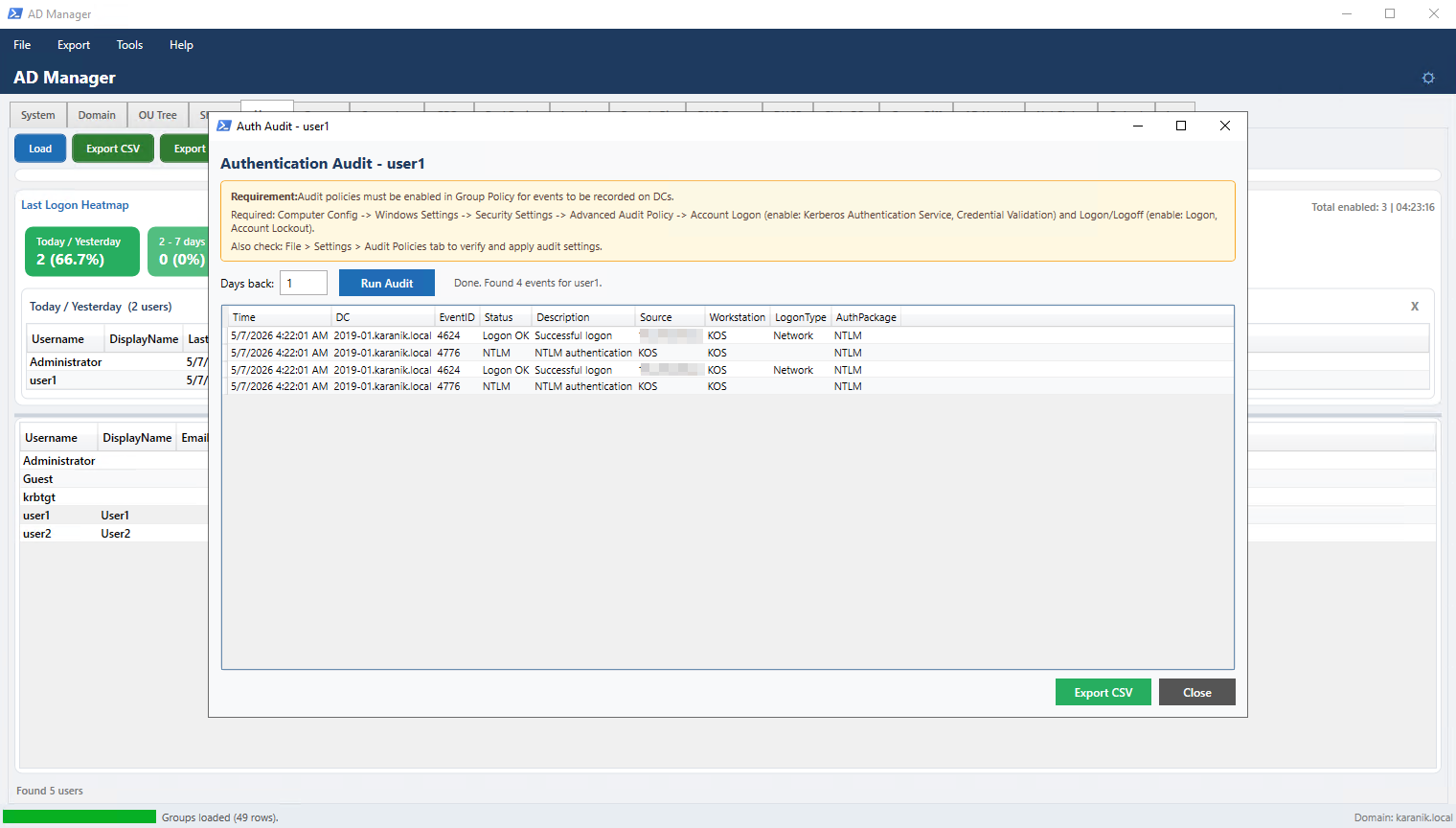
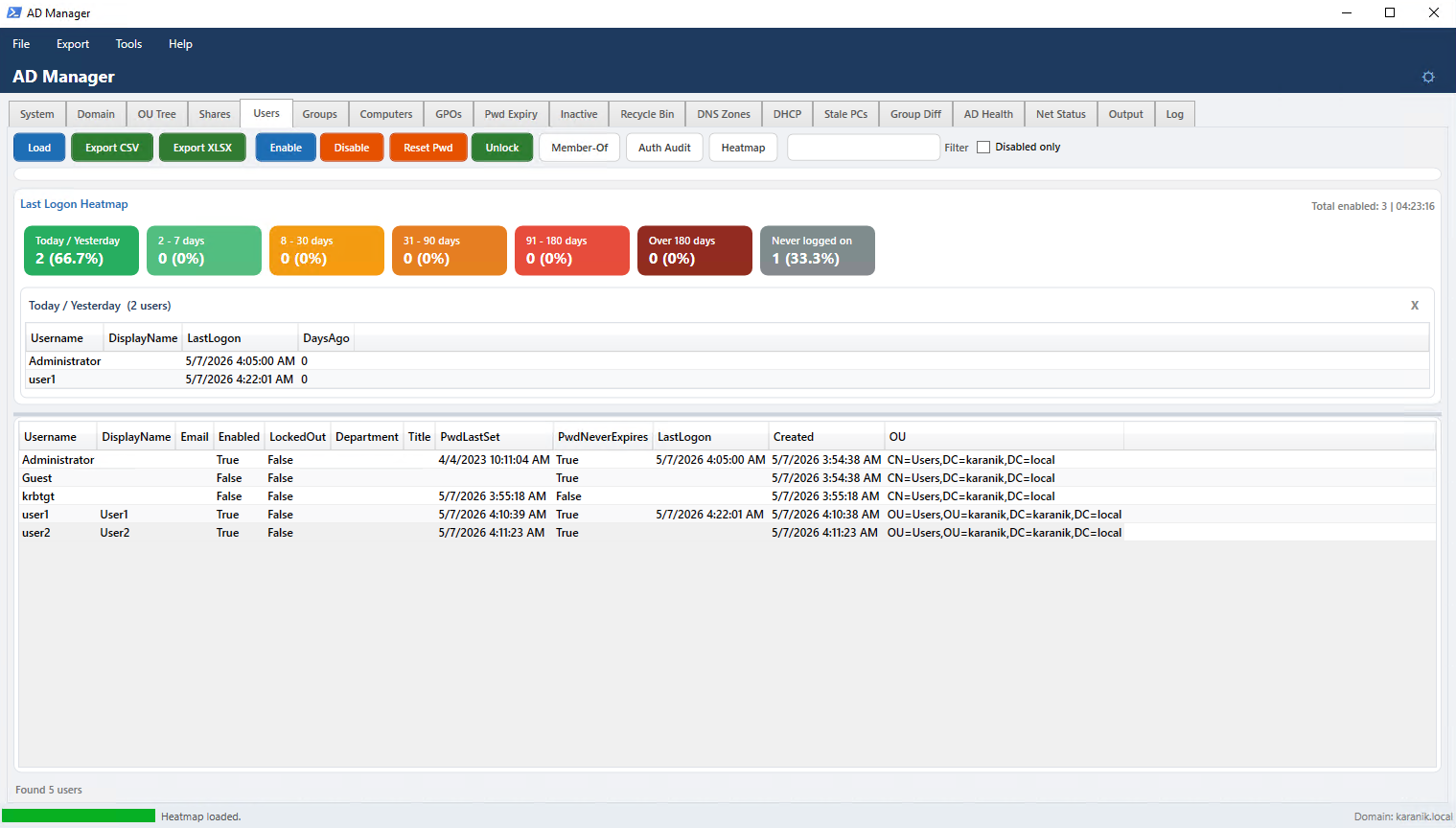
| Per-user authentication events from all DCs (4624, 4768, 4776, 4740...) | Last logon activity heatmap with inline user list on tile click | Group management with Group Details and member add/remove |
| Shares | Net Status | Settings – Audit |
 |
 |
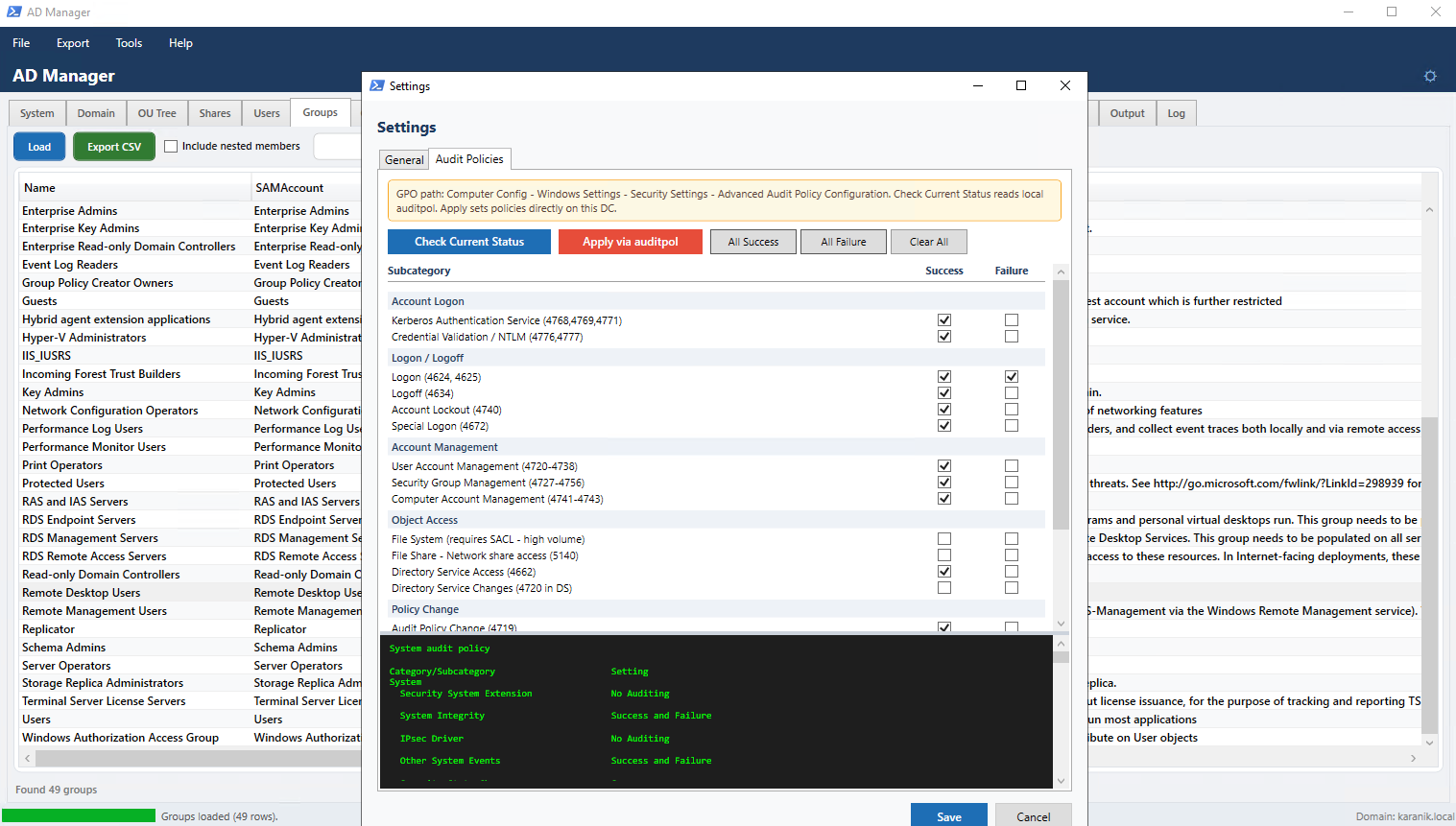 |
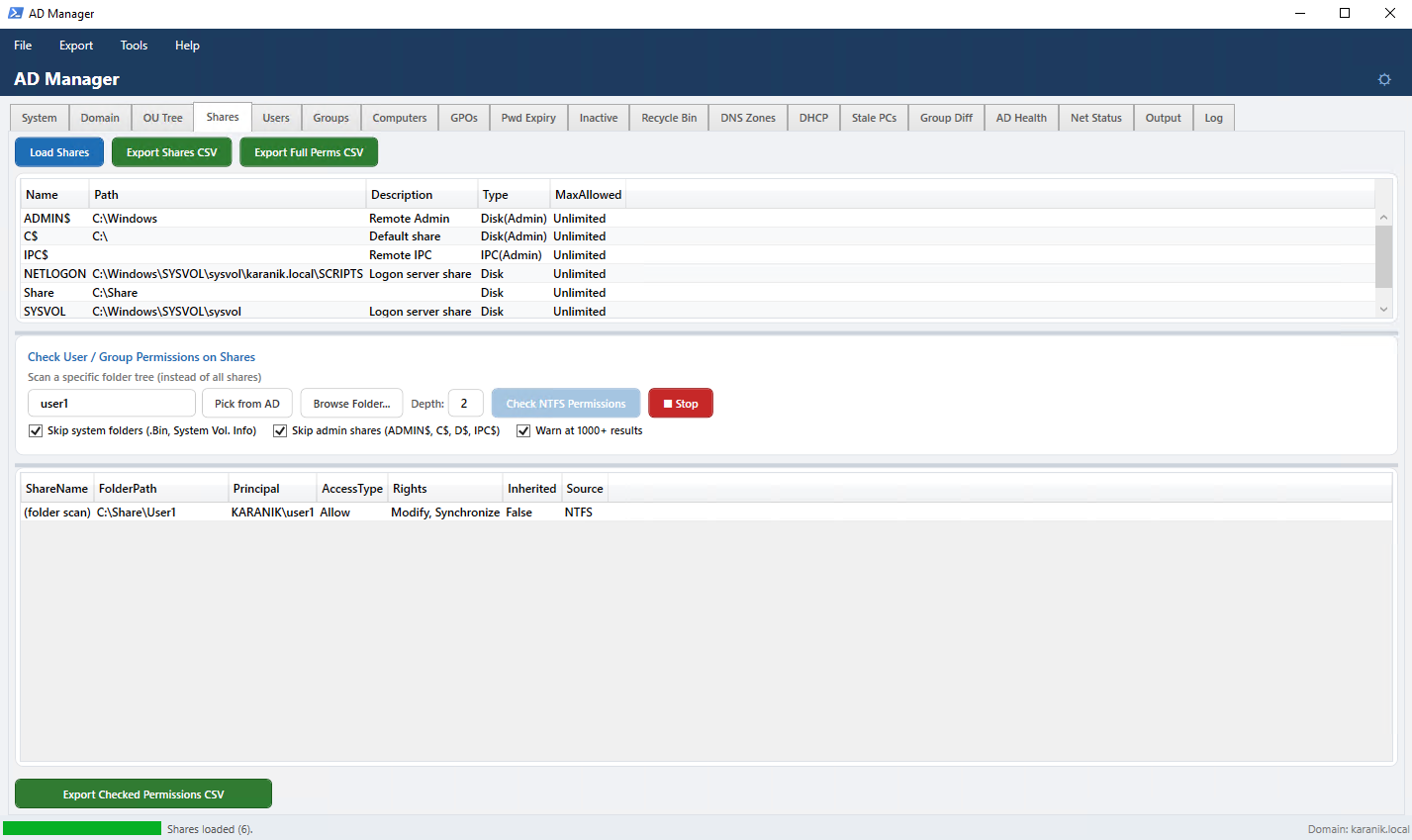
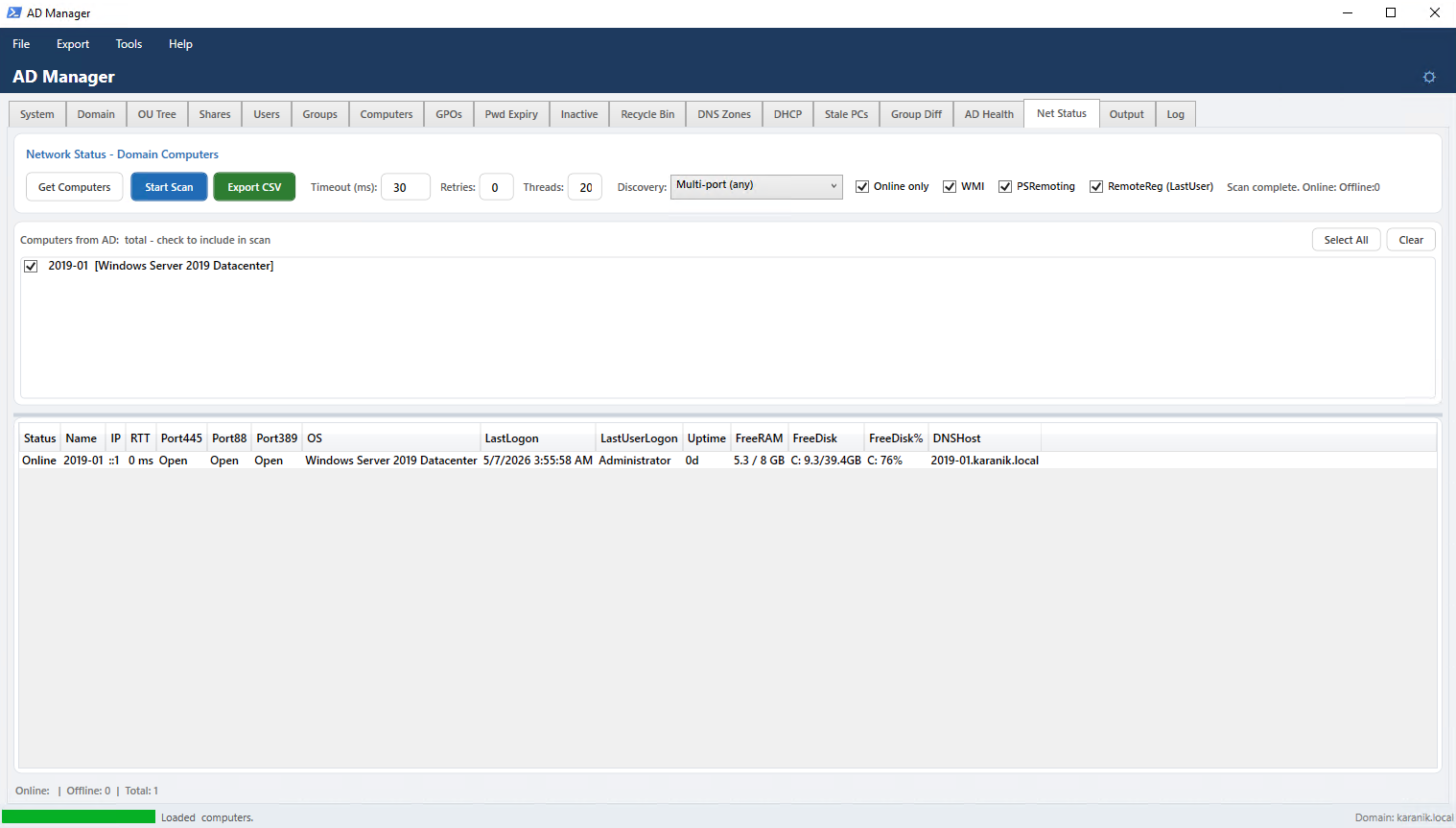
| Share list with ACL display and NTFS permission scanner | Parallel network scanner with port checks, WMI/RemoteReg enrichment, IPv6 | Audit Policies — Success/Failure per subcategory with auto-read from auditpol |
AD Manager is a professional Active Directory administration tool built entirely in PowerShell (~4,800 lines) with a WPF GUI. It provides a unified tabbed interface for the most common — and not so common — AD management tasks.
Designed for IT administrators and sysadmins managing Windows Server domains. Runs directly on a domain controller or any domain-joined machine with RSAT installed. Single .ps1 file, no installation required.
# Run from PowerShell (as Administrator recommended)
Set-ExecutionPolicy -Scope Process Bypass
.\AD_Manager.ps1| Requirement | Details |
|---|---|
| PowerShell | 5.1 (primary target) or 7.x |
| OS | Windows 10/11 or Windows Server 2012 R2+ |
| Module | ActiveDirectory — RSAT on workstation, or run directly on a DC |
| Optional | DnsServer module for the DNS Zones tab |
| Optional | DhcpServer module for the DHCP tab |
| Permissions | Domain Admin or delegated AD permissions as appropriate |
Local machine hardware and software inventory. Loads automatically on startup. All fields support text wrapping — no horizontal scroll.
| Section | Contents |
|---|---|
| Operating System | Caption, architecture, hostname, timezone |
| Computer / Manufacturer | Make, model, serial number |
| BIOS | Manufacturer, version, serial |
| Processor | Name, cores, max speed |
| Memory (RAM) | Total, used, free + per-slot breakdown (size, speed, manufacturer) |
| Disk Drives | Logical (label, total, used, free, used%) and physical drives |
| Network Adapters | Adapter name, MAC, IP, gateway, DNS servers |
| Services | All services with state/start mode/account — live text filter |
| Startup Applications | Items in registry Run keys |
| Top 30 Processes | Sorted by CPU time |
Refresh System Info reloads all sections on demand.
Domain and forest summary. Loads automatically on startup.
- Forest name, functional level, schema version
- Domain name, SID, NetBIOS name
- FSMO roles: PDC Emulator, RID Master, Infrastructure Master, Schema Master, Domain Naming Master
- All Domain Controllers with site, IP, OS, Global Catalog, RODC status
- Object counts (users, groups)
- Last Logon Heatmap — calendar heat tiles by day; click any tile to see which users last logged on that day inline
Organizational Unit hierarchy browser. Export the full structure to CSV.
Local share enumeration with deep NTFS permission scanner.
Top grid — all shared folders (Name, Path, Description, Type, MaxAllowed).
Click a share → immediately shows its root ACL in the bottom grid (Principal, AccessType, Rights, Inherited, Source). The grid updates on click without running a full scan.
Check User / Group Permissions section:
| Control | Description |
|---|---|
| Text box | SAMAccountName or group name to search for |
| Users | Opens AD picker: loads all users on open, live filter, multi-select (Ctrl+Click) |
| Groups | Opens AD picker: loads all groups on open, live filter, multi-select (Ctrl+Click) |
| Browse Folder... | Pick a specific subfolder path to scan instead of all shares |
| Depth | How many subfolder levels to scan (default 2) |
| Check NTFS Permissions | Start scan — if a share is selected, scans only that share; otherwise scans all shares |
| Stop | Cancels the running scan immediately |
Checkboxes:
- Skip system folders (.Bin, System Vol. Info)
- Skip admin shares (ADMIN$, C$, D$, IPC$)
- Warn at 1000+ results
Live progress label below the checkboxes shows current share and folder count during scan.
Result columns: ShareName · FolderPath · Principal · AccessType · Rights · Inherited · Source (Share ACL or NTFS)
Export Shares CSV — exports the share list.
Export Full Perms CSV — exports all root ACLs across all shares.
Export Checked Permissions CSV — exports the last scan results.
Note: Load Shares does not trigger the NTFS scanner. The scanner only runs when you explicitly click "Check NTFS Permissions".
Full AD user management hub.
Toolbar:
| Button | Action |
|---|---|
| Load | Fetch all domain users |
| Export CSV | Export current view to CSV |
| Export XLSX | Export to Excel with formatting |
| Enable / Disable | Toggle selected user(s) with confirmation |
| Reset Pwd | Reset password for selected user |
| Unlock | Unlock a locked-out account |
| Member-Of | Show all groups the selected user belongs to |
| Auth Audit | Authentication event audit for selected user (all DCs) |
| Heatmap | Last logon activity heatmap |
Live filter — type to instantly narrow by username, display name, email, department, or title.
Disabled only checkbox — show only disabled accounts.
Columns: Username, DisplayName, Email, Enabled, LockedOut, Department, Title, PwdLastSet, PwdNeverExpires, LastLogon, Created, OU
Right-click: Copy cell · Copy row · Show user details
Double-click → User Details dialog.
Opens on double-click or right-click → Show user details.
- Left panel (dark console) — full user attributes: Username, Display, Email, Title, Department, Office, Phone, Mobile, Manager, Direct Reports count, Description, OU, Enabled, LockedOut, Created, Last Logon, Pwd LastSet, Pwd Never Expires, Account Expiry, SID, Distinguished Name
- Right panel — Group Membership list (multi-select with Ctrl+Click / Shift+Click)
- Browse... — opens Browse Groups: loads all AD groups on open, searchable by name (partial match), multi-select, adds user to all selected groups
- Add — add to a group typed in the text box
- Remove from Selected Groups — removes user from highlighted groups with confirmation
- Copy Info — copies the info panel text to clipboard
Select a user → click Auth Audit.
Queries all Domain Controllers for the last N days (default 7, max 90). Runs in a background runspace — dialog stays responsive. Stop button cancels mid-scan.
| Event ID | Meaning |
|---|---|
| 4624 | Successful logon (includes logon type: 2=Console, 3=Network, 7=Unlock, 10=RDP) |
| 4625 | Failed logon |
| 4768 | Kerberos TGT request |
| 4769 | Kerberos service ticket request |
| 4771 | Kerberos pre-authentication failure |
| 4776 | NTLM credential validation |
| 4740 | Account lockout |
Result columns: Time · DC · EventID · Status · Description · Source IP · Workstation · Logon Type · Auth Package
Export CSV saves results.
Prerequisite: Audit policies must be enabled in GPO. The yellow notice in the dialog shows the exact path. Use File → Settings → Audit Policies to check and apply.
AD group management with member editing.
Toolbar: Load · Export CSV · Include nested members · live Filter
Columns: Name, SAMAccount, Category, Scope, Description
Right-click: Copy cell · Copy row · Group Details / Members...
Double-click → Group Details dialog.
- Left panel — group info: Name, SAMAccount, Category, Scope, Description, Email, ManagedBy, Created, Modified, Members count, DN
- Right panel — Member list (multi-select)
- Browse... — loads all AD users and groups on open, searchable, multi-select → Add Selected
- Add — add by SAMAccountName
- Remove Selected Members — with confirmation
- Copy Info — copies info panel to clipboard
AD computer account list.
Columns: Name, SAMAccount, DNSHostName, OS, OSVersion, Enabled, LastLogon, Created
Right-click: Copy cell · Copy row · Ping (continuous) · RDP connect
Heatmap — last logon heatmap for computer accounts.
Group Policy Object list.
Columns: Name, ID (GUID), Status, Owner, Created, Modified, UserVersion, ComputerVersion
GPO Link Viewer — shows every GPO-to-OU link across the domain. Export to CSV.
Users whose password will expire within N days (configurable). Export to CSV.
Users and computers with no logon in N days (configurable threshold). Two separate grids. Export to CSV.
Deleted AD objects — requires the AD Recycle Bin feature to be enabled on the domain. Shows object name, class, when deleted, last known parent OU.
Requires DnsServer PowerShell module.
- All DNS zones (name, type, replication scope)
- Click a zone → load its resource records (Name, Type, TTL, RecordData)
- Export to CSV
Requires DhcpServer PowerShell module.
- All DHCP scopes with subnet, range, state, lease count
- Click a scope → load active leases (IP, MAC, hostname, expiry)
- Export to CSV
Computer accounts whose machine account password has not changed in N days (configurable). Indicates machines that may be offline, decommissioned, or disconnected from the domain.
Side-by-side group membership comparison between two AD users. Shows groups unique to each user and groups they share.
Domain health diagnostic checks:
| Check | Method |
|---|---|
| DC Reachability | Ping each DC |
| LDAP | TCP port 389 test per DC |
| Replication | repadmin /replsummary |
| SYSVOL share | SMB accessibility check |
| NETLOGON share | SMB accessibility check |
| GPO Policies | Detect orphaned / unlinked GPOs |
Parallel network scanner for all domain computers.
Controls:
| Control | Description |
|---|---|
| Get Computers | Load AD computer list as scrollable checkboxes — check/uncheck which to scan |
| Select All / Clear | Bulk select/deselect |
| Start Scan | Begin parallel scan |
| Stop | Abort scan |
| Export CSV | Save results |
| Timeout (ms) | Per-host timeout (default 30 ms) |
| Retries | Ping retries (default 0) |
| Threads | Parallel workers via RunspacePool MTA (default 20, max 50) |
| Discovery | Detection method (see below) |
Discovery methods:
| Method | Behavior |
|---|---|
| Ping (ICMP) | Standard ICMP — may be blocked by Windows Firewall |
| TCP 445 (SMB) | SMB port — usually open on domain machines even when ICMP is blocked |
| TCP 88 (Kerberos) | Kerberos KDC port — domain controllers |
| TCP 389 (LDAP) | LDAP port — domain controllers |
| TCP 3389 (RDP) | Remote Desktop port |
| Multi-port (any) | Tries Ping → 445 → 88 → 389 → 3389 in sequence (default) |
Enrichment options:
| Checkbox | What it adds |
|---|---|
| Online only | Hides offline machines |
| WMI | Uptime, Free RAM, Free Disk via CIM/WMI |
| PSRemoting | Same enrichment via PowerShell Remoting (fallback) |
| RemoteReg (LastUser) | Last logged-on username from remote registry |
Result columns: Status · Name · IP · IPv6 · RTT · Port445 · Port88 · Port389 · OS · LastLogon · LastUserLogon · Uptime · FreeRAM · FreeDisk · FreeDisk% · DNSHost
Right-click on results: Copy cell · Copy row · Ping (continuous) · RDP connect
Scan runs in a background RunspacePool (MTA). Grid updates live every 5 results. IPv6 address resolved via DNS and shown in separate column.
Live console showing every PowerShell command executed by the tool, with timestamps. Auto-scroll toggle. Save to file.
Timestamped session event log — every action, warning, and error. Save to file.
| Item | Action |
|---|---|
| Export Current Tab | Export the active tab's grid to CSV |
| Settings | Open Settings dialog |
| Exit | Close the application |
- Keyboard shortcuts (F5 = Refresh, Ctrl+E = Export, Ctrl+F = Filter focus)
- Feature toggles: live filter on DataGrids, confirm before destructive actions, show row count
Full audit policy configurator. Each subcategory has independent Success and Failure checkboxes in a scrollable table with a resizable output console (GridSplitter).
Categories:
| Category | Subcategory | Key Events |
|---|---|---|
| Account Logon | Kerberos Authentication Service | 4768, 4769, 4771 |
| Account Logon | Credential Validation / NTLM | 4776, 4777 |
| Logon/Logoff | Logon | 4624, 4625 |
| Logon/Logoff | Logoff | 4634 |
| Logon/Logoff | Account Lockout | 4740 |
| Logon/Logoff | Special Logon | 4672 |
| Account Management | User Account Management | 4720–4738 |
| Account Management | Security Group Management | 4727–4756 |
| Account Management | Computer Account Management | 4741–4743 |
| Object Access | File System | (requires SACL) |
| Object Access | File Share | 5140 |
| Object Access | Directory Service Access | 4662 |
| Object Access | Directory Service Changes | 4720 (DS) |
| Policy Change | Audit Policy Change | 4719 |
| Policy Change | Authentication Policy Change | 4706, 4707 |
| Privilege Use | Sensitive Privilege Use | 4672, 4673 |
| System | Security State Change | 4608, 4609 |
| System | System Integrity | 4612 |
Each row has a detailed tooltip: event IDs, practical use case, volume warnings, and exact GPO path (Computer Configuration → Policies → Windows Settings → Security Settings → Advanced Audit Policy Configuration → [Category] → Audit [Subcategory]).
Buttons:
| Button | Action |
|---|---|
| Check Current Status | Runs auditpol /get /category:* and auto-ticks checkboxes |
| Apply via auditpol | Applies all checked Success/Failure settings using auditpol.exe (Admin required) |
| All Success | Tick all Success checkboxes |
| All Failure | Tick all Failure checkboxes |
| Clear All | Untick everything |
Used in the Shares tab (Users and Groups buttons) and User/Group Details dialogs.
- Loads all AD users or groups immediately on open
- Live filter — type to filter the list in real time (no Search button needed)
- Multi-select — Ctrl+Click or Shift+Click for multiple selections
- Double-click selects and closes
- Item count shown:
45 / 123 items
Click any column header in any grid to sort ascending. Click again for descending. Sort indicator (▲▼) shown on the active column. Works across all tabs using PSObject.Properties[$p].Value for reliable PS 5.1 compatibility.
Live Filter — Users, Groups, Computers tabs support real-time text filtering without reloading from AD.
Heatmaps — Calendar heat tiles showing Last Logon distribution by day. Click any tile to see which accounts last logged on that day.
Export — CSV export on all major grids. Users tab additionally supports Excel (.xlsx) export.
Runspace Architecture — Net Status scan, NTFS Permissions scan, and Auth Audit run in separate PowerShell runspaces (background threads) keeping the UI fully responsive. All have Stop buttons for clean cancellation.
Stop mechanism (NTFS scan) — Uses a synchronized hashtable AND a temp file (%TEMP%\ADMgr_StopScan.tmp) as dual inter-runspace cancel signals for reliable stopping across PS 5.1 runspace boundaries.
AD_Manager.ps1    # Single self-contained script (~4,800 lines)
README.md         # This file
Net Status tab
- Parallel RunspacePool scanner (MTA threading); six discovery methods; WMI + PSRemoting + RemoteReg enrichment
- Port445 / Port88 / Port389 columns; IPv6 column (DNS-resolved)
- Live progress counter; Stop button; Export CSV; RDP and Ping context menu
- Scrollable computer checklist with Select All / Clear
Shares tab
- Click a share → immediate ACL display in bottom grid (no scan needed)
- Users and Groups picker buttons replace "Pick from AD" — load all items on open, live filter, multi-select
- Load Shares no longer triggers the NTFS scanner
- NTFS scan Stop button works reliably via temp file signal
- Live progress label during scan showing current share/folder count
Users tab
- User Details dialog: full attribute panel + group membership editor
- Browse Groups: loads all on open, search filter, multi-select add
- Auth Audit: per-user authentication events from all DCs, background runspace, Stop button, Export CSV
- GPO prerequisite notice with exact path
Groups tab
- Group Details dialog: full info panel + member list with Browse Users/Groups (multi-select), Add/Remove
Settings → Audit Policies tab
- Success/Failure checkbox table per subcategory
- Check Current Status reads
auditpoland auto-ticks checkboxes - Apply via auditpol; All Success / All Failure / Clear All
- Rich tooltips with exact GPO paths
- Resizable output console via GridSplitter
Column sorting
- Universal sort handler on all DataGrids
- Uses
PSObject.Properties[$p].Valuefor PS 5.1 compatibility - Direction toggle with ▲▼ indicator
Computers tab
- RDP and Ping context menu items
System tab
- TextWrapping on all stat fields — no horizontal scroll
- Initial WPF GUI release — 19 tabs
- Live filter on Users / Groups / Computers
- Last logon heatmap (Domain and Users tabs)
- Export CSV and XLSX
- Member-Of viewer
- NTFS permission recursive scanner
- GPO link viewer
- AD Health diagnostic suite
Nikolaos Karanikolas
karanik.gr · github.com/karanikn
Developed with the assistance of Claude (Anthropic) and ChatGPT (OpenAI) for code generation, architecture decisions, and debugging.
This tool is provided as-is for administrative use in Windows Active Directory environments. Always test in a non-production environment before deploying to production. The author is not responsible for unintended changes to Active Directory. All operations that modify AD (enable/disable accounts, password resets, group membership changes) prompt for confirmation when the relevant setting is enabled. Audit policy changes made via the Settings dialog apply directly to the local machine using auditpol.exe and require Administrator privileges.