Pasteable is a dependency free library that will allow you to paste text into any HTML element. Try it!
Click on the text input and it receives the focus...
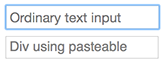
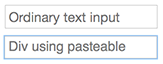
...then click on the element using pasteable and it receives the focus.
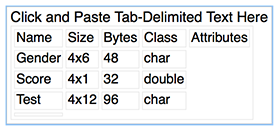
In the "test" folder there is an Simple Grid Example using Angular.
Click..

...and paste!
<html>
  <head>
    <script src="../pasteable.js"></script>
    <script src="https://ajax.googleapis.com/ajax/libs/angularjs/1.4.9/angular.min.js"></script>
    <script src="PasteCtrl.js"></script>
    <link rel="stylesheet" href="style.css" />
  </head>
  <body ng-app="PasteApp" ng-controller="PasteCtrl">
    <h4>Simple Grid Example</h4>
    <div id="my_element">Click and Paste Tab-Delimited Text Here
      <!--
      The elements below will render a multi-dimensional array into a grid
      -->
      <table id="my_grid">
        <tr ng-repeat="row in grid_data track by $index">
          <td ng-repeat="col in row track by $index">{{col}}</td>
        </tr>
      <table>
    </div>
  </body>
</html>var PasteApp = angular.module("PasteApp",[]);
PasteApp.controller('PasteCtrl', function ($scope, $http, $rootScope){
$scope.grid_data = [];
/************************************
* Initialize your pasteable element
************************************/
var s = pasteable({selectElement:'#my_element'});
s.addEventListener('paste', function(e){
/************************************
* Parse the pasted data into a multi-
* dimensional array and allow Angular
* template to render it into a grid.
************************************/
var rows = e.detail.split(/\n/);
for(var r in rows){
var columns = rows[r].split(/\t/);
$scope.grid_data.push(columns);
}
$scope.$apply();
});
});