This is a small Katalon Studio project for demonstration purpose. This project proposes a solution to the problem raised at the topic in the Katalon Community :
The original poster argued:
zedromason Nov 12 Hello, is there a setting to generate an HTML file so it can be accessed immediately before the test script is finished? I’m having trouble. I manually integrated Jira with a listener and uploaded supporting documents to Jira. The only files my script can upload are .png and console0, but the HTML file isn’t found because it only appears after the script finishes running.
Katalon Studio generates HTML report after the Test Suite is entirely finished; after the @AfterTestSuite-annotated method in Test Listener finished. But I want to generate the HTML HTML report in the @AfterTestSuite-annotated method and post-process the file further (e.g., upload to JIRA).
A @AfterTestSuite-annotated method in my Test Listener should invoke the processing of generating the built-in HTML report. I would not rely on Katalon Studio to generate it. I will trigger it myself.
I developed a Test Listener Test Listeners/GenerateTestSuiteReports.groovy, which is as follows:
import java.nio.file.Files
import java.nio.file.Path
import java.nio.file.Paths

import com.kms.katalon.core.annotation.AfterTestSuite
import com.kms.katalon.core.configuration.RunConfiguration
import com.kms.katalon.core.context.TestSuiteContext
import com.kms.katalon.core.logging.KeywordLogger
import com.kms.katalon.core.logging.model.TestSuiteLogRecord
import com.kms.katalon.core.reporting.ReportWriterUtil
import com.kms.katalon.core.reporting.ReportWriterUtil.SuiteReportGenerationOptionsBuilder
import com.kms.katalon.core.reporting.pdf.TestSuitePdfGenerator
import com.kms.katalon.core.reporting.pdf.exception.JasperReportException
import com.kms.katalon.core.setting.ReportBundleSettingStore
import com.kms.katalon.core.setting.ReportSettings
import com.kms.katalon.core.util.internal.ExceptionsUtil


class GenerateTestSuiteReports {

	@AfterTestSuite
	def afterTestSuite(TestSuiteContext testSuiteContext) {
		// generate test-suite-report.html file
		Path htmlReport = ReportGenerator.generateHTMLReport("test-suite-report.html")
		println "HTML report: " + htmlReport.toString()

		// generate test-suite-report.pdf file
		Path pdfReport = ReportGenerator.generatePDFReport("test-suite-report.pdf")
		println "PDF report: " + pdfReport.toString()
	}


	/**
	 *
	 */
	private class ReportGenerator {

		private static final KeywordLogger logger = KeywordLogger.getInstance(ReportGenerator.class);

		private static Path projectDir = Paths.get(RunConfiguration.getProjectDir()).toAbsolutePath()
		private static Path reportFolder = Paths.get(RunConfiguration.getReportFolder()).toAbsolutePath()
		private static ReportSettings settings = ReportBundleSettingStore.getStore(projectDir.toString()).getSettings()

		static void validateParams() {
			assert Files.exists(projectDir)
			assert settings != null
			assert Files.exists(reportFolder)
		}

		static Path generateHTMLReport(String htmlFileName) {
			validateParams()
			Path htmlReport = reportFolder.resolve(htmlFileName).toAbsolutePath()
			TestSuiteLogRecord testSuiteLogRecord = ReportWriterUtil.parseTestSuiteLog(reportFolder.toString())
			ReportWriterUtil.writeHTMLReport(
				SuiteReportGenerationOptionsBuilder.create()
					.suiteLogRecord(testSuiteLogRecord)
					.settings(settings)
					.reportDir(reportFolder.toFile())
					.outputFile(htmlReport.toFile())
					.build())
			return htmlReport
		}

		static Path generatePDFReport(String pdfFileName) {
			validateParams()
			Path pdfReport = reportFolder.resolve(pdfFileName).toAbsolutePath()
			TestSuiteLogRecord testSuiteLogRecord = ReportWriterUtil.parseTestSuiteLog(reportFolder.toString())
			TestSuitePdfGenerator pdfGenerator = new TestSuitePdfGenerator(testSuiteLogRecord);
			try {
				pdfGenerator.exportToPDF(pdfReport.toString());
			} catch (JasperReportException e) {
				logger.logWarning(ExceptionsUtil.getStackTraceForThrowable(e));
				throw new IOException(e);
			}
			return pdfReport
		}
	}
}
With this Test Listener implemented, I ran a Test Suite. In the Reports folder, I could find a new file named test-suite-report.html and a new PDF file named test-suite-report.pdf were generated by my Test Listener.
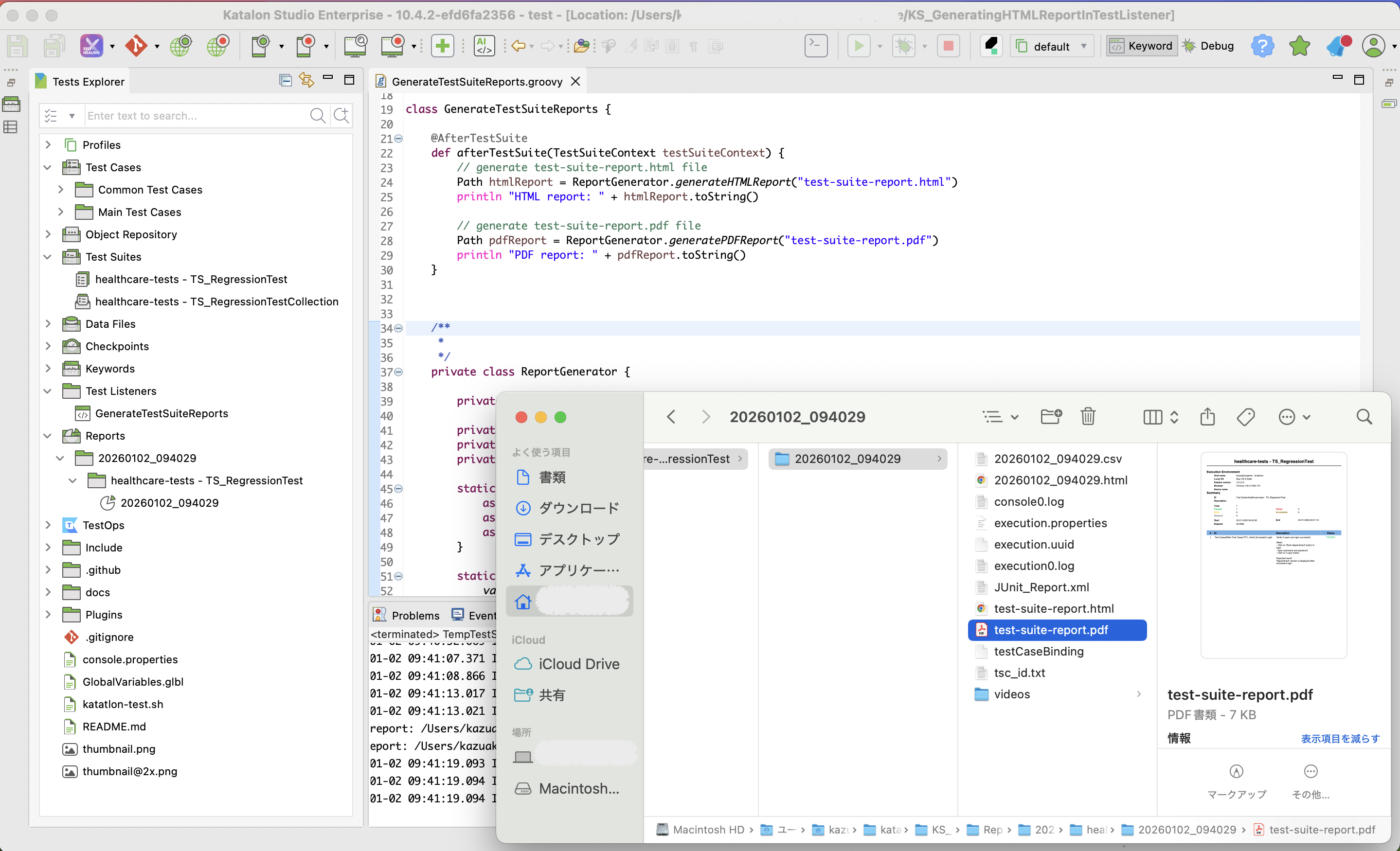
The test-suite-report.html and test-suite-report.pdf looked just fine. I found nothing wrong in the new reports.
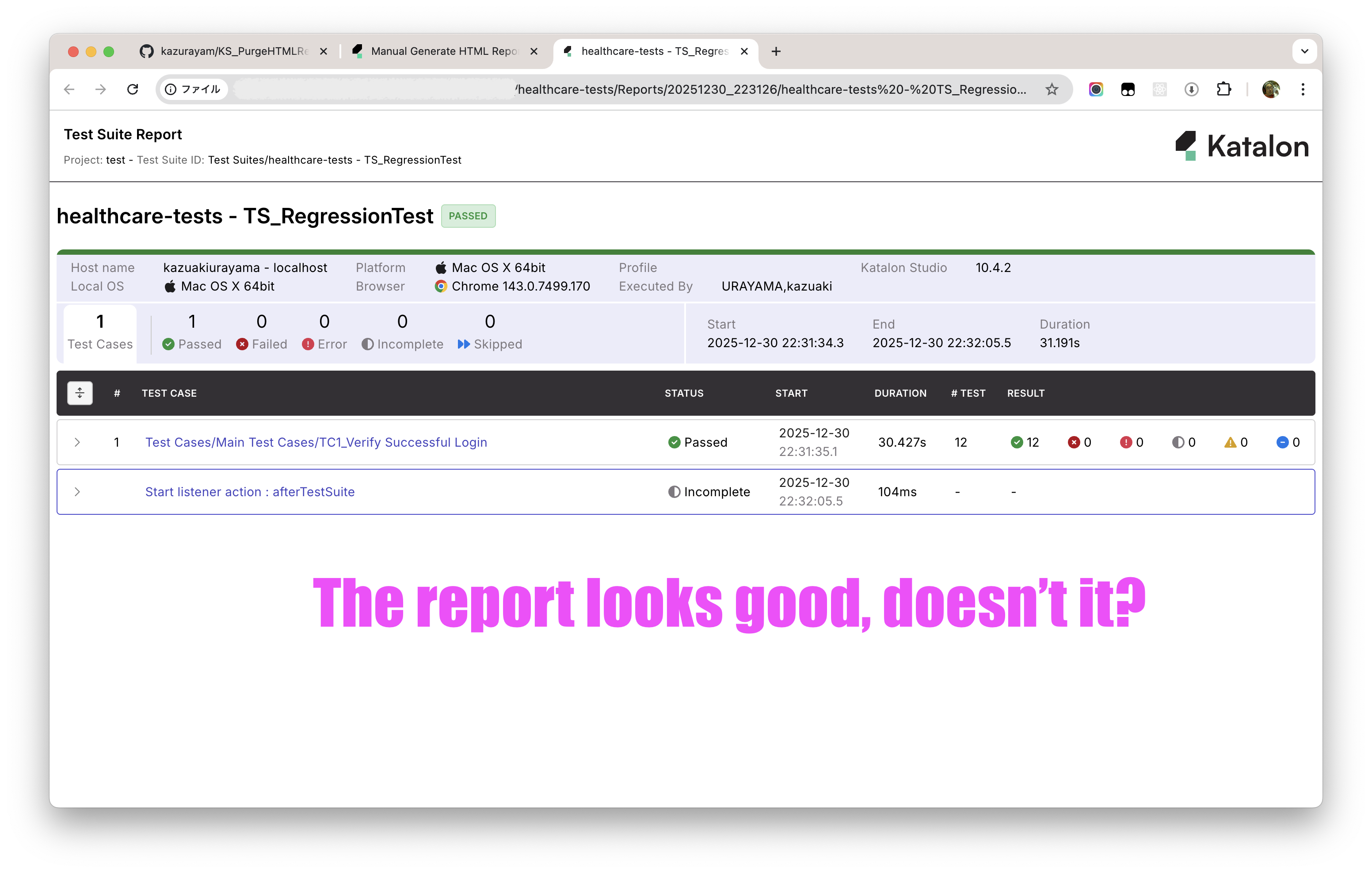


I can do any post-processing over these forcibly-generated reports in my @AfterTestSuite-annotated method in my TestListener. For example, I can upload the files to any external locations such as JIRA, GitHub Issues, Slack etc.
Every Katalon studio installation contains the source codes of com.kms.katalon.core.* classes. You can find it in the $KATALON_STUIO_INSTALLATION_FOLDER/configuration/resources/source. I read the source code. of com.kms.katalon.core.reporting.KatalonExportReportProvider class. Especially the exportTestSuite method was most interesting, which looks as follows:
    @Override
    public File exportTestSuite(File exportLocation, String projectDir, String reportId, String formatType)
            throws IOException, URISyntaxException, XMLParserException, XMLStreamException {
        var settings = ReportBundleSettingStore.getStore(projectDir).getSettings();
        File reportFolder = new File(projectDir, reportId);
        TestSuiteLogRecord testSuiteLogRecord = ReportWriterUtil.parseTestSuiteLog(reportFolder.getAbsolutePath());
        switch (formatType) {
            case "HTML":
                ReportWriterUtil.writeHTMLReport(SuiteReportGenerationOptionsBuilder.create()
                        .suiteLogRecord(testSuiteLogRecord)
                        .settings(settings)
                        .reportDir(reportFolder)
                        .outputFile(exportLocation)
                        .build());
                return exportLocation;
            case "CSV (Summary)":
                ReportWriterUtil.writeLogRecordToCSVFile(testSuiteLogRecord, exportLocation,
                        Arrays.asList(testSuiteLogRecord.filterFinalTestCasesResult()), false);
                return exportLocation;
            case "CSV (Details)":
                ReportWriterUtil.writeLogRecordToCSVFile(testSuiteLogRecord, exportLocation,
                        Arrays.asList(testSuiteLogRecord.filterFinalTestCasesResult()), true);
                return exportLocation;
            case "PDF":
                TestSuitePdfGenerator pdfGenerator = new TestSuitePdfGenerator(testSuiteLogRecord);
                try {
                    pdfGenerator.exportToPDF(exportLocation.getAbsolutePath());
                } catch (JasperReportException e) {
                    logger.logWarning(ExceptionsUtil.getStackTraceForThrowable(e));
                    throw new IOException(e);
                }

                return exportLocation;
            default:
                break;
        }

        return null;
    }
I thought that Katalon Studio calls this method to generate the HTML report. The method signature was easy to understand. I would be able to write a @AfterTestSuite-annotated method in my Test Listener that implement report generation in the similar way.
So I tried implementing it. It looks working fine.
The first version 1.0 of this project supported forcibly generating a HTML report. The second version 2.0 added PDF report.