A Particle project named zbar5
Every new Particle project is composed of 3 important elements that you'll see have been created in your project directory for zbar5.
This is the source folder that contains the firmware files for your project. It should not be renamed. Anything that is in this folder when you compile your project will be sent to our compile service and compiled into a firmware binary for the Particle device that you have targeted.
If your application contains multiple files, they should all be included in the src folder. If your firmware depends on Particle libraries, those dependencies are specified in the project.properties file referenced below.
This file is the firmware that will run as the primary application on your Particle device. It contains a setup() and loop() function, and can be written in Wiring or C/C++. For more information about using the Particle firmware API to create firmware for your Particle device, refer to the Firmware Reference section of the Particle documentation.
This is the file that specifies the name and version number of the libraries that your project depends on. Dependencies are added automatically to your project.properties file when you add a library to a project using the particle library add command in the CLI or add a library in the Desktop IDE.
If you would like add additional files to your application, they should be added to the /src folder. All files in the /src folder will be sent to the Particle Cloud to produce a compiled binary.
If your project includes a library that has not been registered in the Particle libraries system, you should create a new folder named /lib/<libraryname>/src under /<project dir> and add the .h, .cpp & library.properties files for your library there. Read the Firmware Libraries guide for more details on how to develop libraries. Note that all contents of the /lib folder and subfolders will also be sent to the Cloud for compilation.
When you're ready to compile your project, make sure you have the correct Particle device target selected and run particle compile <platform> in the CLI or click the Compile button in the Desktop IDE. The following files in your project folder will be sent to the compile service:
- Everything in the
/srcfolder, including your.inoapplication file - The
project.propertiesfile for your project - Any libraries stored under
lib/<libraryname>/src
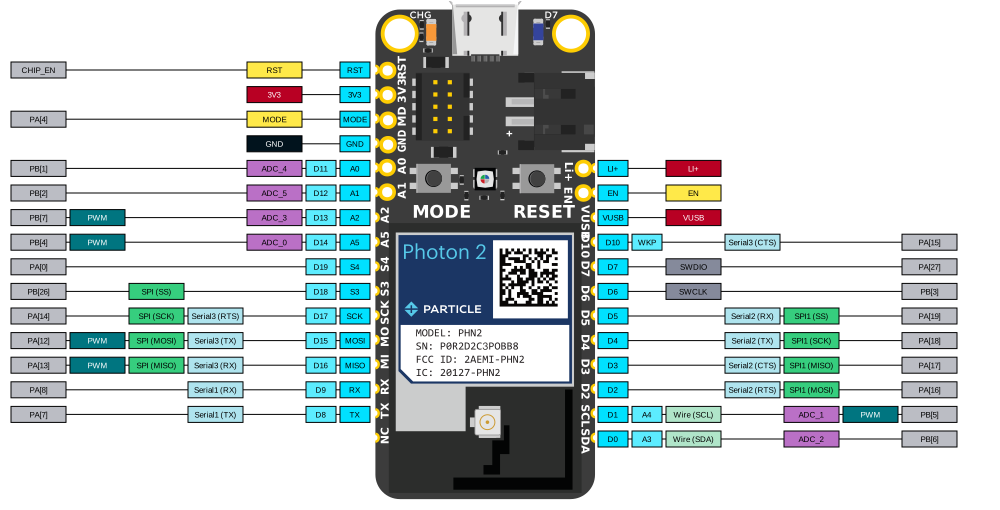
| Pin | Board | Function | x |
|---|---|---|---|
| VUSB | J7 | VIN | (+) rail (7 right) |
| GND | E4 | gnd | (-) rail (1 right) |
| D2 | J14 | D2 | header |
| D3 | J13 | D3 | header |
| D4 | J12 | D4 | header |
| led | condition | Amps | per led | per led only | amps per white power |
|---|---|---|---|---|---|
| none | none | .05 | |||
| strip 1 (18) | white 50 | 0.107 | w50 = .006 | .0032 | .000064 |
| strip 1 (18) | white 100 | 0.165 | w100 = .009 | .0064 | .000064 |
| strip 1 (18) | white 255 | 0.34 | w255 = .019 | .0016 | .0000062 |
| strip 1 (18) | all 100 | 0.300 | |||
| strip 1 (18) | all 255 | 0.75 | |||
| strip 1 (18) | rgb 100 | 0.22 | |||
| strip 2 (81) | white 50 | 0.33 | w50 = .004 | .0034 | .0000068 |
| strip 2 (81) | white 100 | 0.56 | w100 = .007 | .0063 | .000063 |
| strip 2 (81) | white 255 | 1.35 | w255 = .016 | .0160 | .000062 |
| strip 2 (81) | all 100 | 1.31 | |||
| strip 2 (81) | all 255 | 3.05 | |||
| strip 2 (81) | rgb 255 | 1.95 | |||
| strip 2 (81) | rgb 100 | 0.80 | |||
| stp 1&2 (99) | all 100 | 1.59 | |||
| stp 1&2 (99) | all 255 | 3.58 | |||
| stp 1&2 (99) | white 50 | 0.36 | w50 = .004 | .0031 | .000031 |
| stp 1&2 (99) | white 100 | 0.68 | w100 = .006 | .0063 | .000032 |
| stp 1&2 (99) | white 255 | 1.63 | w255 = .016 | .0159 | .00062 |
- 4x w/orange, orange, white green, wh/blu signal blue
- green, white brown brown not used white blue