Merged from John Papa and Todd Motto's Angular Style Guides, arranged in a way I can understand better.
Thanks to these two amazing authors: @toddmotto @John_Papa
Checkout the original stuff at: Todd's guidelines John Papa's guidelines
- Application Structure LIFT Principle
- Application Structure
- IIFE
- Modules
- Controllers
- Services and Factory
- Comment standards
- Naming Read the rest of the stuff below as/when needed:
- Directives
- Filters
- Routing resolves
- Publish and subscribe events
- Performance
- Angular wrapper references
- Minification and annotation
[Style Y140]
-
Structure your app such that you can
Locate your code quickly,Identify the code at a glance, keep theFlattest structure you can, andTry to stay DRY. The structure should follow these 4 basic guidelines.Why LIFT?: Provides a consistent structure that scales well, is modular, and makes it easier to increase developer efficiency by finding code quickly. Another way to check your app structure is to ask yourself: How quickly can you open and work in all of the related files for a feature?
When I find my structure is not feeling comfortable, I go back and revisit these LIFT guidelines
Locating our code is easyIdentify code at a glanceFlat structure as long as we canTry to stay DRY (Don’t Repeat Yourself) or T-DRY
[Style Y141]
-
Make locating your code intuitive, simple and fast.
Why?: I find this to be super important for a project. If the team cannot find the files they need to work on quickly, they will not be able to work as efficiently as possible, and the structure needs to change. You may not know the file name or where its related files are, so putting them in the most intuitive locations and near each other saves a ton of time. A descriptive folder structure can help with this.
/bower_components
/client
  /app
    /avengers
    /blocks
      /exception
      /logger
    /core
    /dashboard
    /data
    /layout
    /widgets
  /content
  index.html
.bower.json
[Style Y142]
-
When you look at a file you should instantly know what it contains and represents.
Why?: You spend less time hunting and pecking for code, and become more efficient. If this means you want longer file names, then so be it. Be descriptive with file names and keeping the contents of the file to exactly 1 component. Avoid files with multiple controllers, multiple services, or a mixture. There are deviations of the 1 per file rule when I have a set of very small features that are all related to each other, they are still easily identifiable.
[Style Y143]
-
Keep a flat folder structure as long as possible. When you get to 7+ files, begin considering separation.
Why?: Nobody wants to search 7 levels of folders to find a file. Think about menus on web sites … anything deeper than 2 should take serious consideration. In a folder structure there is no hard and fast number rule, but when a folder has 7-10 files, that may be time to create subfolders. Base it on your comfort level. Use a flatter structure until there is an obvious value (to help the rest of LIFT) in creating a new folder.
[Style Y144]
-
Be DRY, but don't go nuts and sacrifice readability.
Why?: Being DRY is important, but not crucial if it sacrifices the others in LIFT, which is why I call it T-DRY. I don’t want to type session-view.html for a view because, well, it’s obviously a view. If it is not obvious or by convention, then I name it.
[Style Y150]
-
Have a near term view of implementation and a long term vision. In other words, start small but keep in mind on where the app is heading down the road. All of the app's code goes in a root folder named
app. All content is 1 feature per file. Each controller, service, module, view is in its own file. All 3rd party vendor scripts are stored in another root folder and not in theappfolder. I didn't write them and I don't want them cluttering my app (bower_components,scripts,lib).Note: Find more details and reasoning behind the structure at this original post on application structure.
[Style Y151]
-
Place components that define the overall layout of the application in a folder named
layout. These may include a shell view and controller may act as the container for the app, navigation, menus, content areas, and other regions.Why?: Organizes all layout in a single place re-used throughout the application.
[Style Y152]
-
Create folders named for the feature they represent. When a folder grows to contain more than 7 files, start to consider creating a folder for them. Your threshold may be different, so adjust as needed.
Why?: A developer can locate the code, identify what each file represents at a glance, the structure is flat as can be, and there is no repetitive nor redundant names.
Why?: The LIFT guidelines are all covered.
Why?: Helps reduce the app from becoming cluttered through organizing the content and keeping them aligned with the LIFT guidelines.
Why?: When there are a lot of files (10+) locating them is easier with a consistent folder structures and more difficult in flat structures.
/**
 * recommended
 */

app/
    app.module.js
    app.config.js
    components/
        calendar.directive.js
        calendar.directive.html
        user-profile.directive.js
        user-profile.directive.html
    layout/
        shell.html
        shell.controller.js
        topnav.html
        topnav.controller.js
    people/
        attendees.html
        attendees.controller.js
        people.routes.js
        speakers.html
        speakers.controller.js
        speaker-detail.html
        speaker-detail.controller.js
    services/
        data.service.js
        localstorage.service.js
        logger.service.js
        spinner.service.js
    sessions/
        sessions.html
        sessions.controller.js
        sessions.routes.js
        session-detail.html
        session-detail.controller.js
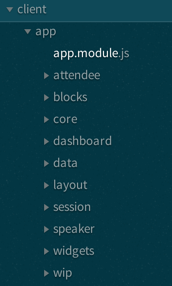
Note: Do not structure your app using folders-by-type. This requires moving to multiple folders when working on a feature and gets unwieldy quickly as the app grows to 5, 10 or 25+ views and controllers (and other features), which makes it more difficult than folder-by-feature to locate files.
/*
* avoid
* Alternative folders-by-type.
* I recommend "folders-by-feature", instead.
*/

app/
    app.module.js
    app.config.js
    app.routes.js
    directives.js
    controllers/
        attendees.js
        session-detail.js
        sessions.js
        shell.js
        speakers.js
        speaker-detail.js
        topnav.js
    directives/
        calendar.directive.js
        calendar.directive.html
        user-profile.directive.js
        user-profile.directive.html
    services/
        dataservice.js
        localstorage.js
        logger.js
        spinner.js
    views/
        attendees.html
        session-detail.html
        sessions.html
        shell.html
        speakers.html
        speaker-detail.html
        topnav.html
[Style Y010]
- Wrap Angular components in an Immediately Invoked Function Expression (IIFE).
Why?: An IIFE removes variables from the global scope. This helps prevent variables and function declarations from living longer than expected in the global scope, which also helps avoid variable collisions.
Why?: When your code is minified and bundled into a single file for deployment to a production server, you could have collisions of variables and many global variables. An IIFE protects you against both of these by providing variable scope for each file.
/* avoid */
// logger.js
angular
    .module('app')
    .factory('logger', logger);

// logger function is added as a global variable
function logger() { }

// storage.js
angular
    .module('app')
    .factory('storage', storage);

// storage function is added as a global variable
function storage() { }
/**
* recommended
*
* no globals are left behind
*/
// logger.js
(function() {
'use strict';
angular
.module('app')
.factory('logger', logger);
function logger() { }
})();
// storage.js
(function() {
'use strict';
angular
.module('app')
.factory('storage', storage);
function storage() { }
})();-
Note: For brevity only, the rest of the examples in this guide may omit the IIFE syntax.
-
Note: IIFE's prevent test code from reaching private members like regular expressions or helper functions which are often good to unit test directly on their own. However you can test these through accessible members or by exposing them through their own component. For example placing helper functions, regular expressions or constants in their own factory or constant.
-
Definitions: Declare modules without a variable using the setter and getter syntax
// avoid
var app = angular.module('app', []);
app.controller();
app.factory();

// recommended
angular
  .module('app', [])
  .controller()
  .factory();
-
Note: Using
angular.module('app', []);sets a module, whereasangular.module('app');gets the module. Only set once and get for all other instances. -
Methods: Pass functions into module methods rather than assign as a callback
// avoid
angular
  .module('app', [])
  .controller('MainCtrl', function MainCtrl () {

  })
  .service('SomeService', function SomeService () {

  });

// recommended
function MainCtrl () {

}
function SomeService () {

}
angular
  .module('app', [])
  .controller('MainCtrl', MainCtrl)
  .service('SomeService', SomeService);
-
ES6 Classes are not hoisted, which will break your code if you rely on hoisting
-
This aids with readability and reduces the volume of code "wrapped" inside the Angular framework
-
IIFE scoping: To avoid polluting the global scope with our function declarations that get passed into Angular, ensure build tasks wrap the concatenated files inside an IIFE
(function () {

  angular
    .module('app', []);

  // MainCtrl.js
  function MainCtrl () {

  }

  angular
    .module('app')
    .controller('MainCtrl', MainCtrl);

  // SomeService.js
  function SomeService () {

  }

  angular
    .module('app')
    .service('SomeService', SomeService);

  // ...

})();
-
controllerAs syntax: Controllers are classes, so use the
controllerAssyntax at all times<!-- avoid --> <div ng-controller="MainCtrl"> {{ someObject }} </div> <!-- recommended --> <div ng-controller="MainCtrl as vm"> {{ vm.someObject }} </div>
-
In the DOM we get a variable per controller, which aids nested controller methods, avoiding any
$parentcalls -
The
controllerAssyntax usesthisinside controllers, which gets bound to$scope// avoid function MainCtrl ($scope) { $scope.someObject = {}; $scope.doSomething = function () { }; } // recommended function MainCtrl () { this.someObject = {}; this.doSomething = function () { }; }
-
Only use
$scopeincontrollerAswhen necessary; for example, publishing and subscribing events using$emit,$broadcast,$onor$watch. Try to limit the use of these, however, and treat$scopeas a special use case -
Inheritance: Use prototypal inheritance when extending controller classes
function BaseCtrl () {
  this.doSomething = function () {

  };
}
BaseCtrl.prototype.someObject = {};
BaseCtrl.prototype.sharedSomething = function () {

};

AnotherCtrl.prototype = Object.create(BaseCtrl.prototype);

function AnotherCtrl () {
  this.anotherSomething = function () {

  };
}
-
Use
Object.createwith a polyfill for browser support -
controllerAs 'vm': Capture the
thiscontext of the Controller usingvm, standing forViewModel// avoid function MainCtrl () { var doSomething = function () { }; this.doSomething = doSomething; } // recommended function MainCtrl () { var vm = this; var doSomething = function () { }; vm.doSomething = doSomething; }
Why? : Function context changes the
thisvalue, use it to avoid.bind()calls and scoping issues -
ES6: Avoid
var vm = this;when using ES6// avoid function MainCtrl () { let vm = this; let doSomething = arg => { console.log(vm); }; // exports vm.doSomething = doSomething; } // recommended function MainCtrl () { let doSomething = arg => { console.log(this); }; // exports this.doSomething = doSomething; }
Why? : Use ES6 arrow functions when necessary to access the
thisvalue lexically -
Presentational logic only (MVVM): Presentational logic only inside a controller, avoid Business logic (delegate to Services)
// avoid
function MainCtrl () {

  var vm = this;

  $http
    .get('/users')
    .success(function (response) {
      vm.users = response;
    });

  vm.removeUser = function (user, index) {
    $http
      .delete('/user/' + user.id)
      .then(function (response) {
        vm.users.splice(index, 1);
      });
  };

}

// recommended
function MainCtrl (UserService) {

  var vm = this;

  UserService
    .getUsers()
    .then(function (response) {
      vm.users = response;
    });

  vm.removeUser = function (user, index) {
    UserService
      .removeUser(user)
      .then(function (response) {
        vm.users.splice(index, 1);
      });
  };

}
Why? : Controllers should fetch Model data from Services, avoiding any Business logic. Controllers should act as a ViewModel and control the data flowing between the Model and the View presentational layer. Business logic in Controllers makes testing Services impossible.
- All Angular Services are singletons, using
.service()or.factory()differs the way Objects are created.
Services: act as a constructor function and are instantiated with the new keyword. Use this for public methods and variables
```javascript
function SomeService () {
  this.someMethod = function () {

  };
}
angular
  .module('app')
  .service('SomeService', SomeService);
```
Factory: Business logic or provider modules, return an Object or closure
-
Always return a host Object instead of the revealing Module pattern due to the way Object references are bound and updated
function AnotherService () {
  var AnotherService = {};
  AnotherService.someValue = '';
  AnotherService.someMethod = function () {

  };
  return AnotherService;
}
angular
  .module('app')
  .factory('AnotherService', AnotherService);
Why? : Primitive values cannot update alone using the revealing module pattern
-
jsDoc: Use jsDoc syntax to document function names, description, params and returns
/**
 * @name SomeService
 * @desc Main application Controller
 */
function SomeService (SomeService) {

  /**
   * @name doSomething
   * @desc Does something awesome
   * @param {Number} x - First number to do something with
   * @param {Number} y - Second number to do something with
   * @returns {Number}
   */
  this.doSomething = function (x, y) {
    return x * y;
  };

}
angular
  .module('app')
  .service('SomeService', SomeService);
[Style Y120]
-
Use consistent names for all components following a pattern that describes the component's feature then (optionally) its type. My recommended pattern is
feature.type.js. There are 2 names for most assets:- the file name (
avengers.controller.js) - the registered component name with Angular (
AvengersController)
Why?: Naming conventions help provide a consistent way to find content at a glance. Consistency within the project is vital. Consistency with a team is important. Consistency across a company provides tremendous efficiency.
Why?: The naming conventions should simply help you find your code faster and make it easier to understand.
- the file name (
[Style Y121]
-
Use consistent names for all components following a pattern that describes the component's feature then (optionally) its type. My recommended pattern is
feature.type.js.Why?: Provides a consistent way to quickly identify components.
Why?: Provides pattern matching for any automated tasks.
/**
 * common options
 */

// Controllers
avengers.js
avengers.controller.js
avengersController.js

// Services/Factories
logger.js
logger.service.js
loggerService.js
/**
 * recommended
 */

// controllers
avengers.controller.js
avengers.controller.spec.js

// services/factories
logger.service.js
logger.service.spec.js

// constants
constants.js

// module definition
avengers.module.js

// routes
avengers.routes.js
avengers.routes.spec.js

// configuration
avengers.config.js

// directives
avenger-profile.directive.js
avenger-profile.directive.spec.js
Note: Another common convention is naming controller files without the word controller in the file name such as avengers.js instead of avengers.controller.js. All other conventions still hold using a suffix of the type. Controllers are the most common type of component so this just saves typing and is still easily identifiable. I recommend you choose 1 convention and be consistent for your team. My preference is avengers.controller.js identifying the AvengersController.
```javascript
/**
 * recommended
 */
// Controllers
avengers.js
avengers.spec.js
```
[Style Y122]
-
Name test specifications similar to the component they test with a suffix of
spec.Why?: Provides a consistent way to quickly identify components.
Why?: Provides pattern matching for karma or other test runners.
/**
 * recommended
 */
avengers.controller.spec.js
logger.service.spec.js
avengers.routes.spec.js
avenger-profile.directive.spec.js
[Style Y123]
-
Use consistent names for all controllers named after their feature. Use UpperCamelCase for controllers, as they are constructors.
Why?: Provides a consistent way to quickly identify and reference controllers.
Why?: UpperCamelCase is conventional for identifying object that can be instantiated using a constructor.
/**
 * recommended
 */

// avengers.controller.js
angular
    .module
    .controller('HeroAvengersController', HeroAvengersController);

function HeroAvengersController() { }
[Style Y124]
-
Append the controller name with the suffix
Controller.Why?: The
Controllersuffix is more commonly used and is more explicitly descriptive./** * recommended */ // avengers.controller.js angular .module .controller('AvengersController', AvengersController); function AvengersController() { }
[Style Y125]
-
Use consistent names for all factories and services named after their feature. Use camel-casing for services and factories. Avoid prefixing factories and services with
$. Only suffix service and factories withServicewhen it is not clear what they are (i.e. when they are nouns).Why?: Provides a consistent way to quickly identify and reference factories.
Why?: Avoids name collisions with built-in factories and services that use the
$prefix.Why?: Clear service names such as
loggerdo not require a suffix.Why?: Service names such as
avengersare nouns and require a suffix and should be namedavengersService./** * recommended */ // logger.service.js angular .module .factory('logger', logger); function logger() { }
/**
 * recommended
 */

// credit.service.js
angular
    .module
    .factory('creditService', creditService);

function creditService() { }

// customer.service.js
angular
    .module
    .service('customerService', customerService);

function customerService() { }
[Style Y126]
-
Use consistent names for all directives using camel-case. Use a short prefix to describe the area that the directives belong (some example are company prefix or project prefix).
Why?: Provides a consistent way to quickly identify and reference components.
/**
 * recommended
 */

// avenger-profile.directive.js
angular
    .module
    .directive('xxAvengerProfile', xxAvengerProfile);

// usage is <xx-avenger-profile> </xx-avenger-profile>

function xxAvengerProfile() { }
[Style Y127]
-
When there are multiple modules, the main module file is named
app.module.jswhile other dependent modules are named after what they represent. For example, an admin module is namedadmin.module.js. The respective registered module names would beappandadmin.Why?: Provides consistency for multiple module apps, and for expanding to large applications.
Why?: Provides easy way to use task automation to load all module definitions first, then all other angular files (for bundling).
[Style Y128]
-
Separate configuration for a module into its own file named after the module. A configuration file for the main
appmodule is namedapp.config.js(or simplyconfig.js). A configuration for a module namedadmin.module.jsis namedadmin.config.js.Why?: Separates configuration from module definition, components, and active code.
Why?: Provides an identifiable place to set configuration for a module.
[Style Y129]
- Separate route configuration into its own file. Examples might be
app.route.jsfor the main module andadmin.route.jsfor theadminmodule. Even in smaller apps I prefer this separation from the rest of the configuration.
[Style Y140]
-
Structure your app such that you can
Locate your code quickly,Identify the code at a glance, keep theFlattest structure you can, andTry to stay DRY. The structure should follow these 4 basic guidelines.Why LIFT?: Provides a consistent structure that scales well, is modular, and makes it easier to increase developer efficiency by finding code quickly. Another way to check your app structure is to ask yourself: How quickly can you open and work in all of the related files for a feature?
When I find my structure is not feeling comfortable, I go back and revisit these LIFT guidelines
Locating our code is easyIdentify code at a glanceFlat structure as long as we canTry to stay DRY (Don’t Repeat Yourself) or T-DRY
[Style Y141]
-
Make locating your code intuitive, simple and fast.
Why?: I find this to be super important for a project. If the team cannot find the files they need to work on quickly, they will not be able to work as efficiently as possible, and the structure needs to change. You may not know the file name or where its related files are, so putting them in the most intuitive locations and near each other saves a ton of time. A descriptive folder structure can help with this.
/bower_components
/client
  /app
    /avengers
    /blocks
      /exception
      /logger
    /core
    /dashboard
    /data
    /layout
    /widgets
  /content
  index.html
.bower.json
[Style Y142]
-
When you look at a file you should instantly know what it contains and represents.
Why?: You spend less time hunting and pecking for code, and become more efficient. If this means you want longer file names, then so be it. Be descriptive with file names and keeping the contents of the file to exactly 1 component. Avoid files with multiple controllers, multiple services, or a mixture. There are deviations of the 1 per file rule when I have a set of very small features that are all related to each other, they are still easily identifiable.
[Style Y143]
-
Keep a flat folder structure as long as possible. When you get to 7+ files, begin considering separation.
Why?: Nobody wants to search 7 levels of folders to find a file. Think about menus on web sites … anything deeper than 2 should take serious consideration. In a folder structure there is no hard and fast number rule, but when a folder has 7-10 files, that may be time to create subfolders. Base it on your comfort level. Use a flatter structure until there is an obvious value (to help the rest of LIFT) in creating a new folder.
[Style Y144]
-
Be DRY, but don't go nuts and sacrifice readability.
Why?: Being DRY is important, but not crucial if it sacrifices the others in LIFT, which is why I call it T-DRY. I don’t want to type session-view.html for a view because, well, it’s obviously a view. If it is not obvious or by convention, then I name it.
-
Declaration restrictions: Only use
custom elementandcustom attributemethods for declaring your Directives ({ restrict: 'EA' }) depending on the Directive's role<!-- avoid --> <!-- directive: my-directive --> <div class="my-directive"></div> <!-- recommended --> <my-directive></my-directive> <div my-directive></div>
-
Comment and class name declarations are confusing and should be avoided. Comments do not play nicely with older versions of IE. Using an attribute is the safest method for browser coverage.
-
Templating: Use
Array.join('')for clean templating// avoid function someDirective () { return { template: '<div class="some-directive">' + '<h1>My directive</h1>' + '</div>' }; } // recommended function someDirective () { return { template: [ '<div class="some-directive">', '<h1>My directive</h1>', '</div>' ].join('') }; }
Why? : Improves readability as code can be indented properly, it also avoids the
+operator which is less clean and can lead to errors if used incorrectly to split lines -
DOM manipulation: Takes place only inside Directives, never a controller/service
// avoid
function UploadCtrl () {
  $('.dragzone').on('dragend', function () {
    // handle drop functionality
  });
}
angular
  .module('app')
  .controller('UploadCtrl', UploadCtrl);

// recommended
function dragUpload () {
  return {
    restrict: 'EA',
    link: function (scope, element, attrs) {
      element.on('dragend', function () {
        // handle drop functionality
      });
    }
  };
}
angular
  .module('app')
  .directive('dragUpload', dragUpload);
-
Naming conventions: Never
ng-*prefix custom directives, they might conflict future native directives// avoid // <div ng-upload></div> function ngUpload () { return {}; } angular .module('app') .directive('ngUpload', ngUpload); // recommended // <div drag-upload></div> function dragUpload () { return {}; } angular .module('app') .directive('dragUpload', dragUpload);
-
Directives and Filters are the only providers that have the first letter as lowercase; this is due to strict naming conventions in Directives. Angular hyphenates
camelCase, sodragUploadwill become<div drag-upload></div>when used on an element. -
controllerAs: Use the
controllerAssyntax inside Directives as well// avoid function dragUpload () { return { controller: function ($scope) { } }; } angular .module('app') .directive('dragUpload', dragUpload); // recommended function dragUpload () { return { controllerAs: 'vm', controller: function () { } }; } angular .module('app') .directive('dragUpload', dragUpload);
-
Global filters: Create global filters using
angular.filter()only. Never use local filters inside Controllers/Services// avoid function SomeCtrl () { this.startsWithLetterA = function (items) { return items.filter(function (item) { return /^a/i.test(item.name); }); }; } angular .module('app') .controller('SomeCtrl', SomeCtrl); // recommended function startsWithLetterA () { return function (items) { return items.filter(function (item) { return /^a/i.test(item.name); }); }; } angular .module('app') .filter('startsWithLetterA', startsWithLetterA);
-
This enhances testing and reusability
-
Promises: Resolve Controller dependencies in the
$routeProvider(or$stateProviderforui-router), not the Controller itself// avoid function MainCtrl (SomeService) { var _this = this; // unresolved _this.something; // resolved asynchronously SomeService.doSomething().then(function (response) { _this.something = response; }); } angular .module('app') .controller('MainCtrl', MainCtrl); // recommended function config ($routeProvider) { $routeProvider .when('/', { templateUrl: 'views/main.html', resolve: { // resolve here } }); } angular .module('app') .config(config);
-
Controller.resolve property: Never bind logic to the router itself. Reference a
resolveproperty for each Controller to couple the logic// avoid function MainCtrl (SomeService) { this.something = SomeService.something; } function config ($routeProvider) { $routeProvider .when('/', { templateUrl: 'views/main.html', controllerAs: 'vm', controller: 'MainCtrl' resolve: { doSomething: function () { return SomeService.doSomething(); } } }); } // recommended function MainCtrl (SomeService) { this.something = SomeService.something; } MainCtrl.resolve = { doSomething: function (SomeService) { return SomeService.doSomething(); } }; function config ($routeProvider) { $routeProvider .when('/', { templateUrl: 'views/main.html', controllerAs: 'vm', controller: 'MainCtrl' resolve: MainCtrl.resolve }); }
-
This keeps resolve dependencies inside the same file as the Controller and the router free from logic
-
$scope: Use the
$emitand$broadcastmethods to trigger events to direct relationship scopes only// up the $scope $scope.$emit('customEvent', data); // down the $scope $scope.$broadcast('customEvent', data);
-
$rootScope: Use only
$emitas an application-wide event bus and remember to unbind listeners// all $rootScope.$on listeners $rootScope.$emit('customEvent', data);
-
Hint: Because the
$rootScopeis never destroyed,$rootScope.$onlisteners aren't either, unlike$scope.$onlisteners and will always persist, so they need destroying when the relevant$scopefires the$destroyevent// call the closure var unbind = $rootScope.$on('customEvent'[, callback]); $scope.$on('$destroy', unbind);
-
For multiple
$rootScopelisteners, use an Object literal and loop each one on the$destroyevent to unbind all automaticallyvar unbind = [ $rootScope.$on('customEvent1'[, callback]), $rootScope.$on('customEvent2'[, callback]), $rootScope.$on('customEvent3'[, callback]) ]; $scope.$on('$destroy', function () { unbind.forEach(function (fn) { fn(); }); });
-
One-time binding syntax: In newer versions of Angular (v1.3.0-beta.10+), use the one-time binding syntax
{{ ::value }}where it makes sense// avoid <h1>{{ vm.title }}</h1> // recommended <h1>{{ ::vm.title }}</h1>
Why? : Binding once removes the watcher from the scope's
$$watchersarray after theundefinedvariable becomes resolved, thus improving performance in each dirty-check -
Consider $scope.$digest: Use
$scope.$digestover$scope.$applywhere it makes sense. Only child scopes will update$scope.$digest();
Why? :
$scope.$applywill call$rootScope.$digest, which causes the entire application$$watchersto dirty-check again. Using$scope.$digestwill dirty check current and child scopes from the initiated$scope
-
$document and $window: Use
$documentand$windowat all times to aid testing and Angular references// avoid function dragUpload () { return { link: function ($scope, $element, $attrs) { document.addEventListener('click', function () { }); } }; } // recommended function dragUpload ($document) { return { link: function ($scope, $element, $attrs) { $document.addEventListener('click', function () { }); } }; }
-
$timeout and $interval: Use
$timeoutand$intervalover their native counterparts to keep Angular's two-way data binding up to date// avoid function dragUpload () { return { link: function ($scope, $element, $attrs) { setTimeout(function () { // }, 1000); } }; } // recommended function dragUpload ($timeout) { return { link: function ($scope, $element, $attrs) { $timeout(function () { // }, 1000); } }; }
-
ng-annotate: Use ng-annotate for Gulp as
ng-minis deprecated, and comment functions that need automated dependency injection using/** @ngInject *//** * @ngInject */ function MainCtrl (SomeService) { this.doSomething = SomeService.doSomething; } angular .module('app') .controller('MainCtrl', MainCtrl);
-
Which produces the following output with the
$injectannotation/** * @ngInject */ function MainCtrl (SomeService) { this.doSomething = SomeService.doSomething; } MainCtrl.$inject = ['SomeService']; angular .module('app') .controller('MainCtrl', MainCtrl);
For anything else, including API reference, check the Angular documentation.
Open an issue first to discuss potential changes/additions.
The MIT License
Copyright (c) 2015-2016 Todd Motto
Permission is hereby granted, free of charge, to any person obtaining a copy of this software and associated documentation files (the 'Software'), to deal in the Software without restriction, including without limitation the rights to use, copy, modify, merge, publish, distribute, sublicense, and/or sell copies of the Software, and to permit persons to whom the Software is furnished to do so, subject to the following conditions:
The above copyright notice and this permission notice shall be included in all copies or substantial portions of the Software.
THE SOFTWARE IS PROVIDED 'AS IS', WITHOUT WARRANTY OF ANY KIND, EXPRESS OR IMPLIED, INCLUDING BUT NOT LIMITED TO THE WARRANTIES OF MERCHANTABILITY, FITNESS FOR A PARTICULAR PURPOSE AND NONINFRINGEMENT. IN NO EVENT SHALL THE AUTHORS OR COPYRIGHT HOLDERS BE LIABLE FOR ANY CLAIM, DAMAGES OR OTHER LIABILITY, WHETHER IN AN ACTION OF CONTRACT, TORT OR OTHERWISE, ARISING FROM, OUT OF OR IN CONNECTION WITH THE SOFTWARE OR THE USE OR OTHER DEALINGS IN THE SOFTWARE.
The MIT License (MIT)
Copyright (c) 2014-2016 John Papa
Permission is hereby granted, free of charge, to any person obtaining a copy of this software and associated documentation files (the "Software"), to deal in the Software without restriction, including without limitation the rights to use, copy, modify, merge, publish, distribute, sublicense, and/or sell copies of the Software, and to permit persons to whom the Software is furnished to do so, subject to the following conditions:
The above copyright notice and this permission notice shall be included in all copies or substantial portions of the Software.
THE SOFTWARE IS PROVIDED "AS IS", WITHOUT WARRANTY OF ANY KIND, EXPRESS OR IMPLIED, INCLUDING BUT NOT LIMITED TO THE WARRANTIES OF MERCHANTABILITY, FITNESS FOR A PARTICULAR PURPOSE AND NONINFRINGEMENT. IN NO EVENT SHALL THE AUTHORS OR COPYRIGHT HOLDERS BE LIABLE FOR ANY CLAIM, DAMAGES OR OTHER LIABILITY, WHETHER IN AN ACTION OF CONTRACT, TORT OR OTHERWISE, ARISING FROM, OUT OF OR IN CONNECTION WITH THE SOFTWARE OR THE USE OR OTHER DEALINGS IN THE SOFTWARE.
Ads:
