


JForm能帮助你快速搭建复杂且流畅的表单,灵感来自于XLForm与Texture。不同于XLForm是一个UIViewController的子类,JForm是UIView的子类,也就是说,你可以像使用 UIView 一样使用 JForm,使用更加方便广泛。JForm也可以用来创建列表(例如 demo 里的微博以及 ig 列表),而不仅仅是表单。
JForm 使用 Texture 完成 UI 控件的创建、布局与加载,因此拥有了 Texture 的优点:控件异步渲染,极度流畅。使用 JForm,你可以忘记使用 UITableView 时需要注意的东西,例如:高度设置,单元行复用。
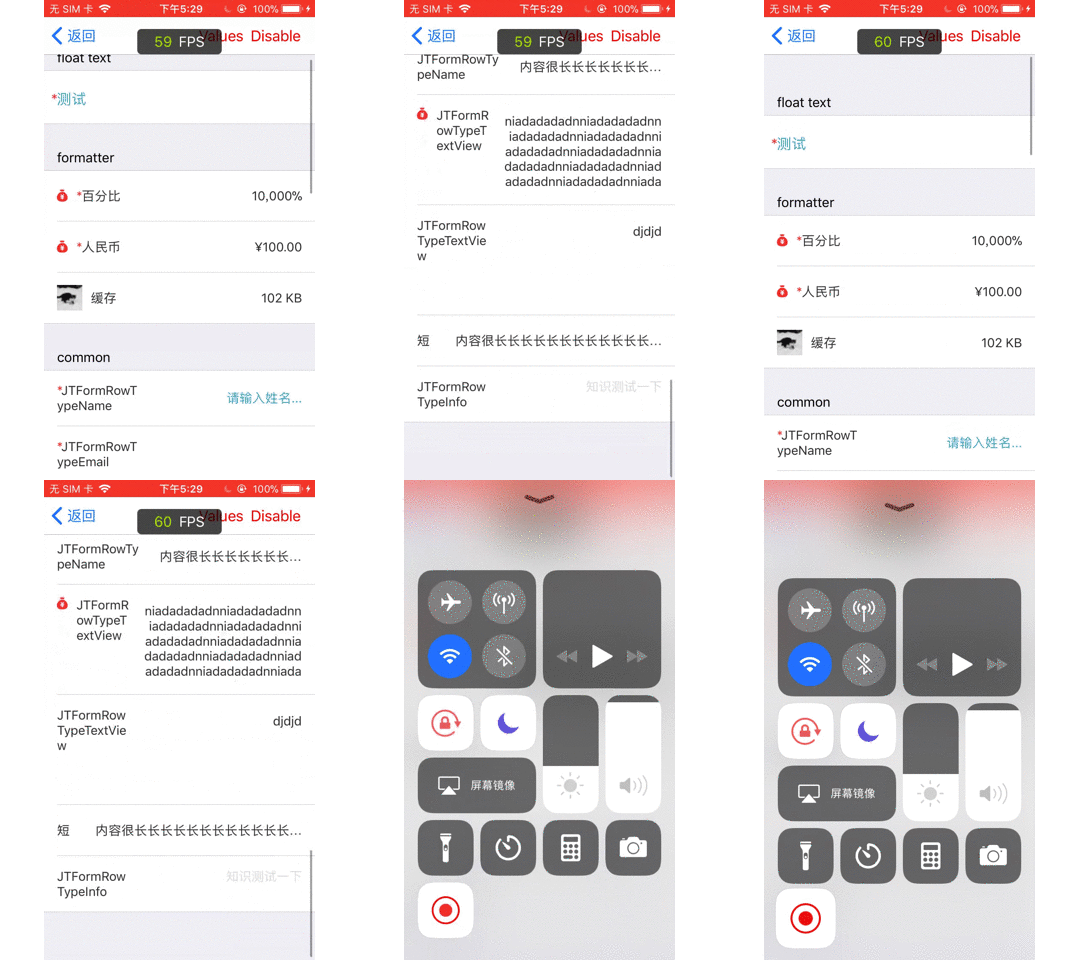
下面是 demo 运行在公司老旧设备5s的截图,可以看到fps基本保持在60左右。

pod 'JForm', '~> 0.0.3'
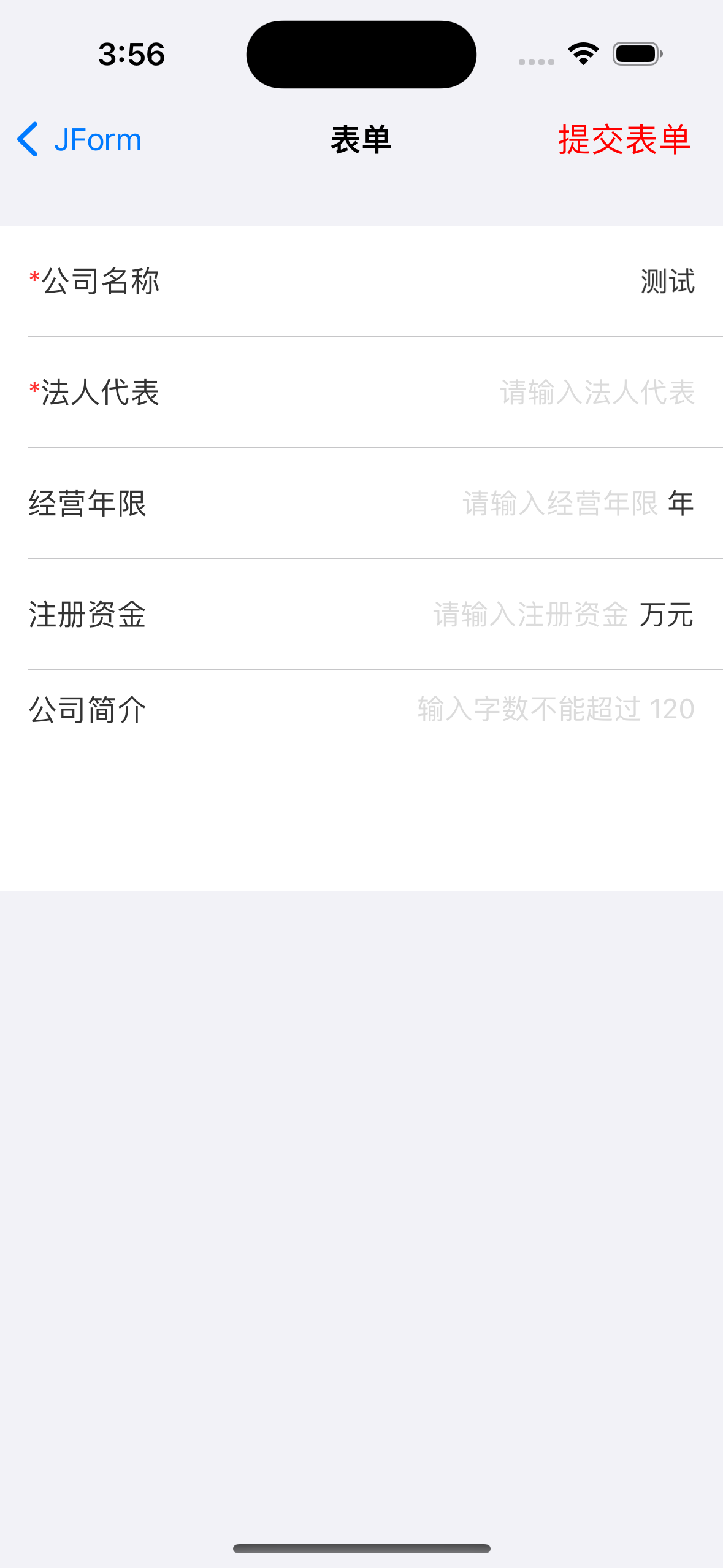
使用下图中的代码即可创建出上图的表单
let formDescriptor = FormDescriptor.init()
// 是否在必填行的title前面添加一个红色的 *
formDescriptor.addAsteriskToRequiredRow = true
// 是否自动添加 placeholder
formDescriptor.autoAddPlaceholder = true

// s 1
let section = SectionDescriptor.init()
formDescriptor.add(section)

var row: RowDescriptor!

row = RowDescriptor.init(withTag: "公司名称", rowType: .text, title: "公司名称")
row.isRequired = true
row.value = "测试"
section.add(row)

row = RowDescriptor.init(withTag: "法人代表", rowType: . name, title: "法人代表")
row.isRequired = true
section.add(row)

row = RowDescriptor.init(withTag: "经营年限", rowType: .integer, title: "经营年限")
row.unit = "年"
row.addValidator(JRegexValidator.init(regex: "^([5-9][0-9]|100)$", message: "经营年限应大50"))
section.add(row)

row = RowDescriptor.init(withTag: "注册资金", rowType: .decimal, title: "注册资金")
row.unit = "万元"
section.add(row)

row = RowDescriptor.init(withTag: "公司简介", rowType: .textView, title: "公司简介")
row.placeholder = "输入字数不能超过 120"
row.height = 120
row.maxNumberOfCharacters = 120
section.add(row)

let form = JForm.init(withDecriptor: formDescriptor, frame: self.view.bounds)
self.view.addSubview(form)
- 如果自带的单元行样式满足不了需求,可以自定义单元行,当然这需要了解一些Texture的相关知识。
- 需要使用类似
IQKeyboardManager的第三方,设置键盘弹起后表单的偏移量
RowDescriptor、SectionDescriptor、FormDescriptor 均为 BaseDescriptor 的子类,因此都拥有属性 public var style: BaseDescriptor.Style? 。通过更改该属性的值,可以改变标题的颜色,字体等 UI 样式。
该类的属性如下。
优先级 row > section > form
 /** 详情占位文本颜色 */
public var placeholderColor: UIColor?
/** 标题颜色 */
public var titleColor: UIColor?
/** 高亮时标题颜色 */
public var titleHighlightColor: UIColor?
/** 只读时标题颜色 */
public var titleDisabledColor: UIColor?
/** 详情颜色 */
public var detailColor: UIColor?
/** 只读时详情颜色 */
public var detailDisabledColor: UIColor?
/** 控件背景颜色 */
public var backgroundColor: UIColor?

/** 标题字体 */
public var titleFont: UIFont?
/** 高亮时标题字体 */
public var titleHighlightFont: UIFont?
/** 只读时标题字体 */
public var titleDisabledFont: UIFont?
/** 详情字体 */
public var detailFont: UIFont?
/** 只读时详情字体 */
public var detailDisabledFont: UIFont?
/** 详情占位文本字体 */
public var placeholderFont: UIFont?

/** 高度 */
public var height: CGFloat?
行描述 RowDescriptor 是单元行的数据源,我们通过修改 RowDescriptor 的属性来控制单元行的行为。 下面是 RowDescriptor 的主要属性和常用方法:
imageName:本地图片的名字
imageURL:网络图片的地址
优先级:imageURL > imageName
图片位于标题左边,且和标题居中对齐。如果图片来自网络,您还需要使用
imageEditBlock手动设置图片的 size 大小
初始化时,选择的 type 不同,那么创建出的单元行也会不同。所有的 type -> row 映射关系保存在 JForm 的 cellClassesForRowTypes 属性中。当你创建了自己的单元行,你需要在应用的入口函数或者某个合适的地方,使用 public static func register(rowType: RowDescriptor.RowType, cellType: JBaseCellNode.Type) 类函数来注册
该属性不能为空。在 JForm 中,每一个单元行均有一个 tag 来标记自己,方便查找。所有的 tag -> row的映射关系保存在 FormDescriptor 的 allRowsByTag 属性中。
如果单元行的 tag 相同,那么保存在前面的映射关系将会被覆盖。
该属性控制着单元行高度。默认值为UnspecifiedRowHeight,即不指定高度(自动布局)。
你可以通过以下方法来设置单元行高度(固定高度):
- RowDescriptor 中 的 height 属性
- 覆写 JBaseCellNode 的类方法
open class func customRowHeight() -> CGFloat? { nil } - BaseDescriptor.Style 中的 height 属性
优先级 1 > 2 > 3
isHidden & isDisabled
public var isHidden: Bool = false: 隐藏或显示单元行
public var isDisabled: Bool = false:使能单元行
SectionDescriptor 和 FormDescriptor 同样具有这些属性。优先级 RowDescriptor > SectionDescriptor > FormDescriptor
这几个属性均为字典类型,你可以在里面添加一些键值映射,在某个时机,会使用 KVO 进行属性设置
- configAfterCreate:在创建之后使用
- configAfterUpdate:在 update 方法执行后使用
- configAfterDisabled:当设置单元行状态为 disabled 时使用
以上 ↑↑↑ 几种均使用 kvo 设置属性
- configReserve:预留,可以用来做一些数据转移的事情
- valueTransformer:文本格式转换,该属性作用于显示内容。例如,单元行的值为 10,如果你设置了某个 valueTransformer,显示出的内容可能为 100000
- placeholder:占位符,当 value 为空时显示该内容 (适用于框架内所有类型的单元行)
- maxNumberOfCharacters:文本类单元行能输入最大字符数
使用验证器来对值进行验证,可以判断单元行的值是否满足要求。例如,某个单元行要求输入身份证号,你可以添加一个验证器来验证身份证号格式是否正确。自定义的验证器需要遵守协议 JValidateProtocol。
public func addValidator(_ validator: JValidateProtocol)添加验证器public func removeValidator(_ validator: JValidateProtocol)移除验证器
- text
- name
- decimal
- integer
- password
- phone
- url
- info
- textView
- longInfo
这几种主要的区别是键盘不同。 info 和 longInfo 的区别是:info 类型的单元行居中对齐,而 longInfo 是上边对齐
- pushSelect:push 到另一个 UIViewController 中,单选
- multipleSelect:push 到另一个 UIViewController 中,多选
- sheet:使用 UIAlertControllerStyleActionSheet 样式的 UIAlertController来选择,单选
- alert:使用 UIAlertControllerStyleAlert 样式的 UIAlertController来选择,单选
- picker:使用 UIPicker 来选择,单选
- pushButton:具体行为需要你在
actionblock 中定义
除pushButton 外,其它几种类型需要你为属性optionItmes赋值以提供选择项。
选择项OptionItem,属性title用来展示文本,属性value用来表示值,由于 value 的类型是 String,因为你可能需要将其转换成别的类型以满足接口要求。
-
date
-
time
-
dateTime
-
countDownTimer
-
dateInline
-
timeInline
-
dateTimeInline
-
countDownTimerInline
你可以设置minimumDate和maximumDate来限制日期的选择范围,例如使用上面提到过的 configAfterCreate属性
- switch_ (因为 switch 这个属于关键字,不让用。。。)
- check
- stepCounter
- segmentedControl
- slider
具体样式可以看 demo
单元行的基类,你需要继承它来自定义单元行。下面简单介绍它的属性和方法
该方法在整个单元行的周明周期内仅调用一次,你可以在里面设置 cell 的一些属性,子类实现时需要调用super.config()
更新视图内容,在生命周期中会被多次调用,子类中实现时需要调用[super update]
该方法内设置单元行的布局,需要一点 Texture 的布局知识。如果你对学习 Texture 感到犹豫, 相信我,你的收获绝对会大于付出
展示文本。可以覆写该计算属性以便显示文本满足您的要求
hidden 操作
当表单创建之后,改变 FormDescriptor、SectionDescriptor、RowDescriptor 的 isHidden 的值来隐藏或者显示对应的的表、节、行
改变 FormDescriptor、SectionDescriptor、RowDescriptor 的 isDisabled 的值来使能对应的表、节、行
var section = SectionDescriptor.init()
section.editStyle = .delete
当你设置 SectionDescriptor 的 editStyle 属性为 .delete,那么该节下面的单元节具有删除功能。你可以在单元行右向左滑删除或者设置 form.tableView.isEditing属性为 true
如果视图仅包含简单的文字内容,你可以设置 SectionDescriptor 的 headerAttributeString或者footerAttributeString属性。
对于复杂的视图,你需要同时设置 SectionDescriptor 的headerHeight和headerView属性,footer 类似。
优先级 headerView > headerAttributeString
JForm 的计算属性formValues可以得到所有单元行 tag -> value的映射。在这之前,建议你先使用 validateErrors 属性,来提示用户哪一些必填项没有输入
请参考 JDateInlineCellNode 文件