Supports connecting to any database via JDBC.
👉https://github.com/kjstart/cursor_db_mcp
A Model Context Protocol (MCP) server for Oracle Database, enabling AI assistants like Cursor to execute SQL statements directly against Oracle databases.
Alvin Liu — https://alvinliu.com · Project: https://github.com/kjstart/cursor_oracle_mcp_server
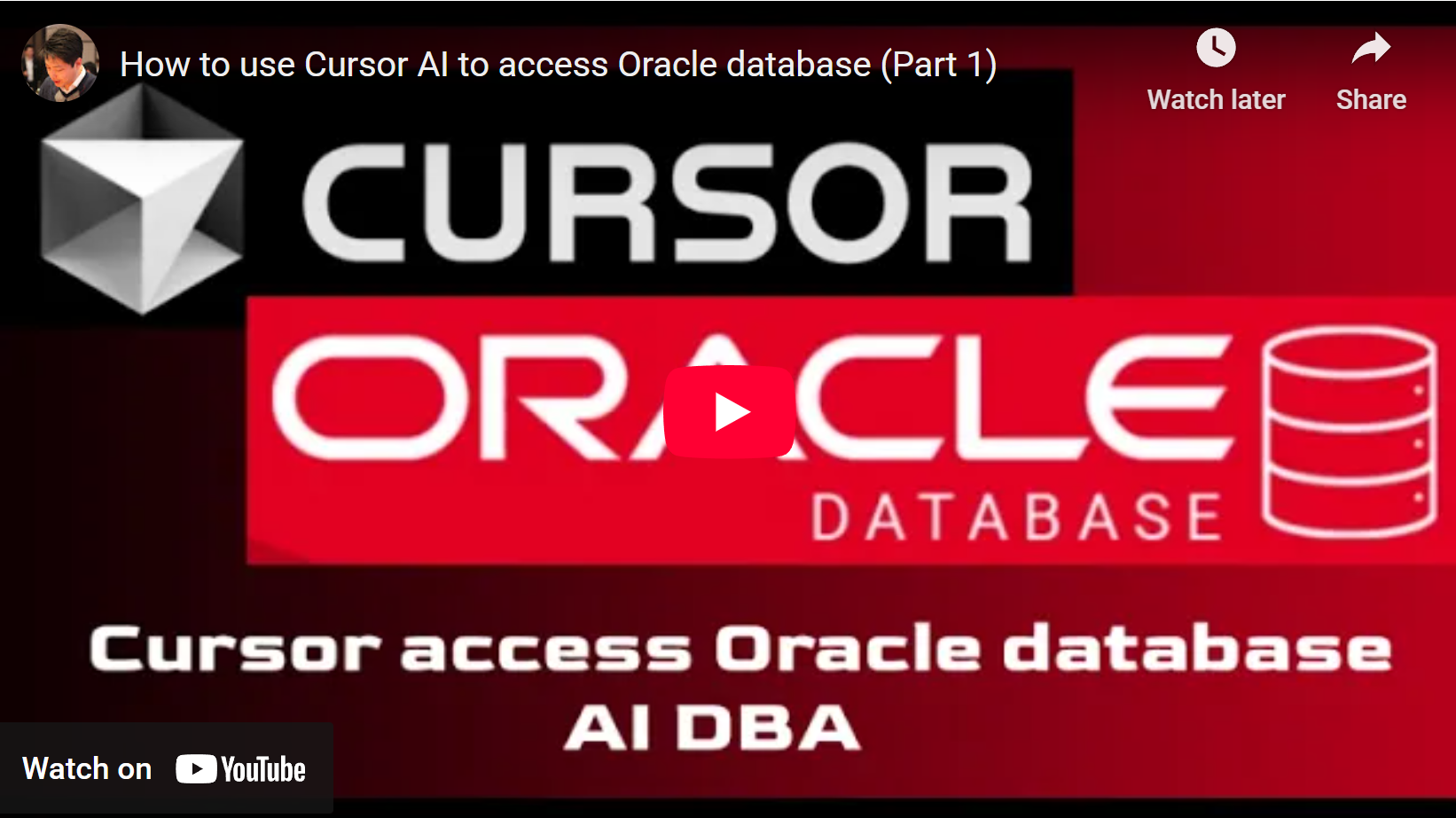
👉 Click the image below to watch on YouTube
- Full SQL support: SELECT, INSERT, UPDATE, DELETE, DDL (CREATE, DROP, ALTER, etc.), and multiple statements per request
- Execute from file: Run a full SQL file via
execute_sql_file; trailing SQL*Plus/is stripped automatically - Query to file:
query_to_csv_file(result as CSV, RFC 4180, UTF-8) andquery_to_text_file(plain text, tab-separated, CLOB in full; e.g. for procedure source) - PL/SQL blocks: CREATE PROCEDURE/FUNCTION/PACKAGE (including files with leading comments) and anonymous blocks are executed as one unit
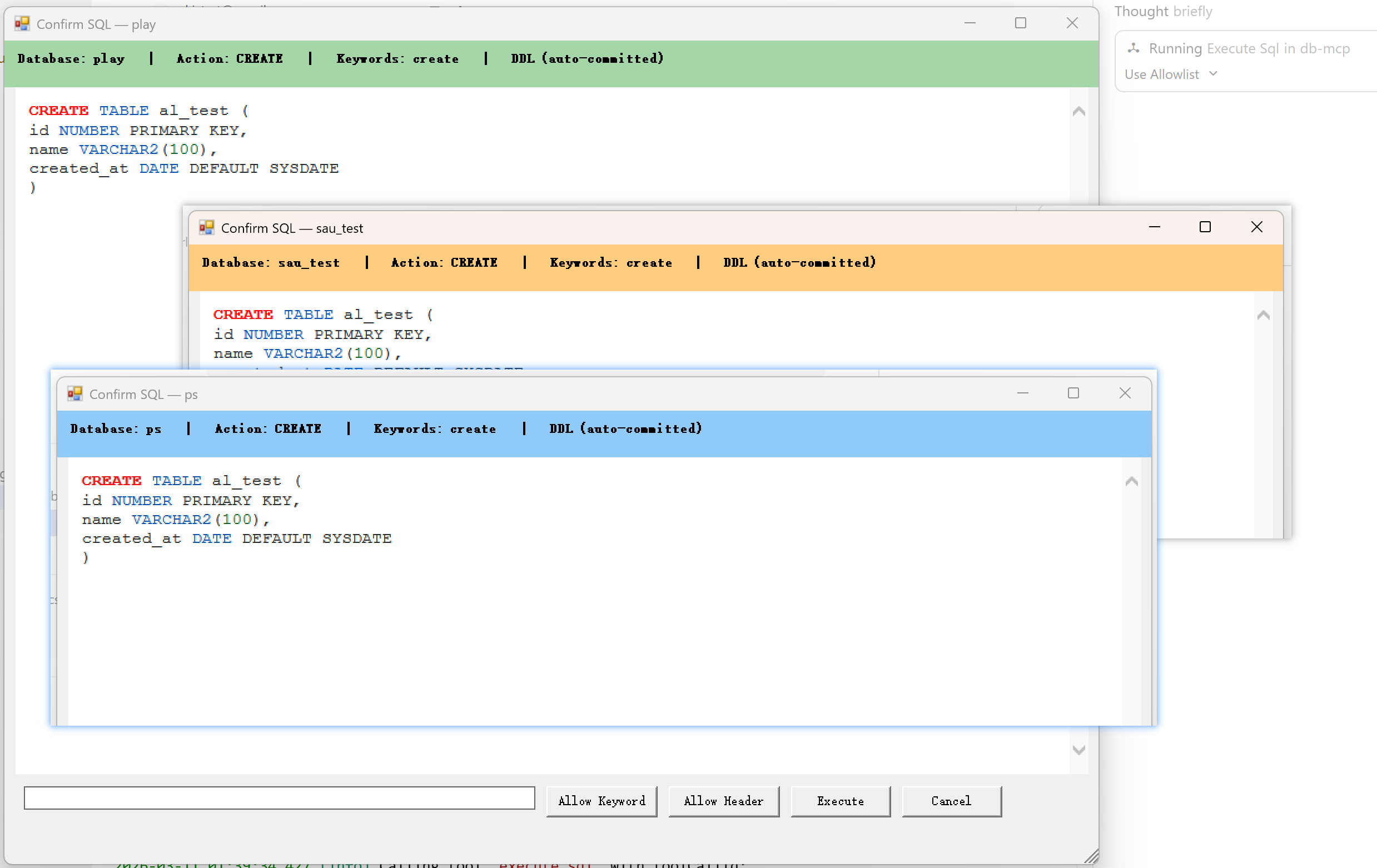
- Human-in-the-loop review UI: Configurable danger keywords trigger a review window with full SQL. The
Keywordsarea shows the actual expanded identifiers that triggered review (for examplecreated_at, not justcreate) - Whitelist review bypass:
Allow Headersaves the SQL first line towhitelist.jsonand skips future review for the same connection + header line - Whitelist keyword filtering:
Allow Keywordsaves a keyword towhitelist.jsonwithout approving the current review; future matches remove only that specific expanded keyword trigger, while other unmatched dangerous triggers still open review - Whitelist keyword guardrails: review UI only accepts whitelist keywords made of letters, numbers, and underscores, and blocks values that exactly match
danger_keywords(case-insensitive) - Danger keyword matching:
whole_text(substring in full SQL) ortokens(exact token match; e.g.created_atdoes not matchcreate) - Multi-database: Configure multiple connections; use
list_connectionsto see names and status (failed connections are retried on each list; onlylist_connectionsre-validates—other tools fast-fail on an unavailable connection until you call it again) - Audit logging: Keyed fields (
AUDIT_TIME,AUDIT_CONNECTION,AUDIT_KEYWORDS,AUDIT_APPROVED,AUDIT_ACTION,AUDIT_SQL) plus whitelist context such asHEADER_LINEandEXPANDED_KEYWORDS; full SQL, record separator######AUDIT_END######; 10MB rotation, reuse last non-full file on startup, filenames include creation date (e.g.audit_2006-01-02_150405.log) - Connection security: Database connection strings (including passwords) in
config.yamlare automatically encrypted on first startup — no manual steps required - Cross-platform review UI: Windows (WinForms + WebBrowser) and macOS (JXA/Cocoa dialog) both support
Allow Keyword,Allow Header,Execute, andCancel - Single executable: Standalone binary (requires Oracle Instant Client)
-
Oracle Instant Client
- Download from Oracle website
- Version 19c or later recommended
- Required files:
oci.dll,oraociei19.dll(Windows) or equivalent.dylib(macOS)
-
Environment Setup
# Windows: Add Instant Client to PATH
set PATH=C:\path\to\instantclient;%PATH%

# macOS: Set library path
export DYLD_LIBRARY_PATH=/path/to/instantclient:$DYLD_LIBRARY_PATH
Pre-built binaries are published on GitHub Releases. No build required.
-
Download the archive for your platform:
- Windows:
oracle-mcp-server-windows-amd64-<version>.zip - macOS Apple Silicon (M1/M2/M3):
oracle-mcp-server-darwin-arm64-<version>.tar.gz - macOS Intel:
oracle-mcp-server-darwin-amd64-<version>.tar.gz
- Windows:
-
Extract the archive. You will get:
- The executable (e.g.
oracle-mcp-server-windows-amd64.exeororacle-mcp-server-darwin-arm64) user_guide.md— step-by-step setupconfig.yaml.example— copy toconfig.yamland edit
- The executable (e.g.
-
Install Oracle Instant Client (see Requirements above) and add it to
PATH(Windows) or setORACLE_HOMEandDYLD_LIBRARY_PATH(macOS). -
Configure
config.yamlwith your database connection(s), then add the server to Cursor MCP (see Configuration and Usage with Cursor below).
For a full walkthrough, see user_guide.md.
Copy config.yaml.example to config.yaml and configure at least one connection under oracle.connections:
oracle:
  connections:
    database1: "user/pass@//host:1521/ORCL"
    # database2: "user/pass@//host2:1521/ORCL"

security:
  # "whole_text" = substring in full SQL; "tokens" = exact token match (e.g. created_at ≠ create)
  danger_keyword_match: "whole_text"

  danger_keywords:
    - truncate
    - drop
    - delete
    - create
    - update
    - execute immediate
    # ... (see config.yaml.example)

  require_confirm_for_ddl: true   # DDL always requires confirmation

logging:
  audit_log: true
  verbose_logging: true   # One short stderr line per execute_sql / execute_sql_file
  log_file: "audit.log"  # Base name; actual files: audit_YYYY-MM-DD_HHMMSS.log, 10MB rotation
With one connection, all SQL runs against that database (no need to pass connection). With multiple connections, use the connection argument in execute_sql / execute_sql_file and list_connections to see names and availability.
Connection security: On first startup, any plain-text connection strings in
config.yamlare automatically replaced with encrypted values. The file is updated in place — comments and formatting are preserved.
| Variable | Description |
|---|---|
ORACLE_MCP_CONFIG |
Path to config file (overrides default locations) |
ORACLE_HOME |
Oracle client installation path |
PATH (Windows) |
Must include Instant Client directory |
TNS_ADMIN |
Required for Oracle Autonomous Database (ADB) — directory containing tnsnames.ora and wallet files (e.g. cwallet.sso, ewallet.pem, sqlnet.ora) from the ADB Wallet zip |
ADB uses TCPS (SSL) and requires the Wallet. Use the TNS name from the wallet’s tnsnames.ora (e.g. mcpdemo_high):
- Download Wallet: Oracle Cloud Console → your Autonomous Database → DB connection → Download Wallet. Unzip to a folder (e.g.
D:\oracle\wallet_mcpdemo). The folder must containtnsnames.ora,sqlnet.ora,cwallet.sso,ewallet.pem, etc. - config.yaml — use TNS alias and your DB user/password:
oracle:
  connections:
    mcpdemo: "mcpdemo/YourPassword@mcpdemo_high"
- Cursor MCP — set
TNS_ADMINto the Wallet directory so the process can findtnsnames.oraand SSL certs. On Windows, also include Instant Client inPATH:Replace{ "mcpServers": { "oracle": { "command": "D:\\work\\code\\cursor_oracle_mcp_server\\oracle-mcp.exe", "args": [], "env": { "TNS_ADMIN": "D:\\oracle\\wallet_mcpdemo", "PATH": "C:\\path\\to\\instantclient;%PATH%" } } } }D:\oracle\wallet_mcpdemowith your unzipped wallet path, and ensure Instant Client is onPATH. WithoutTNS_ADMIN, you may see ORA-12541 (no listener) or SSL errors because the client cannot resolve the TNS name or use the wallet.
Add to your Cursor MCP settings (~/.cursor/mcp.json or workspace .cursor/mcp.json):
Windows:
{
  "mcpServers": {
    "oracle": {
      "command": "C:\\path\\to\\oracle-mcp.exe",
      "args": []
    }
  }
}Use the env block so the MCP process sees ORACLE_HOME and DYLD_LIBRARY_PATH:
{
  "mcpServers": {
    "oracle": {
      "command": "/path/to/oracle-mcp",
      "args": [],
      "env": {
        "ORACLE_HOME": "/opt/oracle/instantclient_19_20",
        "DYLD_LIBRARY_PATH": "/opt/oracle/instantclient_19_20"
      }
    }
  }
}
Replace /path/to/oracle-mcp and /opt/oracle/instantclient_19_20 with your actual paths. You can also reference existing shell env with "ORACLE_HOME": "${env:ORACLE_HOME}" if Cursor was started from a terminal that already has it set.
| Tool | Description |
|---|---|
| execute_sql | Run SQL (one or multiple statements). Params: sql, optional connection. Do not specify schema-qualified object names such as hr.employees; the server rejects them. |
| execute_sql_file | Read SQL from a file, analyze, show review if needed, then execute. Trailing / is stripped. Params: file_path, optional connection. SQL in the file must not specify schema-qualified object names such as hr.employees. |
| list_connections | List configured connection names and availability; retries previously failed connections (only this tool re-validates—others fast-fail on unavailable connection until you call list_connections again). |
| query_to_csv_file | Run a query and write the result to a file as CSV (header + rows, UTF-8, RFC 4180). Params: sql, file_path (absolute), optional connection. Same review as execute_sql when SQL matches danger keywords or DDL (if enabled). Do not specify schema-qualified object names such as hr.employees. |
| query_to_text_file | Run a query and write the result to a file as plain text (tab-separated, no header; CLOB in full; e.g. for procedure source). Params: sql, file_path (absolute), optional connection. Same review as execute_sql when SQL matches danger keywords or DDL (if enabled). Do not specify schema-qualified object names such as hr.employees. |
// One connection: no need to pass connection
execute_sql({ "sql": "SELECT table_name FROM user_tables" })

// Multiple connections
execute_sql({ "sql": "SELECT * FROM my_table", "connection": "database1" })
execute_sql({ "sql": "CREATE TABLE test (id NUMBER)", "connection": "database2" })

// Run a SQL file (e.g. procedure script; trailing / stripped)
execute_sql_file({ "file_path": "d:\\scripts\\myscript.sql", "connection": "ps" })

// See connection names and status
list_connections()

// Write query result to CSV or text file (file_path must be absolute; same review rules as execute_sql when needed)
query_to_csv_file({ "sql": "SELECT * FROM my_table", "file_path": "d:\\out\\data.csv", "connection": "database1" })
query_to_text_file({ "sql": "SELECT text FROM user_source WHERE name='MY_PROC'", "file_path": "d:\\out\\my_proc.sql" })
When SQL matches danger_keywords or is DDL (if require_confirm_for_ddl is true), a confirmation window appears:
- Keywords display: the review header shows the actual expanded identifiers that triggered review, not just the original configured danger keyword
- Allow Header: stores the current SQL first line in
whitelist.json; future SQL on the same connection with the same first line skips review - Allow Keyword: stores one keyword in
whitelist.jsonbut does not approve the current review; users can add multiple keywords before choosingExecuteorCancel - Keyword whitelist behavior: a whitelisted keyword removes only that specific expanded-keyword trigger; if the same SQL still has other dangerous unmatched triggers, review still opens
- Whitelist storage:
whitelist.jsonis stored in the executable directory / program directory - Windows: WinForms window with syntax-highlighted SQL (WebBrowser)
- macOS: JXA/Cocoa dialog with the same review actions as Windows
Execution proceeds only after the user confirms. Rejection is logged and returned as USER_REJECTED.
- Single statement: One SQL statement, with or without trailing semicolon.
- Multiple statements: One per line, each line ending with a semicolon. Executed in order.
- PL/SQL: CREATE PROCEDURE/FUNCTION/PACKAGE (including files with leading
--or/* */) and anonymous blocks (BEGIN...END; / DECLARE...END;) are treated as one block and not split. - From file: Trailing SQL*Plus
/(on its own line) is removed before execution.
- Keyed format:
AUDIT_TIME=...,AUDIT_CONNECTION=...,AUDIT_KEYWORDS=...,AUDIT_APPROVED=...,AUDIT_ACTION=..., optionalHEADER_LINE=..., optionalEXPANDED_KEYWORDS=..., thenAUDIT_SQL=followed by the full SQL, then a line######AUDIT_END######as record separator. - Rotation: 10MB per file. On startup, the most recent existing log file under 10MB is reused; when full, a new file is created with creation date in the name:
audit_2006-01-02_150405.log.
Input: sql (required), connection (optional). Do not specify schema-qualified object names such as hr.employees; the server rejects them.
Output (query): columns, rows, statement_type, execution_time_ms, success.
Output (DML/DDL): rows_affected, statement_type, execution_time_ms, success, optional warning.
Error (user rejected): code -32000, message "Execution cancelled by user", data.code "USER_REJECTED", data.matched_keywords.
Input: file_path (required), connection (optional). Same analysis and review rules as execute_sql; executes the file contents (trailing / stripped).
Input: none. Output: connections (name + availability), message. Only this tool re-validates failed connections; other tools return an error if the chosen connection is currently unavailable until you call list_connections again.
Input: sql (required), file_path (required, absolute path), connection (optional). Output: success and path. Same confirmation rules as execute_sql when SQL matches danger_keywords or is DDL (if require_confirm_for_ddl). Writes CSV with header, UTF-8, RFC 4180; CLOB columns read in full.
Input: sql (required), file_path (required, absolute path), connection (optional). Output: success and path. Same confirmation rules as execute_sql when SQL matches danger_keywords or is DDL (if require_confirm_for_ddl). Writes plain text, tab-separated columns, no header; CLOB in full (e.g. for procedure source).
Error: ORA-12541: TNS:no listener
→ Check that Oracle Instant Client is in PATH and listener is running
Error: DPI-1047: Cannot locate a 64-bit Oracle Client library
→ Install Oracle Instant Client and add to PATH
Error: ORA-01031: insufficient privileges
→ The configured database user lacks required permissions
If you prefer to build the binary yourself (e.g. for a different Go version or platform):
- Go 1.22+
- CGO must be enabled: godror requires CGO and a C compiler.
- Windows: Use MinGW-w64 (GCC 7.2+) and add its
binto PATH.- Do not use Cygwin's gcc. If both are installed, ensure MinGW's
bincomes before Cygwin in PATH, or you may seecannot parse gcc output ... as ELF, Mach-O, PE, XCOFF. - Install via Chocolatey:
choco install mingw, or MSYS2 thenpacman -S mingw-w64-ucrt-x86_64-gccand usemingw64\bin. - Verify with
where gccandgcc -v; you should see "mingw" or "MinGW" and 64-bit (x86_64).
- Do not use Cygwin's gcc. If both are installed, ensure MinGW's
- macOS: Run
xcode-select --installfor command line tools.
Important: Build with CGO enabled and GCC available, or you will see errors like undefined: VersionInfo.
# Clone the repository
git clone https://github.com/kjstart/cursor_oracle_mcp_server
cd cursor_oracle_mcp_server

# Download dependencies
go mod tidy

# Windows (PowerShell): enable CGO and ensure gcc is in PATH
$env:CGO_ENABLED="1"
go build -o oracle-mcp.exe .

# Windows (CMD)
set CGO_ENABLED=1
go build -o oracle-mcp.exe .

# Windows (MSYS UCRT64)
export PATH=/c/oracle/instantclient_21_12:$PATH
export ORACLE_HOME=/c/oracle/instantclient_21_12
pacman -S mingw-w64-ucrt-x86_64-go
export GOROOT=/ucrt64/lib/go
export PATH=$GOROOT/bin:$PATH
export CGO_ENABLED=1
export CC=x86_64-w64-mingw32-gcc
go install github.com/godror/godror@latest
CGO_ENABLED=1 GOOS=windows GOARCH=amd64 go build -o oracle-mcp.exe .

# macOS (Intel): native build only
CGO_ENABLED=1 GOOS=darwin GOARCH=amd64 go build -o oracle-mcp .

# macOS (Apple Silicon)
CGO_ENABLED=1 GOOS=darwin GOARCH=arm64 go build -o oracle-mcp .| Error | Cause | Fix |
|---|---|---|
undefined: VersionInfo |
CGO disabled | Set CGO_ENABLED=1 and install gcc |
gcc not found |
gcc not installed or not in PATH | Install MinGW-w64 and add its bin to PATH |
cannot parse gcc output ... as ELF, Mach-O, PE, XCOFF |
Wrong gcc (e.g. Cygwin gcc) | Use MinGW-w64 gcc and put it before Cygwin in PATH; verify with where gcc and gcc -v |
After changing gcc or PATH, clear the build cache and rebuild:
go clean -cache
go build -o oracle-mcp.exe .MIT License - see LICENSE file
- Fork the repository
- Create a feature branch
- Submit a pull request
- godror - Oracle driver for Go
- Model Context Protocol - MCP specification
👉https://github.com/kjstart/cursor_db_mcp
基于 Model Context Protocol (MCP) 的 Oracle 数据库服务端,让 Cursor 等 AI 助手直接对 Oracle 数据库执行 SQL。
作者:Alvin Liu — https://alvinliu.com · 项目: https://github.com/kjstart/cursor_oracle_mcp_server
B站视频介绍: Cursor连接Oracle自动编写存储过程
- 完整 SQL 支持:SELECT、INSERT、UPDATE、DELETE、DDL(CREATE、DROP、ALTER 等),单次请求可执行多条语句
- 从文件执行:通过
execute_sql_file执行整个 SQL 文件;自动去除末尾 SQL*Plus 的/ - 查询结果写入文件:
query_to_csv_file(结果写为 CSV,RFC 4180,UTF-8)与query_to_text_file(纯文本、制表符分隔、CLOB 完整输出,如存过程源码) - PL/SQL 块:CREATE PROCEDURE/FUNCTION/PACKAGE(含文件头部注释)及匿名块作为整体执行
- 人工确认窗口:可配置危险关键词,触发带完整 SQL 的确认窗口;
Keywords区域显示的是真正命中的 expanded keyword(例如显示created_at,而不是只显示create) - Header 白名单:
Allow Header会把 SQL 第一行写入whitelist.json,下次同一连接且第一行相同的 SQL 直接跳过 review - Keyword 白名单:
Allow Keyword只把关键字写入whitelist.json,不会自动批准当前 review;后续只会消掉该 expanded keyword 对应的触发项,其他未放行触发项仍会继续弹出 review - Keyword 白名单限制:只能添加字母、数字、下划线组成的关键字;如果与
danger_keywords中某项完全相同(忽略大小写)则禁止添加 - 危险词匹配:
whole_text(整段 SQL 子串)或tokens(精确词匹配,如created_at不匹配create) - 多数据库:可配置多个连接;用
list_connections查看名称与状态(失败连接每次列出时会重试;仅list_connections会重新校验—其他工具在连接不可用时直接报错,需再次调用 list_connections 后重试) - 审计日志:键值字段(
AUDIT_TIME、AUDIT_CONNECTION、AUDIT_KEYWORDS、AUDIT_APPROVED、AUDIT_ACTION、AUDIT_SQL),并可附带HEADER_LINE、EXPANDED_KEYWORDS;完整 SQL、记录分隔符######AUDIT_END######;单文件 10MB 轮转,启动时复用最近未满的日志,文件名含创建日期(如audit_2006-01-02_150405.log) - 连接安全:
config.yaml中的数据库连接串(含密码)在首次启动时自动加密,无需任何手动操作 - 跨平台确认窗口:Windows(WinForms + WebBrowser)与 macOS(JXA/Cocoa)都支持
Allow Keyword、Allow Header、Execute、Cancel - 单可执行文件:独立二进制(需安装 Oracle Instant Client)
-
Oracle Instant Client
- 从 Oracle 官网 下载
- 建议 19c 或更高版本
- 所需文件:
oci.dll、oraociei19.dll(Windows)或对应.dylib(macOS)
-
环境配置
# Windows:将 Instant Client 加入 PATH
set PATH=C:\path\to\instantclient;%PATH%

# macOS:设置库路径
export DYLD_LIBRARY_PATH=/path/to/instantclient:$DYLD_LIBRARY_PATH
预编译包发布在 GitHub Releases,无需自行编译。
-
下载对应平台的压缩包:
- Windows:
oracle-mcp-server-windows-amd64-<版本>.zip - macOS Apple Silicon (M1/M2/M3):
oracle-mcp-server-darwin-arm64-<版本>.tar.gz - macOS Intel:
oracle-mcp-server-darwin-amd64-<版本>.tar.gz
- Windows:
-
解压后得到:
- 可执行文件(如
oracle-mcp-server-windows-amd64.exe或oracle-mcp-server-darwin-arm64) user_guide.md— 分步设置说明config.yaml.example— 复制为config.yaml后编辑
- 可执行文件(如
-
安装 Oracle Instant Client(见上方 环境要求),并加入
PATH(Windows)或设置ORACLE_HOME、DYLD_LIBRARY_PATH(macOS)。 -
配置
config.yaml中的数据库连接,再将本服务加入 Cursor MCP(见下方 配置 与 在 Cursor 中使用)。
完整步骤可参考 user_guide.md。
将 config.yaml.example 复制为 config.yaml,在 oracle.connections 下至少配置一个连接:
oracle:
  connections:
    database1: "user/pass@//host:1521/ORCL"
    # database2: "user/pass@//host2:1521/ORCL"

security:
  # danger_keywords 匹配方式:"whole_text" 或 "tokens"
  danger_keyword_match: "whole_text"

  danger_keywords:
    - truncate
    - drop
    - delete
    - create
    - update
    - execute immediate
    # ... (见 config.yaml.example)

  require_confirm_for_ddl: true   # DDL 始终需确认

logging:
  audit_log: true
  verbose_logging: true
log_file: "audit.log"单连接时所有 SQL 都发往该库(无需传 connection)。多连接时在 execute_sql / execute_sql_file 中通过 connection 指定,并用 list_connections 查看名称与可用性。
连接安全: 首次启动时,
config.yaml中的明文连接串会被自动替换为加密值,文件原地更新,注释与格式完整保留。
| 变量 | 说明 |
|---|---|
ORACLE_MCP_CONFIG |
配置文件路径(覆盖默认位置) |
ORACLE_HOME |
Oracle 客户端安装路径 |
PATH(Windows) |
须包含 Instant Client 目录 |
TNS_ADMIN |
连接 Oracle 自治数据库 (ADB) 时必填 — 存放 tnsnames.ora 及钱包文件的目录(如从 ADB 下载的 Wallet zip 解压后的目录) |
ADB 使用 TCPS (SSL),需要 Wallet。连接串使用钱包中 tnsnames.ora 的 TNS 别名(如 mcpdemo_high):
- 下载 Wallet:Oracle Cloud 控制台 → 你的自治数据库 → DB 连接 → 下载 Wallet。解压到某目录(如
D:\oracle\wallet_mcpdemo),该目录需包含tnsnames.ora、sqlnet.ora、cwallet.sso、ewallet.pem等。 - config.yaml — 使用 TNS 别名和数据库用户/密码:
oracle:
  connections:
    mcpdemo: "mcpdemo/YourPassword@mcpdemo_high"
- Cursor MCP — 在 MCP 配置中设置
TNS_ADMIN为 Wallet 目录,以便进程找到tnsnames.ora和 SSL 证书。Windows 下还需在PATH中包含 Instant Client:将{ "mcpServers": { "oracle": { "command": "D:\\path\\to\\oracle-mcp-server-windows-amd64.exe", "args": [], "env": { "TNS_ADMIN": "D:\\oracle\\wallet_mcpdemo", "PATH": "C:\\path\\to\\instantclient;%PATH%" } } } }D:\oracle\wallet_mcpdemo换成你的 Wallet 解压路径,并确保 Instant Client 在PATH中。未设置TNS_ADMIN可能出现 ORA-12541(无监听)或 SSL 相关错误。
在 Cursor 的 MCP 设置(~/.cursor/mcp.json 或工作区 .cursor/mcp.json)中添加:
Windows(Oracle 客户端已在系统 PATH 中):
{
  "mcpServers": {
    "oracle": {
      "command": "C:\\path\\to\\oracle-mcp-server-windows-amd64.exe",
      "args": []
    }
  }
}
macOS
通过 env 让 MCP 进程能读到 ORACLE_HOME 和 DYLD_LIBRARY_PATH:
{
  "mcpServers": {
    "oracle": {
      "command": "/path/to/oracle-mcp-server-darwin-arm64",
      "args": [],
      "env": {
        "ORACLE_HOME": "/opt/oracle/instantclient_19_20",
        "DYLD_LIBRARY_PATH": "/opt/oracle/instantclient_19_20"
      }
    }
  }
}
将 /path/to/oracle-mcp-server-darwin-arm64 和 /opt/oracle/instantclient_19_20 换成你的实际路径。若从已设置环境的终端启动 Cursor,也可用 "ORACLE_HOME": "${env:ORACLE_HOME}" 引用现有环境变量。
| 工具 | 说明 |
|---|---|
| execute_sql | 执行 SQL(单条或多条)。参数:sql,可选 connection。 |
| execute_sql_file | 从文件读取 SQL,分析、必要时展示确认,再执行。末尾 / 会被去除。参数:file_path,可选 connection。 |
| list_connections | 列出已配置连接名称及可用性;会对之前失败的连接重试(仅此工具会重新校验—其他工具在连接不可用时直接报错,需再次调用 list_connections 后重试)。 |
| query_to_csv_file | 执行查询并将结果写入文件为 CSV(表头+行,UTF-8,RFC 4180)。参数:sql、file_path(绝对路径),可选 connection。与 execute_sql 相同:命中危险词或 DDL(若开启)时弹出审查。 |
| query_to_text_file | 执行查询并将结果写入文件为纯文本(制表符分隔、无表头;CLOB 完整输出,如存过程源码)。参数:sql、file_path(绝对路径),可选 connection。与 execute_sql 相同:命中危险词或 DDL(若开启)时弹出审查。 |
// 单连接:无需传 connection
execute_sql({ "sql": "SELECT table_name FROM user_tables" })

// 多连接
execute_sql({ "sql": "SELECT * FROM my_table", "connection": "database1" })
execute_sql({ "sql": "CREATE TABLE test (id NUMBER)", "connection": "database2" })

// 执行 SQL 文件(末尾 / 会被去除)
execute_sql_file({ "file_path": "d:\\scripts\\myscript.sql", "connection": "ps" })

// 查看连接名称与状态
list_connections()

// 将查询结果写入 CSV 或文本文件(file_path 须为绝对路径;需要时与 execute_sql 相同审查规则)
query_to_csv_file({ "sql": "SELECT * FROM my_table", "file_path": "d:\\out\\data.csv", "connection": "database1" })
query_to_text_file({ "sql": "SELECT text FROM user_source WHERE name='MY_PROC'", "file_path": "d:\\out\\my_proc.sql" })
当 SQL 命中 danger_keywords 或为 DDL(且 require_confirm_for_ddl 为 true)时,会弹出确认窗口:
- 关键词展示:窗口中的
Keywords显示真正命中的 expanded keyword,而不是原始 danger keyword - Allow Header:把当前 SQL 第一行写入
whitelist.json;同一连接下第一行再次匹配时直接跳过 review - Allow Keyword:只写入一个 keyword 到
whitelist.json,不会批准当前 review;可以在同一个窗口里连续添加多个 keyword - Keyword 白名单行为:某个 keyword 被放行后,只会消掉它自己对应的 expanded keyword 触发项;如果 SQL 里还有其他未放行危险项,仍然会弹出 review
- 白名单位置:
whitelist.json位于程序目录 / 可执行文件目录 - Windows:WinForms 窗口,SQL 语法高亮(WebBrowser)
- macOS:JXA/Cocoa 窗口,交互语义与 Windows 一致
用户确认后才会执行。拒绝会记录并返回 USER_REJECTED。
- 单条语句:一条 SQL,可有可无末尾分号。
- 多条语句:每行一条,每行以分号结尾。按顺序执行。
- PL/SQL:CREATE PROCEDURE/FUNCTION/PACKAGE(含文件头部
--或/* */)及匿名块(BEGIN...END; / DECLARE...END;)视为一整块,不拆分。 - 从文件:单独一行的 SQL*Plus
/会在执行前移除。
- 键值格式:
AUDIT_TIME=...、AUDIT_CONNECTION=...、AUDIT_KEYWORDS=...、AUDIT_APPROVED=...、AUDIT_ACTION=...,以及可选的HEADER_LINE=...、EXPANDED_KEYWORDS=...,然后是AUDIT_SQL=后跟完整 SQL,再以######AUDIT_END######作为记录分隔。 - 轮转:单文件 10MB。启动时复用最近未满的日志文件;写满后新建带创建日期的文件,如
audit_2006-01-02_150405.log。
输入:sql(必填),connection(可选)。
输出(查询):columns、rows、statement_type、execution_time_ms、success。
输出(DML/DDL):rows_affected、statement_type、execution_time_ms、success,可选 warning。
错误(用户拒绝):code -32000,message "Execution cancelled by user",data.code "USER_REJECTED",data.matched_keywords。
输入:file_path(必填),connection(可选)。与 execute_sql 相同的分析与确认规则;执行文件内容(末尾 / 去除)。
输入:无。输出:connections(名称 + 可用性),message。仅此工具会重新校验失败连接;其他工具在所选连接不可用时直接报错,需再次调用 list_connections 后重试。
输入:sql(必填)、file_path(必填,绝对路径)、connection(可选)。输出:成功及路径。与 execute_sql 相同:命中 danger_keywords 或为 DDL(若 require_confirm_for_ddl)时弹出确认。写入带表头的 CSV,UTF-8,RFC 4180;CLOB 列完整读取。
输入:sql(必填)、file_path(必填,绝对路径)、connection(可选)。输出:成功及路径。与 execute_sql 相同:命中 danger_keywords 或为 DDL(若 require_confirm_for_ddl)时弹出确认。写入纯文本,列以制表符分隔、无表头;CLOB 完整输出(如存过程源码)。
Error: ORA-12541: TNS:no listener
→ 确认 Oracle Instant Client 在 PATH 中且监听正常
Error: DPI-1047: Cannot locate a 64-bit Oracle Client library
→ 安装 Oracle Instant Client 并加入 PATH
Error: ORA-01031: insufficient privileges
→ 当前配置的数据库用户权限不足
若希望自行编译(例如使用不同 Go 版本或平台):
- Go 1.22+
- 须启用 CGO:godror 依赖 CGO 和 C 编译器。
- Windows:使用 MinGW-w64(GCC 7.2+)并将其
bin加入 PATH。- 不要用 Cygwin 的 gcc。 若两者都有,确保 PATH 中 MinGW 的
bin在 Cygwin 之前,否则可能出现cannot parse gcc output ... as ELF, Mach-O, PE, XCOFF。 - 可用 Chocolatey:
choco install mingw,或 MSYS2 后pacman -S mingw-w64-ucrt-x86_64-gcc,使用mingw64\bin。 - 用
where gcc和gcc -v检查,应看到 "mingw" 或 "MinGW" 及 64 位 (x86_64)。
- 不要用 Cygwin 的 gcc。 若两者都有,确保 PATH 中 MinGW 的
- macOS:执行
xcode-select --install安装命令行工具。
注意:需在启用 CGO 且已安装 GCC 的环境下构建,否则会出现 undefined: VersionInfo 等错误。
# 克隆仓库
git clone https://github.com/kjstart/cursor_oracle_mcp_server
cd cursor_oracle_mcp_server

# 下载依赖
go mod tidy

# Windows (PowerShell):启用 CGO,确保 gcc 在 PATH 中
$env:CGO_ENABLED="1"
go build -o oracle-mcp.exe .

# Windows (CMD)
set CGO_ENABLED=1
go build -o oracle-mcp.exe .

# macOS (Intel)
CGO_ENABLED=1 GOOS=darwin GOARCH=amd64 go build -o oracle-mcp .

# macOS (Apple Silicon)
CGO_ENABLED=1 GOOS=darwin GOARCH=arm64 go build -o oracle-mcp .| 错误 | 原因 | 处理 |
|---|---|---|
undefined: VersionInfo |
未启用 CGO | 设置 CGO_ENABLED=1 并安装 gcc |
gcc not found |
未安装 gcc 或不在 PATH | 安装 MinGW-w64 并将其 bin 加入 PATH |
cannot parse gcc output ... as ELF, Mach-O, PE, XCOFF |
使用了错误的 gcc(如 Cygwin gcc) | 使用 MinGW-w64 的 gcc,并保证在 PATH 中位于 Cygwin 之前;用 where gcc 和 gcc -v 核对 |
修改 gcc 或 PATH 后,清理缓存再构建:
go clean -cache
go build -o oracle-mcp.exe .MIT License - 见 LICENSE 文件
- Fork 本仓库
- 创建功能分支
- 提交 Pull Request
- godror - Go 版 Oracle 驱动
- Model Context Protocol - MCP 规范