BRAW Gyro Stabilizer v1.0.0

Native Premiere Pro gyro stabilizer for Blackmagic RAW footage — reads the gyro embedded in the .braw and stabilizes on the GPU, in real time, no calibration.
Install
- Download BRAW-Gyro-Stabilizer-1.0.0.pkg below.
- Double-click it. Because it isn't signed with an Apple Developer ID, macOS blocks it the first time with "…was blocked to protect your Mac." — this is expected.
- Open System Settings → Privacy & Security, scroll to Security, and click Open Anyway next to the blocked-
.pkgmessage (see below). Confirm with your password / Touch ID. - The installer runs — follow the prompts (it asks for an admin password to install system-wide).
- Restart Premiere Pro → the effect is under Video Effects → BRAW Tools → BRAW Gyro Stabilizer.
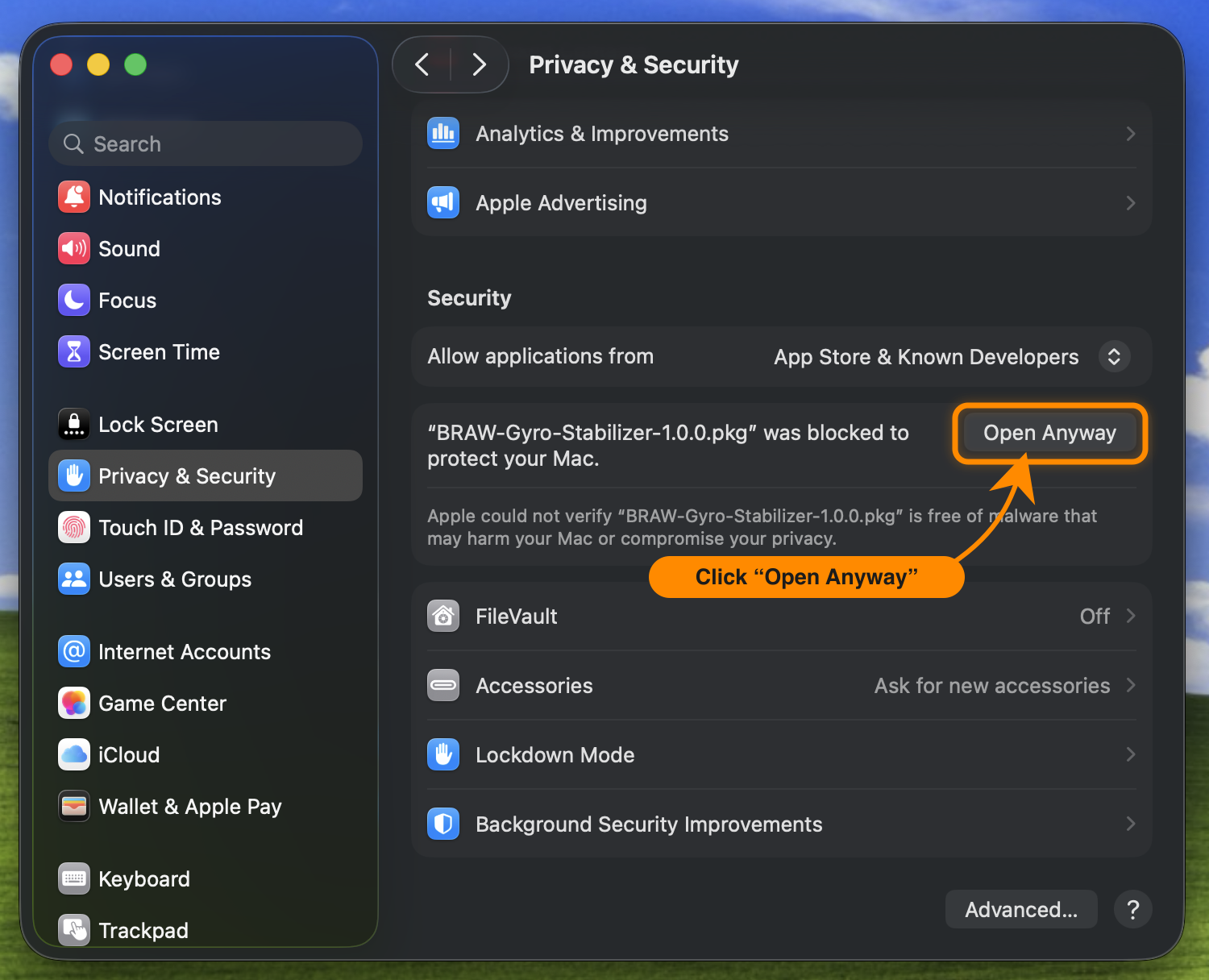
On older macOS you could right-click the
.pkg→ Open instead; on current macOS use the Open Anyway button in Privacy & Security as above.
Requires an Apple-silicon Mac and Premiere Pro 26. See the README for supported cameras (Blackmagic bodies that record gyro into .braw, firmware 7.9+ on Pocket 4K/6K).