


A lightweight, highly customizable, and thread-safe-ready CLI progress bar for Rust.
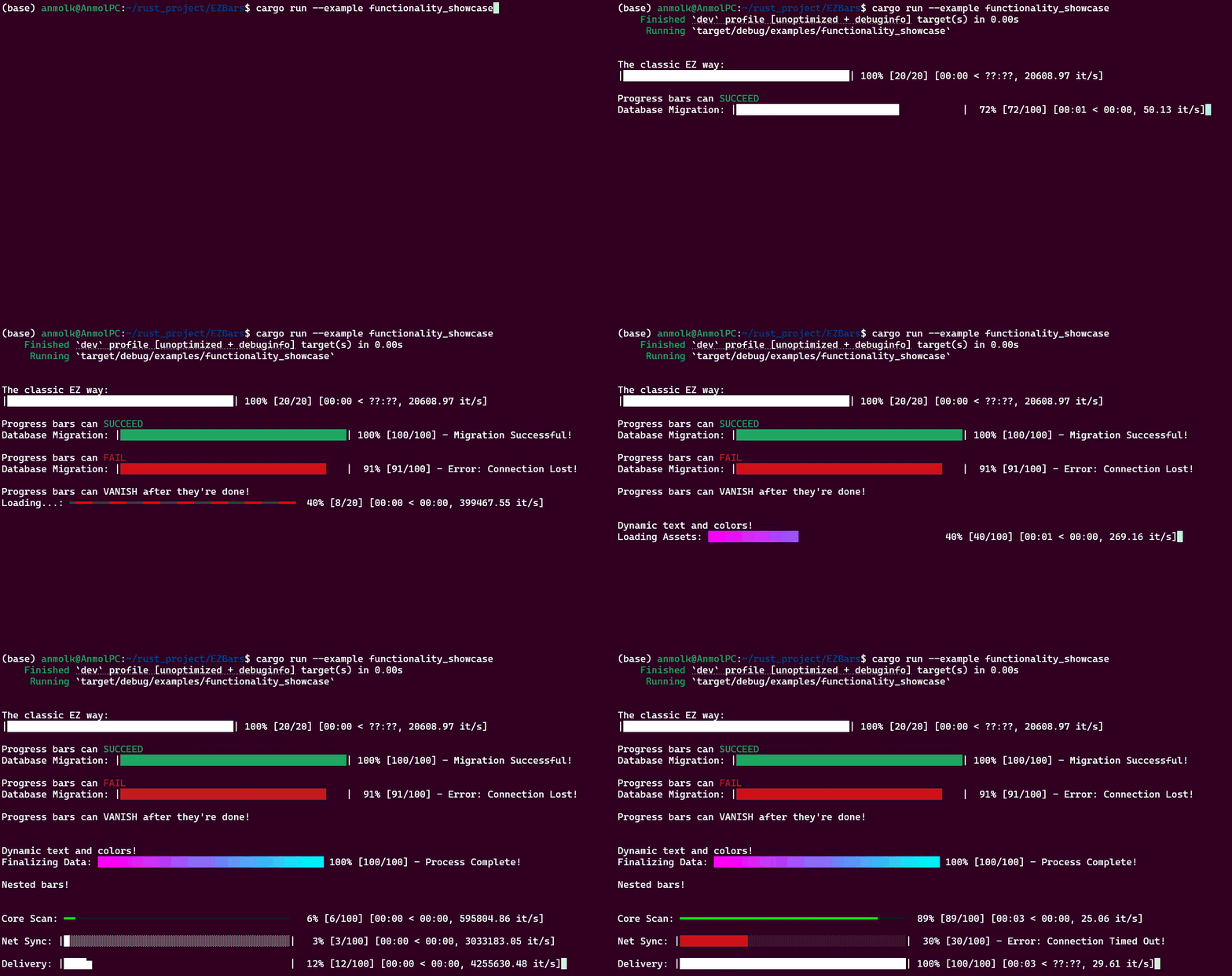
- EZ Syntax: Wrap any exact-size iterator and get a visual progress bar instantly. Alternatively, create and manually tick the progress bar as needed.
- Unicode-Safe Rendering: Full support for multi-byte characters, emojis and specialized symbols.
- Dynamic Text Updates: Change the bar metrics and text on the fly. Let the users know exactly what's going on at any time.
- Lifecycle States: Let users know the final outcome using a success (green) or Failure (red) state. Configure whether to clear the bar from the terminal or persist upon completion. Keep it clean!
- Safe Logging: Only activates if running in a terminal to prevent piped output or log file clutter, encouraging hassle-free usage.
- Multi-Bar Orchestration: Spawn multiple bars at once seamlessly! EZBars auomatically adjust themselves on your terminal when in a nested configuration.
- Smart ETA: Intelligent Exponential Smoothing Algorithm for highly accurate statistics.
- Extensive library of built-in styles: Choose from over 20 customizable styles: pick deterministic styles for percentage-based tracking or indeterminate spinners for active loading. To view all possible styles run
cargo run --example style_showcase:
Making progress bars are ez-pz!
use ezbars::ProgressIterator;

let pb = ProgressBar::new();

for item in pb.wrap(0..100) {
    // Perform work...
    std::thread::sleep(std::time::Duration::from_millis(30));
}

//Alternatively, manually increment while doing work
let pb2 = ProgressBar::new();
for iter in 0..500 {
    // ... perform complex logic ...

    // Manually increment by 1 (or any amount)
    pb.manually_increment(1);
}You can fully customize the look and feel of the progress bar before the loop starts by chaining the builder methods.
use ezbars::{MultiProgress, ProgressBar, Style};

// Fully configure using the Builder Pattern
let pb = ProgressBar::new()
    .total(1000)                   // Define the target completion value (optional)
    .theme(Style::Fractional)      // Choose a visual style (optional)
    .width(60)                     // Customize the width in terminal columns (optional)
    .desc("High-Precision Upload") // Set the leading description string (optional)
.vanish_on_finish(true); // Vanish the bar once finished (optional)Update the bar on the fly!
use ezbars::{MultiProgress, ProgressBar, Style};

let pb = ProgressBar::new();
for i in 1..=100 {
    if i == 25 { // Change the prefix text
        pb.set_description("Loading Assets...");
    }

    // Change metadata (like filenames or status) after the statistics
    if i == 50 {
        pb.set_postfix("Working on: metadata.json");
    }

    // Instead of incrementing, you can snap the bar to a specific value
    if i == 75 {
        pb.set_position(90); // Jump directly to 90%
    }
    else{
        // You can also manually increment to whatever value you want
        pb.manually_increment(1);
        // pb.manually_increment(5);
        // pb.manually_increment(10);
    }

    if failure_condition()
    {
        // Failure Termination
        // Stops the bar, colors it RED, and displays a final message
        pb.finish_with_failure("Connection Lost!");
        return;
    }

    thread::sleep(Duration::from_millis(50));
}

// Success Termination
// Finishes the bar, colors it Green, and displays a final message
pb.finish_with_message("Deployment Successful!");By default, EZBars uses the Fractional style for a smooth classic feel. To see all a showcase of all style options, run cargo run --example style_showcase. This list will keep growing based on user feedback, so check back often! Many of these styles are also user-configurable for a personal feel.
/// [████---] | Deterministic | Fixed-character block bar. Parameters: (filled_char, empty_char)
Classic(char, char),

/// [███▌   ] | Deterministic | Default | High-resolution progress using Unicode 1/8th blocks.
#[default]
Fractional,

/// [ █▂   ] | Deterministic | Sequential vertical fill of individual cells from left to right.
VerticalFill,

/// [  ███  ] | Indeterminate | Ping-pong animation of a sliding block. Parameters: (block_width, filled_char, empty_char)
Bouncing(usize, char, char),

/// [ ██████ ] | Deterministic | Linear RGB interpolation between two 24-bit hex colors.
/// Parameters: (start_hex: String, end_hex: String)
Gradient(String, String),

/// [ ━━━━━━ ] | Deterministic | TrueColor slim-line bar for modern terminal emulators.
/// Parameters: (fill_hex: String, background_hex: String)
ModernSlim(String, String),

/// [ ━━━    ] | Indeterminate | color-shifting pattern for indeterminate states.
/// Parameters: (primary_hex: String, secondary_hex: String)
Marquee(String, String),

/// [ | ] | Indeterminate | Sequential ASCII rotation: `|`, `/`, `-`, `\`.
AsciiSpinner,

/// [ ⠋ ] | Indeterminate | Sequential rotation using 8-dot Braille patterns.
BrailleSpinner,

/// [ Hello! ] | Indeterminate | Horizontal marquee for custom strings.
TextTicker(String),

/// [  DVD   ] | Indeterminate | Bouncing DVD logo logic.
DVD,

/// [ ᗧ • • ] | Deterministic | Progression-based animation using pacman.
Pacman,

/// [ -/\--• ] | Deterministic | Dynamic EKG line with a leading pulse blip.
EKG,

/// [ ▂▃▅▆▇ ] | Deterministic | Global vertical fill level across the entire bar width.
WaterLevel,

/// [ ><(((°> ] | Deterministic | Fish swimming from left to right.
Fish,

/// [ ▁▅▇██▇▅ ] | Indeterminate | sine-wave oscillations using block height variations.
Waves,

/// [ >>>>   ] | Deterministic | Directional arrows using ASCII chevrons.
Arrows,

/// [ 🚀~~~~ ] | Deterministic | Rocket flying with ANSI-colored exhaust and starfield.
Rocket,

/// [ <°)))>< ] | Indeterminate | Ping-pong anuimation of a fish.
FishBounce,

/// [ ⠁⠈⠐⠠ ] | Indeterminate | High-speed rippling effect using dots.
DotWaves,

/// [ ~~~🐱  ] | Deterministic | 256-color rainbow trail with a cat.
NyanCatEZBars uses std::io:IsTerminal to automatically detect if its being used inside a terminal application. This allows it to prevent piped output or log file clutter, encouraging hassle-free usage.
- Thanks to https://github.com/rsalmei/alive-progress for inspiration .
- I used Gemini Pro to write most of this code.
Email me at anmolkathail@gmail.com , or create an issue in the github repository.
See CONTRIBUTIONS.md
-
Template String Engine: Flexible layout definition (e.g., "{spinner} [{elapsed}] {bar:40} {bytes}/{total} ({eta})") for ultimate developer control over data placement.
-
Throttled I/O Rendering (FPS Capping): Decoupling iteration speed from terminal redraw speed (e.g., max 30-60 redraws/sec) to prevent CPU bottlenecking on micro-second loops.
-
Background Ticker Thread: A mechanism to keep indeterminate spinners animating smoothly even when the main thread blocks on heavy synchronous I/O (like database queries). Provide a
enable_steady_tick(100)method that spawns a lightweight background thread to keep the spinner animating automatically. -
Native Async Stream Wrappers: First-class extension traits for tokio and futures streams to track asynchronous pipelines without manual increment logic.
-
Parallel Iterator Extension: Native, lock-free integration with the rayon crate for zero-friction tracking across heavily multi-threaded workloads.
-
Dynamic Terminal Resizing (SIGWINCH): Signal handling to detect terminal resizing events, instantly re-scaling the bar width to prevent visual artifacting and line wrapping.
-
stderr Default Routing: Adhering to the UNIX philosophy by sending diagnostic UI to stderr by default, allowing developers to pipe stdout safely without corrupting their data.
-
Ecosystem Logging Integration: A suspended-draw lock that hides the bar, allows crates like log or tracing to print to the terminal, and instantly redraws the bar underneath.
-
Smart Byte & Throughput Formatting: Built-in formatters that auto-scale large integers into human-readable data units (KB, MB, GB) and network speeds (MB/s).
-
Pluggable ETA Algorithms: Offering choices between Exponential Moving Average (EMA), Linear Regression, or Sliding Window predictions to match the specific volatility of the task.
-
Hierarchical Tree Tasks: Managing nested "parent-child" progress structures for complex pipelines, where a master bar automatically advances based on child completion.
-
CI/CD "Dumb" Mode: Automatically switching to periodic text-only emission (e.g., "Progress: 25%" every 10 seconds) when headless environments like GitHub Actions are detected. Automatically detect environment variables like CI=true or GITHUB_ACTIONS=1.
-
Custom Widget Columns: Allowing users to inject custom structs that implement a Widget trait, enabling them to render highly specific, dynamic inline data blocks.
-
HTTP Client Integration: Pre-built convenience wrappers for crates like reqwest or hyper to track network payloads and file downloads with minimal boilerplate.
-
WASM & no_std Compatibility: Feature flags that gracefully degrade or strip out ANSI drawing code, allowing the library to compile cleanly for WebAssembly or embedded targets.
-
Pause and Resume States: The ability to temporarily halt the timer and speed calculations during intentional programmatic pauses, preventing the ETA from skewing
-
Dual-Line / Multi-Line Status: Allow a progress bar to have a dedicated "Title" line above it that updates independently, preventing the bar itself from shifting left and right when the text length changes.
-
Inline Rich Text Markup: Allow users to use a simple markup language in their descriptions instead of manual ANSI codes (e.g., pb.set_description("[bold red]Error[/] parsing file")).
-
Lock-Free State Management: For extreme parallel workloads (like rayon iterators processing millions of items), Rc or standard Mutex will bottleneck the CPU. Implement a lock-free atomic state or message-passing channel (MPSC) to handle thousands of concurrent updates safely.
-
Native Async/Await Support: Provide .wrap_stream() extension traits for tokio and futures streams, allowing users to track asynchronous file downloads or network requests with zero manual
inc()calls. -
Log & Tracing Suspension: Provide a suspend(|| { log::info!("...") }) macro. When called, EZBars erases the current bars, prints the log message, and instantly redraws the bars below it. This prevents logs and progress bars from overlapping into terminal garbage.
-
Anomaly Detection: Detect if an iteration takes unusually long compared to the baseline, and visually indicate a "stall" or "waiting" state (e.g., turning the bar yellow or changing the spinner) so the user knows the program is hanging, not just processing slowly.
-
Post-Mortem Receipts: When a bar finishes, optionally replace the progress track with a detailed summary (e.g., [✓] Processed 500 items in 2.4s (avg: 208 it/s)).