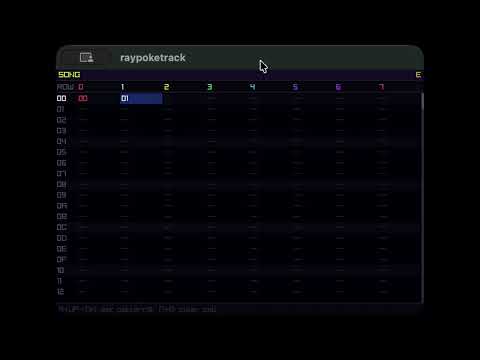
This is a cross-platform joystick-driven music-tracker.
It uses CLAP for sound-generation and effects, which you can sequence. This allows a wide variety of instrument-types, from the same interface.
Grab the latest reelase for your platform. On steamdeck, I made a non-steam game launcher. Joystick (analog/dpad/etc) worked for me without any config, but since SELECT is next to dpad, I also added controller-maps so triggers act as START/SELECT (on opposite sides) which allows for easier SELECT + dpad. In launch options, add --fullscreen.
I don't have mobile builds setup yet, but it should work OK on the web:

You should be able to track quickly with a joystick, or keys:

It may seem a bit inscrutable at first, but input is meant to be consistent and fast with a joystick, so once you get the hang of it, it should work well. A is "edit/change value", B is "delete/reset/cancel", X is "fill column", Y is "clear column", SELECT + arrow is "change screen", and START is "play song/pattern".
| Input | Screen | Purpose |
|---|---|---|
| SELECT + ←/↑/↓/→ | Any | Switch to Song / Pattern / Instrument / Menu screen |
| START | Any | Play/stop |
| START | Pattern | Loop current pattern only (not full song) |
| ↑/↓ | Song | Move cursor row |
| ←/→ | Song | Scroll visible channels |
| A + ↑/↓ | Song | Set pattern number in focused cell |
| B | Song | Clear cell |
| L / R | Pattern | Previous / next pattern |
| ↑/↓ | Pattern | Move cursor row |
| ←/→ | Pattern | Move cursor column (note → vel → inst → fx…) |
| A + ↑/↓ | Pattern, note col | Step note up/down by current scale |
| A + ←/→ | Pattern, note col | Octave up/down |
| A + B | Pattern, note col | Insert NOTE-OFF |
| B | Pattern, note col | Clear note |
| A + ↑/↓ | Pattern, velocity col | Change velocity ±1 |
| A + ←/→ | Pattern, velocity col | Change velocity ±16 |
| B | Pattern, velocity col | Reset velocity to 100 |
| A + ↑/↓ | Pattern, instrument col | Change instrument number |
| B | Pattern, instrument col | Reset instrument to 0 |
| A + ↑/↓ | Pattern, FX col | Cycle FX type |
| A + ↑/↓ | Pattern, FX value col | Change FX value ±1 |
| A + ←/→ | Pattern, FX value col | Change FX value ±16 |
| B | Pattern, FX col | Clear FX |
| X | Pattern | Fill entire column with current row's value |
| Y | Pattern | Clear entire column |
| L / R | Instrument | Previous / next instrument |
| ↑/↓ | Instrument, slot panel | Navigate chain slots |
| → | Instrument, slot panel | Enter param panel for selected slot |
| A + ↑/↓ | Instrument, slot panel | Cycle unit type in slot |
| A + B | Instrument, slot panel | Toggle slot enabled/disabled |
| B | Instrument, slot panel | Clear slot |
| ↑/↓ | Instrument, param panel | Navigate params |
| ← | Instrument, param panel | Back to slot panel |
| A + ↑/↓ | Instrument, param panel | Change param value ±1 |
| A + ←/→ | Instrument, param panel | Change param value ±16 |
| B | Instrument, param panel | Reset param to default |
| A | Instrument, FILE row | Open file picker |
| B | Instrument, FILE row | Clear file path |
| ↑/↓ | Menu | Navigate items |
| A + ↑/↓ | Menu, BPM | Change BPM ±1 |
| A + ←/→ | Menu, BPM | Change BPM ±10 |
| A + ↑/↓ | Menu, KEY | Change scale root note |
| A + ↑/↓ | Menu, SCALE | Cycle scale (chromatic, major, minor, Persian…) |
| A | Menu | Confirm action |
Here are some videos:
There are some built-in units (effects/sound-generators) but you can also use CLAP plugins.
Instruments
- Surge XT — subtractive/wavetable synth; good first test
- Vital — wavetable synth, free tier
- Dexed — DX7 FM emulation
- OB-Xd — Oberheim-style analog
Effects
- Airwindows — large collection of free DSP effects
- Dragonfly Reverb — room/hall/plate reverbs
CLAP lands at:
- macOS:
/Library/Audio/Plug-Ins/CLAP/*.clap - Windows:
C:\Program Files\Common Files\CLAP\*.clap - Linux:
/usr/lib/clap/*.clap
They can be pretty confusing, since the original GUI is missing, and that is generally how these plugins were designed to be used, but it's doable. Here is an example test with "Surge XT":
map these params:
- 319 (cutoff)
- 320 (resonance)
- 317 (filter type)
set resonance high, and filter-type to 10 hex (lowpass)
Pattern would look like:
C-4  00  00 80
---  00  00 90
---  00  00 A0
---  00  00 B0
which sequences cutoff.
At some point, I will try to make a bunch of simpler 1-function CLAP units that can be dropped in easier. In general, I think it's actually better to chain several differnt units together, and there are a lot of built-ins that should just work.
# build native
cmake -B build -DCMAKE_BUILD_TYPE=Release
cmake --build build --parallel

# build web
emcmake cmake -B build-web -DCMAKE_BUILD_TYPE=Release -DPLATFORM=Web
cmake --build build-web --parallel

# run local watching web-server
npx -y live-server webroot --mount=/raypoketrack.mjs:./build-web/raypoketrack.mjs

# format code
find . -name "*.c" -o -name "*.h" | grep -v build | xargs clang-format -i