An emulator of the Orion-128, a home computer built around the KR580VM80A processor (an i8080 clone).


orion128 emulates the hardware — memory-mapped video, the keyboard, ports and the disk controller — and runs the real ROM and software on top of it. It is built on the z80 package for the i8080 core and on cpm80 for the CP/M side of the disks, and aims to stay in pure Python. The display is built on PySDL2 and numpy.
Norton Commander (NC.COM) running under CP/M, booted from a disk image:
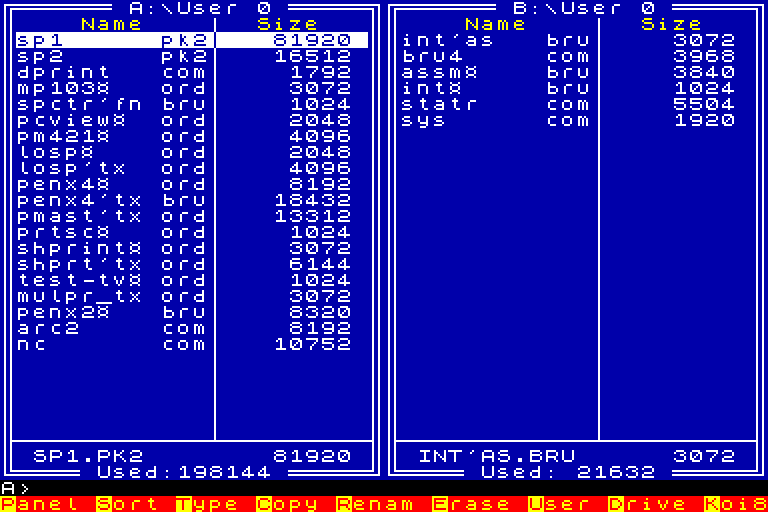
It ships with the Monitors for both Orion keyboards, the MS7007 and the RK-86, and an ORDOS 4.03 ROM-disk, so once installed from PyPI it boots a working system out of the box:
pip install orion128
orion128
--rk86 selects the RK-86 keyboard machine, with its own Monitor and
keyboard layout, for software written for that keyboard. --z80 runs on
the Z80 core, for software that uses Z80 instructions. --monitor PATH
and --romdisk PATH replace the bundled ROMs. --help lists everything.
Each extra argument is a file the emulator loads. An ORDOS program (.ORD
or .BRU) is placed on the RAM-disk (drive B:). A disk image is put in a
floppy drive; give several to fill the drives in turn:
orion128 PENX4$.ORD
orion128 system.img data.img
With a disk in the drive the Orion's own disk software runs: the ORDOS file manager copies files to and from disks, and CP/M boots from a system disk. Changes to a disk are kept in memory, so your image files are left as they are.
Disk images can also be worked on from the host:
orion128 dir work.odi              # list the files of every user area
orion128 dir work.odi --user 1     # just one user area's
orion128 save HELLO.COM work.odi   # put host files on the disk
orion128 save work.odi HELLO.COM   # take files off the disk
orion128 ren work.odi HI.COM=HELLO.COM   # rename a file, NEW=OLD
orion128 era work.odi HELLO.COM    # delete files
orion128 format work.odi           # make a blank disk (--tracks 82 for 820K)
orion128 sysgen system.odi work.odi   # copy the system tracks
orion128 sysgen system.odi osdos.sys  # extract them to a file
orion128 sysgen osdos.sys work.odi    # install them from a file
orion128 split work.odi parts/     # take the image apart, erased files too
orion128 strip PENX4$.BRU          # write the canonical PENX4$.ORD
split writes every byte of the image into a directory: the system tracks,
the directory, the live files by user area, the erased files with the
blocks taken over since filled in, and the unallocated blocks that hold
data, with a report of what went where. That is the raw material for
recovering erased files by hand.
F12 is the RESET button. F10 closes the emulator.
Each PC key is mapped to the Orion key that gives the same character, so
:, ; and # come out as expected, even though the Orion's own keyboard
is laid out quite differently. Old games that scan the keyboard ports
directly, like Manic Miner, keep working too.
The bundled ROMs are the copyright of their original authors and are not
covered by this package's MIT licence; see orion128/ROMS.txt.