Skip to content

Conversation

@furey
Copy link
Contributor

@furey furey commented Sep 21, 2017

This PR optionally enables a fallback site path for uncaught urls.

It adds a "fallback" command to the CLI:

fallback

It also adds the inverse command, "unfallback":

unfallback

Example use case…

I'm developing a site locally on my Mac and I want to view it on my mobile device which is connected to the same LAN. I could run valet share from my site's local directory, but because ngrok is painfully slow where I live & work, I run valet fallback instead:

updated

On my mobile device, I enter my Mac's LAN IP address and I am now viewing the site I was developing on my Mac. Yay! When I'm done, I run valet unfallback (or valet unfall because it sounds cooler) and the site I'm developing is no longer viewable by my mobile device:

removed

Closes #440

@joshmanders
Copy link
Contributor

This is an interesting PR.

@furey
Copy link
Contributor Author

furey commented Sep 21, 2017

@joshmanders Cheers!

The particular use case I wrote it for is as follows…

I'm creating a web app for a trade show, where there'll be a web server and a bunch of peripheral devices (phones, tablets, etc) on the same LAN connecting to that server via their web browsers.

With this PR I simply run valet fallback in my web server's site path directory, distribute the server's LAN IP address to all the peripheral devices, and then they can all see the web app regardless of the LAN's external internet connectivity. Easy!

As an aside, there are obviously many ways to determine your LAN IP, but the following bash alias (throw it in your ~/.bash_profile) does the job for me…

_ip() {
    ifconfig | grep "inet " | grep -Fv 127.0.0.1 | awk '{print $2}'
}
alias ip=_ip

@joshmanders joshmanders mentioned this pull request Sep 21, 2017
@mikemand
Copy link

This works great for my use case (#440). The only problem I have is getting an SSL certificate to work for my Mac's LAN IP address. Any ideas on what I can do?

@furey
Copy link
Contributor Author

furey commented Sep 22, 2017

Hi @mikemand!

My SSL/network knowledge is limited, but as an avid tinkerer I just had to dive in for you.

I started by hacking the valet secure command to accept IP addresses (without the TLD)…

/**
 * Secure the given domain with a trusted TLS certificate.
 */
$app->command('secure [-i|--ignoreTLD] [domain]', function ($ignoreTLD, $domain = null) {
    $url = ($domain ?: Site::host(getcwd()))
          .($ignoreTLD ? '' : '.'.Configuration::read()['domain']);
    Site::secure($url);
    PhpFpm::restart();
    Nginx::restart();
    info('The ['.$url.'] site has been secured with a fresh TLS certificate.');
})->descriptions('Secure the given domain… etc');

/**
 * Stop serving the given domain over HTTPS and remove the trusted TLS certificate.
 */
$app->command('unsecure [-i|--ignoreTLD] [domain]', function ($ignoreTLD, $domain = null) {
    $url = ($domain ?: Site::host(getcwd()))
          .($ignoreTLD ? '' : '.'.Configuration::read()['domain']);
    Site::unsecure($url);
    PhpFpm::restart();
    Nginx::restart();
    info('The ['.$url.'] site will now serve traffic over HTTP.');
})->descriptions('Stop serving the given domain… etc');

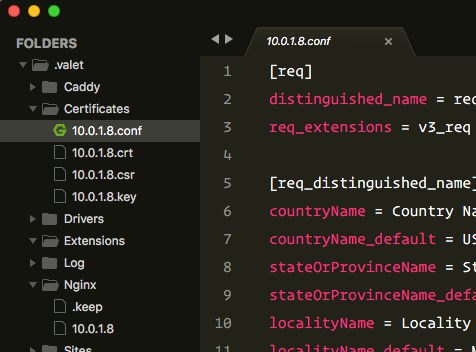
…and even though the appropriate certificates got created…

certificate

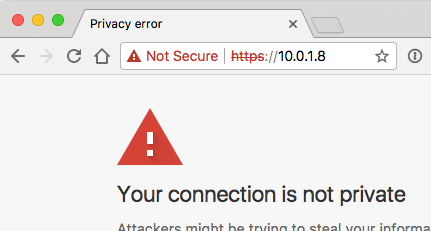
…the browser still errored:

error

A little Googling revealed it doesn't sound like you can achieve what you're after…

https://community.letsencrypt.org/t/certificates-for-hosts-on-private-networks/174
https://community.letsencrypt.org/t/certificate-for-static-ip/84
https://au.godaddy.com/help/can-i-request-a-certificate-for-an-intranet-name-or-ip-address-6935

…but I ain't no expert, so, maybe?

🤷‍♂️

@joshmanders
Copy link
Contributor

You can't create an ssl cert for ips.

@furey
Copy link
Contributor Author

furey commented Sep 22, 2017 via email

@mikemand
Copy link

Thank you guys for the research and help. I'll see if I can create a subdomain and get an SSL for that, then just point the A record at my LAN IP.

@drbyte
Copy link
Contributor

drbyte commented Sep 22, 2017

For HTTPS, no matter how you slice it, Valet will still issue a self-signed certificate ... and therefore any other device that connects will need to click to Accept / Trust that certificate when visiting the site for the first time.

To get around that, you'd need to register a proper domain (and point the A record to your local IP, as you said), get an SSL cert for it, and then manually configure your local nginx configs to use that specific SSL cert. And then NOT use Valet's valet secure command on it (nor valet domain or valet path), else your nginx configs will get overwritten.

@drbyte
Copy link
Contributor

drbyte commented Sep 22, 2017

While the following doesn't fix the "self-signed cert" "issue", you could leverage http://xip.io for minimizing some DNS complexity:

  1. valet domain io -- to default to serving all domains as *.io (helpful for using valet secure, below)
  2. then get your local IP address like @furey posted above
  3. then have Valet set self-signed SSL for it: valet secure 10.0.1.8.xip.io
  4. then point your local mobile device/s to https://10.0.1.8.xip.io
    (and probably good to set APP_URL=https://10.0.1.8.xip.io in .env

(Still have to do HTTPS separately)

Alternatively, you could sign up for a Free DNS provider and pick a vanity domain (like bananas.afraid.org), and configure that domain to point to your local 10.0.1.8 IP address. Then people can type in that vanity domain, and if the IP changes they won't have to know the new number.
(Again, still have to do HTTPS separately)

There are other variations as well. Just mentioning these 2 for the benefit of those who didn't know about the .xip.io option, or about 3rd-party free dns services.

@mikemand
Copy link

@drbyte: You are amazing. I did not know about xip.io before now, and it has saved my sanity.

Here's what I did, for anyone else that wants to do so as well:

  1. valet domain io
  2. cd ~/Path/to/my/fallback/application then valet link 10.0.1.8.xip (this creates 10.0.1.8.xip.io as a valid application)
  3. valet fallback (this is required to make external requests route to this application)
  4. valet secure

At this point, I had to navigate to ~/.valet/Certificates and email the certificate to myself so I could add it as trusted on my iOS devices and any other computers I may need to use this application with.

My application is a very simple Lumen application with two endpoints: status and print. I had to add middleware to handle CORS, but after that everything is working fantastically.

I should note that this is all from a completely fresh install of Valet. I don't have any other applications running on it and for my current use case I won't have to...I'm just using it has a bridge between my SSL-secured website and a Zebra GX420d printer that doesn't have SSL (stupid Zebra -.-).

@drbyte
Copy link
Contributor

drbyte commented Sep 23, 2017

@mikemand 👍 Glad you got a working solution! And kudos to @furey for the fallback idea ;)

@furey
Copy link
Contributor Author

furey commented Sep 23, 2017

@mikemand Just followed your instructions and I can confirm that by doing so, https via xip.io and valet fallback works for devices on my LAN! Thank you!

@mikemand
Copy link

I'm not sure if this will work, but I'm going to try anyway:

Closes #440

@drbyte
Copy link
Contributor

drbyte commented Sep 24, 2017

I tend to agree.
👍
I'm satisfied that this PR is suitable for its stated purpose, and hope @adamwathan will merge it.

It serves a slightly different purpose than valet share, and I don't think it's at cross-purposes with the share/ngrok functionality. And I don't anticipate it being a big support burden to be built-in to the package.

I've wrestled with whether the fallback/unfallback naming is best, but haven't come up with anything else that's much more expressive of the intended purpose and still "short", so have no alternate suggestion. I don't think it needs changing. But that's just my opinion, today.

@Bonobomagno
Copy link

the main purpose here is to share for dev purpose, not share for send links to clients.
Usually this is how you use vagrant, so a feature for easy lan share is amazing!

@mikemand
Copy link

Any updates on when this might be merged? I would really like this to be "official" so I can use it in my project.

@drbyte
Copy link
Contributor

drbyte commented Nov 14, 2017

(Until it's merged, I'm just using it directly in my ~/.composer/vendor/laravel/valet folder, by making direct edits to those files. If a new release is tagged I know it'll wipe out my changes ... but hopefully that'll be because of a bunch of merges.)

@drbyte
Copy link
Contributor

drbyte commented Dec 13, 2017

I've been using this with no problems or difficulties since September.

👍 to merge IMO.

@furey
Copy link
Contributor Author

furey commented Dec 13, 2017

I've also been using it since submission (LAN kiosks) and have had no issue either.

🤓👍

@eberkund
Copy link
Contributor

Is this basically to replace the 404 page?

@drbyte
Copy link
Contributor

drbyte commented Dec 22, 2017

@eberkund wrote:
Is this basically to replace the 404 page?

Yes and no.
Indirectly "yes", as it intercepts the default 404 response valet gives if no such domain is found.

In short, with a fallback configured, all incoming requests would:

  • first search for any configured matching domain.tld and serve those if found
  • if no match found, instead of throwing a 404, would serve the configured fallback site

Longer explanation: its purpose in the author's original context was to set up the machine to respond to any incoming request regardless of whether a configured domain is a match. This way it can be a server to respond to any incoming request within a given network ... without having to configure every other machine by editing every hosts file to add a domain name and IP address, in order to have those devices access the server. Especially important if mobile/tablet devices are being used, since those are not customizable when it comes to networking and hosts files.

In the author's example, it was to allow the server to respond to "kiosk" devices within a local network, in this case at a trade show.

@eberkund
Copy link
Contributor

Oh that makes sense, I actually used Valet for something like that in the past and it just happened to be the quickest way to set up a PHP web server. Cool.

@adamwathan
Copy link
Contributor

I'd like to merge this but I don't like the "fallback" terminology. What do you think about calling it the "default" site rather than the fallback site?

The hard part is naming the "remove default" command :/

@drbyte
Copy link
Contributor

drbyte commented Jan 24, 2018

Perhaps rename valet unfallback to one of:
valet default-off ?
valet disable-default?

@furey
Copy link
Contributor Author

furey commented Jan 25, 2018

  • valet fallback / fail
  • valet catch / ignore
  • valet default / dofault

…or any combination of the above?

@mikemand
Copy link

What about making it a flag of the link command? valet link --default

@drbyte
Copy link
Contributor

drbyte commented Jan 25, 2018

What about making it a flag of the link command? valet link --default

I like it.

And unlink would then simply make sure the default was unset.

@furey
Copy link
Contributor Author

furey commented Jan 27, 2018

And unlink would then simply make sure the default was unset.

@drbyte So to remove the default/fallback site path, you'd have to navigate to the default/fallback site path before running valet unlink --default? I assume you'd still pass the --default flag as you may want to keep the link and just remove the default/fallback role of that link?

How about simply providing a --remove (or --clear, --forget, etc) flag to the fallback command? This would negate the need for the terribly named unfallback command, and you could call it from anywhere without first having to navigate to the previously defined default/fallback site path.

FYI the term fallback was chosen to mirror existing terminology littered throughout the framework.

I'm not precious and will happily resubmit as default if that's the consensus!

Thoughts?

@mikemand
Copy link

@furey As far as I know, valet unlink will allow you to pass the name of a site to it (e.g. valet unlink codenamebanana.

@furey
Copy link
Contributor Author

furey commented Jan 28, 2018

So to clarify (and before making changes to the PR), the proposed API would be…

Set Fallback Site Path

When the working directory is the intended fallback site path:

valet link --default
valet link [<name>] --default

Remove Fallback Site Path

When the working directory is the fallback site path:

valet unlink

When the working directory is not the fallback site path, but the fallback link name is specified:

valet unlink [<name>]

When the working directory is not the fallback site path, and no link name is specified:

valet unlink --default

@drbyte
Copy link
Contributor

drbyte commented Jan 28, 2018

I like it.
I wanted to ask: when you were looking at the unlink options, and came up with 3 cases, can you share your thinking process for settling on these 3? vs 2, vs always specifying --default, etc. (Notwithstanding that I know I said "unlink could just ensure default is unset" earlier).
I'm just thinking about ensuring we propose the simplest (both cognitively and technically) signature for these commands.

@furey
Copy link
Contributor Author

furey commented Jan 28, 2018

Hi @drbyte,

My thinking supplement's the existing unlink functionality if you're in the fallback directory (1) or have passed the fallback directory's symlink name (2), and also provides an option to remove the fallback directory without any knowledge of its directory or name (3).

To elaborate…

  1. Calling valet unlink (without passing [<name>]) currently destroys the working directory's symlink. I'm proposing if the working directory's symlink pointed to the stored fallback site path, the fallback site path would be forgotten.

  2. Calling valet unlink [<name>] currently unlinks the [<name>] symlink. I'm proposing if the [<name>] symlink pointed to the stored fallback site path, the fallback site path would be forgotten.

  3. I'm also proposing valet unlink --default (without passing [<name>]) as a third option to enable users to forget the fallback site path without having to navigate to the fallback directory (1), or know the [<name>] of the fallback symlink (2). It would ignore the working directory and simply forget the fallback site path from wherever you were, without requiring knowledge of the fallback site path or symlink name.

Hope that makes sense. If not, perhaps piggybacking link and unlink muddies the waters and standalone commands (e.g. @adamwathan's valet default and the inverse clear-default or forget-default would be more obvious.

Naming, right?

🤷‍♂️

@drbyte
Copy link
Contributor

drbyte commented Jan 28, 2018

Yup. Naming is tough.

I like the end-user simplicity of simply adding --default to the link and unlink commands.

I'm still undecided whether unlink without --default needs to disconnect the default/fallback site. It feels almost like overreach the more I think about it. I guess it depends on implementation: particularly whether the app in that directory has APP_URL set to a name instead of an IP and uses helper functions that utilize that URL. But that's really not an issue that Valet should concern itself with.

I'm leaning more and more to just:
valet link [name] --default
and
valet unlink [name] --default
... where [name] is entirely optional in both cases.

Also it looks like after the necessary coding changes, the word 'fallback' can be safely changed to 'default' in all cases, and still retain the intended meaning.

@adamwathan
Copy link
Contributor

adamwathan commented Jan 28, 2018

I don't love any of the API suggestions so far, so here's what I think we should do:

Let's make this a sort of "advanced" feature that you setup directly in your config file, at least for now.

We'd keep all the logic this PR adds around checking if a default site is set and serving that if needed, but remove the actual CLI commands to set it; instead recommending that people just change that path in their ~/.valet/config.json file manually.

This way we get the feature in now for folks who need it, but avoid committing to an API we may later regret.

@drbyte
Copy link
Contributor

drbyte commented Jan 28, 2018

Ooooo! A secret undocumented advanced feature! Easter-Eggs, just in time for easter!

@eberkund
Copy link
Contributor

I like that idea @adamwathan

…g that if needed, but removed the actual CLI commands to set it (recommending people add/change their "default" path in their ~/.valet/config.json file manually).
@furey
Copy link
Contributor Author

furey commented Jan 29, 2018

Hi @adamwathan,

I've updated the PR as per your instructions:

  • Removed CLI commands
  • If ~/.valet/config.json contains a valid "default" site path, it's served as fallback

Cheers!

🤓🤞

@adamwathan adamwathan merged commit 4c243d7 into laravel:master Jan 29, 2018
@adamwathan
Copy link
Contributor

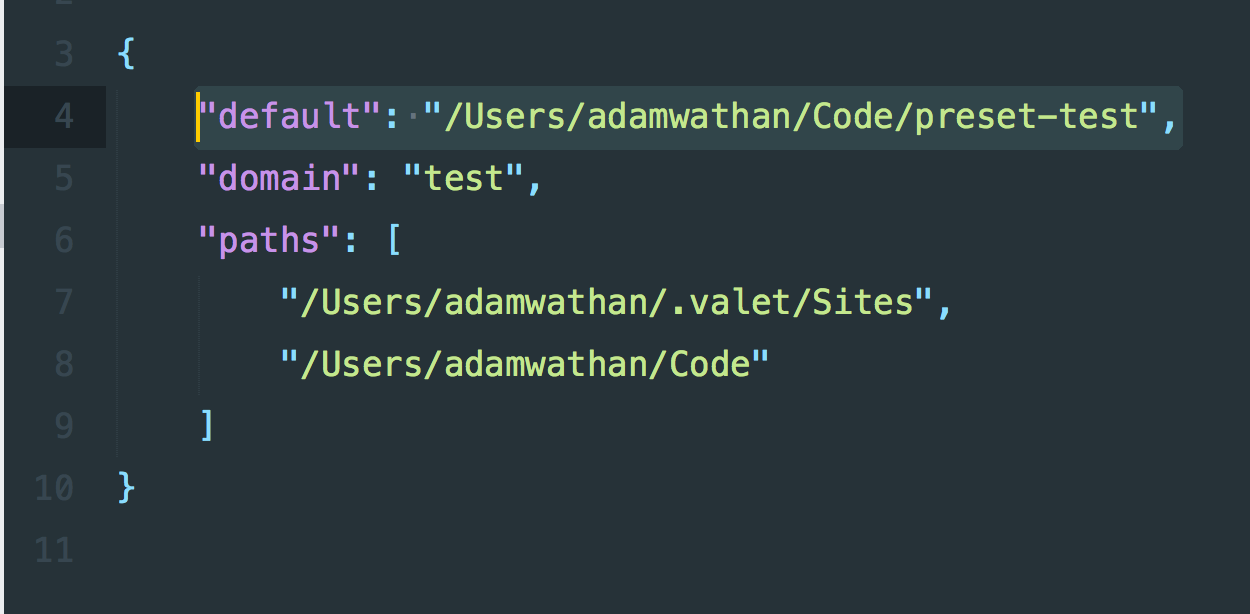
Awesome! So for anyone else who finds this before we document it at some point, you can now have Valet serve a specific project by default by adding a new key to your ~/.valet/config.json file like so:

image

@mikemand
Copy link

mikemand commented Jan 29, 2018

Finally, yay!

Are there any other steps we need to take to get the default site running (other than editing the config file)? Restart valet/dnsmasq/php/etc.? Should we have this site already linked? Edit: I'm just trying to cover all the bases. :)

Thank you @furey and @adamwathan! (And @drbyte too!)

@drbyte
Copy link
Contributor

drbyte commented Jan 29, 2018

@mikemand Nothing special required (no restarts, no linking needed), other than adding the path to config.json, and of course composer update when pointing this project to dev-master

After doing that, when visiting any IP linked to your computer, whether localhost 127.0.0.1 or the IP assigned by your router, it'll serve up whatever project is at the directory specified in config.json.

@furey
Copy link
Contributor Author

furey commented Jan 30, 2018

Running composer global require laravel/valet=dev-master felt so damn good.

feels-good-man

Cheers, Laradudes!

😎🤙

@furey furey deleted the feature/fallback-site-path branch February 1, 2018 12:47
lexuzieel added a commit to lexuzieel/valet-linux that referenced this pull request Jun 2, 2018
@alextime
Copy link

Sorry guys, I moved to dev-master (composer global require laravel/valet=dev-master), I have created a new .valet directory (there was not there at all) under my home directory and created a new config.json file in it looking at the adamwathan image. If I visit 127.0.0.1 the default site does not shows up...I got a simple "404 - Not Found" what am I missing?

@drbyte
Copy link
Contributor

drbyte commented Mar 14, 2019

@alextime A long time ago the ~/.valet directory was moved to ~/.config/valet for consistency with other apps storing configs in the ~/.config folder.

@alextime
Copy link

@alextime A long time ago the ~/.valet directory was moved to ~/.config/valet for consistency with other apps storing configs in the ~/.config folder.

Many thanks, I didn't know it. Now it works even if electron does not to debug Vue using mobile devices...

@elburro1887
Copy link

I just tried this, connecting from my phone, which is on the same LAN.

I type the Mac's IP, and then the phone browser immediately redirects to the Valet domain e.g. "magento.test", this hostname however does'nt exist on the phone, so the page is not loaded.

Am I missing something here?

@eberkund
Copy link
Contributor

eberkund commented Apr 6, 2019

@elburro1887 what is doing the redirecting? I think that might be magento that is doing that, not valet.

@elburro1887
Copy link

@eberkund Yes, that could be the reason, I'll have a look, thanks!

@alextime
Copy link

alextime commented Feb 19, 2020

I'm on valet 2.8.1, the default directive on config.json does work well, because if I visit localhost or 127.0.0.1 I actually see the default site. But if I visit my lan ip I got a ERR_CONNECTION_REFUSED error, even if I visit my ip from my very same Mac. I'm on Catalina 10.15.3 and I thought of some firewall issue, but firewall is not active and I do not have any third part firewall at all. On Mojave it worked, I guess it is an issue related on Catalina and not valet. Do you had any experience on this topic? Securing or unsecuring the default site does not help.

@alextime
Copy link

I'm on valet 2.8.1, the default directive on config.json does work well, because if I visit localhost or 127.0.0.1 I actually see the default site. But if I visit my lan ip I got a ERR_CONNECTION_REFUSED error, even if I visit my ip from my very same Mac. I'm on Catalina 10.15.3 and I thought of some firewall issue, but firewall is not active and I do not have any third part firewall at all. On Mojave it worked, I guess it is an issue related on Catalina and not valet. Do you had any experience on this topic? Securing or unsecuring the default site does not help.

Sorry, it was well documented on valet doc on this paragraph https://laravel.com/docs/6.x/valet#sharing-sites !

Sign up for free to join this conversation on GitHub. Already have an account? Sign in to comment

Labels

None yet

Projects

None yet

Development

Successfully merging this pull request may close these issues.

Local Network access

9 participants