
Demonstrate an Example Microservices Architecture running on Pivotal Web Services and Pivotal Cloud Foundry with ReactJs and Spring Boot
##Microservices
- Frontend: GUI (subscriber on API to get push notifications over STOMP messaging)
- MS-IFA-API: Microservice only accessible via RabbitMQ-Service (Message Servive Broker) offered by Pivotal.
- MS-IFA-WRAP: Microservice accessible via REST API for GUI-subscribing with a Websocket in order to receive STOMP push messages
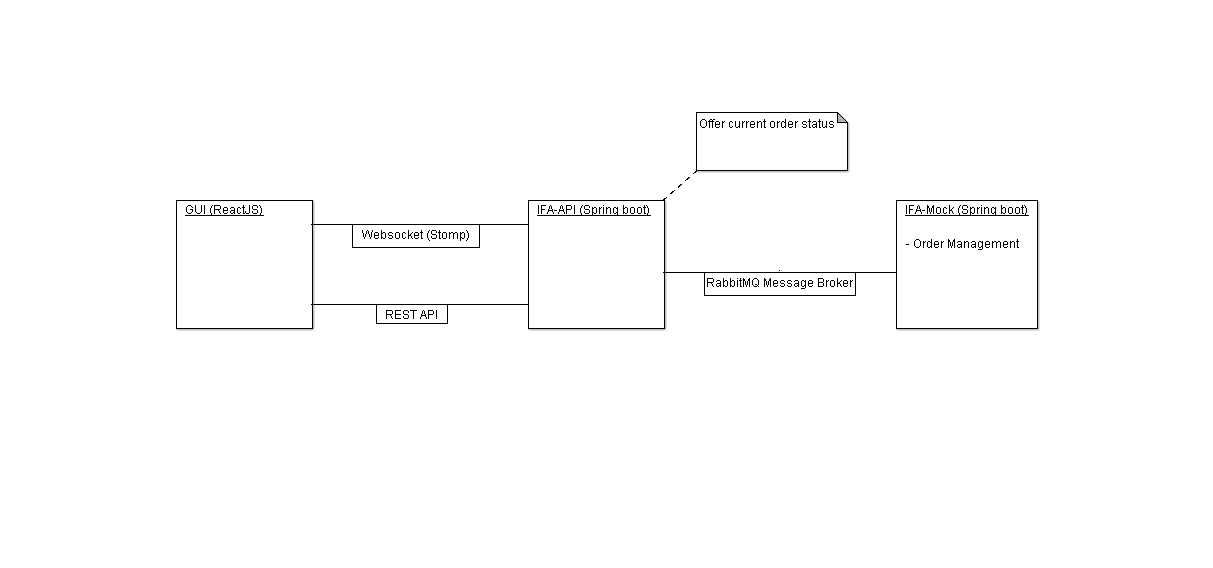
##Demo on Pivotal Web Services Find the GUI on PWS
##Technology
###Frontend
- webpack (bundle packer)
- react
- react bootstrap components
- npm
- babel transpiler
###Backend Microservices
- implemented basically with JAVA Spring boot (REST API, Websocket)
- maven
##Deployment locally ###Precondition Be aware there have to be a rabbitMQ service intance running on the underlying OS, since the project is deployed locally.
###Steps Backend Services: When the project is checked out locally, it can be simply run by Spring boot via the Application.java (in both projects).
Fronend:
- With 'npm start', the dependencies will be downloaded.
- With 'webpack' the final package will be bundles and is ready for usage in index.html.
- with 'webpack-dev-server' a local server instance is going to host the files.
npm start
webpack
webpack-dev-server --port 8123
##Deployment for Pivotal WS or Pivotal CF ###Precondition RabbitMQ Service instance is available in Cloud Foundry instance
###Steps In both java projects the file called 'RabbitConfig.java' the commented annotation has to be activated: '//@Configuration' -> @Configuration By activating the rabbit configuration is looking for a rabbit service instance in the cloud using spring cloud. The primary annotation is necessary because after activation we have two possible instances for autowiring in the communicator class and we want to use the instance coming from spring cloud.
By doing so the RabbitConfig Class will looking for a rabbit AMPQ Service intance (called IFACommunication) in the Spring cloud context.
After this change every sub project (3 projects) can be pushed to the cloud by
cf login

# frontend project
cf push

# maven projects using the maven cloud foundry plugin
mvn clean package cf:push